

LinkedIn automation works best when it removes repetitive publishing and lead-handling tasks without making your account feel robotic. Strong workflows start with a real input, use AI for rewriting or judgment, then pass the result to LinkedIn, a spreadsheet, or a CRM.
The 7 workflows below cover post generation, lead capture, enrichment, and qualification using workflows that you can copy. In this article, we break down seven practical LinkedIn automation workflows worth borrowing.
TL;DR Start with content automation, then connect the response layer: Lead Gen Forms, post engagement, enrichment and CRM routing. Keep scraping, connection requests and automated messaging out of the default path unless LinkedIn explicitly permits the method you are using.
Before You Automate LinkedIn
There is an important line between automating work around LinkedIn and automating LinkedIn itself. LinkedIn says unauthorized third-party tools must not scrape member data or use bots to send messages, add contacts, create engagement or otherwise automate activity on the website.
That makes official integrations, Lead Gen Forms and human-approved publishing the safer foundation. Some community templates below go further; treat those as architecture references rather than a green light to reproduce every step.
1. Turn Email Insights Into LinkedIn Posts With Gumloop
Gumloop’s published template starts with Gmail, extracts useful marketing or automation insights, sends them to an AI step, and produces a LinkedIn-ready copy. The useful part is the trigger: your inbox becomes a lightweight research feed instead of another place you have to manually mine for ideas.
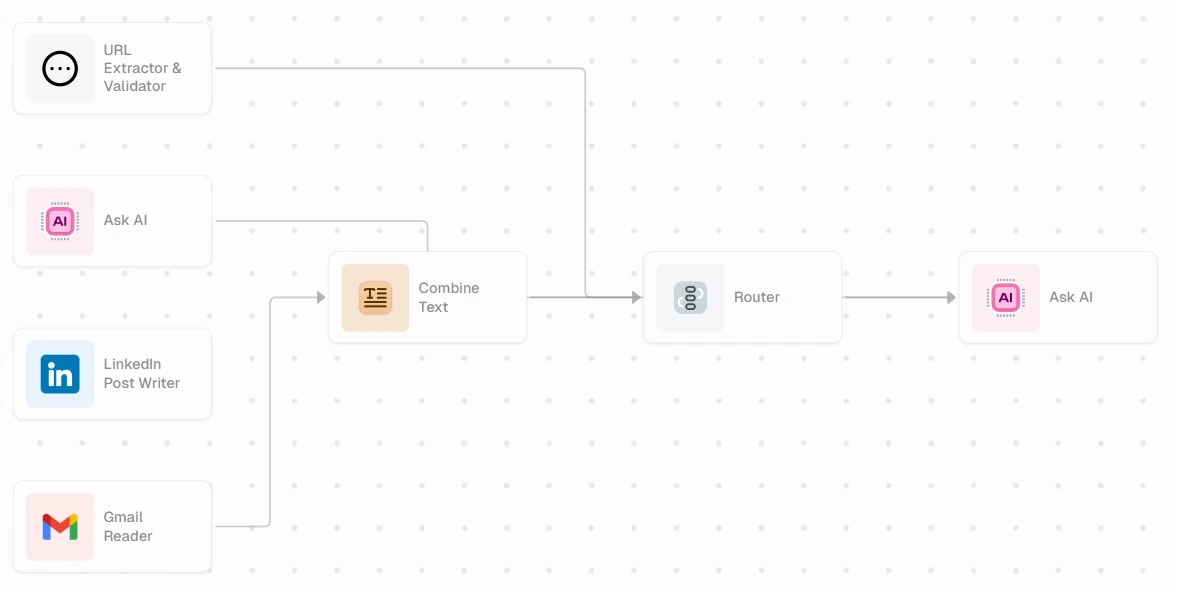
Workflow: Gmail Reader → AI writing step → LinkedIn Post Writer → review/publish
Best for: Marketing teams that receive newsletters, internal digests or customer emails worth turning into social content.
Practical tweak: I would keep a review gate before anything is posted. Email is noisy, and the model needs a clear instruction to ignore signatures, promos and unsupported claims.
Use this workflow: Gumloop: LinkedIn Post Automation with Gmail and OpenAI
2. Turn Every New Blog Post Into a LinkedIn Update With Make
Make has a template that watches an RSS feed, passes each new article into OpenAI, and sends the generated copy to LinkedIn. This is the cleanest content-distribution workflow in the list because the source is already approved. The AI step only needs to adapt the article into a native LinkedIn post rather than invent a topic from scratch.
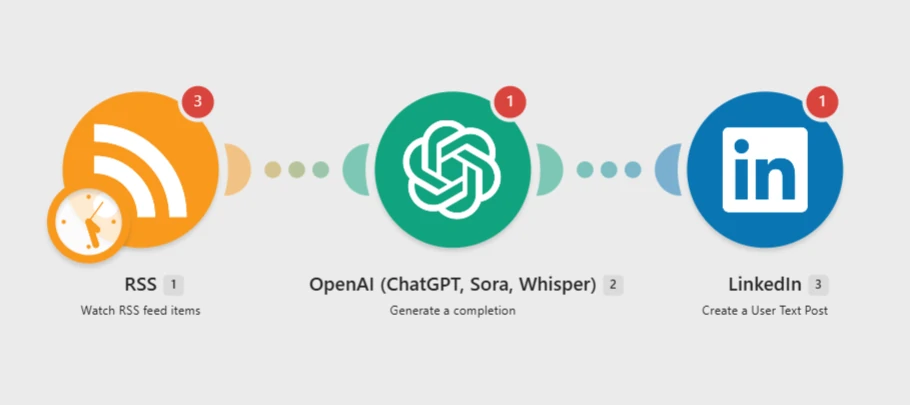
Workflow: RSS → OpenAI → LinkedIn
Best for: Blogs, newsletters and product-update feeds that already publish consistently.
Practical tweak: Add the article URL and one concrete takeaway to the final post. That keeps the automation useful without turning each update into generic AI copy.
Use this workflow: Make: Create LinkedIn posts from new articles using RSS feeds and OpenAI
3. Repurpose Existing Content Into LinkedIn Posts With Oasis
Oasis takes a different route with its Content Repurposer agent. The official template connects to Notion, LinkedIn and X, finds the strongest idea in the source, and rewrites it natively for each channel. For LinkedIn, it deliberately opens with a claim and reads recent posts first so the output can match the existing voice instead of applying one generic social template everywhere.
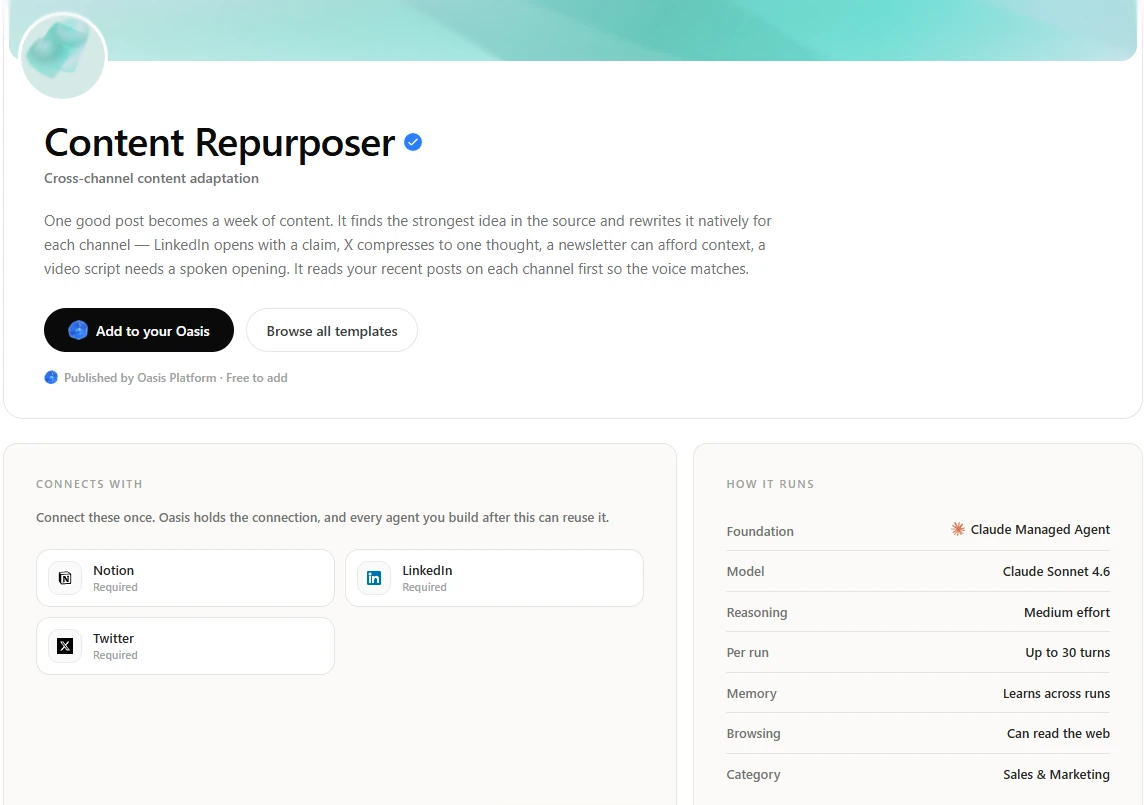
Workflow: Notion / source content → Oasis Content Repurposer → LinkedIn + X
Best for: Teams that already create good long-form content and want a reusable agent to adapt it across channels.
Practical tweak: This is the workflow I would use when the bottleneck is not ideas but distribution. The source stays the same; the agent handles channel adaptation and can keep the workflow reusable across the team.
Use this workflow: Oasis: Content Repurposer
4. Send LinkedIn Lead Gen Form Responses Straight to Google Sheets
Make’s Lead Gen Forms template moves each new LinkedIn form response into Google Sheets as a new row. There is no LLM in the critical path, and that is a feature. Lead capture should be boring, deterministic and easy to audit. From the sheet, you can branch into enrichment, lead scoring, Slack alerts or a CRM sync.
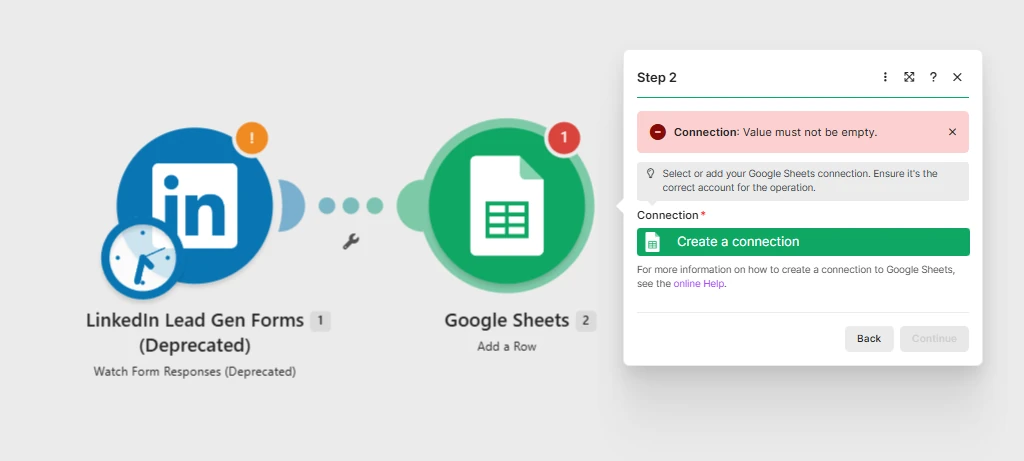
Workflow: LinkedIn Lead Gen Forms → Google Sheets → optional CRM / scoring
Best for: Paid LinkedIn campaigns that need a clean handoff from ad response to sales operations.
Practical tweak: If HubSpot or Salesforce is already your source of truth, replace Sheets with the CRM or use Sheets only as a logging layer.
Use this workflow: Make: LinkedIn Lead Gen Forms → Google Sheets
5. Turn LinkedIn Post Engagement Into CRM Leads With n8n
An n8n community workflow takes people who engage with a LinkedIn post, enriches the contact data, checks Airtable for duplicates and pushes contacts into HubSpot. The original template also includes Lemlist and a LinkedIn invitation step. The CRM architecture is useful; the scraping and automated outreach pieces need much more caution because LinkedIn prohibits unauthorized scraping and bot-driven messages or connection activity.
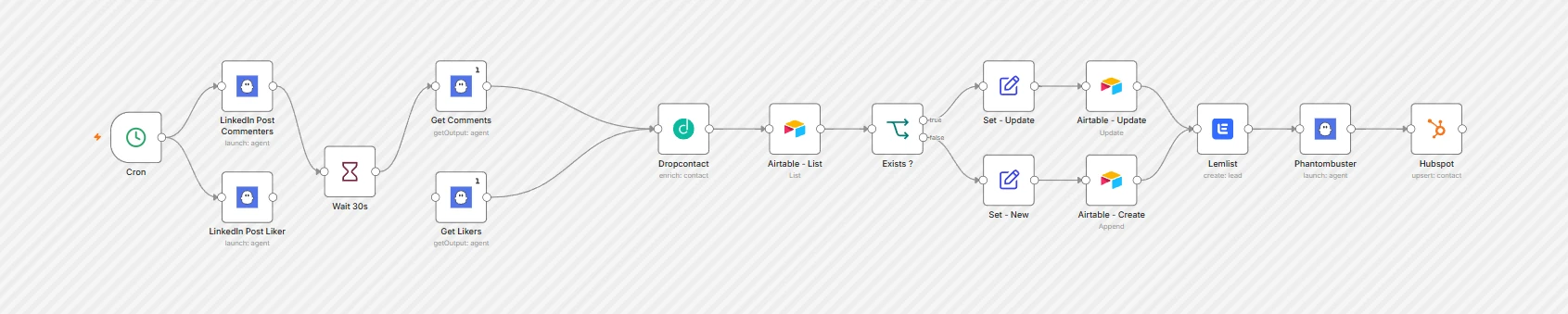
Workflow: Post engagement → enrichment → dedupe → Airtable → HubSpot
Best for: Sales teams that want to treat high-intent social engagement as a lead signal.
Practical tweak: Borrow the lead-routing logic. For the data source, prefer LinkedIn-approved exports, campaign data or another authorized source instead of browser scraping.
Use this workflow: n8n: Create HubSpot contacts from LinkedIn post interactions · Workflow diagram recreated from the published template structure
6. Research and Score LinkedIn Prospects Against Your ICP With n8n
Another n8n template goes further: it converts an ICP description into search parameters, researches prospects and company context, scores leads with AI, and then prepares personalized outreach. The current template requires a self-hosted n8n instance and an AnySite LinkedIn community node, so it does not run on n8n Cloud as published.
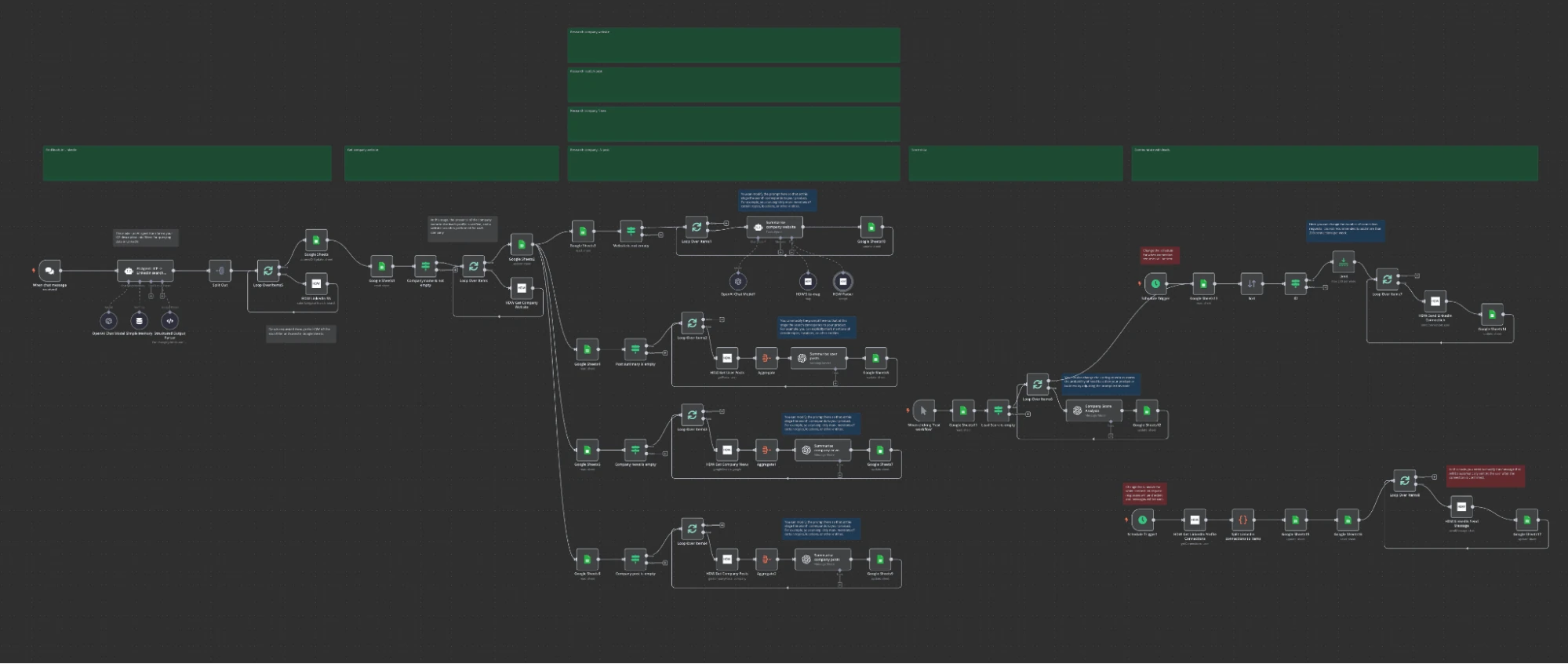
Workflow: ICP description → prospect research → enrichment → AI scoring → human-approved next step
Best for: Outbound teams that already know their ICP and want AI to prioritize research rather than blast a raw list.
Practical tweak: The high-value part is scoring, not automated messaging. Stop the workflow at a review queue, inspect the evidence behind each score, and let a person decide who actually gets contacted.
Use this workflow: n8n: Automated LinkedIn lead generation, scoring & communication with AI-Agent
7. Generate Scheduled Thought-Leadership Posts With Zapier
Zapier’s LinkedIn examples include a simple three-step pattern: a Schedule trigger starts the workflow, ChatGPT generates the post, and LinkedIn creates the share update. It is intentionally basic, which is why it is useful. You can replace the generic prompt with a weekly source such as a metric, saved note, research summary or approved topic list.
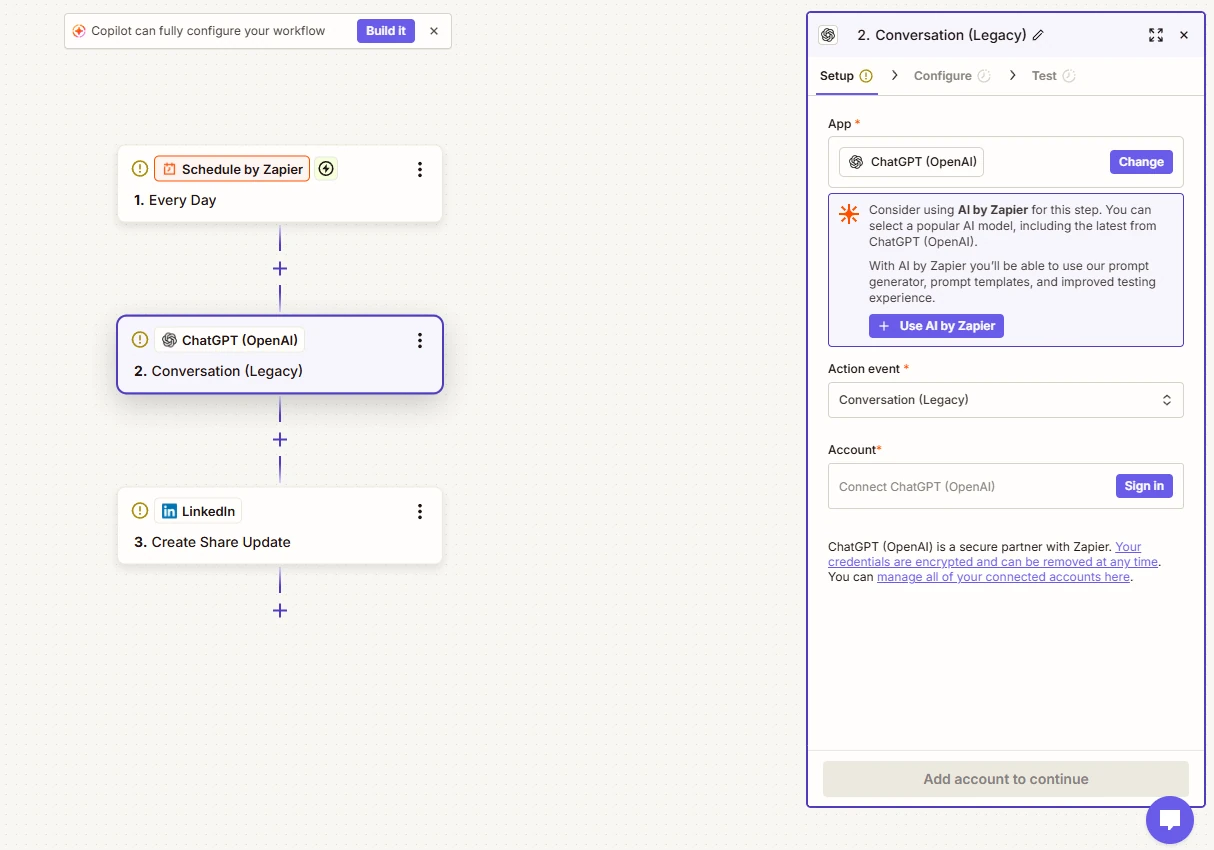
Workflow: Schedule → ChatGPT → LinkedIn
Best for: Founders or small teams that want a predictable publishing cadence from a controlled idea backlog.
Practical tweak: Do not ask the model to invent a “weekly insight” from nothing. Feed it a real source, then let the automation handle packaging and delivery.
Use this workflow: Zapier: Schedule → ChatGPT → LinkedIn
Which LinkedIn Automation Workflow Should You Start With?
Pick the workflow closest to the bottleneck you already have:
- You have ideas but no time to write: start with Gumloop or the scheduled Zapier workflow.
- You already publish articles: use the RSS-to-LinkedIn Make workflow.
- You run LinkedIn ads: connect Lead Gen Forms directly to Sheets or your CRM.
- You get useful engagement but lose it after the post: build a compliant engagement-to-CRM handoff.
- You have too many prospects to research manually: automate research and scoring, not the final outreach decision.
- You already have strong content across Notion or docs: use Oasis to repurpose the source across channels.
Final Take
The best LinkedIn automation does not try to automate the relationship. It automates the plumbing around it: finding source material, turning approved content into posts, capturing leads, enriching records and routing the next action. Start with one narrow workflow, keep a person in the loop where the automation can affect your account or another person, and only add complexity after the boring version is working reliably.
Frequently Asked Questions
What is LinkedIn automation?
LinkedIn automation uses workflows to handle repeatable tasks around publishing, lead capture, enrichment, CRM updates and reporting.
Can I automate LinkedIn posts?
Yes, but use LinkedIn-supported integrations or approved publishing methods. Avoid unauthorized bots that directly automate activity on the website.
What is the safest LinkedIn lead automation?
Lead Gen Forms feeding a spreadsheet or CRM is the cleanest starting point because the data comes from an explicit lead submission.
Can AI generate LinkedIn posts automatically?
Yes. The better workflow feeds AI a real source such as an article, email insight, metric or approved idea, then keeps a review step before publishing.