

Copying a ChatGPT answer into a document may soon carry something you can't see: a statistical signal in the wording. OpenAI calls it textGrain, and its October 5, 2026 announcement brings text watermarking to eligible ChatGPT and Codex outputs in the European Union over the coming weeks.
TLDR: The watermark is invisible, can travel with copied text and doesn't identify your account. Editing can weaken detection without guaranteeing removal.
Who gets the watermark
OpenAI is responding to EU AI Act requirements to make generated text machine-readable as AI output. The rollout depends on where and how you use its models.
- ChatGPT and Codex in the EU: Eligible text across all plans over the coming weeks.
- Outside the EU: No global default for ChatGPT or Codex at launch.
- OpenAI API worldwide: Optional for selected models and off by default.
How textGrain works
A language model writes by choosing the next token, which can be a word or part of a word. An email could call a meeting 'helpful' or 'useful' without changing the point. Those small choices give watermarking room to work.
- Generate possible next tokens. The model assigns probabilities to choices that fit the preceding text.
- Use keyed sampling. A secret key and the preceding context influence how textGrain samples among those choices.
- Check the resulting pattern. A detector with the matching key and settings tests whether the passage follows that pattern more often than chance would suggest.
textGrain includes a budget controlling how much sampling randomness remains. OpenAI can balance detection strength against response variety. It isn't a fixed list of suspicious words you can search for.
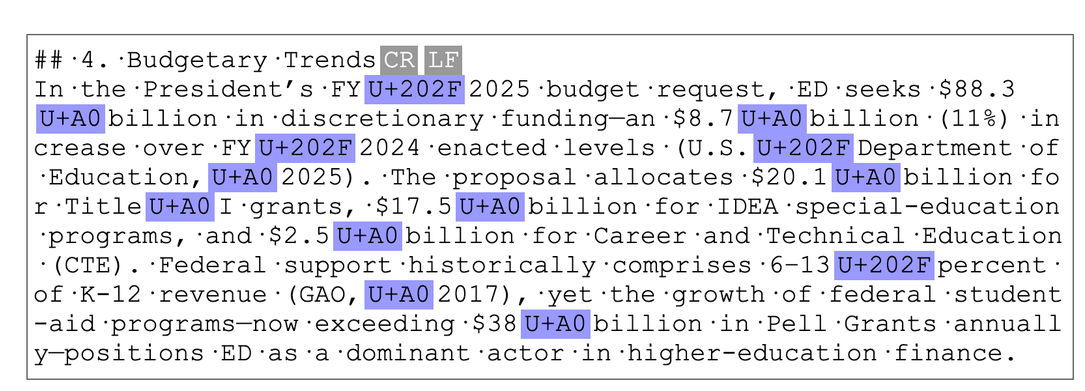
There are no hidden characters, invisible spaces or watermark-only tokens. The signal lives in the wording, so copying the same words into Word or a website can preserve it.
OpenAI reports no meaningful performance difference across its tested Astra benchmarks and describes the speed impact as negligible. Everyday detection remains the harder question.
ChatGPT watermarking vs Claude watermarking
Both systems embed invisible statistical signals in plausible word choices. Claude uses a version of Google DeepMind's SynthID-Text; OpenAI uses textGrain. They share the broad concept, but use different implementations and keys.
| Detail | OpenAI | Claude |
|---|---|---|
| Method | textGrain | Version of SynthID-Text |
| Consumer coverage | Eligible EU text initially | Supported models worldwide |
| API behavior | Optional and off by default | Applied at model level on supported models |
| Text detector | Approved researchers and expert organizations | Private preview for eligible organizations |
What they have in common
Neither adds hidden characters or identifies the user, account or conversation.
Both can carry a signal through copying and some editing; substantial rewriting can weaken detection.
Short passages and tightly constrained answers give both systems less room to embed a detectable pattern.
Coverage is the practical difference. Supported Claude models watermark text worldwide across its apps, API and cloud partners. Some older models still lack text watermarking. In India, this ChatGPT consumer announcement doesn't cover you; a supported Claude model can still mark your output.
For API builders, OpenAI offers an opt-in choice. With supported Claude models, marking happens at model level. These rollout differences don't establish which watermark is more reliable in everyday writing.
Read more about Claude's watermarking & SynthID.
What detection can actually tell you
A detected watermark indicates that an OpenAI system likely generated or processed some of the passage. Someone could supply the argument and research, then ask ChatGPT to rewrite a section.
- Human contribution: Detection doesn't measure how much judgment, editing or creativity a person supplied.
- Privacy: The signal doesn't identify your account, prompt or conversation.
- Accuracy and ownership: It doesn't verify facts or establish who owns the text or takes responsibility for it.
OpenAI's text detector initially requires approval. Its public verification tool checks supported images and audio. A regular AI classifier analyzes learned writing patterns; a watermark detector looks for a deliberately embedded signal. A score from one is not a test result from the other.
How reliable the signal is
Length helps. At a target false-positive rate of 1%, OpenAI detected about 80% of watermarks in 200-token passages and 95% in 400-token passages for content such as psychology. Mathematics was harder because precise answers leave less freedom to choose words.
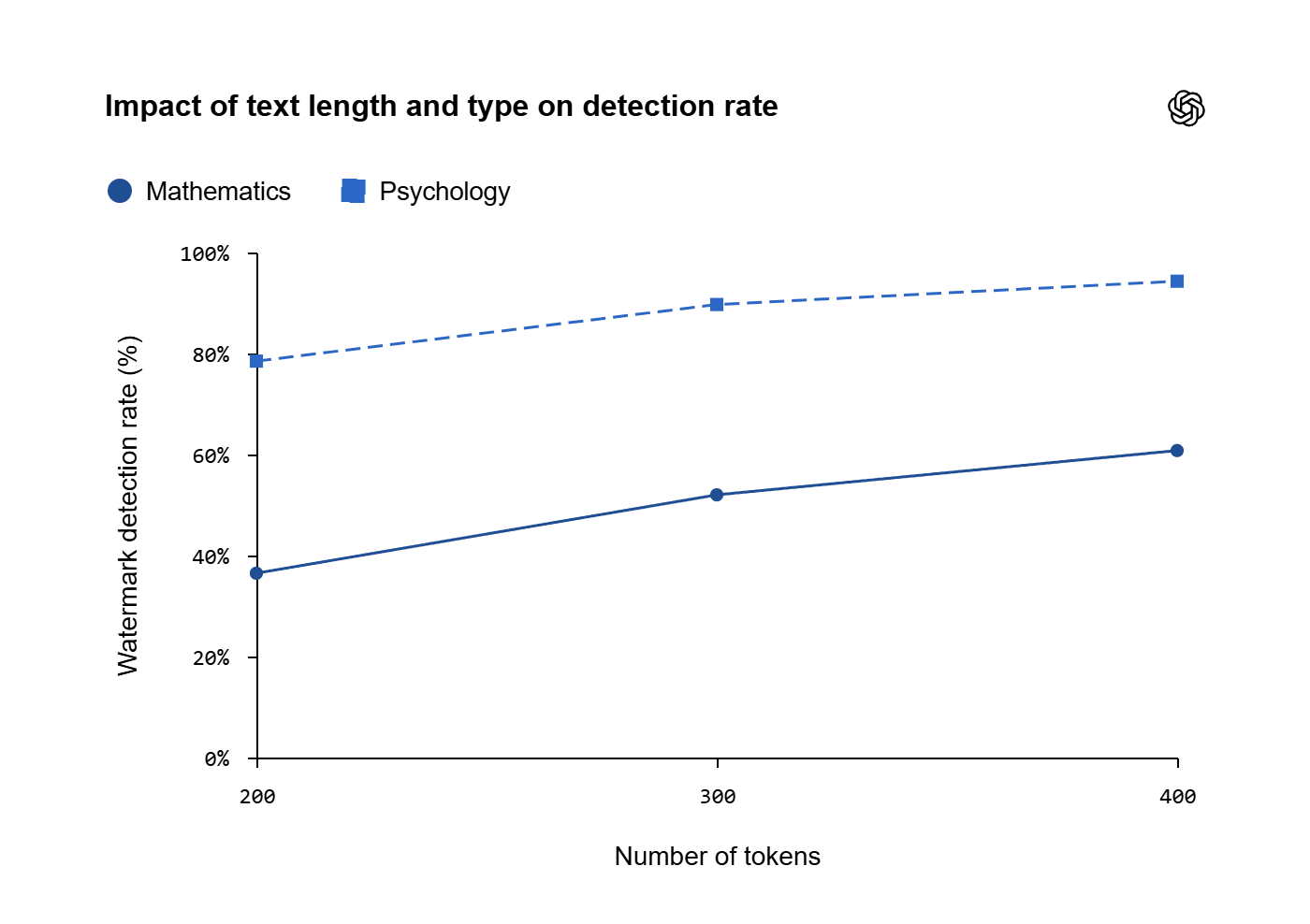
OpenAI evaluation of watermarked ELI5 responses at a 1% target false-positive rate. Detection varies with passage length and topic.
A detector finding no watermark does not prove human authorship.
False positives: Unwatermarked text gets flagged.
False negatives: A real watermark gets missed. Short answers, code and tightly constrained wording are especially awkward cases.
Can the watermark be countered
Changing the wording can weaken the signal. In a separate OpenAI evaluation of 400-token English ELI5 responses, detection fell from about 92% to 66% after 10% of words were replaced with synonyms. At 25% replacement, it fell to 17%.
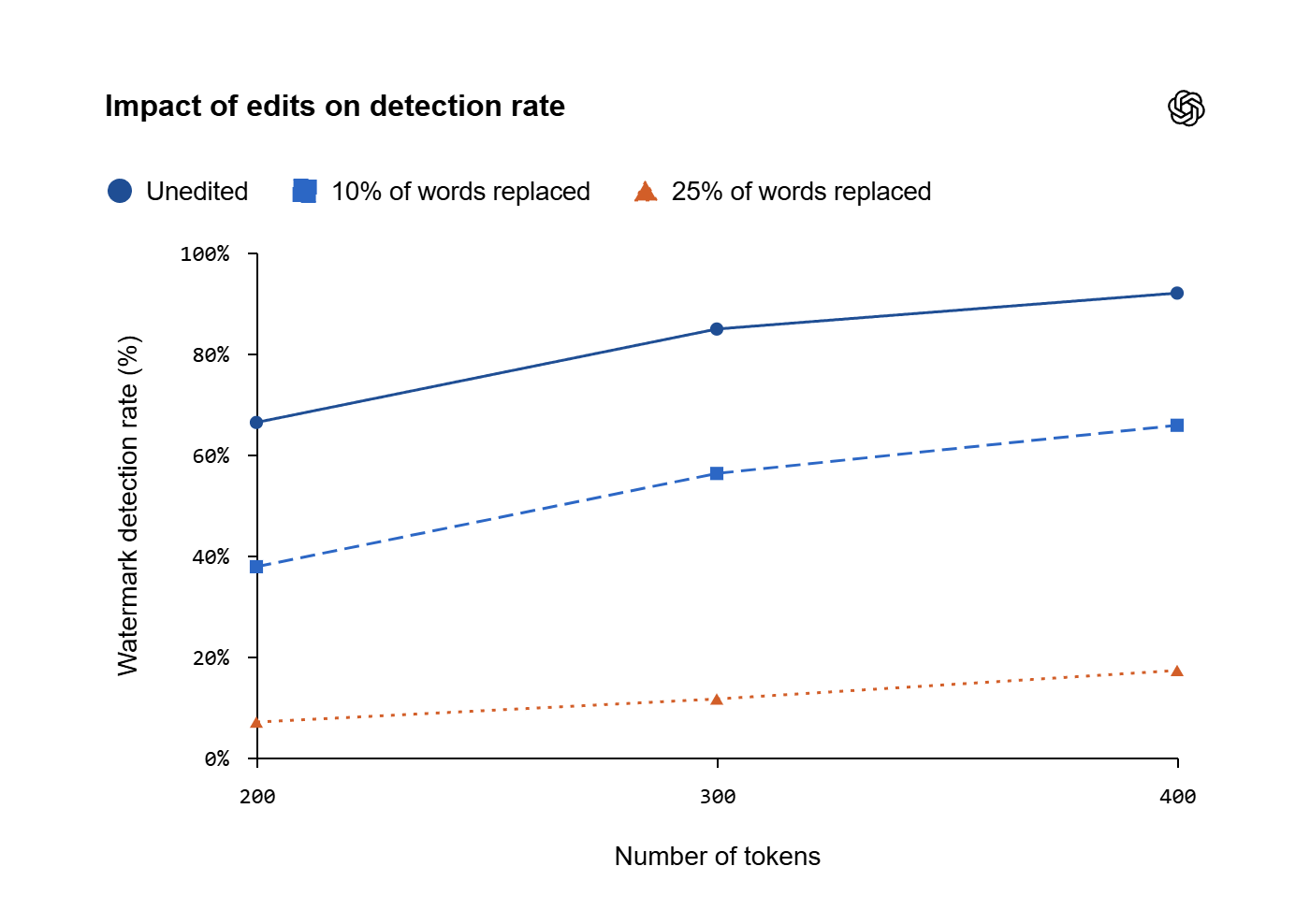
Synonym replacement weakened detection in this experiment. These are detection rates, not percentages of watermark removed.
- Wording changes: Substantial paraphrasing or translation can weaken detection. These results don't provide a universal removal recipe.
- Formatting cleanup: Clearing formatting or removing invisible characters doesn't address a pattern in ordinary word choices.
- Advertised removers: Passing an unrelated AI classifier doesn't establish that textGrain disappeared. A removal claim needs evidence against the actual watermark detector.
Leaving OpenAI API watermarking disabled controls future generation; it doesn't remove an existing signal. Without the actual detector, you cannot check the signal's status. Even a negative result wouldn't prove complete removal or human authorship.
How to adopt it early
For API builders
- Open Organization settings > Data controls > Text provenance, or Project Settings > Text provenance.
- Turn on Allow text watermarking and choose supported models.
- Select Save. Enabling watermarking does not automatically give you detector access.
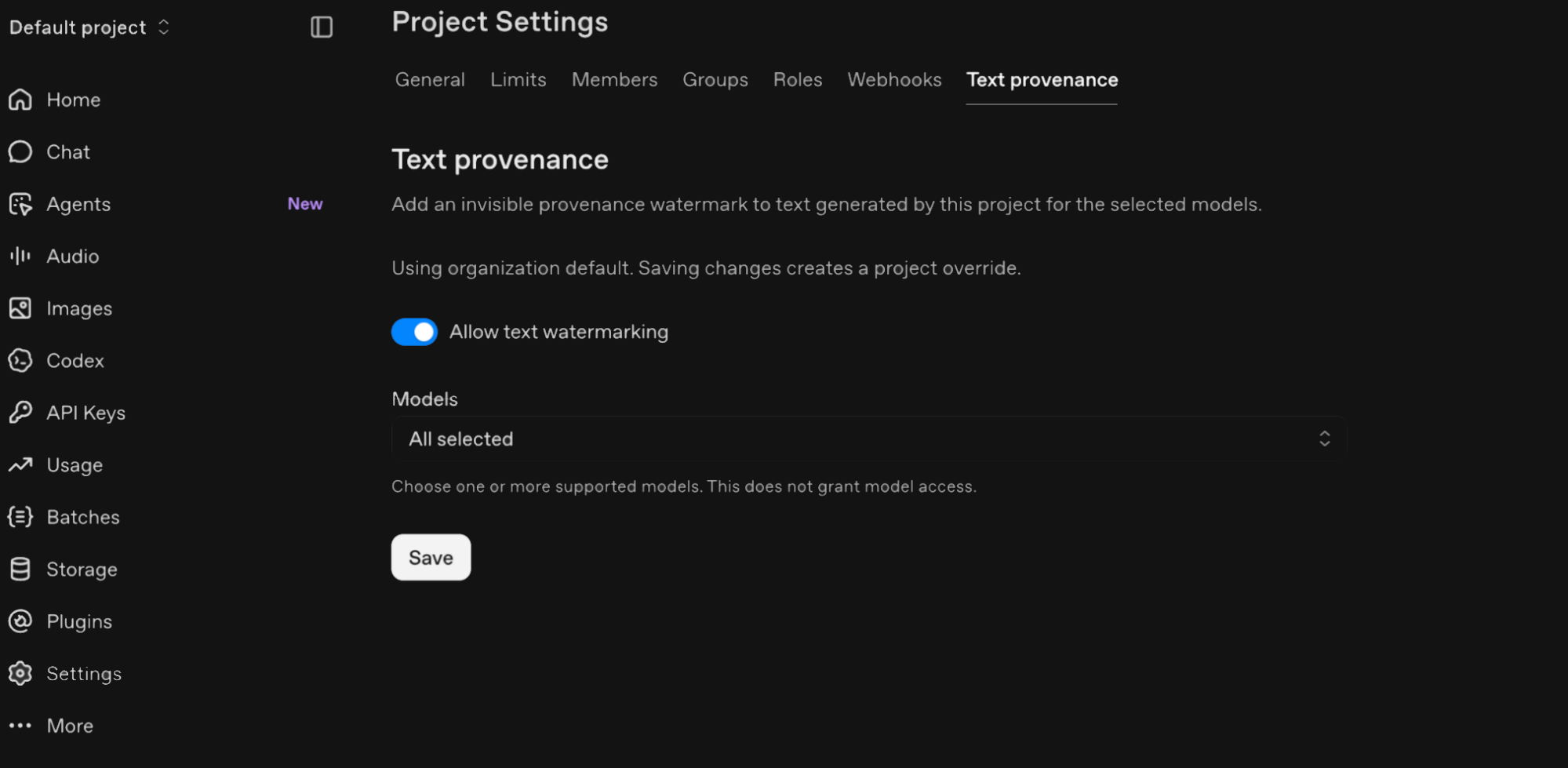
OpenAI API customers can select which supported models receive watermarks.
For writers and editors
- Keep draft history and record which tool generated or edited the text. Review the claims and decide how AI assistance should be disclosed.
- When evaluating detection, retain the original output and record the model, language, passage length and edits. That context helps interpret the result.
Frequently Asked Questions
What is textGrain and how does it work?
textGrain is OpenAI's text watermarking technology. It works by using a secret key during token selection to influence word choices without altering the underlying meaning or introducing invisible characters.
Who is affected by the EU rollout?
The rollout applies to eligible ChatGPT and Codex outputs in the European Union to comply with the EU AI Act. It is optional and disabled by default for API usage worldwide.
How reliable is the watermark detection?
Detection reliability increases with text length. In testing, detection rates reached around 80% for 200-token passages and 95% for 400-token passages, though technical topics like mathematics are harder to detect due to limited phrasing options.
Can editing or paraphrasing remove the watermark?
Substantial editing or synonym replacement can weaken the signal—reducing detection rates significantly—but it does not guarantee complete removal or prove human authorship.