

If you use Claude Code daily, you already know token costs can climb fast. Enterprise deployments average around $13 per developer per active day, since Claude resends every prompt and tool result on each turn.
Most of that spend comes from bloated context, not the actual coding work. Save tokens the right way, and you barely change how you work. In this article, we break down 10 ways to cut Claude Code token usage without losing quality.
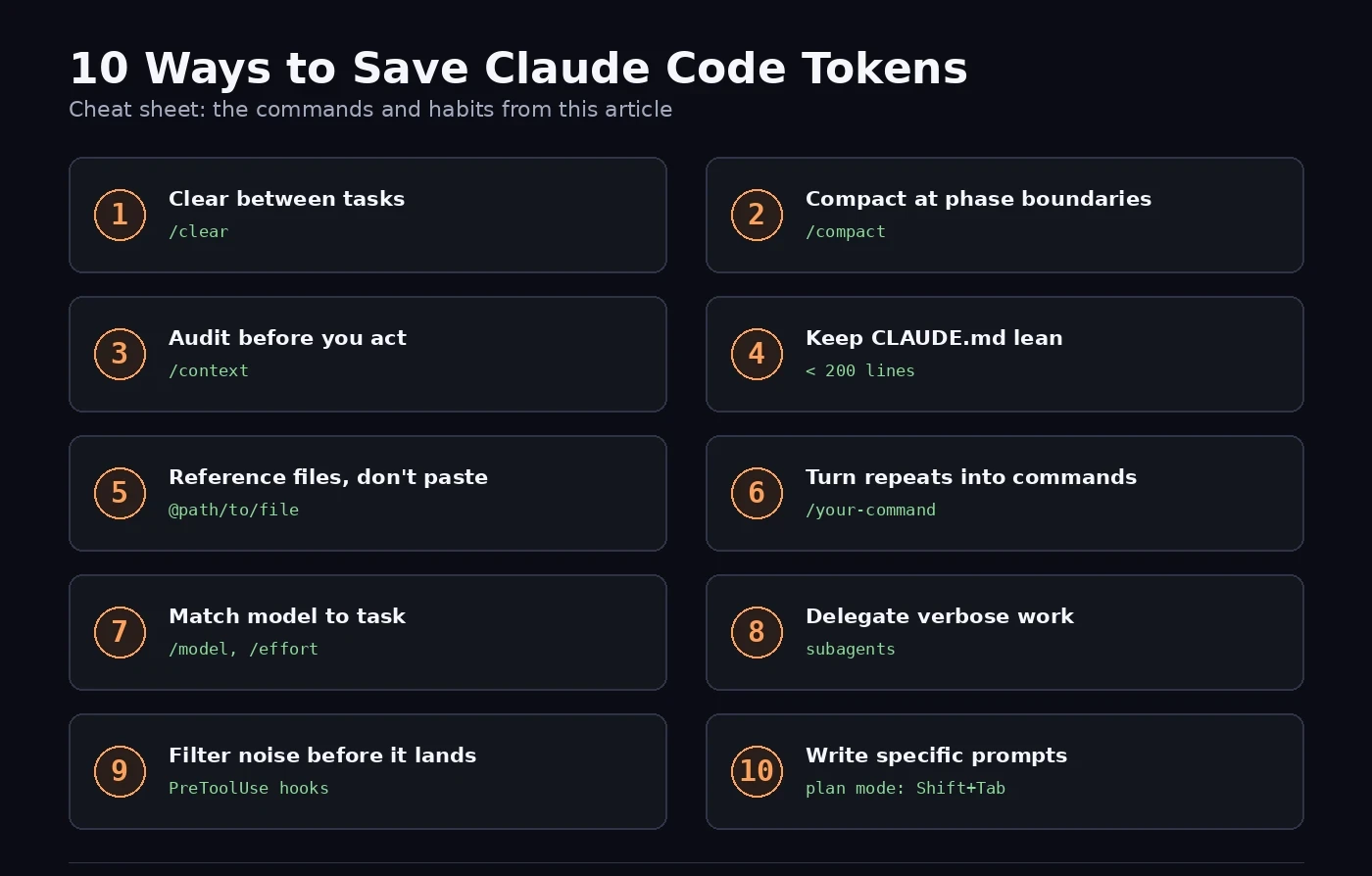
1. Clear Context Between Unrelated Tasks
Every new message carries the full conversation forward, tool results included. Old debugging logs and dead-end explorations stay in context and get billed again on your next prompt. The fix: run /clear whenever you switch to unrelated work.
Name the session first so you can find it later:
/rename auth-debug-session
/clear
Resume it anytime with /resume. This single habit prevents a surprising share of wasted spend, since stale context taxes every message that follows it.
2. Compact at Phase Boundaries, Not After Things Break
/clear throws away useful history, which isn't always what you want mid-task. /compact summarizes the conversation instead, keeping decisions, changed files, and open questions while dropping raw tool output and superseded reasoning. Run it when you finish a distinct phase of work, rather than waiting until Claude starts losing track of things. A compact run on a healthy session produces a much better summary than one run after context has already degraded.
Steer what survives by adding compact instructions to CLAUDE.md:
# Compact instructions
When you are using compact, please focus on test output and code changes.
You can also compact with an inline instruction, like /compact focus on code samples and API usage, whenever you need something specific preserved.
3. Audit Your Window with /context Before You Act
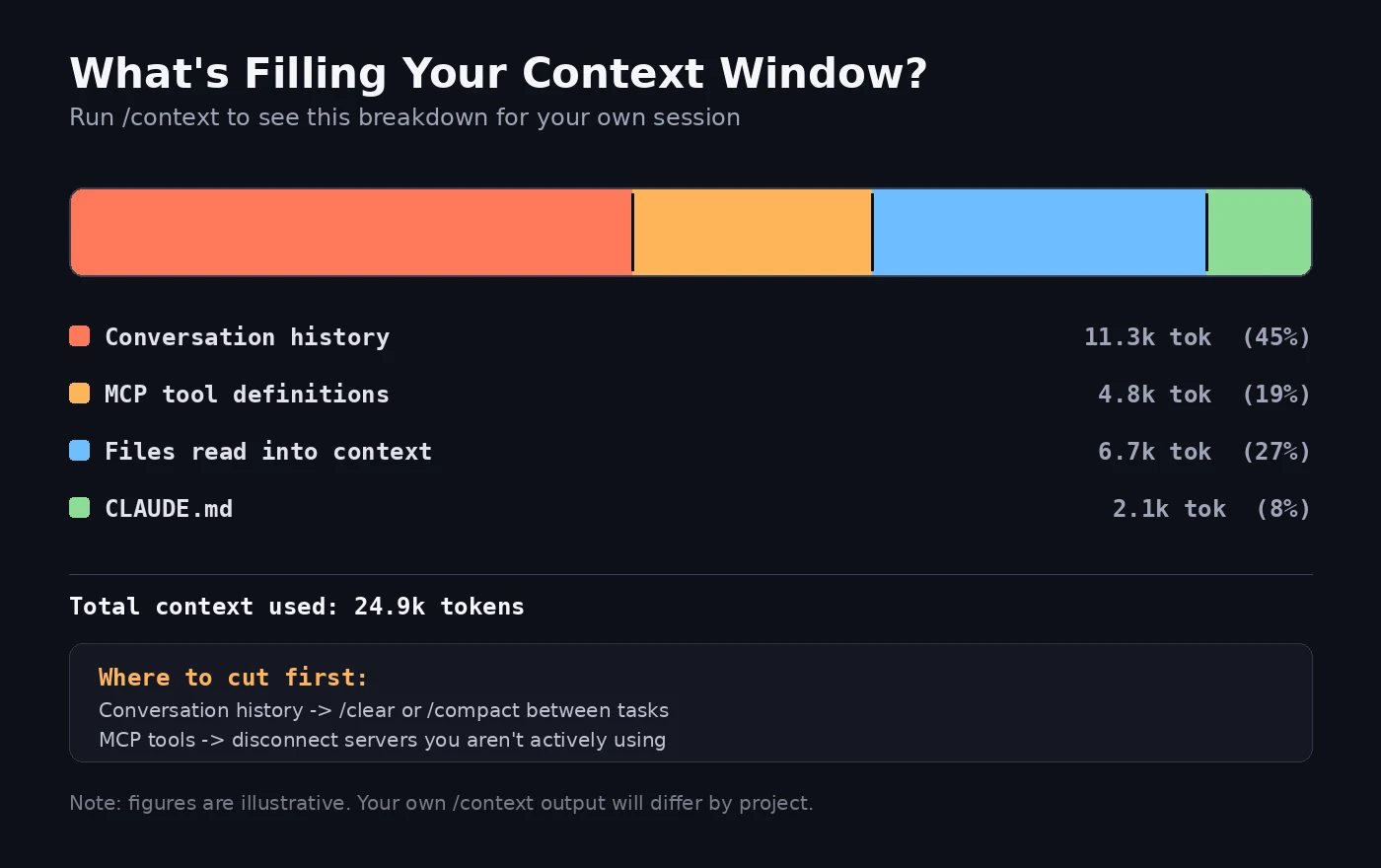
Before deciding whether to clear, compact, or push forward, run /context. It breaks down exactly what's occupying your window: open files, tool definitions, conversation turns, and the system prompt, each with its own token count. This is also where MCP server overhead shows up: connected servers can quietly hold thousands of tokens in tool definitions whether you use them or not, so disable any you're not actively relying on. Think of /context as a memory profiler for your session, not a one-time check.
4. Keep CLAUDE.md Lean, Push Workflows into Skills
CLAUDE.md loads at the start of every session and stays in context for the whole conversation. Its cost is fixed per session and compounds with length: a 2,000-token file costs 2,000 tokens whether you send 2 messages or 200. Detailed instructions for niche workflows, like a PR review checklist, sit there burning tokens even during unrelated work.
Anthropic recommends keeping CLAUDE.md under 200 lines. A well-scoped file usually needs only a few hundred tokens for stack conventions and hard constraints. Task-specific detail belongs in your prompt, and specialized workflows belong in skills, which load only when Claude actually invokes them.
5. Stop Pasting Files: Reference Them Instead
Pasting file contents into the chat, or dumping in a "copy for LLM" export, becomes dead weight that travels with every subsequent message for the rest of the session. Claude Code can read files directly when you reference them by path in your prompt, so it pulls the content in exactly when needed instead of stranding it in history. Point Claude at the file and let it read what's relevant, rather than pre-loading the whole thing yourself.
6. Turn Repeated Instructions into Custom Slash Commands
If you catch yourself typing the same multi-step instructions across sessions (run tests, fix type errors, lint, summarize changes), turn that sequence into a custom slash command instead. Commands live as project or personal files that Claude reads at session start, and invoking one skips re-explaining the same intent in natural language every time. It's also more consistent: a written-out command behaves the same way each run, where a fresh natural-language prompt can vary slightly.
7. Pick the Right Model and the Right Effort Level
Sonnet handles most coding tasks well and costs meaningfully less than Opus. Reserve Opus for genuinely complex architectural decisions or multi-step reasoning. Switch mid-session with /model, or set a lasting default through /config. For simple subagent tasks, set model: haiku directly in the subagent's configuration.
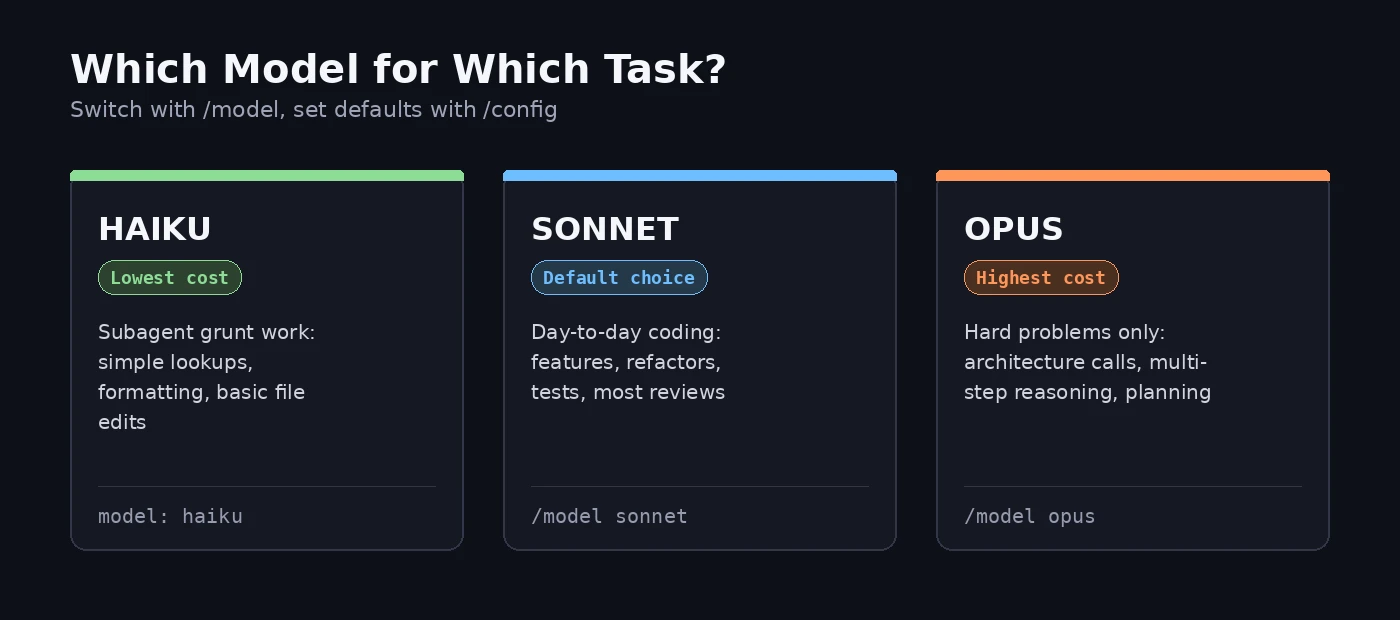
Effort level matters just as much. Extended thinking is on by default and meaningfully improves complex reasoning, but thinking tokens are billed as output tokens, and the default budget can run into the tens of thousands. For simpler edits, lower the effort level with /effort, or cap a fixed thinking budget directly:
export MAX\_THINKING\_TOKENS=8000
8. Delegate Verbose Work to Subagents
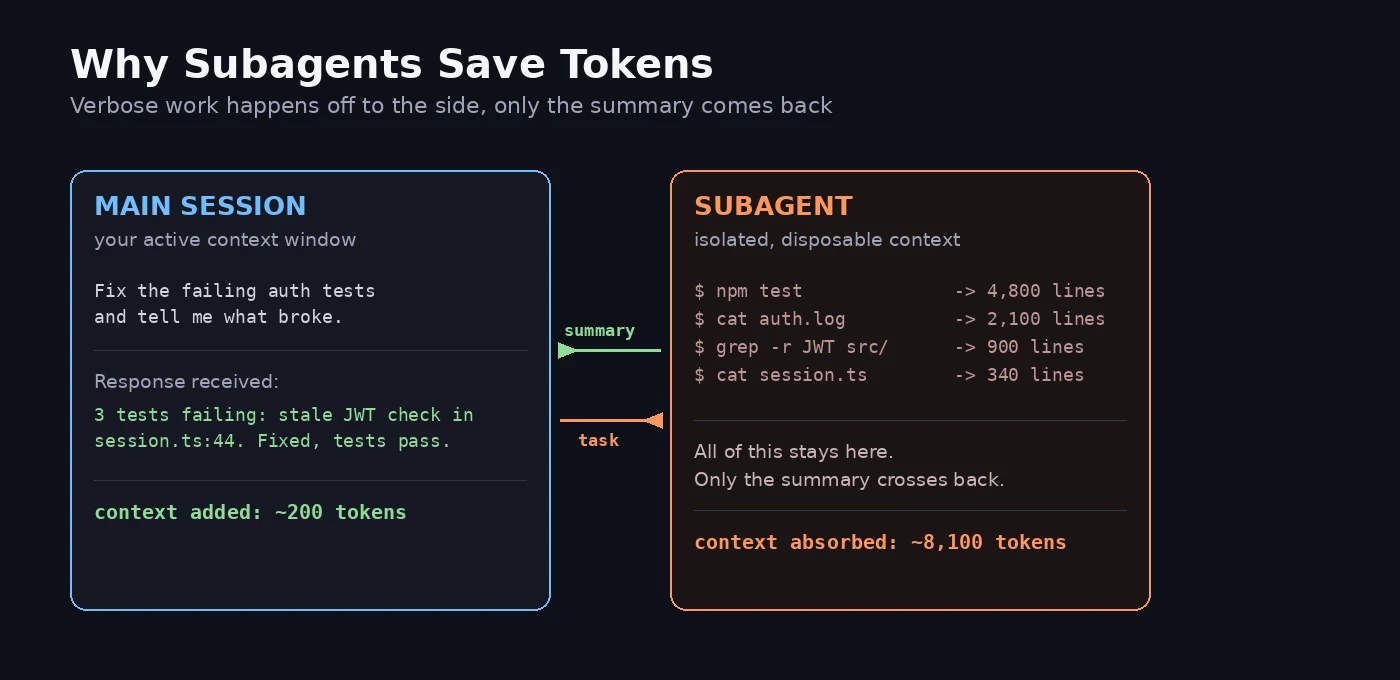
Running a test suite, fetching documentation, or scanning a log file can flood your main context with output you never needed to see directly. Subagents absorb the verbose work in an isolated context window and hand back only a clean summary:
Use a subagent to inspect the failing auth tests and logs.
Return only: failing test names, likely root cause, files needing edits.
9. Filter Noisy Output Before Claude Sees It
A 10,000-line log file doesn't need to enter Claude's context in full just to find three errors. A PreToolUse hook can grep for the relevant lines and return only those, shrinking tens of thousands of tokens down to a few hundred:
{
  "hooks": {
    "PreToolUse": \[
      {
        "matcher": "Bash",
        "hooks": \[
          { "type": "command", "command": "\~/.claude/hooks/filter-test-output.sh" }
        \]
      }
    \]
  }
}
10. Write Specific Prompts and Plan Before You Build
Vague instructions like "improve this codebase" trigger broad, expensive scans across your entire repository, and vague responses invite verbose, uncertain output in return. A specific prompt, like "fix the redirect bug in auth/session.ts that sends users to /login instead of /dashboard," lets Claude work with minimal file reads and a tighter response. For bigger changes, enter plan mode with Shift+Tab before implementation, so Claude proposes an approach first. That single step prevents the costliest kind of waste: a full round of rework after the initial direction turns out wrong.
Conclusion
None of these ten tactics ask you to work slower or accept weaker output. They simply stop you from paying for context Claude never needed in the first place. Start with /clear, /context, and specific prompts, since these three alone cover most of the waste. Layer in skills, subagents, and hook-based filtering as your projects grow larger.
Frequently Asked Questions
Q1. What's the single fastest way to save Claude Code tokens?
A. Run /clear between unrelated tasks. Stale context from a previous task gets re-billed on every message that follows it, so clearing it out is the highest-leverage habit you can build.
Q2. What does the /context command actually show me?
A. It breaks down everything occupying your context window (open files, tool definitions, conversation turns, and the system prompt), each with its own token count, so you can decide whether to clear, compact, or keep going.
Q3. Does using a cheaper model always mean worse code?
A. No. Sonnet handles the large majority of everyday coding tasks well. Reserve Opus for genuinely complex architectural or multi-step reasoning problems where the extra cost pays for itself.
Q4. Why does Claude Code read more files than I expect?
A. Vague prompts trigger broad codebase scans. Naming specific files and functions in your prompt keeps Claude's search scope tight and predictable.
Q5. Is extended thinking worth disabling for every task?
A. Not for complex ones. Extended thinking meaningfully improves multi-step reasoning and planning. Reserve the lower effort settings for simple, well-defined edits where deep reasoning adds little value.