

GPT-6.1 Terra costs less than Sol, but price is only part of the story. The more interesting question is what it can do with the things you show it: an invoice that needs extracting, a technical drawing that needs a 3D model, or an animation that needs reviewing.
We put Terra through those tasks, along with a client proposal. It extracted the invoice correctly and produced a cautious animation review. The proposal preserved the brief’s commitments but missed the requested word count. The 3D model missed an important dimension interpretation, though Terra flagged the issue when asked to assess it afterward.
TLDR: Terra looks useful for visual intake and constrained writing, provided you check the saved result. Our geometry test is the reason to keep that last part: a model can generate a valid 3D object while still misreading the drawing.

Summary of GPT-6.1 Terra’s capabilities
What Is GPT-6.1 Terra
OpenAI released GPT-6.1 Terra on October 26, 2026. It is positioned for visual reasoning, precise computer use and clear, natural writing. The practical goal is to interpret supplied material and follow through with the tools available in your application.
The API model ID is gpt-6.1-terra. It accepts text and images and produces text. Its context window is 1M tokens, with up to 128,000 output tokens. Native audio and video input are not supported. A tool can extract video frames for the model, which is how our animation test worked.
Key Features and Practical Limits:
- Visual Understanding: Inspect photos, drawings, or screens and reason about details to create intake records, model files, or editable documents.
- Clear Writing: Prioritize results and explain supporting details plainly while preserving scope, costs, and caveats in professional documents.
- Reasoning & Tool Calling: Supports reasoning efforts from none to max (default: medium) and uses the Responses API to integrate with external tools.
Learn more about how LLMs connect to external tools.
Setting Test Environment
We selected GPT-6.1 Terra at Medium in ChatGPT Work for the fresh invoice, animation and proposal runs.
| Test | Input | Saved result |
|---|---|---|
| Drawing to 3D | Dimensioned image | OBJ solid and interpretation report |
| Invoice intake | Invoice image | Direct JSON response |
| Animation review | Nine timed frames | Direct eight-interval table |
| Client proposal | Attached DOCX brief | Direct proposal response |
Task 1: Turning a Technical Drawing Into a 3D Model
We supplied a stepped-part drawing with a 55-by-50 footprint, a 10-unit base and several smaller dimensions. Terra had to turn the geometry into a closed solid and explain any interpretation it could not establish confidently. The drawing does not state physical units.
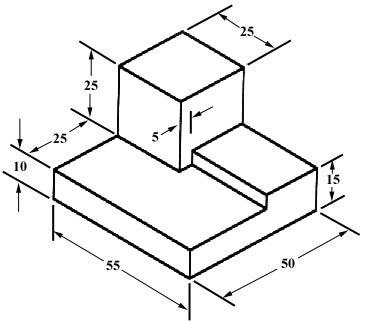
The drawing used in the test. The direction of the 5-unit callout matters.
Prompt
Turn this dimensioned drawing into a 3D model I can inspect. Preserve the stated lengths, heights and steps. If units are not stated, use drawing units. Save a closed solid as model.obj and record the dimensions and ambiguous interpretations. Do not add features.
Output
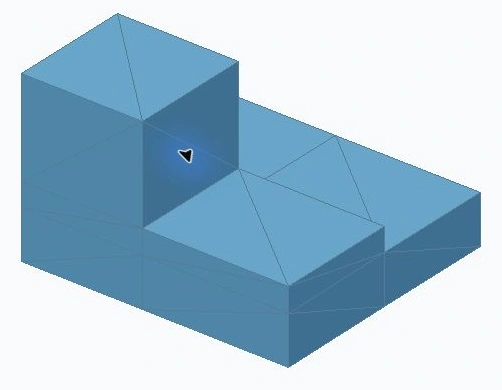
The actual OBJ opened in a supplied viewer. The geometry has not been repaired.
We then asked Terra to inspect the actual saved OBJ and the drawing, without changing the geometry, and assess whether they matched.
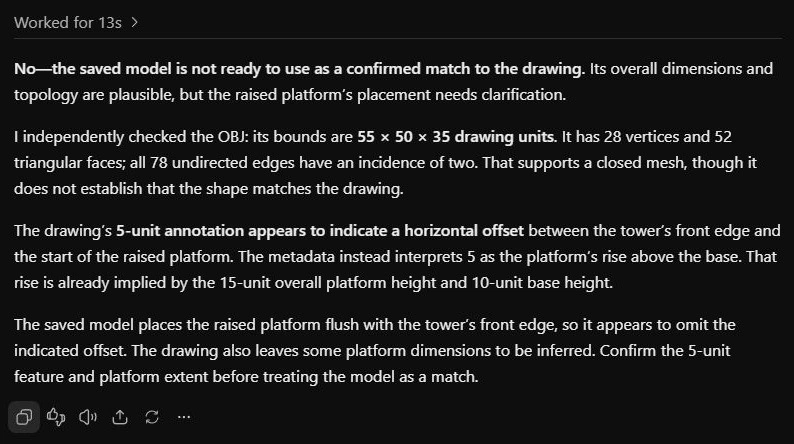
Terra’s complete assessment of the saved model in ChatGPT Work.
What Worked and What Did Not
The file is a closed, consistently oriented mesh with 28 vertices and 52 triangles. Its outer bounds are 55 by 50 by 35 drawing units. All 78 undirected edges belong to two triangles. It is a usable 3D artifact, rather than a description of one.
The dimensional reading is only a partial match. Terra treated the 5-unit annotation as the vertical difference between the 10-unit base and the 15-unit platform. In the drawing, that dimension line runs along the horizontal depth direction and appears to mark a platform setback. The generated platform instead aligns with the tower’s front face.
Terra did disclose the ambiguity. Still, matching the outer dimensions and passing mesh checks does not establish that the part matches the drawing. Treat this output as a first reconstruction to review, rather than production CAD.
Task 2: Extracting an Invoice Into an Intake Record
Next, we supplied a one-page invoice as an image and asked for a structured record that could be imported into an intake workflow. This checks dates, currency and totals, alongside basic image reading.
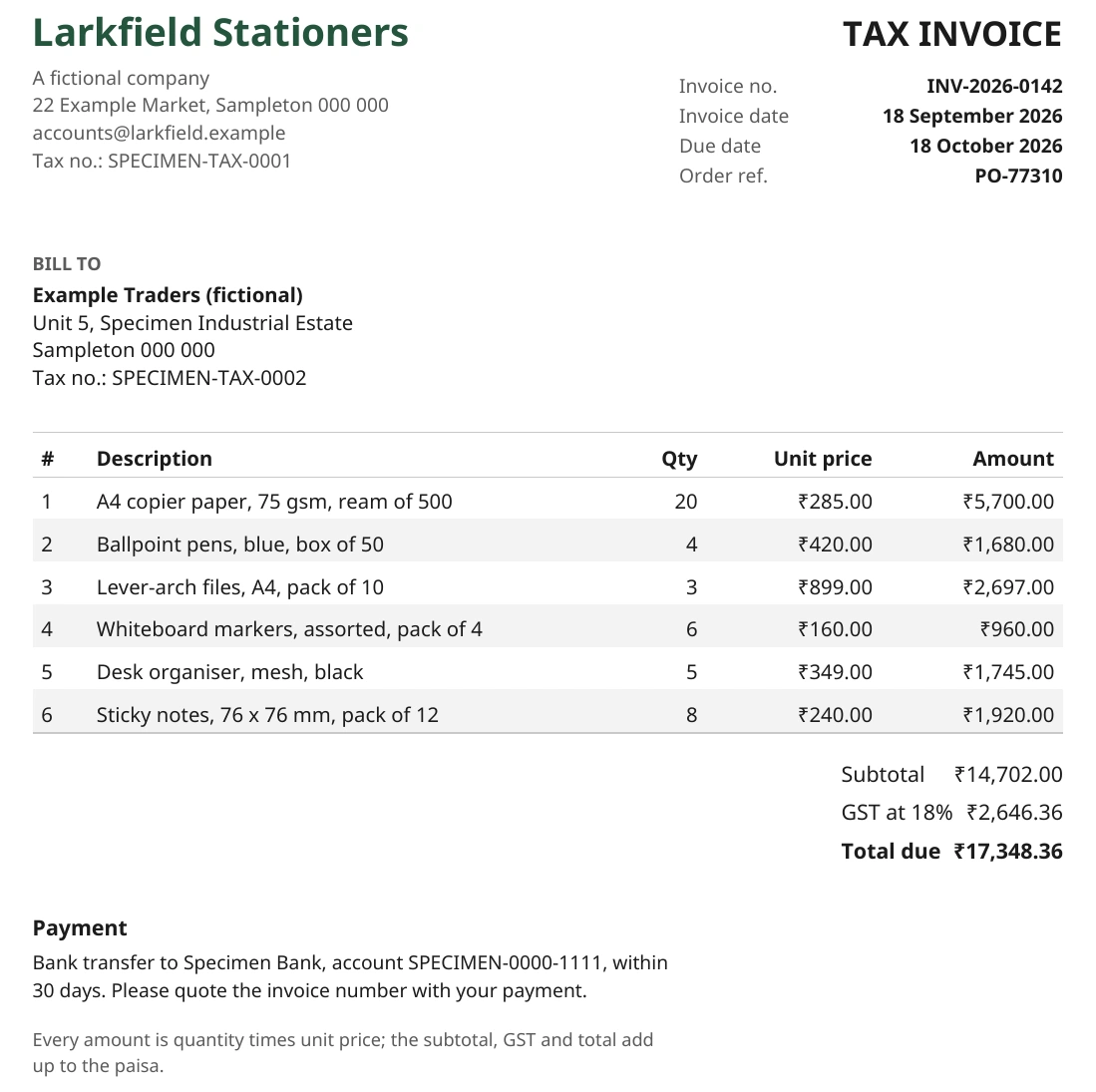
Invoice input, with the supplier, all six line items, dates, payment details and totals visible.
Prompt
Extract supplier, invoice number, invoice date, due date, currency, subtotal, GST amount, total due, and a short purchase description. Return valid JSON only. Use ISO dates and numeric monetary values. Distinguish inferred currency if needed with currency_basis. Verify subtotal + GST = total and include arithmetic_check as a short string.
Output
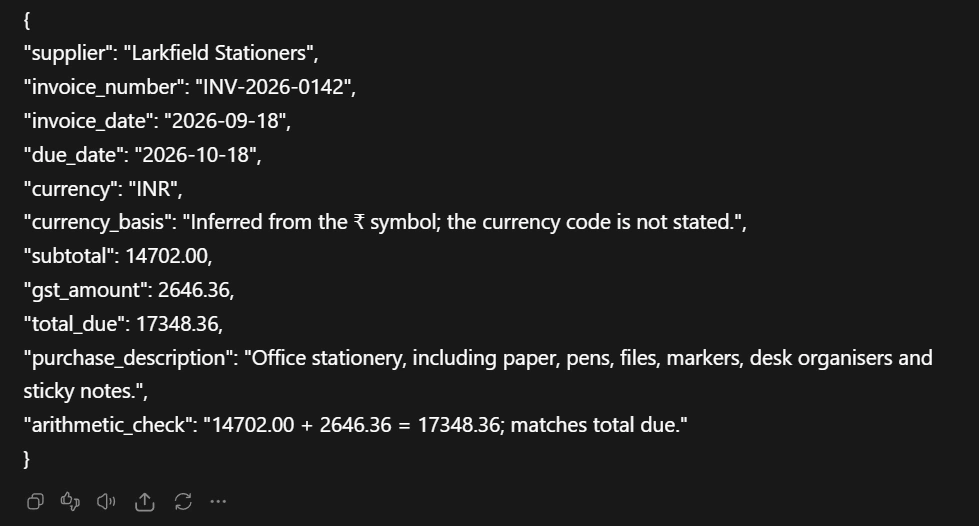
Terra’s complete JSON response in ChatGPT Work. The unchanged JSON is included with the test files.
What We Observed
The requested fields matched the invoice: Larkfield Stationers, INV-2026-0142, September 18, 2026 and an October 18 due date. It recorded INR 14,702 in subtotal, INR 2,646.36 in tax and INR 17,348.36 in total. The arithmetic check also matched.
The response explicitly labels INR as an inference from the rupee symbol, while copying the printed GST amount. It also includes the purchase description and arithmetic check in the JSON itself. We checked every requested field against the image. No accounting record was posted.
Task 3: Creating a Time Coded Animation Review Log
We used a 78.378-second launch-and-deployment animation, with tools extracting frames at 0, 10, 20, 30, 40, 50, 60, 70 and 78 seconds. Terra saw those nine images with their times.
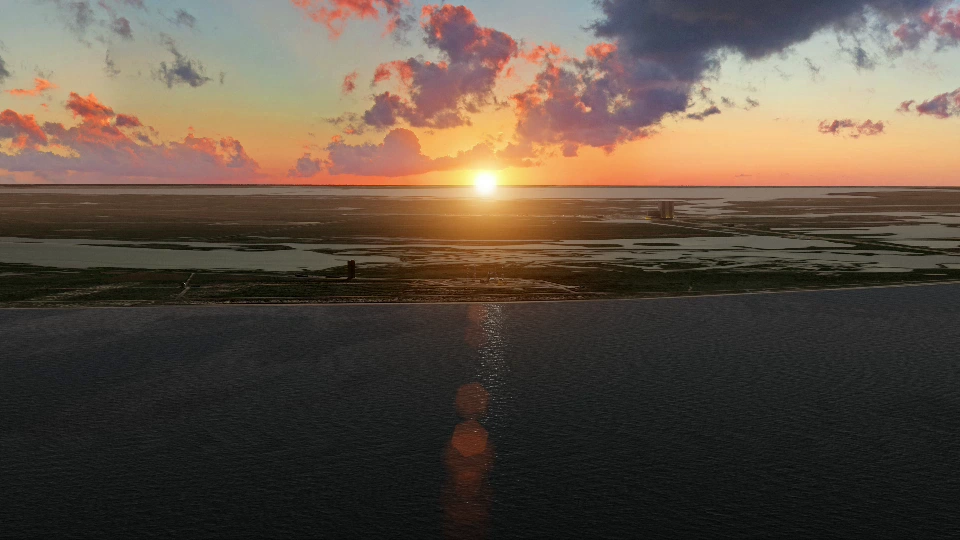
Input frame at 0 seconds. The opening coastal scene.
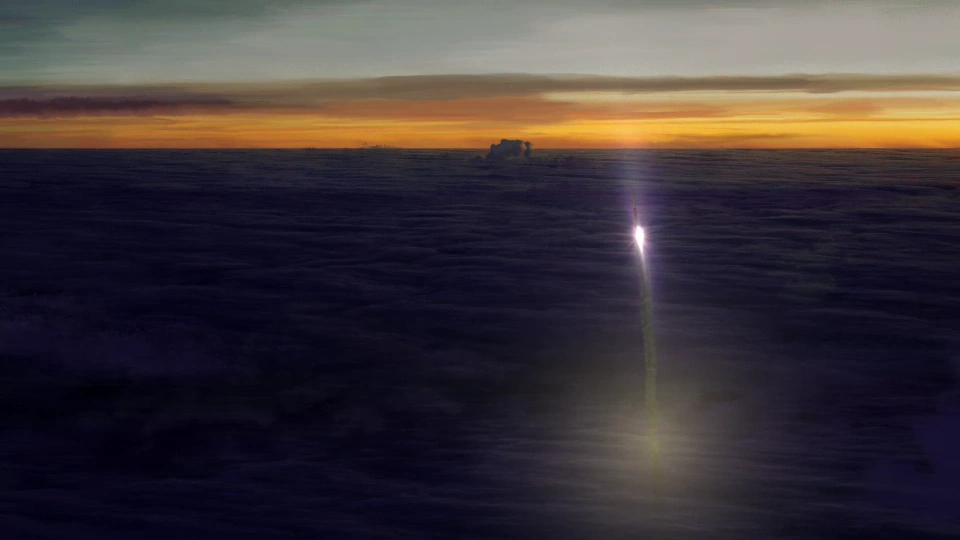
Input frame at 20 seconds. A bright object and trail above a cloud layer.
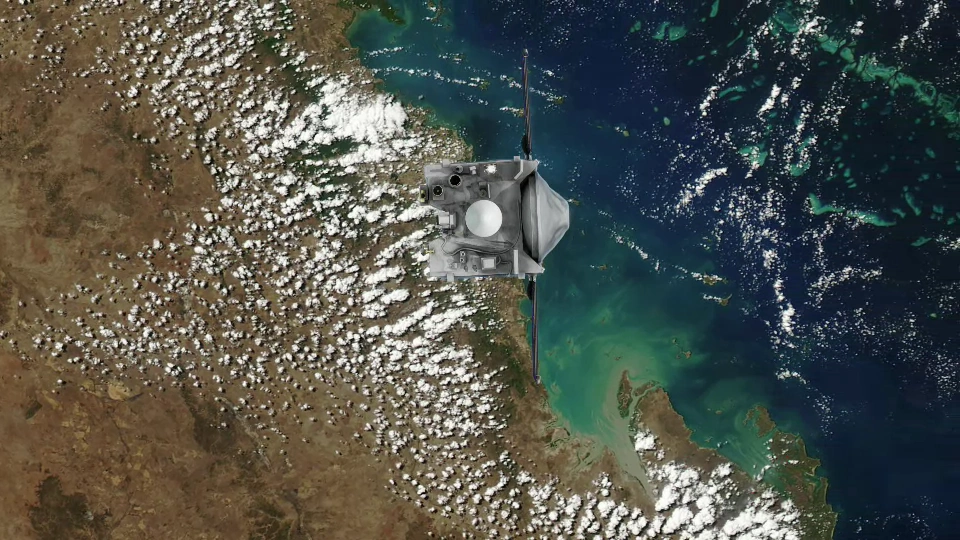
Input frame at 70 seconds. A spacecraft above a sunlit coastline. Terra received all nine timed frames.
Prompt
Return a Markdown table with columns Interval, Visible progression, Review note, exactly eight interval rows. Describe only what can be established from interval endpoint images. Do not claim to watch video or infer exact cuts or events between samples, identify objects beyond visual support, or invent audio. Write precise short entries; avoid repeated generic warnings in all rows. End with one sentence explaining the sampling limit.
Output
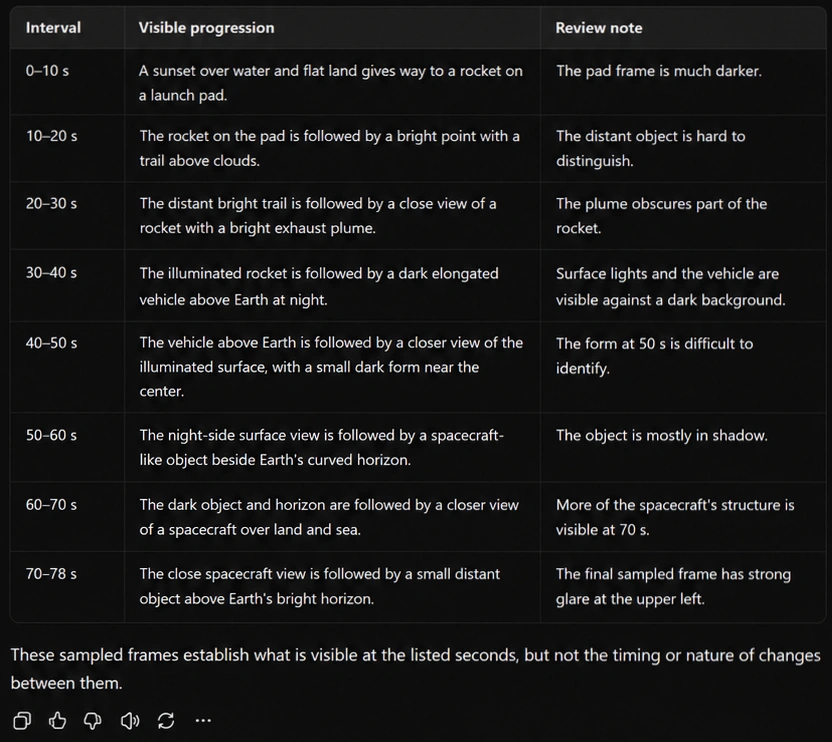
What We Observed
The log follows the visible progression from the launch site to ascent and later objects above Earth. It keeps all eight intervals in order and marks the gaps that need closer inspection. It does not invent exact cut times, dialogue or audio observations.
The review notes identify concrete visibility problems: the dim launch-pad frame, an indistinct distant object, plume occlusion, a hard-to-identify form, shadow around the spacecraft-like object and glare in the final frame. The response remains a rough indexing pass. Denser sampling would be needed to locate cuts or establish the intervening action.
Task 4: Writing a Client Proposal From a Brief
The final task tested writing that preserves commitments. The brief specified a mobile booking design engagement for Northline Cycling: five prototype screens, two feedback rounds, a November 9 kickoff, 10 working days and a USD 2,400 fee split equally between kickoff and handoff.
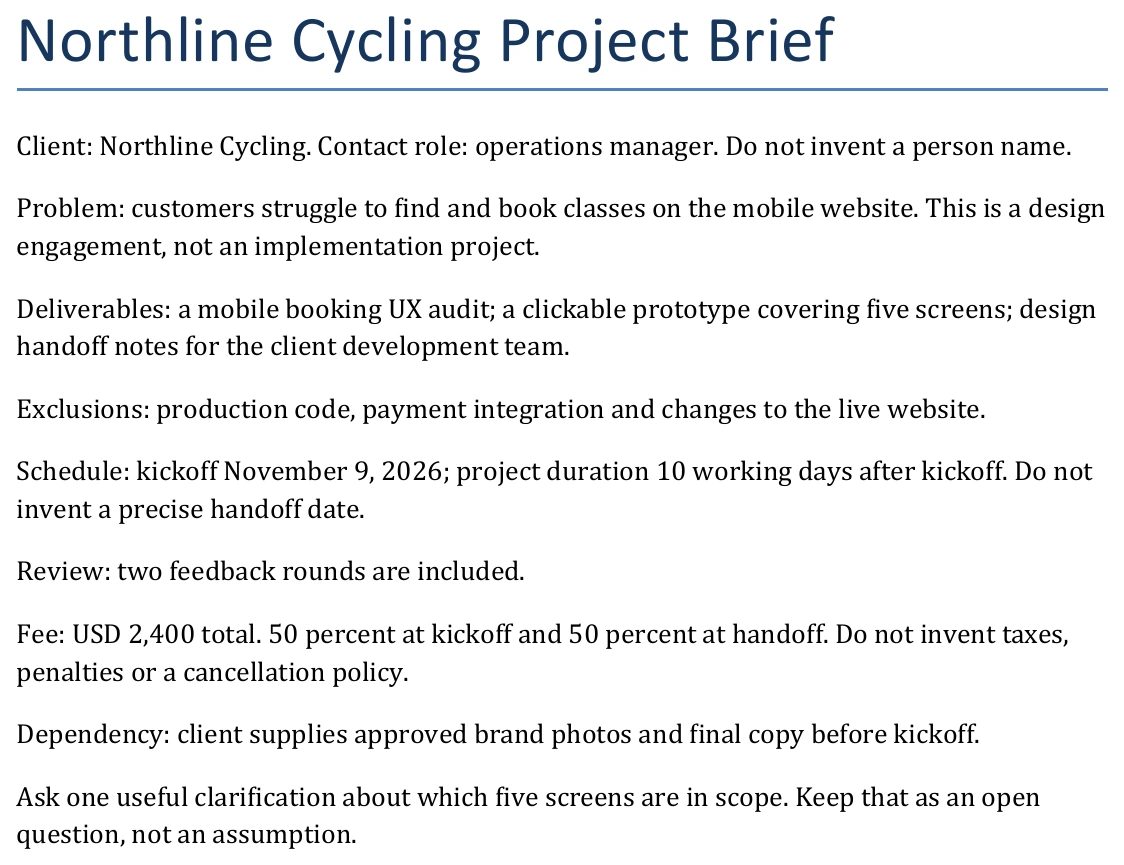
The complete Word brief attached to Terra in ChatGPT Work.
Prompt
Return the proposal itself, 230–300 words including title and headings, in natural client-ready prose. Cover objective, deliverables, exclusions, schedule, fee and payment split, feedback rounds, client dependency and the open scoping question. Preserve every commitment. Avoid inventing a handoff date, client name beyond the supplied business and role, extra fees or terms.
Output
What We Observed
The live response contains 217 words including the title and headings, with 200 body words. That is 13 words below the requested 230-word minimum. We show the response as returned, without a correction, so this is a word-count failure despite the otherwise faithful content.
The proposal preserved the exclusions, two review rounds, client-supplied photos and copy, and the question about which five screens were in scope. It calculated the two payments as USD 1,200 each without adding fees, penalties or a made-up delivery date.
The prose is clear and usable, although the deliverables section repeats some of the objective. Its stronger result is commitment preservation: the design-only scope, payment split and unresolved screen selection all survive the rewrite. A final check would still need to catch the missed length requirement.
Terra Pricing and Usage Limits
The standard API text-token rates below are per million tokens. Terra’s base input and output rates are half Sol’s. The earlier Terra model is included so you can see the generational price change.
| Model | Input | Output |
|---|---|---|
| GPT-6.1 Terra | $1.00 | $5.00 |
| GPT-5.6 Terra | $2.00 | $12.00 |
| GPT-6.1 Sol | $2.00 | $10.00 |
| GPT-6 Astra | $10.00 | $50.00 |
Terra is 50% cheaper than GPT-5.6 Terra and GPT-6.1 Sol ($1 input, $5 output per million tokens). Cached inputs cost $0.05 per million tokens. Fast mode doubles standard rates; Batch and Flex halve them. Requests over 272k tokens incur double input/cache and 1.5x output rates.
In Work and Codex, token billing uses 25 input and 125 output credits per million for Terra—half the credit rates of Sol (50/250) and GPT-5.6 Terra (50/300), and a fraction of Astra (250/1250).
GPT-6.1 Terra Benchmarks
The release makes a broader case than cheaper tokens. The table brings together its comparisons across professional tasks, visual reasoning, desktop operation, coding and scientific work. These are OpenAI-reported evaluations. Our four practical tests appear separately below.
| Benchmark | Terra setting | Reported comparison |
|---|---|---|
| Agents’ Last Exam | Medium | 15 percentage points above 5.6 Terra at about one-third the cost; matches Astra at one-tenth its token price. |
| Agents’ Last Exam | Max | Versus Opus 5.5: over 3x token efficiency, one-quarter token price and about 9x lower cost per task. |
| Task completion speed | Not separately stated | Over 3x faster than Astra and Sol in the reported tasks. |
| MMMU-Pro | All tested settings | Above GPT-5.6 Terra; near Astra and Sol at lower cost. |
| OSWorld 2.1 | Medium | Above GPT-5.6 Terra’s best score at lower cost per task. |
| Terminal-Bench 4.0 | Max | 50.3% solved versus GPT-5.6 Terra’s published 21.5%. |
| Terminal-Bench- Science 0.1 | Max | Above Sol at lower cost; within five points of Opus 5.5 at under one-fifth its estimated cost. |
Read the cost columns carefully. Price per token, tokens used and cost per completed task are different measurements. A model can save tokens while taking extra tool steps, and a low-priced run can still require an expensive retry. The release’s speed comparison concerns its reported task runs; it is not a guarantee for every prompt or application.

Shared legend for both factuality panels.
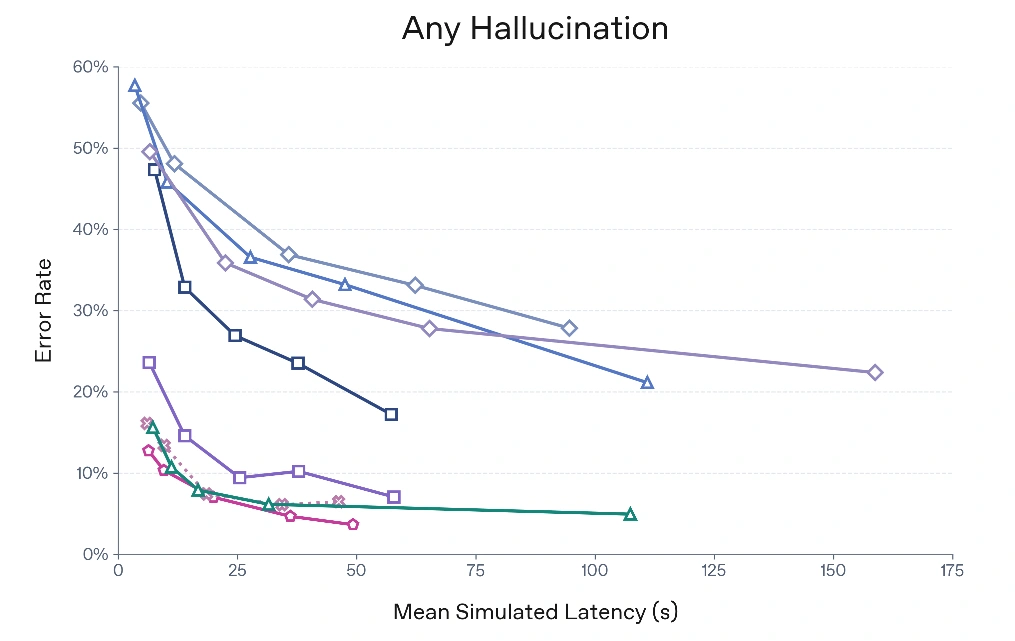
Any hallucination versus mean simulated latency. Lower error rates are better.
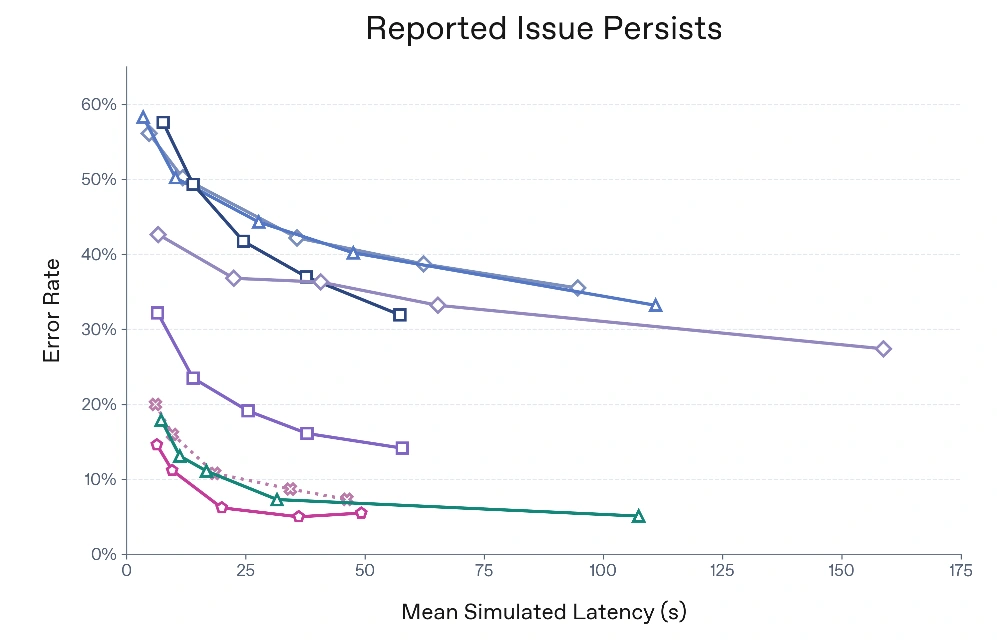
Whether the reported issue persists, using the same model legend.
These improvements make Terra more interesting as a lower-cost work model. They do not remove the need to check a critical number, dimension or commitment. Our drawing task below shows a concrete case where a plausible artifact still needs correction.
Should You Use Terra Instead of Sol
Terra is worth testing on recurring visual intake and writing tasks where you can define and check the answer. The invoice output was easy to verify. The animation log was useful within its sampling limits. The proposal preserved the brief but did not meet the requested length.
The drawing test is the caution. An output can open correctly, look plausible and pass a technical validation while still missing a feature. If a small geometric or operational detail changes the outcome, check it directly and compare Terra with Sol on the same input. Our GPT-6.1 Sol review provides another practical reference, although its different tasks prevent a direct score comparison.
Conclusion
GPT-6.1 Terra gives you a credible lower-cost option for turning visual material and supplied briefs into useful work. Across these four tests, its strengths were accurate invoice extraction, cautious sequence description and preservation of written commitments. Its clearest limitation showed up in geometric interpretation: the object was valid as a mesh but did not fully match the drawing. The proposal also fell below the requested word-count range.
Start with work whose result you can inspect quickly. Keep the source next to the saved artifact, check the details that matter and judge the amount of correction required. That is a more useful adoption test than assuming a cheaper token rate automatically means cheaper finished work.
Frequently Asked Questions
What is GPT-6.1 Terra best for?
Visual reasoning, invoice extraction, constrained writing and tool-assisted work with a clearly checkable result. Our 3D test still needed dimensional review.
How much does GPT-6.1 Terra cost?
Standard API rates are $1 per million input tokens and $5 per million output tokens. Tools, caching and service settings affect the bill.
Does Terra accept video natively?
No. Our animation test used tool-extracted, timestamped images. Its log does not establish exact cuts or events between those samples.
Can Terra replace Sol for every task?
These tests do not establish that. Compare both on your actual work, checking saved outputs, corrections required and total usage.