

From nostalgic photographs and portrait restoration to bilingual infographics and product campaigns, Nano Banana 2.1 promises to make image generation more versatile. Google’s latest model brings improvements in visual quality, text rendering, and consistency, alongside lower API image-generation costs.
But how well does it handle real-world tasks? In this article, we put Nano Banana 2.1 through six hands-on tests in Google AI Studio, sharing the exact prompts, generated outputs, and our observations to see where it excels and where it falls short.
TLDR: 2.1 earns a place in a broad image workflow. Judge the details that make your job useful: reconstructed features in a restored portrait, process logic in a teaching graphic, accurate copy in a campaign. A good-looking image is the beginning of that decision.
What changed in Nano Banana 2.1
The official API name is gemini-nano-banana-2.1. It updates Nano Banana 2, previously available as gemini-3.1-flash-image. Google positions 2.1 for efficient image generation and conversational editing, with Nano Banana Pro remaining the option for more demanding visual work.
More specificially, these are the aspects in which improvements were made:
- Improved Image Quality: Produces more realistic images with better lighting, textures, finer details, and overall visual consistency.
- Better Prompt Adherence: Follows complex instructions more accurately, including object placement, composition, and specific visual requirements.
- Enhanced Text Rendering: Improves the accuracy and readability of text within images, including multilingual labels and typography.
- Improved Image Editing: Supports conversational edits, reference-based transformations, and more consistent subjects across revisions.
- Better Infographic Generation: Handles structured layouts, charts, diagrams, and educational visuals with improved clarity.
- Higher Resolution Support: Generates images at 1K, 2K, and 4K resolutions, with improvements to ultrawide and tall image generation.
Google has also deprecated the older Nano Banana 2 endpoint and recommends moving to 2.1. The English release notes currently give no shutdown date.
What it costs
These are Google's standard API prices for the output image alone, in US dollars.
| Output resolution | Nano Banana 2 | Nano Banana 2.1 | Nano Banana Pro |
|---|---|---|---|
| 1K | $0.067 | $0.0336 | $0.134 |
| 2K | $0.101 | $0.0504 | $0.134 |
| 4K | $0.151 | $0.113 | $0.240 |
At 1K and 2K, 2.1's image-output price is about half the old model's. For 100 successful 1K outputs, that portion costs $3.36 instead of $6.70. The 4K reduction is closer to 25 percent.
Inputs, thinking, search and retries can add cost. There is no listed API free tier for 2.1. A Google AI subscription is a separate access route.
How we ran the tests
We tested on 7 October 2026 in Google AI Studio with gemini-nano-banana-2.1 selected, Medium thinking, Images and text output, and Google Search and Image Search off. We used 1K output. Higher resolutions were disabled when we checked the panorama controls.
We inspected each step's first successful output. The infographic needed a retry after an internal error; we did not reroll for prettier results. The poster and its two follow-ups form one workflow.
We checked visible copy, composition, objects and reference continuity. We did not measure generation speed or compare models. All six results below are from actual runs.
Six tasks, six different uses
1. A 1990s flash snapshot
A 1990s snapshot tests whether clothes, lighting, framing and texture work together.
Prompt
Create a candid 1997 point-and-shoot flash photograph of exactly three adult friends outside a late-night arcade. Baggy denim, color-block windbreakers, chunky sneakers; one friend holds wired headphones. Direct flash, visible film grain, slightly imperfect framing and warm faded print colors. Make it feel like an ordinary snapshot, not a fashion campaign. No smartphones, modern logos or watermarks. Add a small orange date stamp "07 10 97" in the lower right. Landscape 3:2.
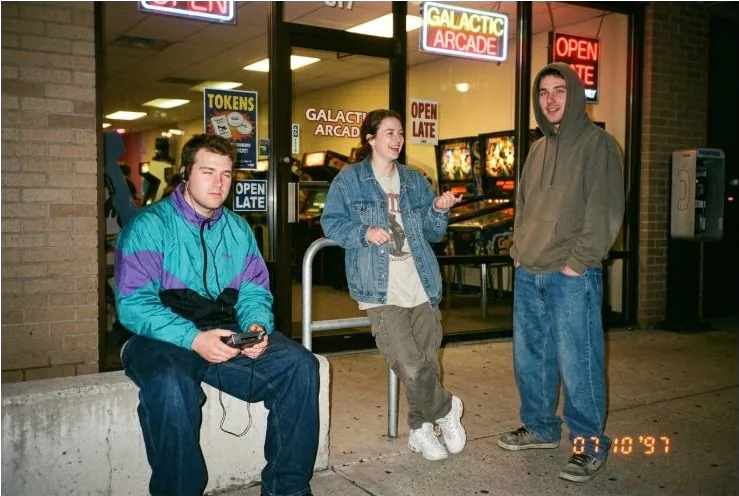
The output felt recognizably like a late-night snapshot. Baggy jeans, a turquoise-and-purple windbreaker, denim, a hoodie and chunky shoes carried the period styling. Direct flash separated the friends from the dark arcade background, and the warm print colors helped. The left friend's blink made the scene feel caught mid-moment.
The orange date stamp was present. Grain was subtle, and a wired portable audio player was clearer than the requested headphones. This was a convincing nostalgic social image, with a correction needed for the requested prop.
2. Restore and colorize a historic portrait
We uploaded Robert Cornelius's 1839 portrait, sourced from the Library of Congress. Its surface damage gives restoration a real job to do.
Prompt
Restore and gently colorize this 1839 portrait of Robert Cornelius. Remove surface scratches, stains and plate damage, but preserve the person's facial structure, expression, hair, pose, clothing, background and original framing. Use restrained, plausible natural colors and keep an antique photographic character. Do not beautify the face, modernize the clothes, add objects or turn it into a glossy modern headshot. Return one restored image at the same aspect ratio.
| Original portrait | Restored result |
|---|---|
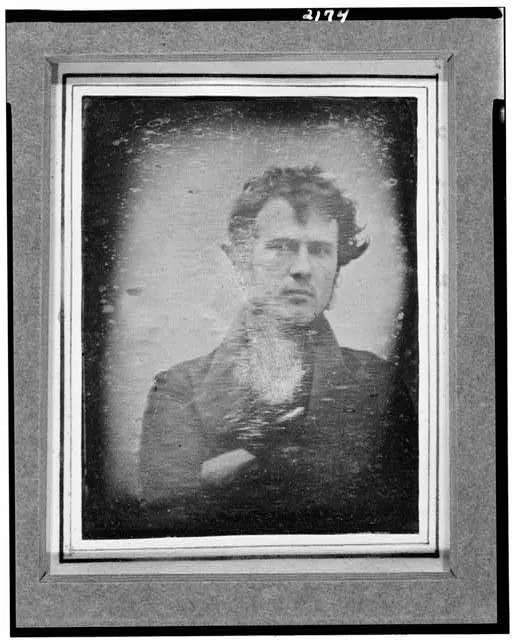 | 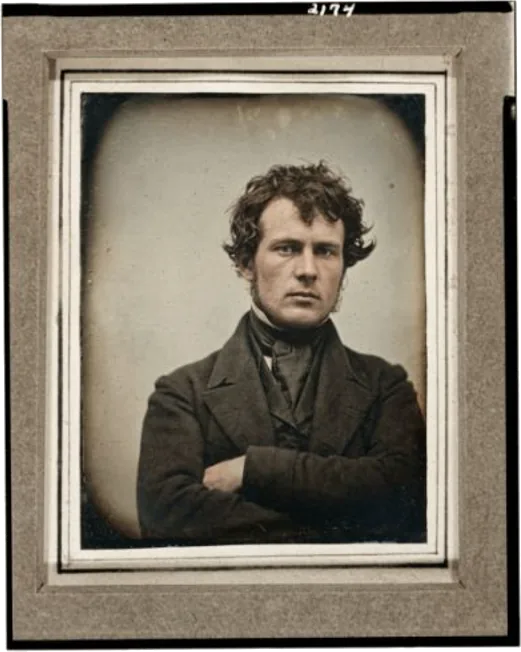 |
Original portrait, left; restored, right.
Nano Banana 2.1 removed much of the dense wear across the face and clothing while preserving the framing, crossed arms, dark coat and wavy hair. The output retained an antique photographic character. Color stayed close to muted sepia, so this was more impressive as cleaning than as rich colorization.
The eyes, nose and mouth became more defined. Those details are reconstruction where the original is damaged. The result could work as an illustrative restored portrait, with that distinction disclosed. It cannot tell us Cornelius's exact appearance or the scene's original colors.
3. A water-cycle infographic in Hindi and English
Short English advertising copy is one thing. Readable bilingual labels, correctly placed inside an explanation, ask more of the model.
Prompt
Create a clean 16:9 educational infographic titled "THE WATER CYCLE". Use a flat illustration with ocean on the left, a cloud above the center, and a mountain and river on the right. Show upward evaporation arrows from ocean to cloud, condensation inside the cloud, rainfall down to the mountain, and river water flowing back to the ocean. Use exactly these three bilingual labels, spelled correctly: "वाष्पीकरण / Evaporation", "संघनन / Condensation", "वर्षा / Rainfall". Place each beside the process it describes. Keep the Hindi and English equally legible, with no other text.
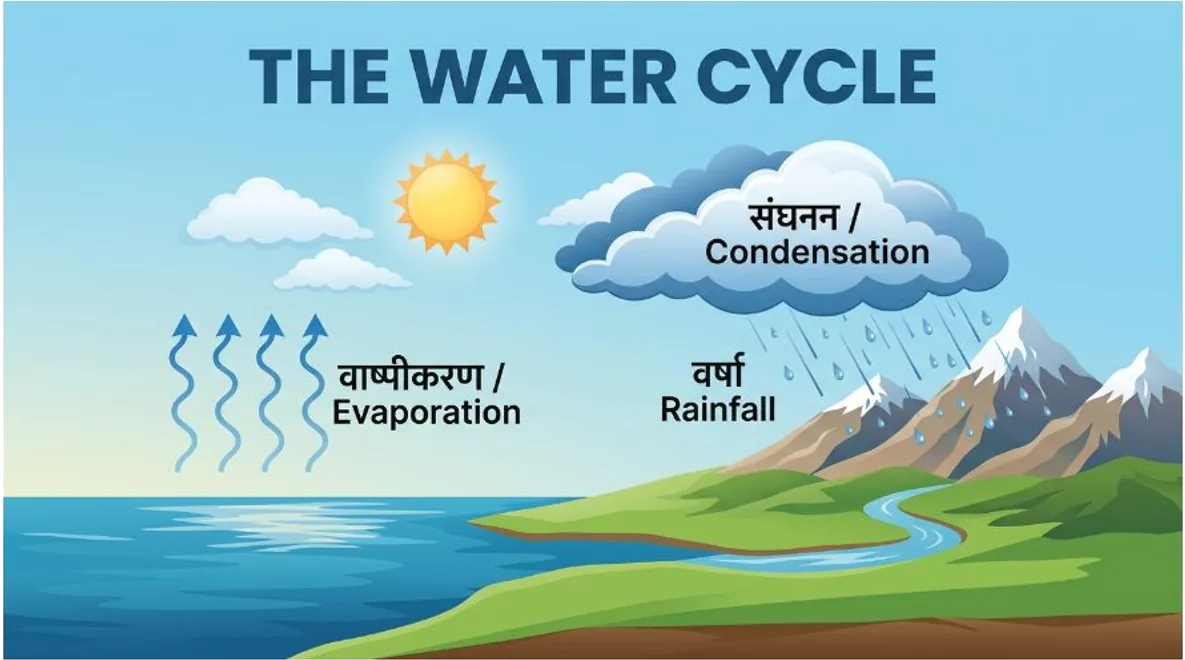
The flat illustration looked polished. Ocean on the left, mountain and river on the right, and a central cloud made the composition easy to scan. The title and all three English labels were correct, and the requested Hindi labels looked readable and correctly spelled.
The explanatory structure was weaker. Upward arrows showed evaporation and rain fell toward the mountain, but the arrows did not clearly connect into the cloud. The river returned toward the ocean visually without an explicit return arrow. We would use this as an attractive draft, then tighten the directional logic before making it a teaching resource.
4. Combine two real photo references
For this test, we supplied a bedroom photograph and a separate red model-car photograph. The job was to place the toy inside the room with believable scale and lighting.
| Original room | Car reference |
|---|---|
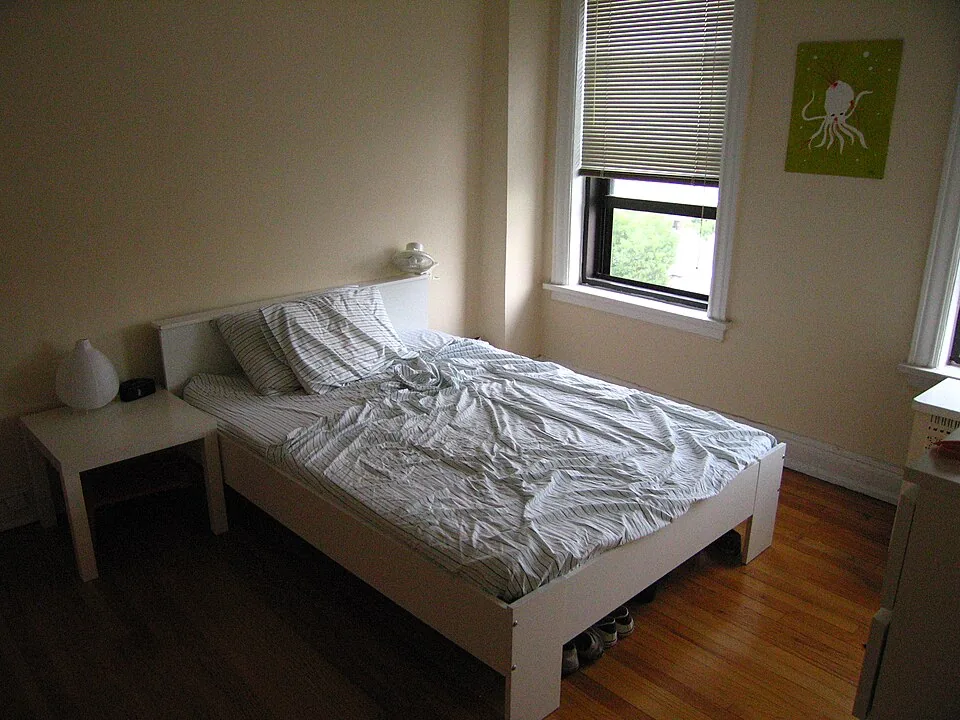 | 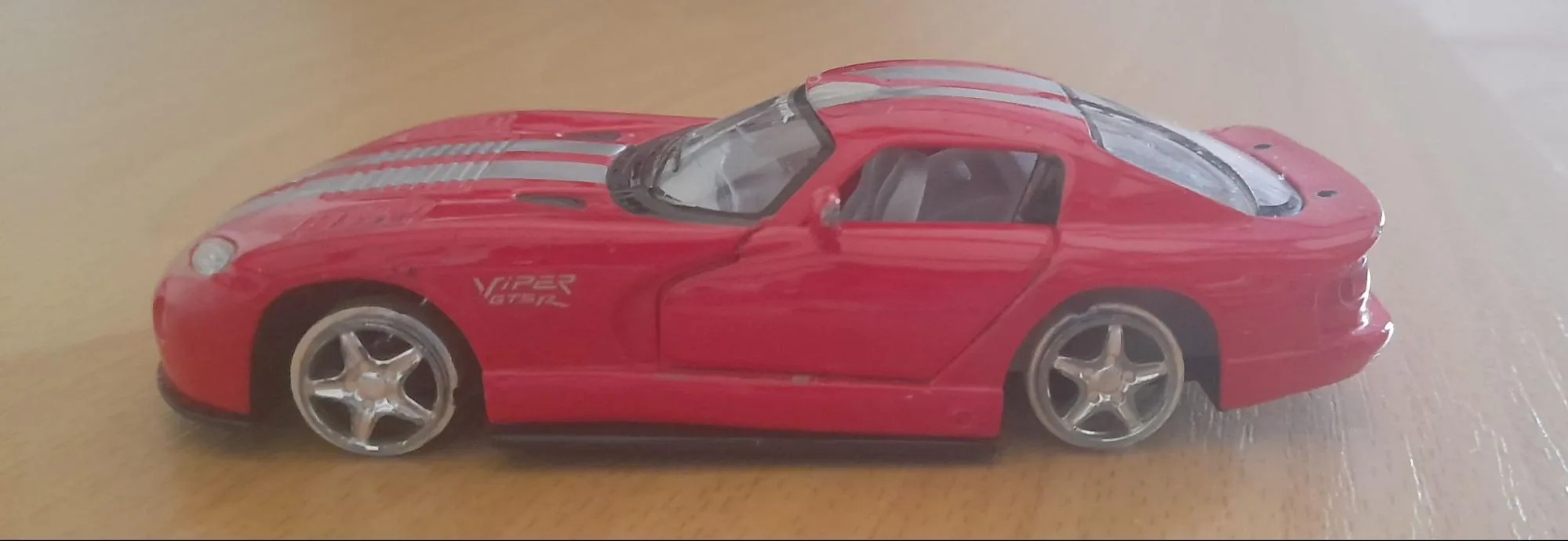 |
Combine these two reference photographs into one realistic 4:3 image. Keep the bedroom composition, bed, wooden floor, walls, window and blinds from the room photo. Place exactly one small red model car from the second photo on the floor beside the bed, about 25 cm long rather than a full-size vehicle. […] Match the room's perspective, window lighting and contact shadow so it looks physically present. No people, added furniture, labels or collage borders.
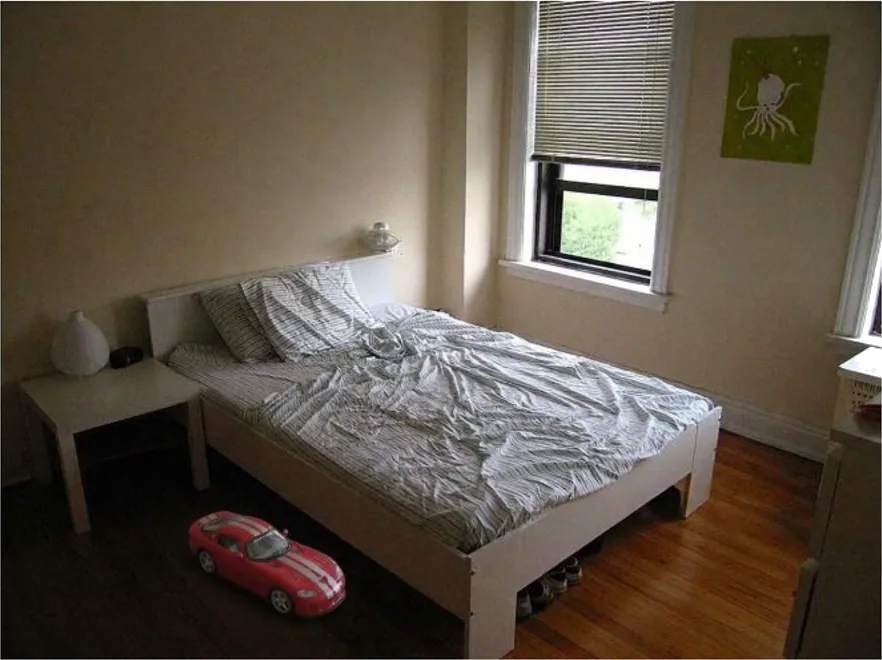
Exactly one small car appeared on the floor beside the bed. Its red body, silver pattern and wheels remained recognizable, while perspective, room lighting and a contact shadow made it feel physically present. The bed, blinds, wall art and nightstand stayed recognizable too, without obvious added furniture.
The car looked miniature, though we cannot verify 25 cm from an image. The photographs combined into a coherent scene, with the supplied room carrying through.
5. Make and revise a product campaign
We tested a fictional DAYBREAK sparkling-tea campaign as one workflow: make the poster, revise its offer, then carry the product into another scene.
First prompt
Create a square product launch poster for a fictional sparkling tea called DAYBREAK. Use an off-white background, one teal 330 ml can with a small orange sun icon, and a realistic soft shadow. Render exactly these three text lines, with no extra words: "DAYBREAK"; "Sparkling tea, zero fuss."; "3 cans | ₹249 | 12–14 October". Give the headline strong hierarchy and keep all text legible. Put exactly three small orange circles in a horizontal row at the bottom.
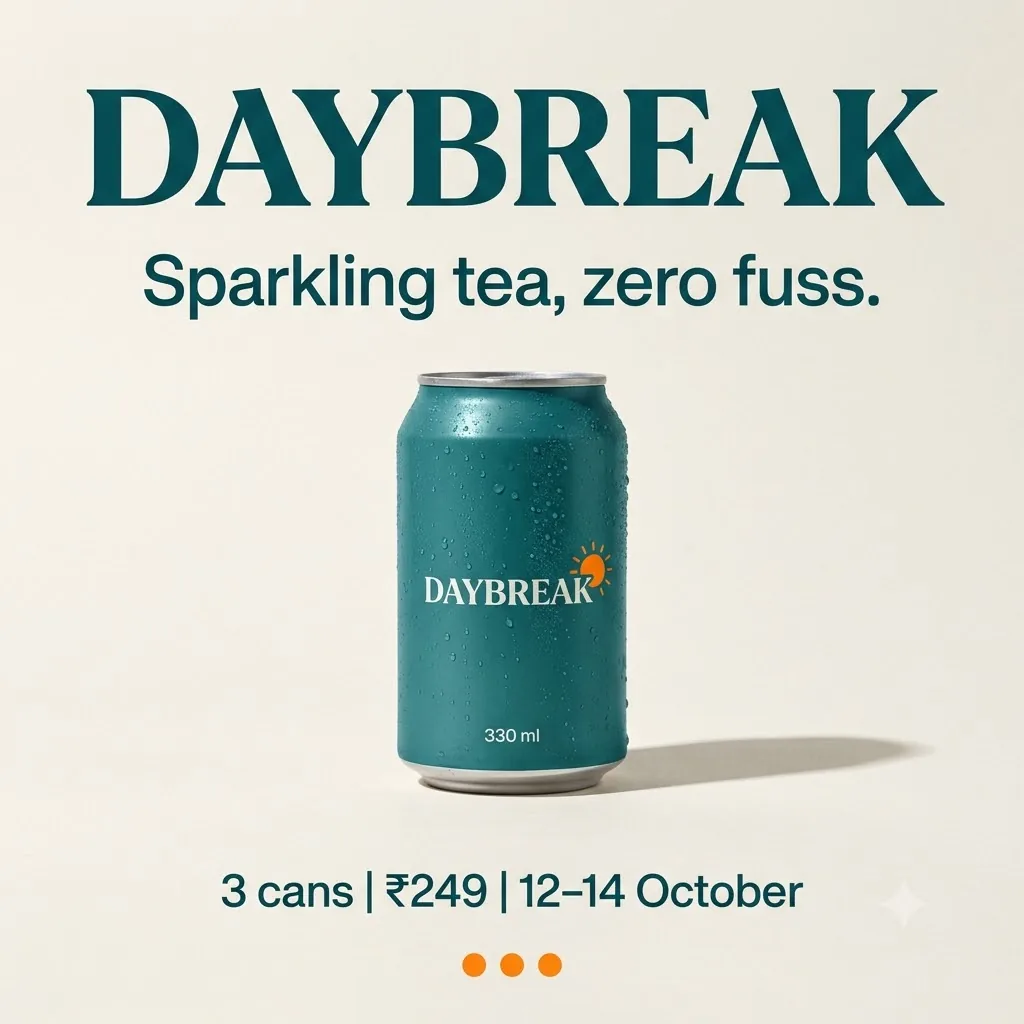
The first poster delivered readable branding, the requested offer and three bottom circles. It also repeated DAYBREAK on the can and added a 330 ml marking beyond the three specified lines, breaking the strict “no extra words” instruction.
Revision prompt
Edit the previous poster. Change only the can color from teal to matte coral and the price from ₹249 to ₹299. Keep the can position, sun icon, DAYBREAK branding, 330 ml marking, headline, tagline, dates, background, shadows, type sizes, and exactly three bottom orange circles unchanged. Return the edited image.
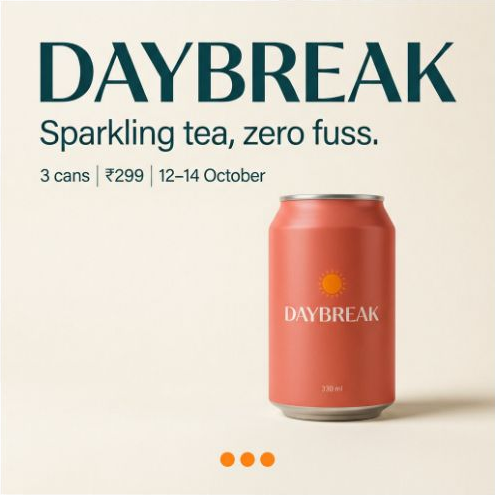
The revised poster changed the can color and offer while retaining the visible layout.
The color became coral and the price became ₹299. Dates, tagline, icon and circles appeared intact, without an obvious redesign.
6. Build one continuous panorama
Google specifically calls out fixes for very wide 2K and 4K images. We could only select 1K, but checked whether 2.1 could build a coherent ultrawide scene without repeating subjects.
Prompt
Create one continuous photorealistic coastal panorama, 4:1 aspect ratio. At the far left, exactly one white lighthouse stands on a rocky headland. Across the center, a curved empty beach leads to a single red fishing boat pulled onto the sand at the far right. Sea and cloud bands must run continuously across the entire frame. No collage, panels, mirrored areas, repeated lighthouses, repeated boats, text or people.
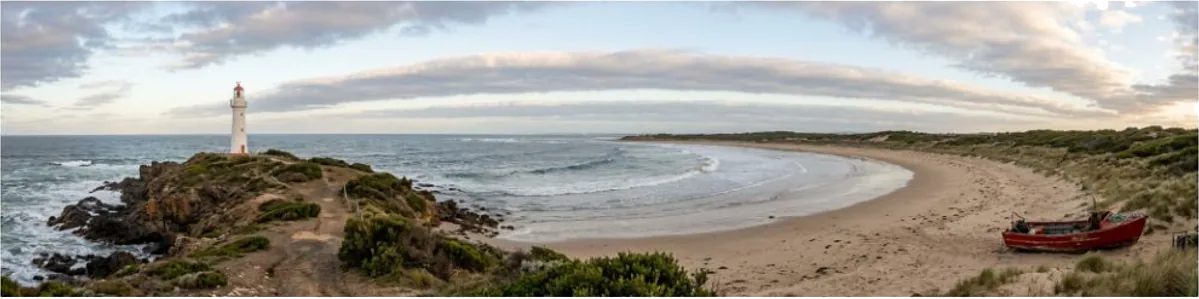
Our 1K panorama forms one continuous coastline with one instance of each requested subject.
The sea, clouds and beach ran continuously across the frame. There was one lighthouse on the left and one boat near the right edge, without obvious mirrored panels, repeated subjects, people or text. The lighthouse sat inward from the edge, so “far left” was approximate.
The displayed image measured 2064 × 512 pixels, approximately 4:1, despite the 1K preset. This was a successful wide composition in our run. It does not verify Google's separate fix at 2K and 4K.
Final Verdict
Yes, especially if your image work changes from task to task. The snapshot, restoration and reference combination gave us distinctly useful results. Campaign revisions worked, and the panorama held together. Lower API output prices add a reason to evaluate Google's recommended successor to Nano Banana 2.
The infographic showed why function needs checking alongside appearance. Readable bilingual text helped, but the arrows needed work. The headphone prop and extra packaging copy showed how smaller instructions can slip.
Frequently Asked Questions
What is Nano Banana 2.1?
Nano Banana 2.1 (official API name gemini-nano-banana-2.1) is Google's updated image generation model released on 6 October 2026. It replaces Nano Banana 2 and is designed for efficient image generation, conversational editing, and improved realism, text rendering, and layout consistency.
How much does output image generation cost in Nano Banana 2.1?
Standard API prices for output images are $0.0336 for 1K resolution, $0.0504 for 2K resolution, and $0.113 for 4K resolution. At 1K and 2K, this is about half the price of Nano Banana 2.
How many reference images does Nano Banana 2.1 support?
It supports up to 14 reference images, along with search grounding and three thinking levels.
Where can I test or use Nano Banana 2.1?
You can select gemini-nano-banana-2.1 in Google AI Studio or access image creation tools within the Gemini app.