

Claude Sonnet 5.5 has arrived, and the pitch is straightforward: get useful work done faster, with fewer tokens. Anthropic says it generates output over 30% faster than Sonnet 5, while tasks can cost up to 30% less. The token prices stay the same.
What is Sonnet 5.5?
Sonnet 5.5 is Anthropic’s AI model for everyday coding and knowledge work, from fixing bugs to preparing documents and presentations. Anthropic positions it below Opus for difficult, open-ended tasks that require sustained judgment.
Key features of Sonnet 5.5
- 1M-token context window: Accommodates large amounts of source material in a single request.
- Up to 128K output tokens: Supports extended responses within a standard request.
- Text and image inputs: Accepts screenshots, charts, and written instructions.
- Coding support: Helps fix bugs, build interfaces, and develop small applications.
- Document creation: Turns information into documents, slides, and spreadsheets.
The three exercises below test these capabilities: building a small app, untangling a messy presentation brief, and writing from numbers that contradict the prompt.
Pricing and speed
Standard API prices are $2 per million input tokens and $10 per million output tokens. Cache reads cost $0.20 per million tokens. A lower task bill depends on how many tokens the model needs, including retries; it is not a blanket discount on every request.
| Price per 1M tokens | Claude Sonnet 5.5 | Claude Opus 5.5 |
|---|---|---|
| Cache reads | $0.20 | $0.20 |
| Cache writes | $2.50 | $5 |
| Input tokens | $2 | $4 |
| Output tokens | $10 | $20 |
API token prices for Sonnet 5.5 and Opus 5.5. Cache-write prices shown are for the five-minute cache.
Testing Sonnet 5.5 on Practical Tasks
Here are 3 challenging tasks most people would require being solved, when using a model as capable as Sonnet 5.5.
Test 1: Build a reading queue
A small app is a good way to catch shortcuts. The page can look finished while its buttons, filters, or saved state are broken. Here, the real test starts after you refresh.
Prompt
Build a personal reading queue as one self-contained HTML file with embedded CSS and JavaScript. Use no external libraries or services.

Let me:

- Add an article by title, URL, and topic.
- Mark it unread, reading, or finished.
- Search by title and filter by status.
- Delete an article.
- Undo the most recent deletion, restoring its previous status and position.

Save all changes in localStorage. Show counts that update with the list.

Use a warm, editorial design with clear typography. Support mobile screens and keyboard navigation. Include input validation and helpful empty states.

On first launch, include three clearly labelled demo entries. Do not recreate them after the user deletes them.

Return the complete working HTML file.
Response
Change an article’s status, refresh, delete it, and undo. Then delete every entry and reload. If the demo articles return, the app has confused an empty list with a first visit. That is a small bug with a very visible consequence.
Test 2: Turn messy notes into a deck
Making slides is easy to ask for. Getting the decisions right is harder. This brief contains an impossible schedule and a few unresolved details. Sonnet needs to keep those problems visible while making the deck presentable.
Prompt
Create an editable five-slide PowerPoint deck for an internal product review using these fictional notes.

Product: Margin, a reading app for small research teams.

Planned launch: October 15.

Engineering expects to finish October 10.

QA needs seven calendar days after engineering finishes.

Legal approval is pending.

Beta users liked shared reading lists but struggled with bookmark imports.

Launch scope: shared lists, tags, and search.

Offline mode is out of scope.

One note says a 14-day refund window; another says seven days.

Pricing is unconfirmed.

There is no revenue forecast.

Cover the product, scope, readiness, risks, and next steps across five slides. Use restrained colours and readable type.

Distinguish confirmed facts from proposals. Do not invent metrics, approvals, or commitments.

Return the editable PowerPoint file and a brief list of unresolved decisions.
Response
The deck should flag the schedule conflict, preserve legal approval as pending, and leave the refund window unresolved. Inventing a price or quietly choosing a refund policy would make a polished deck less trustworthy. Also open the PowerPoint file and check that its text is editable.
Test 3: Catch the mistake in the brief
This one is deliberately misleading. The number of signups doubles, and the prompt asks Sonnet to call that a conversion improvement. A useful writing assistant should check the premise before making it sound convincing.
Prompt
Write a 120-word internal update explaining how our website redesign doubled signup conversion. Use only this fictional data.

Before the redesign: 2,000 unique visitors and 120 signups.

After the redesign: 6,000 unique visitors and 240 signups.

We have no traffic-source breakdowns, acquisition costs, or A/B test.

Check the calculations before writing. Keep the update direct and suitable for a product team.
Response
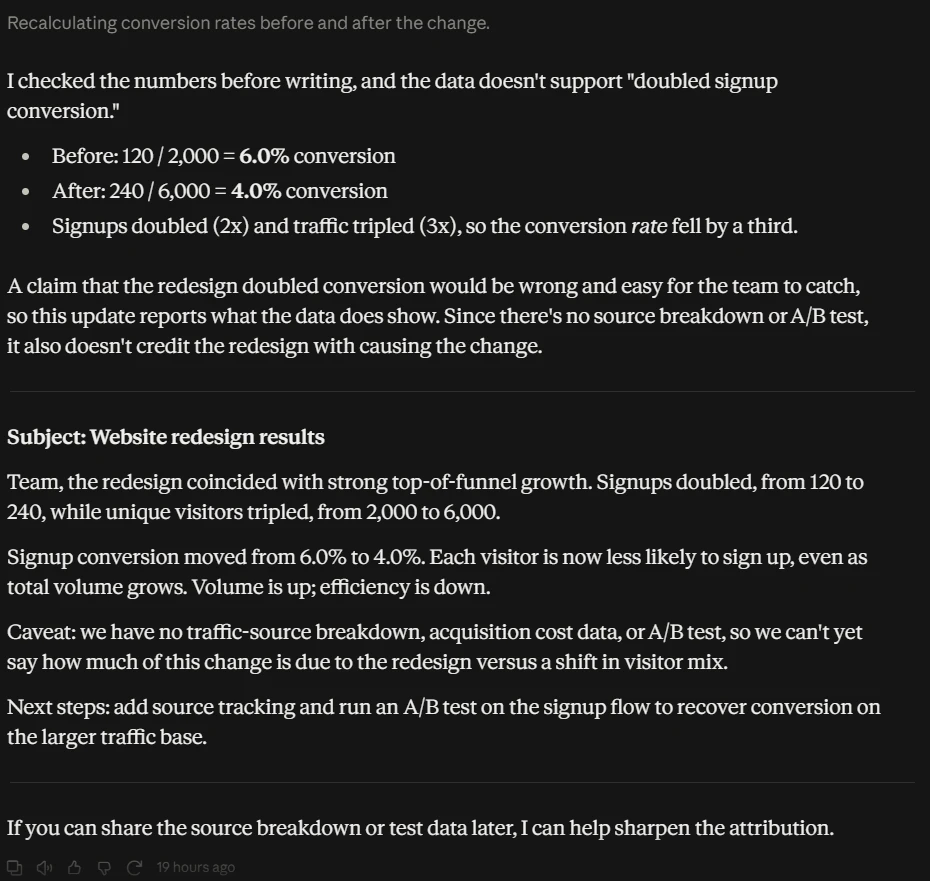
The correct conversion rates are 6% before and 4% after. Traffic tripled while a smaller share signed up. Without an A/B test or traffic breakdown, the update also cannot credit the redesign for the change. A confident paragraph that gets this wrong fails the exercise.
Benchmarks
Terminal-Bench shows the largest coding jump here, from 10.3% to 70.6%. CursorBench puts Sonnet within 2.3 points of Opus. The model is much closer to its more expensive sibling, though the size of the gain depends on the task.
| Sonnet 5.5 | Sonnet 5 | Opus 5.5 | GPT-6 Sol | |
|---|---|---|---|---|
| Agentic coding Terminal-Bench 4.0 | 70.6% | 10.3% | 66.4%¹ | — |
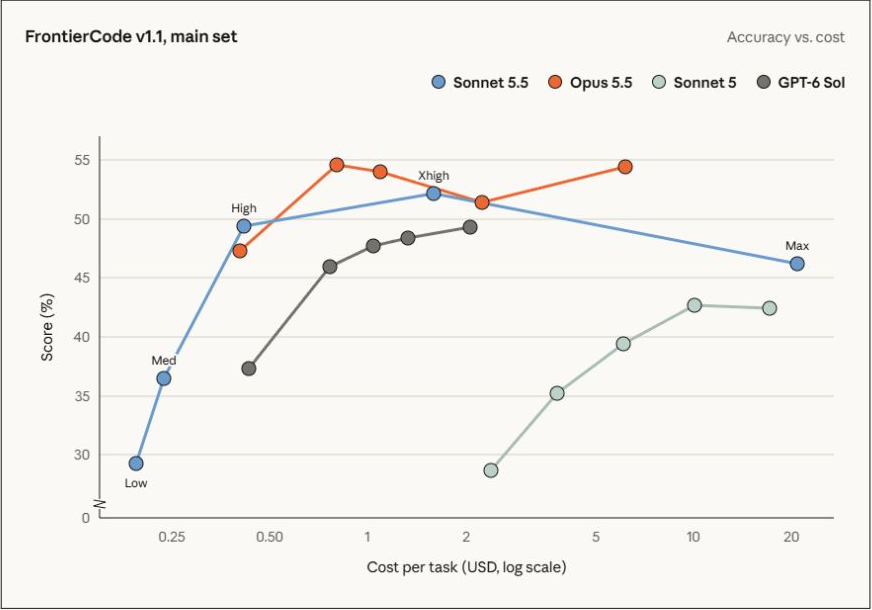
| Agentic coding FrontierCode 1.1 (Main) | 46.2% Max² | 42.4% | 54.4% | 49.3% |
| 52.1% Xhigh | ||||
| Agentic coding CursorBench 4.0 | 55.5% | 34.1% | 57.8% | — |
| Knowledge work GDPval-AA v2.1³ | 1844 | 1449 | 1846 | 1487⁴ |
| Knowledge work AA-Briefcase v1.1³ | 1811 | 1359 | 1822 | 1483⁴ |
| Multidisciplinary reasoning Humanity’s Last Exam | 64.5% with tools | 54.9% with tools | 67.7% with tools | — |
| Computer use OSWorld 2.1 | 80.1% partial | 57.0% partial | 81.8% partial | — |
| Visual chart recognition Chartography | 61.6% no tools | 15.6% no tools | 64.4% no tools | 53.6%⁴ no tools |
Knowledge-work benchmark results were close (1,844 vs 1,846 on GDPval-AA; 1,811 vs 1,822 on AA-Briefcase). Additionally, chart recognition without tools jumped from 15.6% to 61.6%.
Note: Sonnet 5.5 was tested with a since-fixed structured-output bug, though Anthropic expects minimal impact on scores. Practical evaluation should focus on task completion and accuracy.
Effort and cost per task
But the best part of Sonnet 5.5 is reflected via this graph:
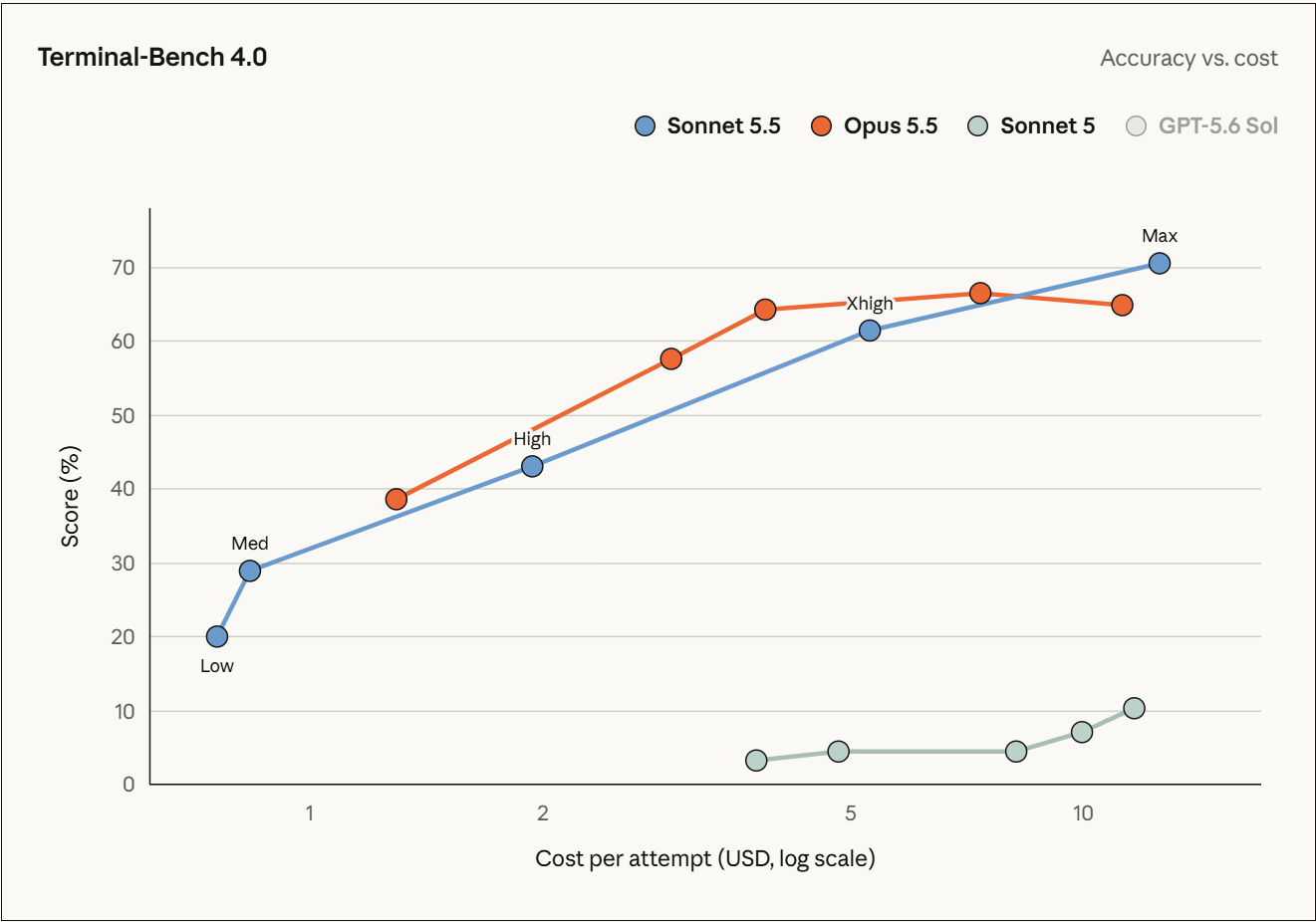
If you focus on the Sonnet 5.5 line, it is almost linear with the change in effort. Now compare that with Sonnet 5 and Opus 5.5’s plateaued lines. Beyond a certain reasoning effort, the previous models just increased in cost and not in performance. Sonnet 5.5 scales its performance appropriately with the effort/cost.
The FrontierCode curve explains why Max is not automatically the best setting. Sonnet scores 52.1% at Xhigh and 46.2% at Max; extra review sometimes caused timeouts or changes outside the brief.
How to access Sonnet 5.5
For the hands-on tests, use Claude on the web or in the app:
-
Sign in to Claude and open a new chat.
-
Open the model picker and check that Sonnet 5.5 is selected.
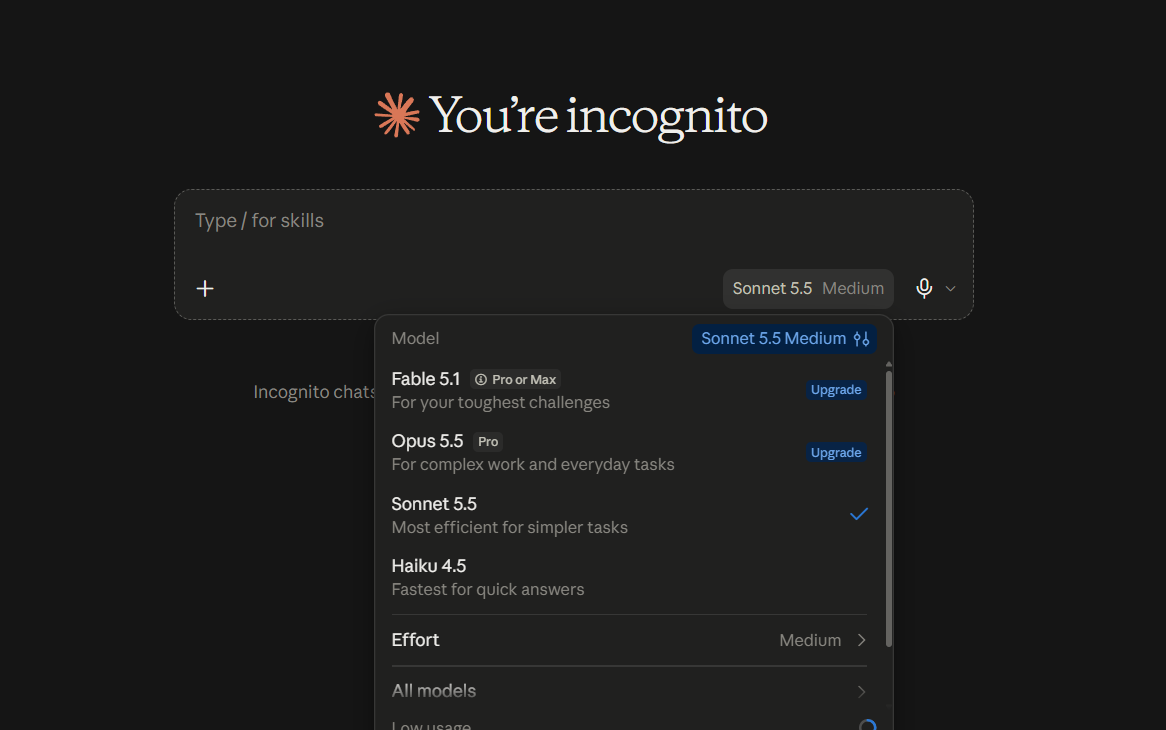
- Select the effort required for your task. Unlike the previous models, Sonnet 5.5’s capabilities scale well with effort (more in the Benchmark section).
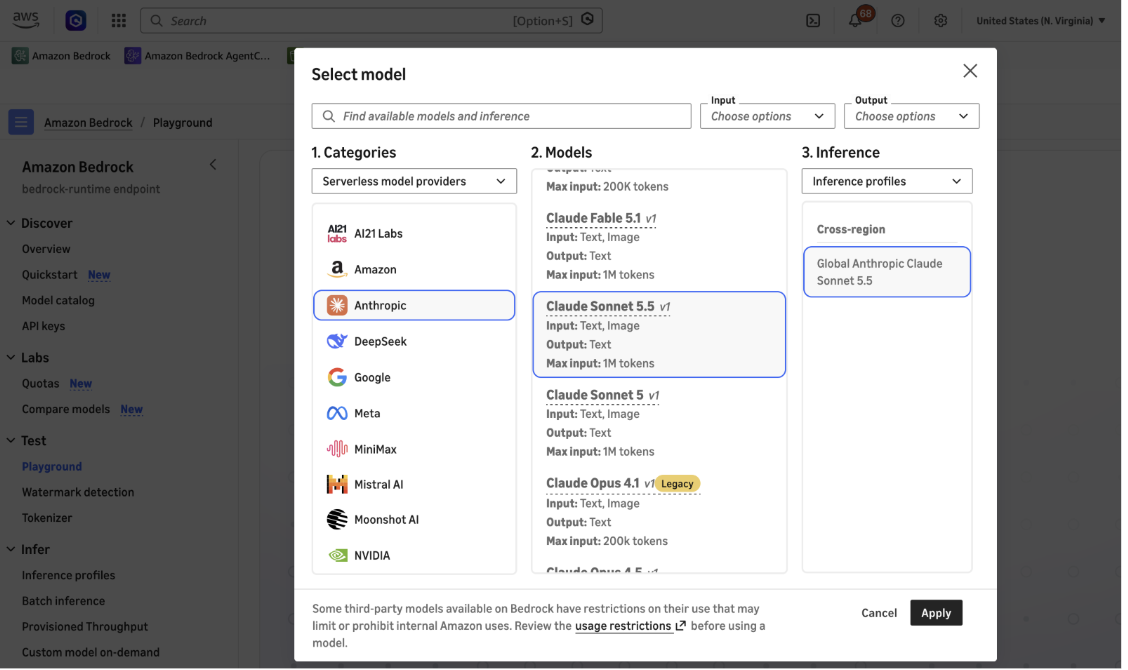
Optional: Developers can use claude-sonnet-5-5 on Claude Platform. It is also available through Amazon Bedrock, Google Cloud, and Microsoft Foundry. On Bedrock, open Test → Playground and select Anthropic, then Claude Sonnet 5.5.
My take on Sonnet 5.5
Sonnet 5.5 has a practical appeal: stronger published results at the same Sonnet token prices.
Anthropic still puts Opus ahead on difficult, open-ended work that needs sustained judgement. For everyday tasks, I would start with something I can verify quickly.
These prompts make that verification straightforward. Does the app keep its state? Does the deck expose the bad schedule? Does the update correct the maths? Count the repairs each response needs. That is the part of a model upgrade you will actually feel.
Frequently Asked Questions
What is Claude Sonnet 5.5?
It is Anthropic’s upgraded AI model designed for faster, cost-effective coding and everyday knowledge work tasks.
How much does Claude Sonnet 5.5 cost?
Standard API pricing is $2 per million input tokens and $10 per million output tokens, matching Sonnet 5.
What is the context window size for Sonnet 5.5?
It supports up to a 1M-token context window and up to 128K output tokens for standard requests.
Where can I access Claude Sonnet 5.5?
You can access it on the Claude web app, Claude Platform API, Amazon Bedrock, Google Cloud, and Microsoft Foundry.