

Anthropic released Claude Opus 5.5 on September 22, 2026, with improvements in coding, reasoning, and long-running agentic tasks. The model also brings lower API pricing and faster responses making it a compelling upgrade for developers.
But how much of an improvement is it over its predecessor? We examine the key changes, benchmark results, and four hands-on tests you can try.
What’s New in Claude Opus 5.5?
1. Longer coding tasks, fewer steps
Anthropic reports a 680,000-line codebase migration completed in under a day. Opus 5.5 also improved load times in 39 of 40 tests without altering functionality.
2. Lower prices and faster output
Pricing drops from $5/$25 to $4/$20 per million input/output tokens, with cache reads falling to $0.20. Anthropic reports over 30% faster output than Opus 5.
3. More focused writing
Anthropic claims clearer, more direct responses that prioritize important information. This also helps agents explain changes, summarize results and flag issues.
4. Always-on reasoning and updated safeguards
Adaptive thinking is mandatory, with medium effort as default. Updated safeguards and API changes require teams to review tool use, thinking settings and legacy integrations before migrating.
| Specification | Details |
|---|---|
| Model ID | claude-opus-5-5 |
| Context Window | 1 million tokens |
| Maximum Output | 128K tokens |
| Default Reasoning Effort | Medium |
| Availability | Claude API and supported cloud platforms |
Claude Opus 5.5 Pricing and Availability
| Per 1 million tokens | Opus 5.5 | Opus 5 |
|---|---|---|
| Cache reads | $0.20 | $0.50 |
| Input | $4 | $5 |
| Output | $20 | $25 |
| Cache read | $0.20 | $0.50 |
| 5-minute cache write | $5 | $6.25 |
The 40% lower total workload cost is Anthropic’s estimate for typical tasks at default settings, not a universal discount. Fast mode offers up to 2.5× speed at $8 input / $40 output per million tokens.
How to Run the Four Tests in Claude Code
Use API billing and a fresh local folder for each coding task. After installing and authenticating Claude Code, launch the model with:
claude --model claude-opus-5-5
Confirm the selected model in your session before pasting a prompt.
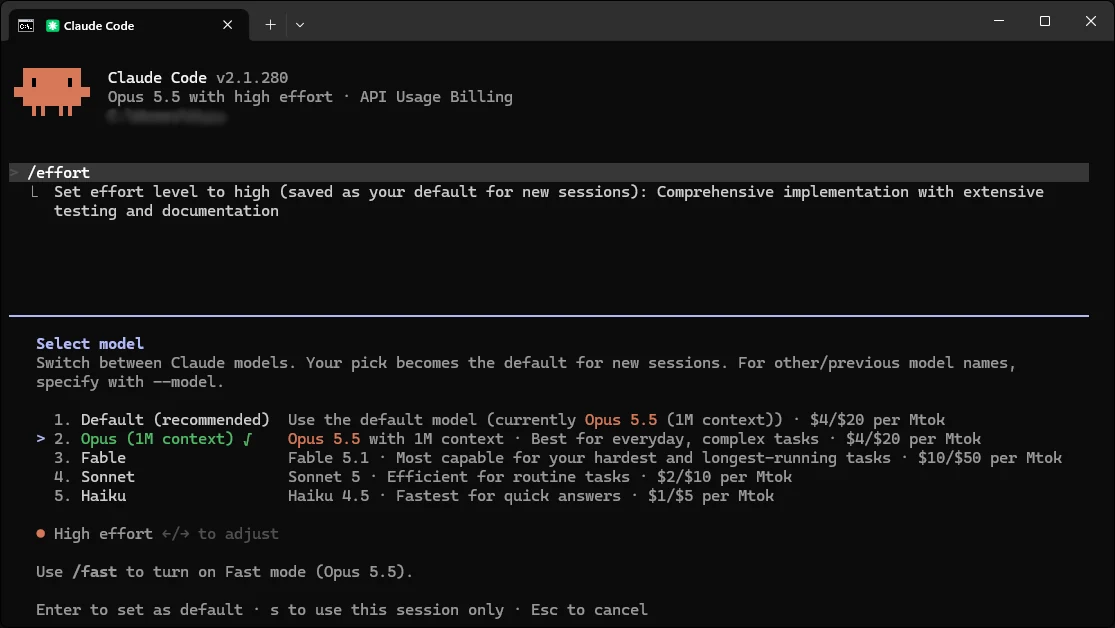
No external API, database, npm package or Python package is needed. Only the first test requires opening an HTML file in a browser. Run each prompt once first; iterate only after saving the initial result.
Claude Opus 5.5 Hands-On with 4 tests
These upcoming prompts put the model to test in all of the 4 improvements that it has had.
1. Build a Single-File Editorial Planner
One-shot coding and product design.
Prompt:
Build a responsive editorial planner for a small AI publication. Save the complete app as index.html.

Requirements:
- A week-view calendar with previous/next-week navigation.
- Eight realistic sample AI article cards with title, category, owner, date, and Draft/Review/Published status.
- Add, edit, delete, and reschedule articles.
- Filter by owner or status and search by title.
- Save edits in localStorage so they survive a refresh.
- A compact summary showing articles by status.

Use plain HTML, CSS, and JavaScript in ONE file. No frameworks, external assets, APIs, build tools, or installation. Make the interface clean, responsive, and editorial rather than generic. Implement functioning interactions, then state how to open it locally.
Output:
Amazing! This dashboard was made in under 5 minutes. This would be useful for developers wanting to quickly prototype without breaking the bank on API credits.
2. Finding details from Illustrations
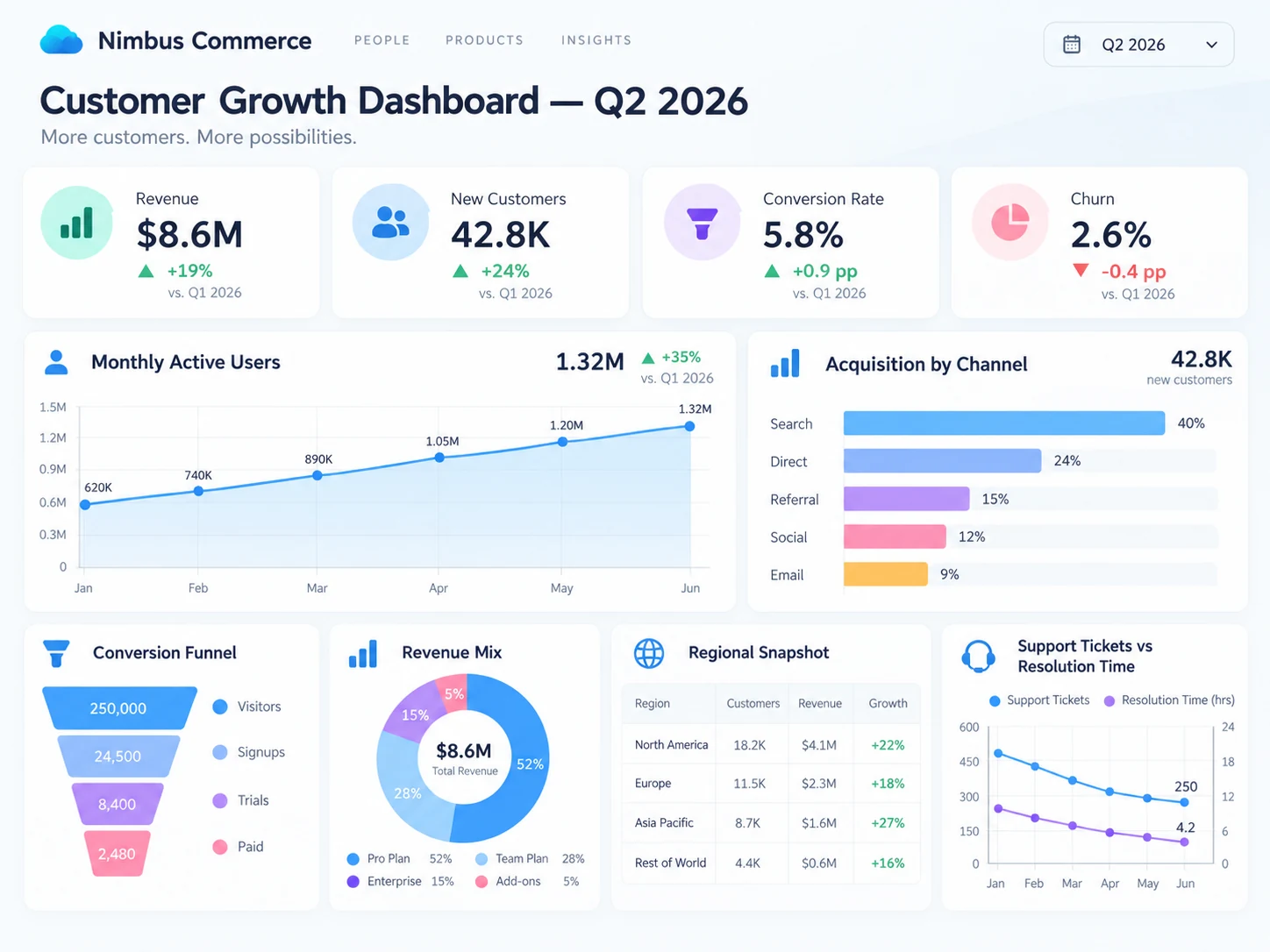
Prompt:
Look at the Nimbus Commerce dashboard carefully. What was the total revenue in Q2 2026, and which subscription plan contributed the largest share? Then compare the customer acquisition channels and identify the one responsible for the most new customers. Finally, examine the conversion funnel and tell me one thing about this dashboard that could potentially mislead a reader.
Output:
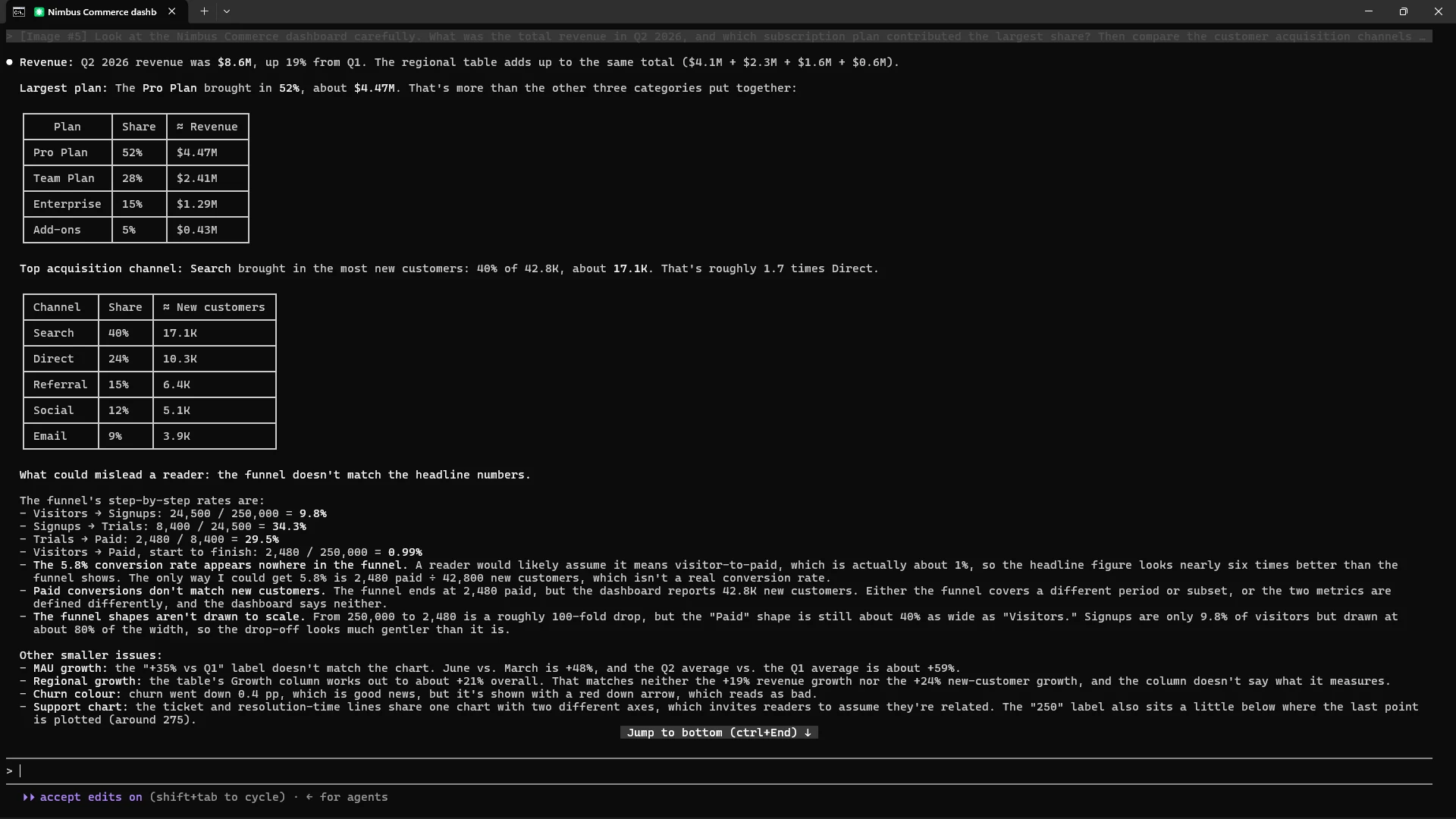
The response had outlined all of the information present in the infographic.
3. Audit a Small Content Dataset
Arithmetic, aggregation and judgment.
Prompt:
Analyze the synthetic CSV below. Do not use the internet or install packages.

article,category,sessions,signups,hours
A,Models,12000,240,8
B,Tutorials,8500,255,12
C,News,22000,110,5
D,Tutorials,6000,240,10
E,Models,15000,225,9
F,News,18000,72,4
G,Tutorials,9500,285,11
H,Models,7000,140,7

Use Python standard-library tools to create analysis.py and report.md.
Calculate every article's signup rate and signups per production hour. For each category, calculate total sessions, total signups, and WEIGHTED signup rate (total signups / total sessions). Flag high-traffic articles with low signup conversion using a rule you define and disclose.

Write a 120-word executive takeaway with two observations, two plausible explanations clearly labelled as hypotheses, and two tests for the next publishing cycle. Run the script. Do not claim these eight articles establish causality.
Output:
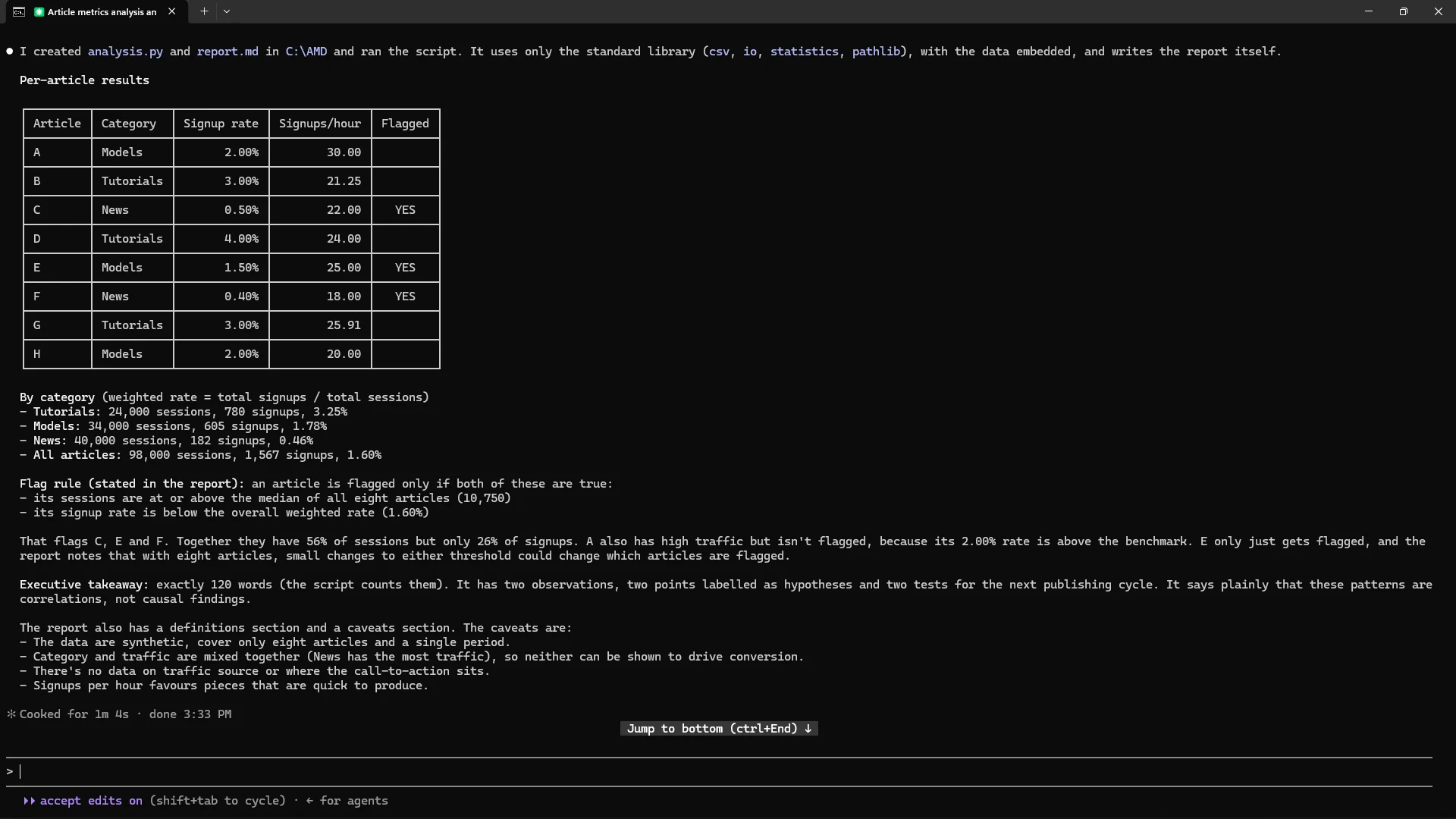
Along with this I was provided with these two files:
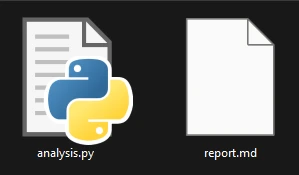
Which had the correct code as well as the contents expected from the report.
4. Compress a Technical Release Note
Writing quality and constraint following.
Prompt:
Rewrite the fictional release note below for a busy engineering manager. The company and figures are invented for this exercise.

Raw note:
"NovaDesk shipped smart routing to 80 beta accounts yesterday. Support says average first-response time went from 4 hours to 2.5 hours, but the sample covers only 23 accounts with complete tracking. A PM wrote ‘this halves response time’; that is not accurate. One customer reported a duplicate-ticket bug; the team says a fix is queued for Friday, not shipped. Sales wants to claim all customers are getting the feature, even though rollout is beta-only."

Produce exactly:
1. A factual headline of at most 10 words.
2. A two-sentence summary of at most 55 words total.
3. Three bullets labelled Shipped, Evidence, and Open issue.

Lead with what shipped. Preserve the sample-size limitation. Correct the percentage claim without overstating causality. Do not turn the planned fix into a shipped fix or claim general availability. Use plain English and no marketing adjectives. Output only the requested copy.
Output:

Succint and to the point, while satisfying all the requirements we had outlined in the prompt.
Opus 5.5 vs Fable 5.1
I thought it’d be only fair if we put the latest Opus 5.5 to the test with the current SOTA Anthropic model Fable 5.1
Here’s how the two models responded when I asked them to create ChatGPT webapp’s front-end interface:
Create a ChatGPT web application clone for me. make sure to nail the aesthetic of the app.
Fable 5.1:
Opus 5.5:
Hmm... The two models nailed the interface, but there a catch.
I asked to nail the aesthetics of the ChatGPT webapp.
Now both the interfaces look comparable in their visual quality, but functinally... Fable 5.1's output was far more usable. Also, Opus 5.5 used local hosting the app, for allowing queries to be sent over to Opus 5 using the API key... which isn't implemented correctly:
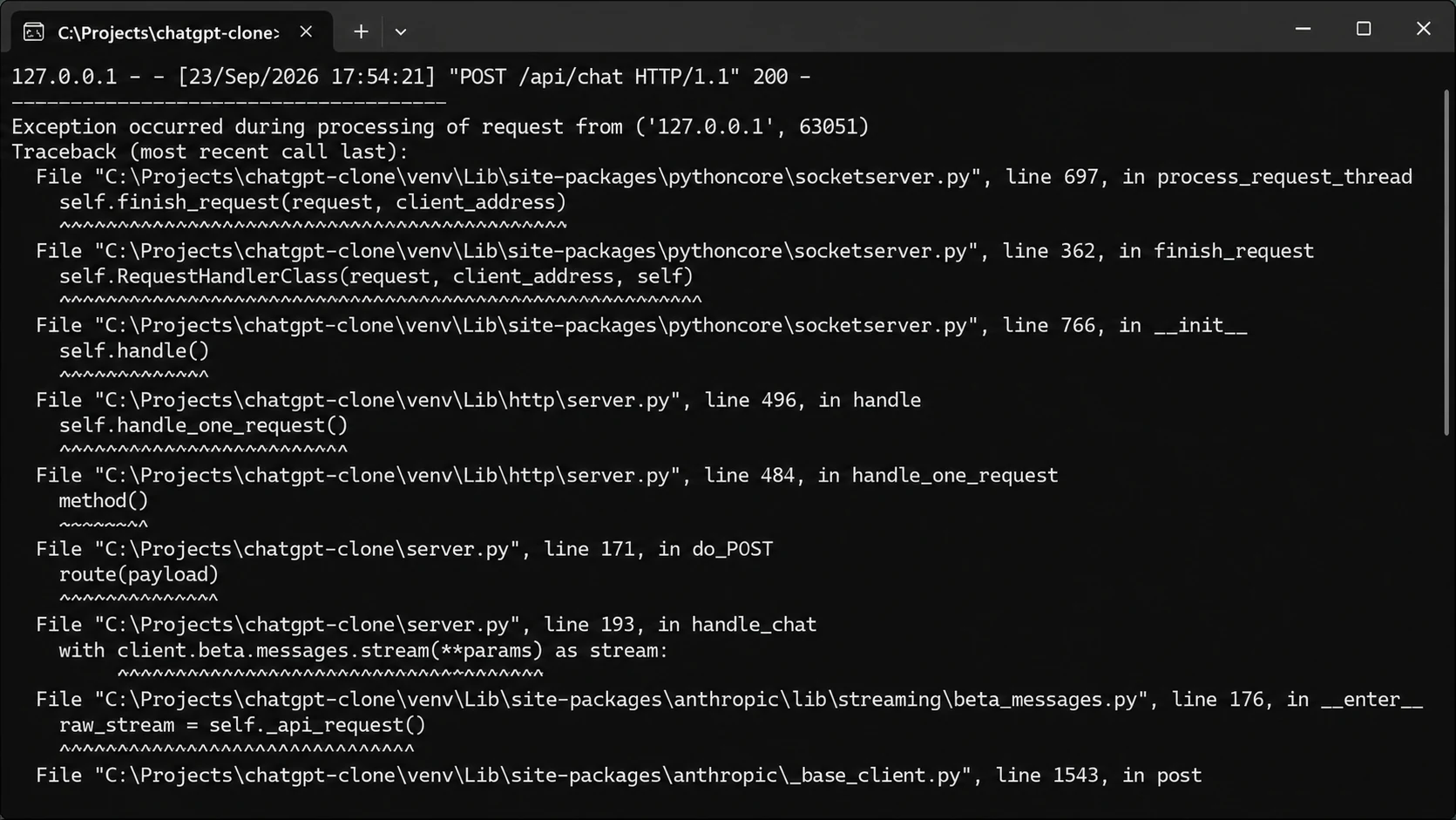
Since I never asked for this, it can be looked past. But Fable 5.1 clearly gave a superior and expected output (took ~$8 in API credits for Opus 5.5's ~$2).
Opus 5.5 Token Usage
Just like the previous comparison, comparing Opus 5.5 to Fable 5.1 would provide a good enough perspective as to token usage expectations.
Here’s the total usage I had with Opus 5.5 running all of the previously mentioned tasks:
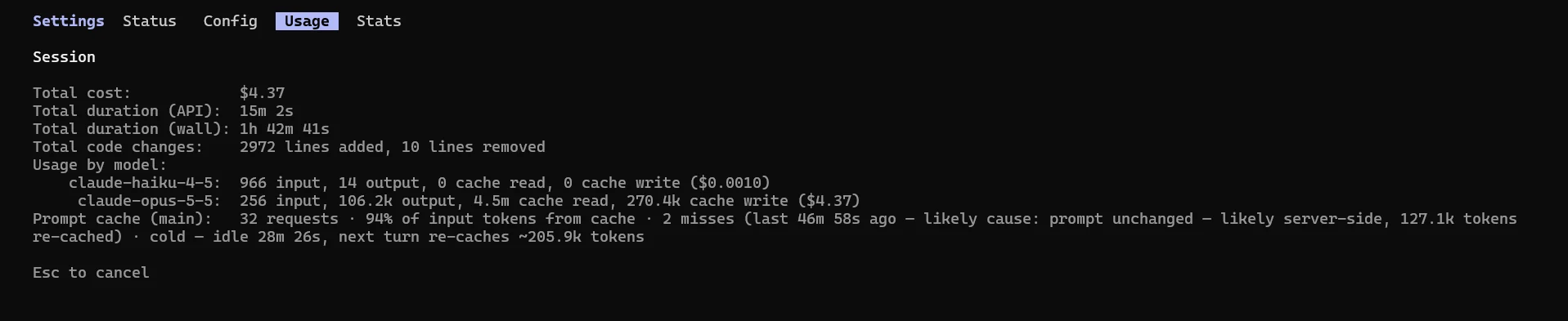
Here’s the usage of Fable 5.1 usage:
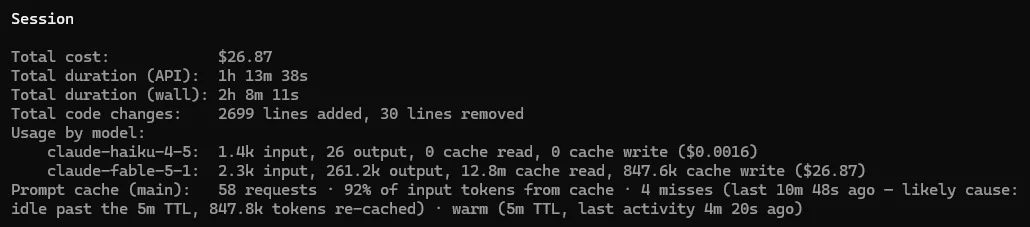
Even though the tasks weren’t always 1-1, it’d be safe to assume that Opus 5.5 is far more economical than Fable 5.1, while providing comparable performance. Fable 5.1 is still superior in terms of the performance.
Claude Opus 5.5 Benchmarks
Anthropic’s launch table reports the following results. These compare different models and sometimes different effort levels; they are not the outcomes of the four exercises below.
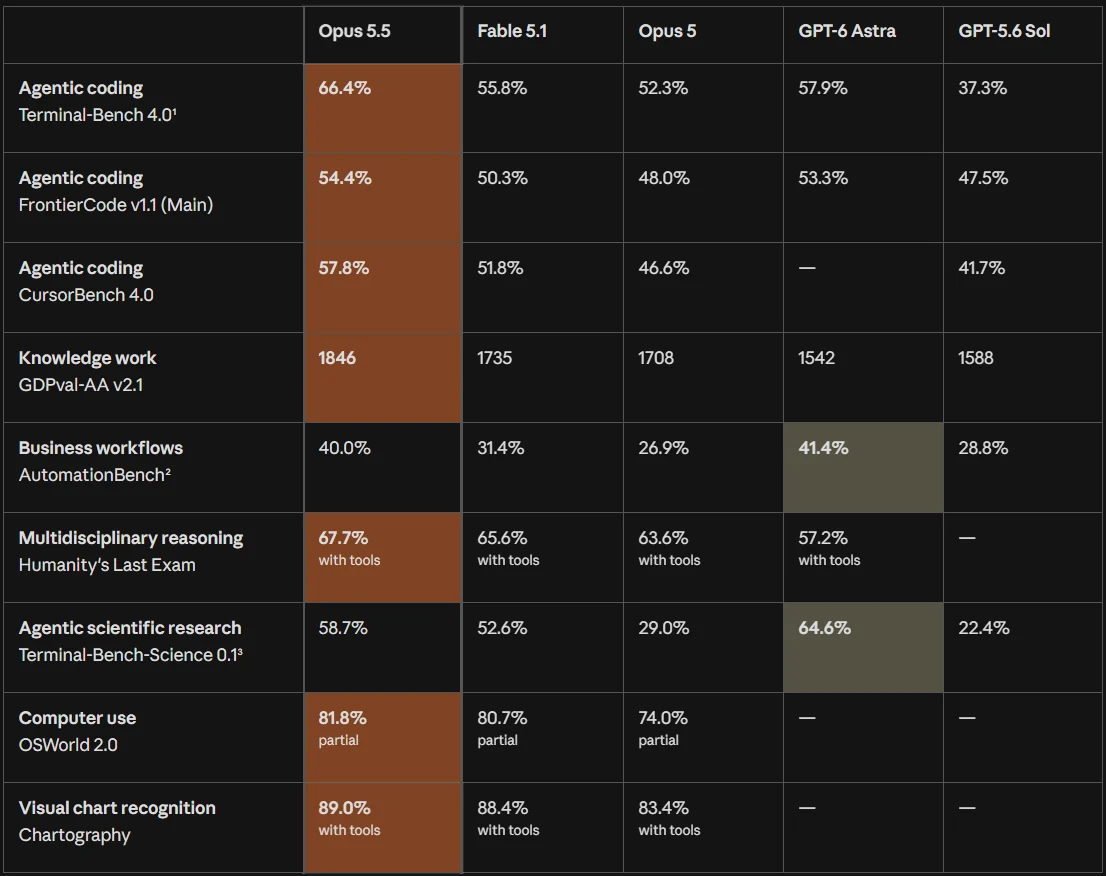
Benchmark caveat: Opus 5.5 usually ran at maximum effort in the launch table; its Terminal-Bench result used xhigh. GPT-6 Astra’s Terminal-Bench result used high effort and was reported by OpenAI. At default effort, cost and benchmark scores may differ.
Things to Look Out for While Using Opus 5.5
- Performance comes at a cost: Top benchmark scores use max effort, while cost comparisons use default effort. You cannot expect both simultaneously.
- Uneven comparisons: Opus 5.5 used
xhigheffort on Terminal-Bench, against GPT-6 Astra athigheffort. Astra’s score was OpenAI-reported. - Mixed-model results: Opus 4.8 handled cybersecurity tasks and Opus 5 handled biology tasks when safeguards blocked Opus 5.5.
- Conditional savings: Tokens cost 20% less, but the advertised 40% savings depend on unspecified workloads. Higher thinking-token usage can further reduce savings.
Conclusion
Opus 5.5 changes the cost equation for Claude Code users: lower token prices and an efficiency claim that can be checked against real usage. Anthropic’s published results also show advances in coding and professional work. The four exercises above are designed to test those claims at a smaller, everyday scale without adding infrastructure.
Frequently Asked Questions
What is the Claude Opus 5.5 API model ID?
claude-opus-5-5.
Can I run these tests with Claude Code?
Yes. Use the specified model and your configured API billing.
How much does Opus 5.5 cost?
$4 per million input tokens and $20 per million output tokens.
Is the reported 40% saving guaranteed?
No. It is Anthropic’s estimate for typical workloads at default settings.