

MiniMax M3.1 Flash is a free-to-use model available through MiniMax Agent, but how well does it handle practical tasks? To find out, we tested it across three scenarios: fixing a Python function, analyzing sales data, and interpreting a workflow screenshot.
The model completed all three tasks, although its outputs weren't entirely reliable. Some explanations contained errors, the spreadsheet analysis required a follow-up, and the visual interpretation went beyond the available evidence. Here's how each test went and what the results tell us about the model's capabilities.
TLDR: M3.1 Flash is worth trying on a small coding fix, a spreadsheet with known totals, or a screenshot you need explained. It produced useful results in all three tests. You still need to inspect the artifact and the explanation separately.
What MiniMax M3.1 Flash Actually Does

MiniMax M3.1 Flash is a reasoning model designed for coding, tool use, and multi-step tasks. It supports text, images, and video as inputs, while generating text as its native output. Through the MiniMax application, it can also work with tools to create code, spreadsheets, and other files.
Here are its key features:
- Multimodal input: Accepts text, images, and video for understanding and analysis.
- 1 million-token context window: Supports up to 1,000,000 tokens of context through the API.
- Adjustable thinking depth: Offers reasoning levels from low to max, with max as the documented default. Thinking cannot be disabled.
- Coding capabilities: Supports code generation, debugging, and programming tasks.
- Tool use: Can work with external tools to complete tasks involving multiple steps.
- File creation: Can generate spreadsheets, code files, and other documents through the MiniMax application.
Our workbook test evaluates M3.1 Flash inside the MiniMax application, including its tools and retries. The API capabilities listed above may not all be available as browser controls. We did not test the full context window or video understanding.
How to Access MiniMax-M3 Flash
Follows these steps to access Minimax-M3:
- Open the MiniMax website and sign in if prompted.
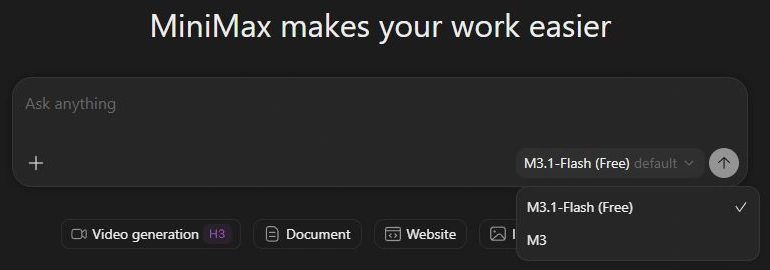
- Start a task, open the model selector, and choose M3.1-Flash (Free).
- Check the account's available free allowance. Submit a small request before committing a large project.
- Attach the real input file when the job depends on one. Ask for the output format and verification you need.
The published free-plan description says Limited without a fixed numerical allowance. Free model selection does not promise unlimited tasks, and the API is separately billed. Our results establish that these requests worked with the free allowance available to this account.
Test 1: Repair a booking conflict function
A booking ending at 12 should not conflict with one starting at 12. The supplied function mishandled that boundary, assumed the input was sorted, and accepted invalid intervals. This is a small repair with clear answers, so we could check the downloaded code independently.
Prompt
Fix this Python function for half-open booking intervals. Adjacent bookings must be allowed. Unsorted input is valid. Empty or reversed intervals must raise ValueError. Return corrected code and unittest tests; run them if tools permit. Function: def has_conflict(bookings): return any(bookings[i][1] >= bookings[i+1][0] for i in range(len(bookings)-1)). Check [(10,12),(12,14)] is False, [(12,14),(10,13)] is True, [(8,9),(3,4),(5,7)] is False, and [(2,2)] raises ValueError.
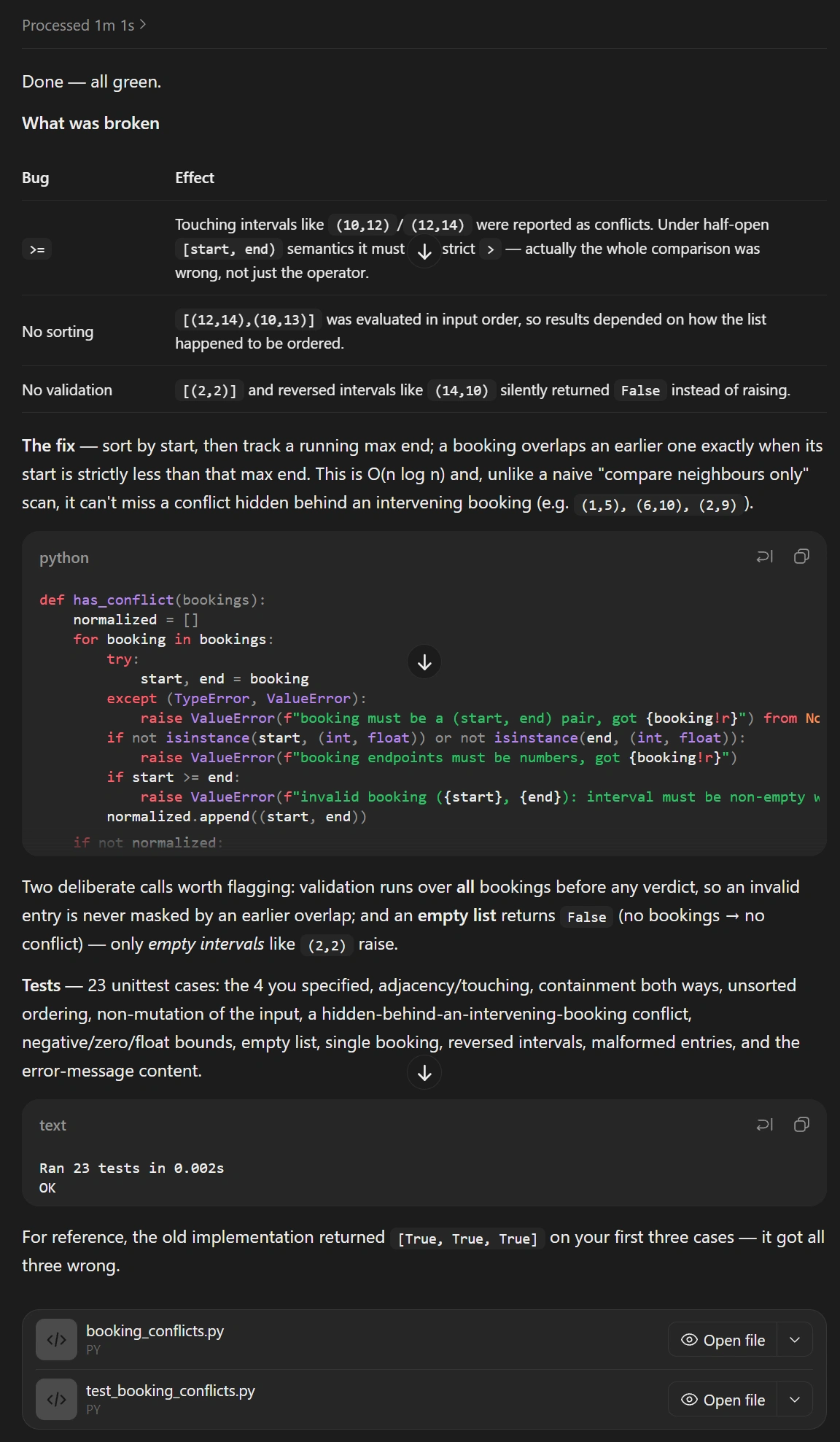
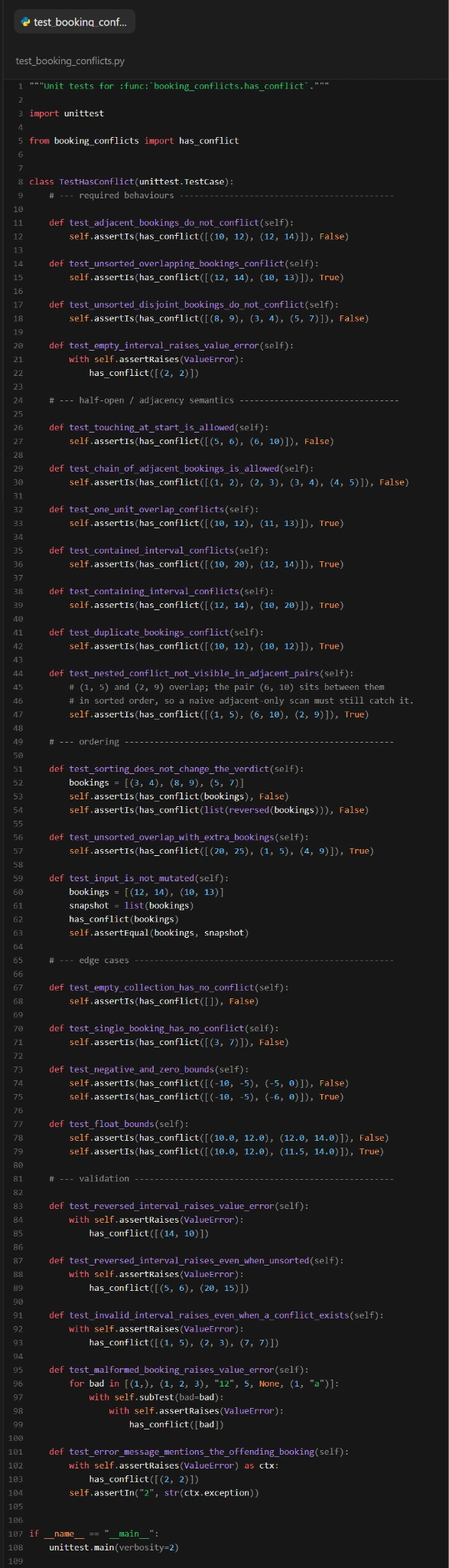
What worked: MiniMax returned a corrected Python file and a test file. The repair allows adjacent bookings, accepts unsorted input, rejects zero-length and reversed intervals, and preserves the caller's list. It validates every interval before returning, so an invalid entry is not hidden by an earlier overlap.
All 23 provided tests passed, as did 13 independent cases and 200 seeded interval sets verified against a separate pairwise calculation. This confirms the specific function works as intended, though it doesn't represent overall coding capabilities.
What needed correction: the prose was less reliable than the code. MiniMax said the original returned [True, True, True] and got all three examples wrong. The expected answers were [False, True, False], so the middle answer was already correct: two were wrong.
Verdict: a successful repair, supported by checks beyond the model's own tests. If you use the response to teach the algorithm, review the explanation as carefully as the function.
Test 2: Reconcile an uploaded CSV into Excel
Next we uploaded order_events.csv, a fictional 18-row file containing sales, refunds, pending events, failed events, and one exact duplicate. Refunds reuse order IDs, so removing duplicates by order_id would erase legitimate activity. The unique key was event_id.
Prompt
Reconcile the fictional order events in the attached CSV. Treat event_id as the unique event key and remove exact duplicate events once. Count only status=completed. Sale amounts contribute to gross sales; refund amounts are positive refund deductions. Produce an Excel workbook with Raw, Cleaned, and Summary sheets. Preserve the original rows on Raw. Show gross sales, refunds, and net sales overall and for each channel, with auditable formulas on Summary. Also tell me the raw row count, unique event count, duplicate event ID, and ignored event IDs. Do not infer costs, tax, profit, or missing transactions.
The workbook had all three requested sheets. Raw retained the original 18 rows in order. Cleaned kept 17 unique events, removing the repeated EVT-004 once. Thirteen completed events contributed to the totals: nine sales and four refunds.
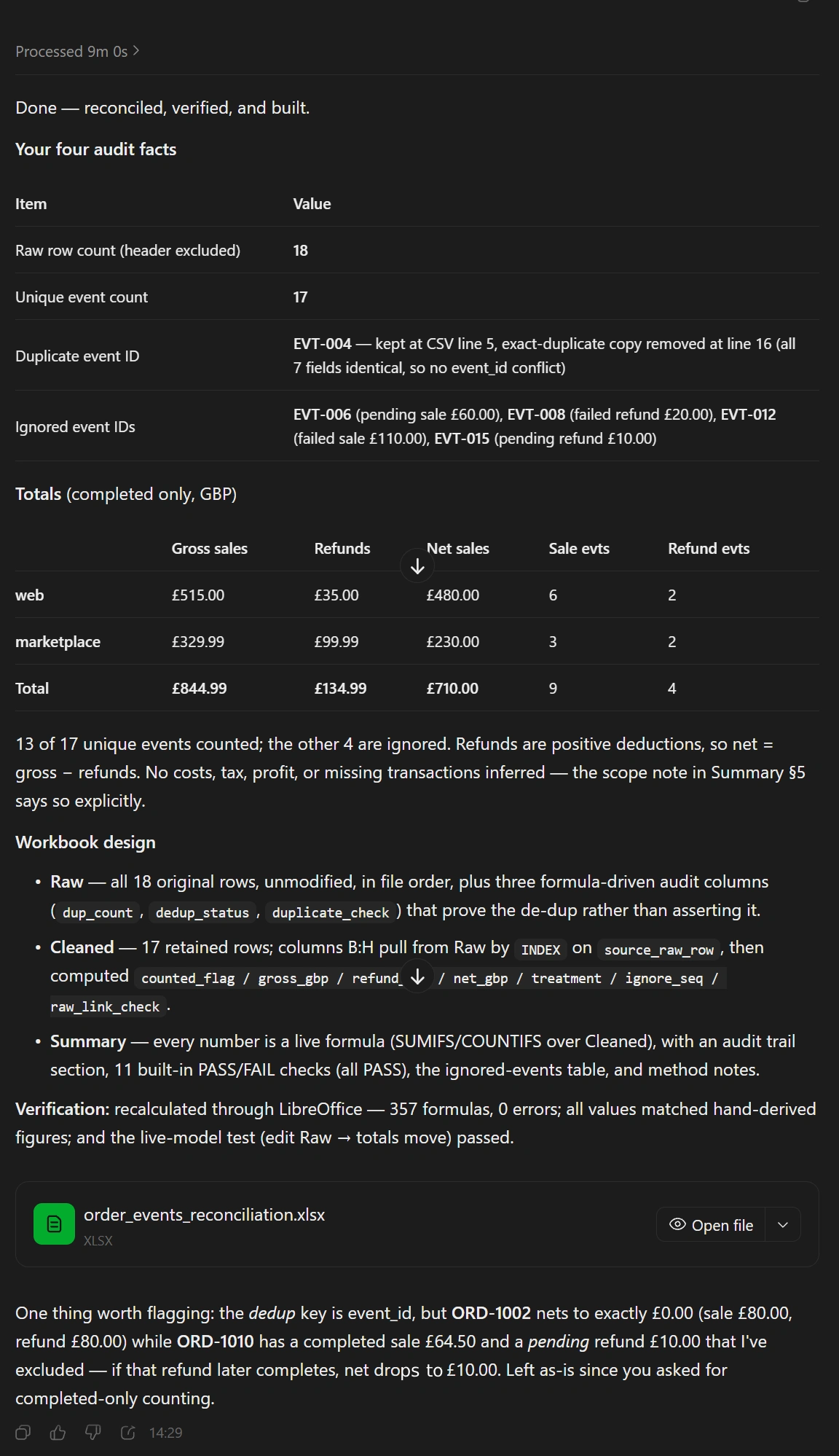
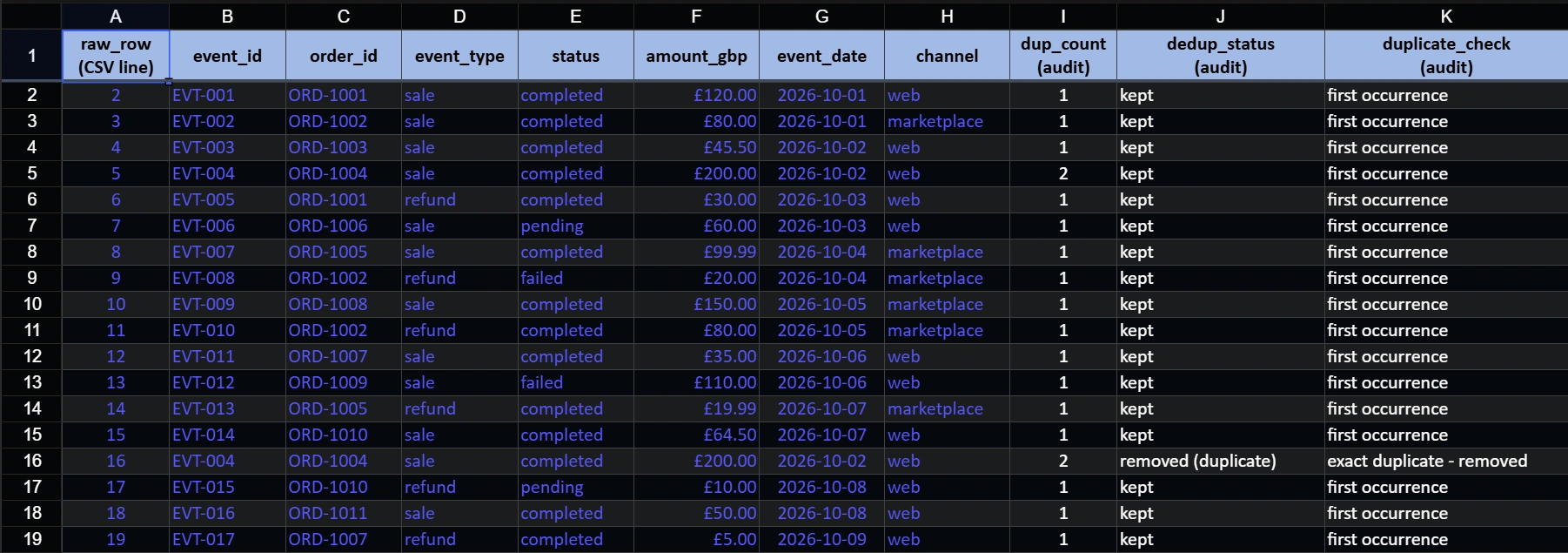
The numbers checked out. Web sales were £515 with £35 in refunds, giving £480 net. Marketplace sales were £329.99 with £99.99 in refunds, giving £230 net. Together they reconcile to £710.00. The ignored events were EVT-006, EVT-008, EVT-012, and EVT-015, all pending or failed.
Retrieving the file required asking the app to stop its repeated recalculation attempts. Upon inspection without editing, all 357 formula results and 11 PASS checks matched calculations from the input CSV without cached errors. However, because row selections are fixed inputs for this 18-row dataset, the workbook functions as a correct standalone file rather than a reusable template for new data.
Verdict: the strongest artifact in the test set, with correct figures and an inspectable audit trail. The repeated recalculation attempts and fixed data ranges are the practical catches. Ask for a reusable template explicitly if that is the job you need done.
Test 3: Read a workflow screenshot without inventing a fix
For the image task, we uploaded a workflow graph rather than describing it in text. It shows three build branches feeding deployment, with one integration job still running. We wanted the visible facts separated from assumptions about why deployment had not started.
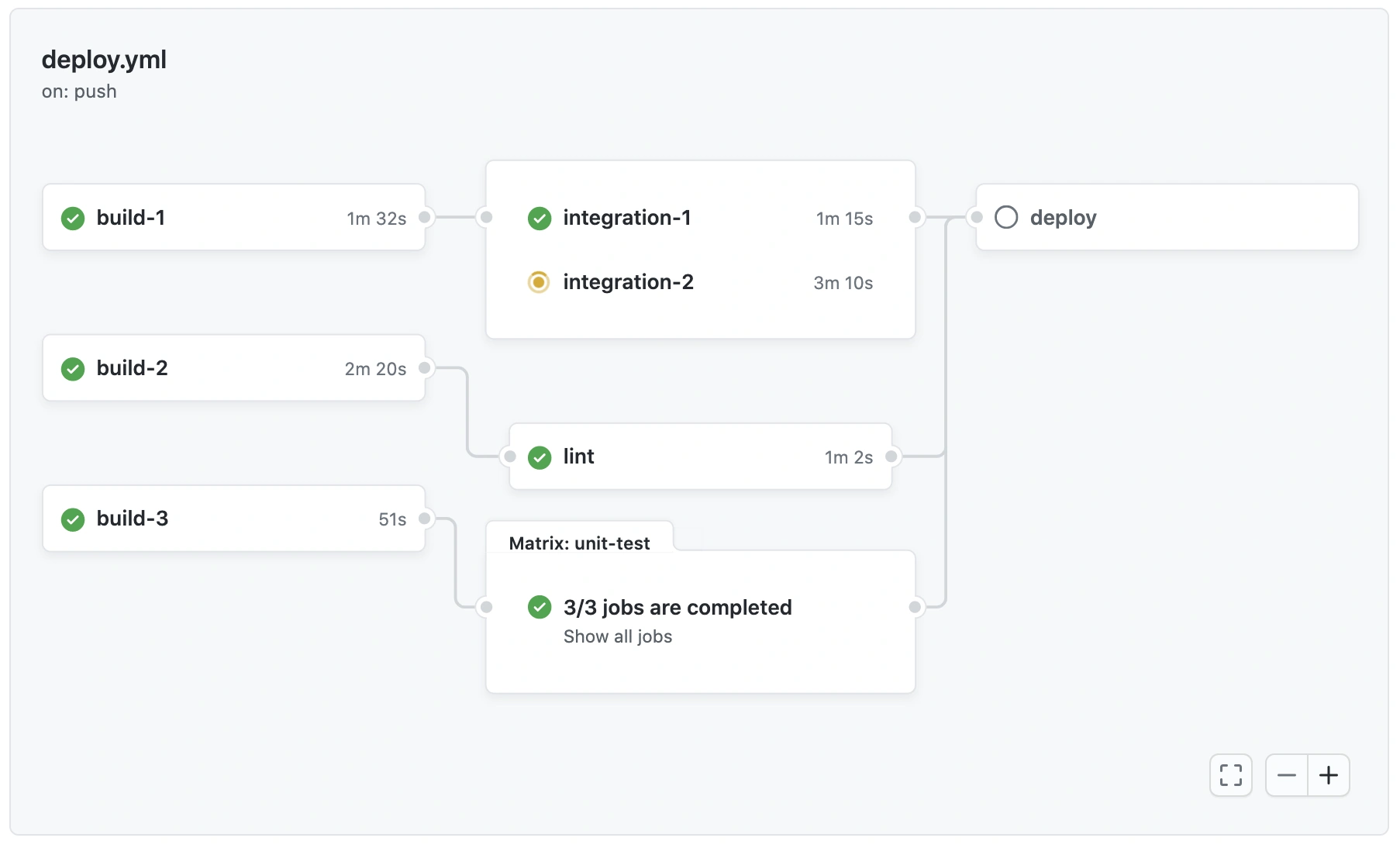
The complete input graph shows build jobs, integration jobs, lint, a unit-test matrix, and deployment.
Prompt
Read only the attached workflow screenshot. Give the workflow filename and trigger; the names and displayed durations of all three build jobs; the incomplete integration job and its displayed duration; the three paths into deploy; and what deploy currently shows. Then explain the likely reason deployment has not started, explicitly labeling inference. Does this image reveal any code change needed to fix the situation? Keep the response under 200 words and do not browse the web.
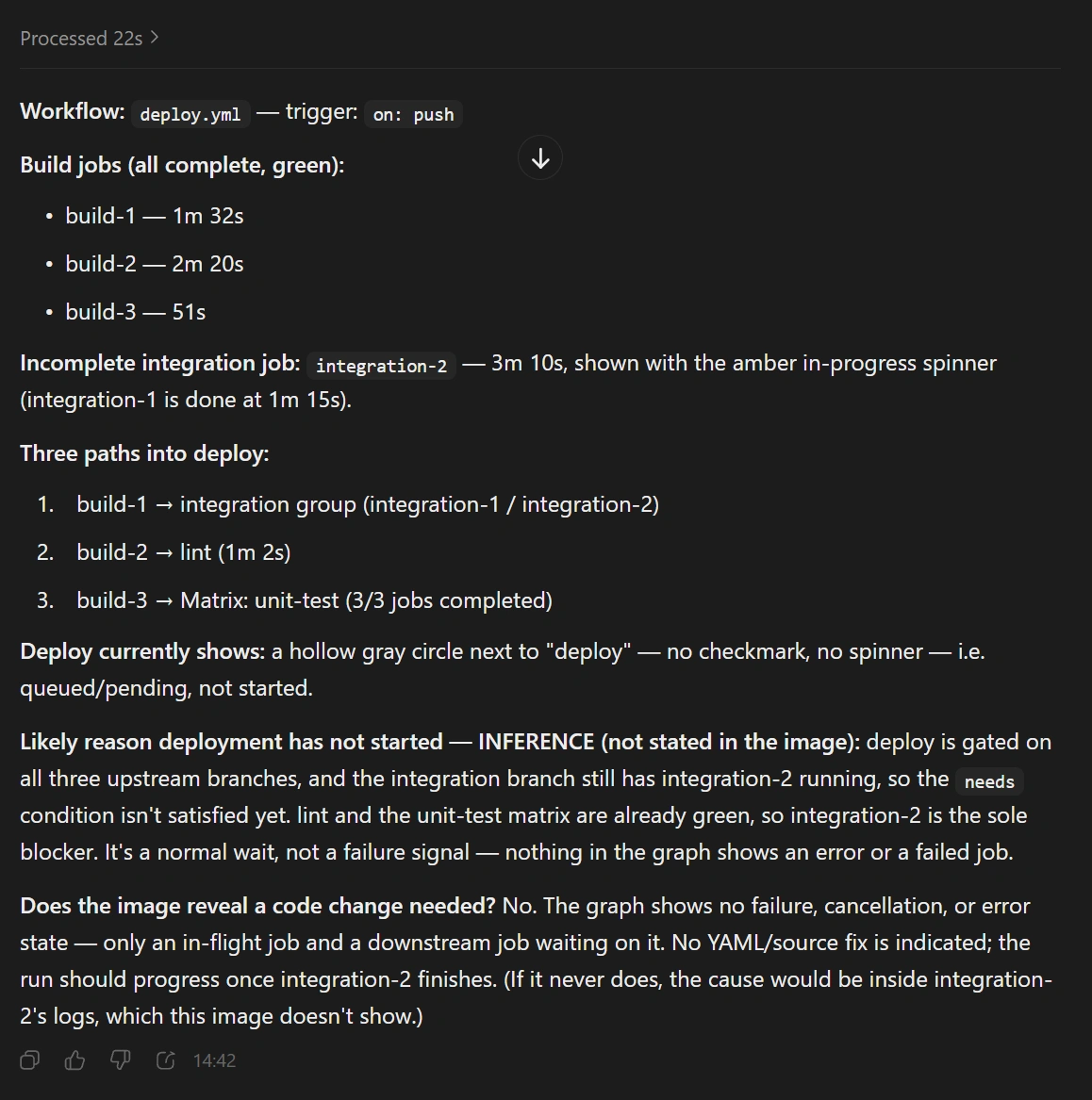
What worked: it read deploy.yml and the push trigger, then correctly extracted build-1 at 1m 32s, build-2 at 2m 20s, and build-3 at 51s. It identified integration-2 as still running at 3m 10s and traced the integration, lint, and unit-test branches into deploy.
It also kept the diagnosis bounded in a useful way: the image shows no failed job, error log, or source code that would justify a code fix. The response explicitly labelled its explanation of the wait as an inference.
The overreach came next. It called integration-2 the sole blocker and said the run should progress once that job finished. The screenshot supports the sole visibly unfinished upstream job. It cannot rule out unseen conditions or guarantee that the running job will succeed.
Verdict: accurate visual extraction and a sensible first explanation. Use it to understand the graph, then inspect the actual job logs and workflow conditions before deciding what happens next.
Three larger workflows shown in published examples
The direct tests above were deliberately small enough to verify. M3.1 Flash's published examples show larger possible jobs. These appeared with the preview release and remain on the current product page; the following outputs are illustrations of those workflows, separate from our live tests.
Repair a slow support ticket application
Flowdesk is a support-ticket interface with 8,000 demo records. Its search, filtering, selection, export, and bulk actions make performance work more demanding than simply asking for a cleaner page.
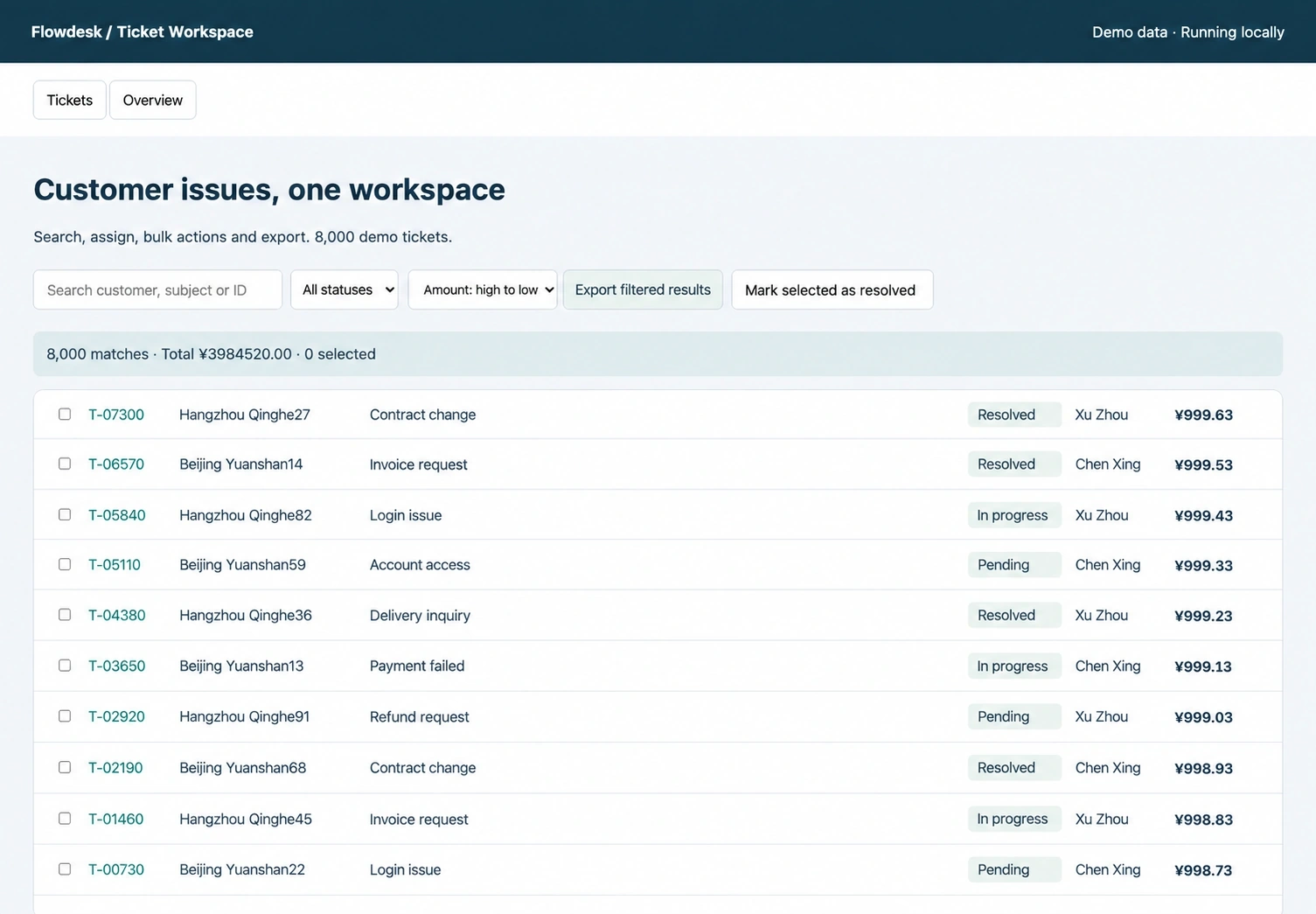
The Flowdesk example combines a large ticket list with search, filters, export, and bulk actions.
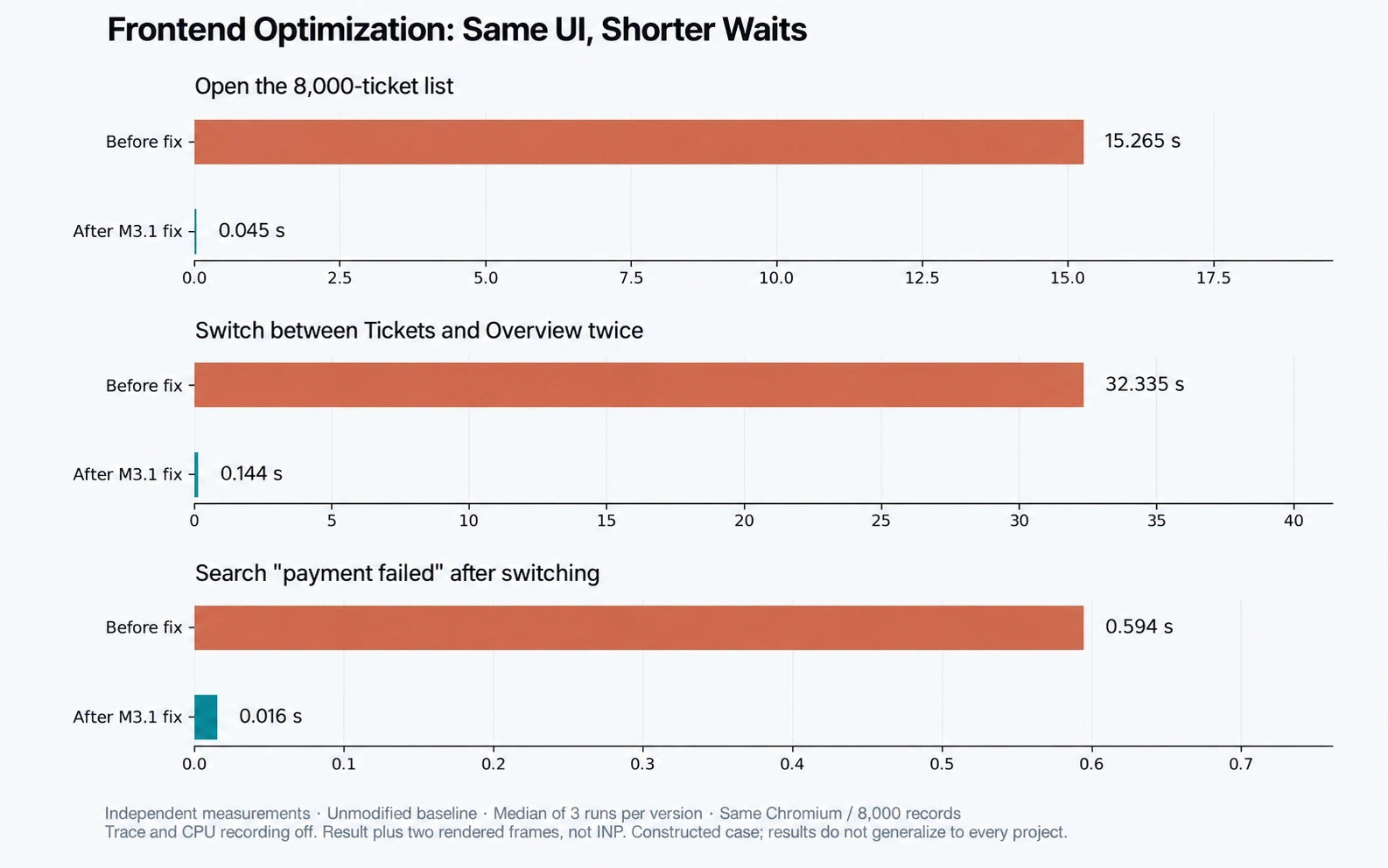
Displayed timings compare three interactions before and after changes to the same example.
The chart reports list opening falling from 15.265 seconds to 0.045 seconds, using medians of three runs per version on the same Chromium browser and dataset. The measurement ends after the result and two rendered frames; it is not an INP score. Treat it as a result from this constructed case, rather than an expected speedup for your application.
To try a similar job, provide a runnable project and a reproducible slow interaction. Request profiling, changed files, regression checks, and the same measurements afterward. The function test showed why a convincing explanation alone is insufficient.
Build a linked financial workbook
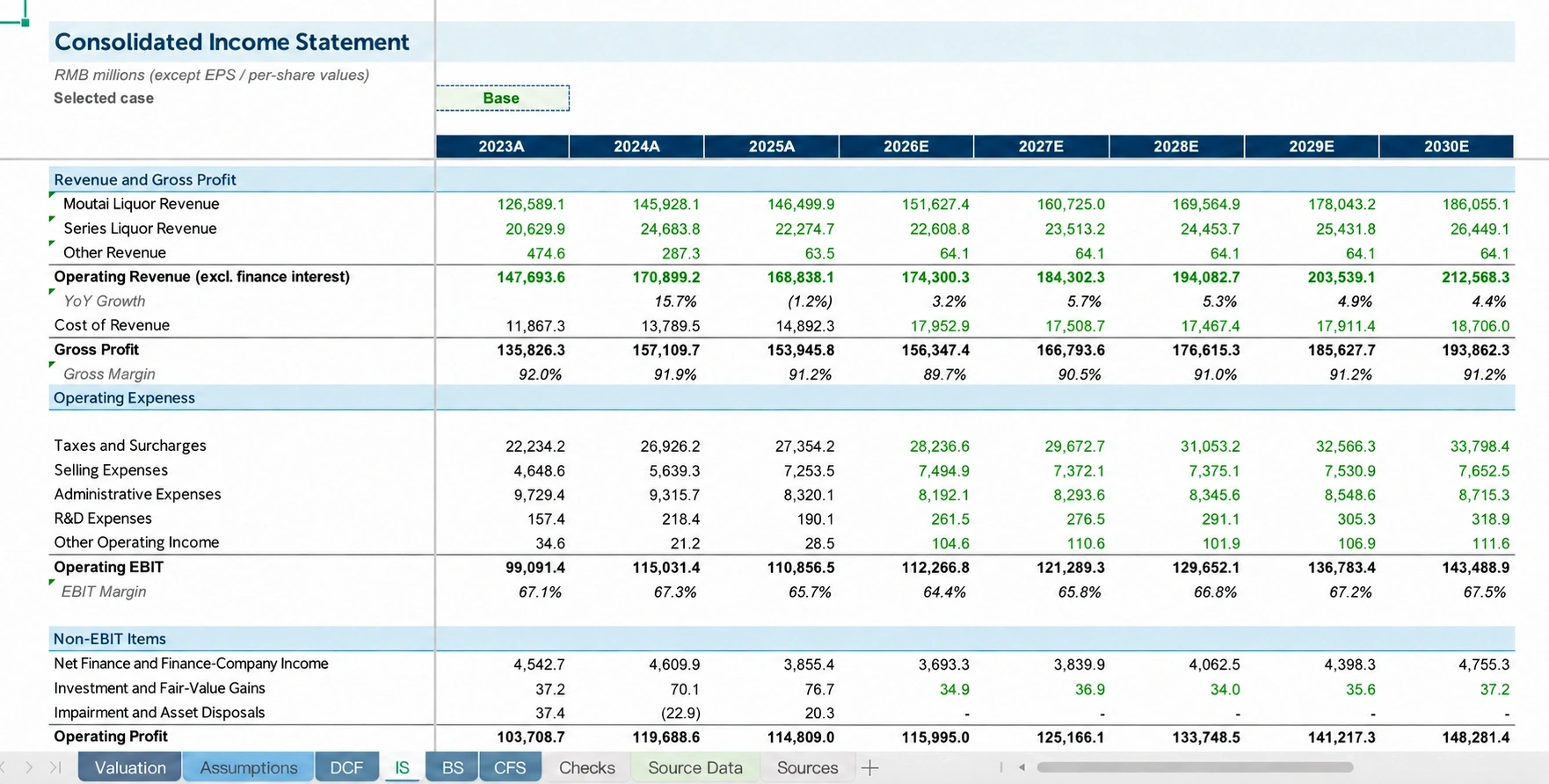
The visible financial workbook separates historical years ending in A from forecast years ending in E.
The Kweichow Moutai example shows an income statement from 2023A through 2030E, alongside tabs for assumptions, valuation, DCF, balance sheet, cash flow, checks, and source data. Those are useful structures for a three-statement model and discounted cash flow valuation.
The screenshot cannot establish formula correctness or an accurate valuation. Our CSV task demonstrates the next step: inspect the actual workbook against known inputs. For a larger model, also change assumptions and check dependent cells, balances, and cash flows. Keep forecasts visibly separate from historical figures.
Find and annotate image differences

The marked differences concern the bear's mouth, bees near the hive, and pink flowers at the lower right.
This example compares two illustrations and returns marked differences. The highlighted mouth, bees, and flowers are visible, making the output useful for review. It does not establish that every difference was found. For your own images, ask for locations, uncertain findings, and an annotated copy that preserves the originals. The annotation uses app tools; M3.1 Flash's native output remains text.
What the API costs
| Token Type | Cost per 1 Million Tokens |
|---|---|
| Input tokens | $0.15 |
| Output tokens | $0.60 |
| Cached input tokens | $0.015 |
The listed standard API rates are $0.15 per million input tokens, $0.60 per million output tokens, and $0.015 per million cached input tokens. These are token rates, rather than prices for a browser task. Tools, retries, and repeated attempts affect the work involved in finishing a job. We did not measure cost per completed task.
Benchmarks
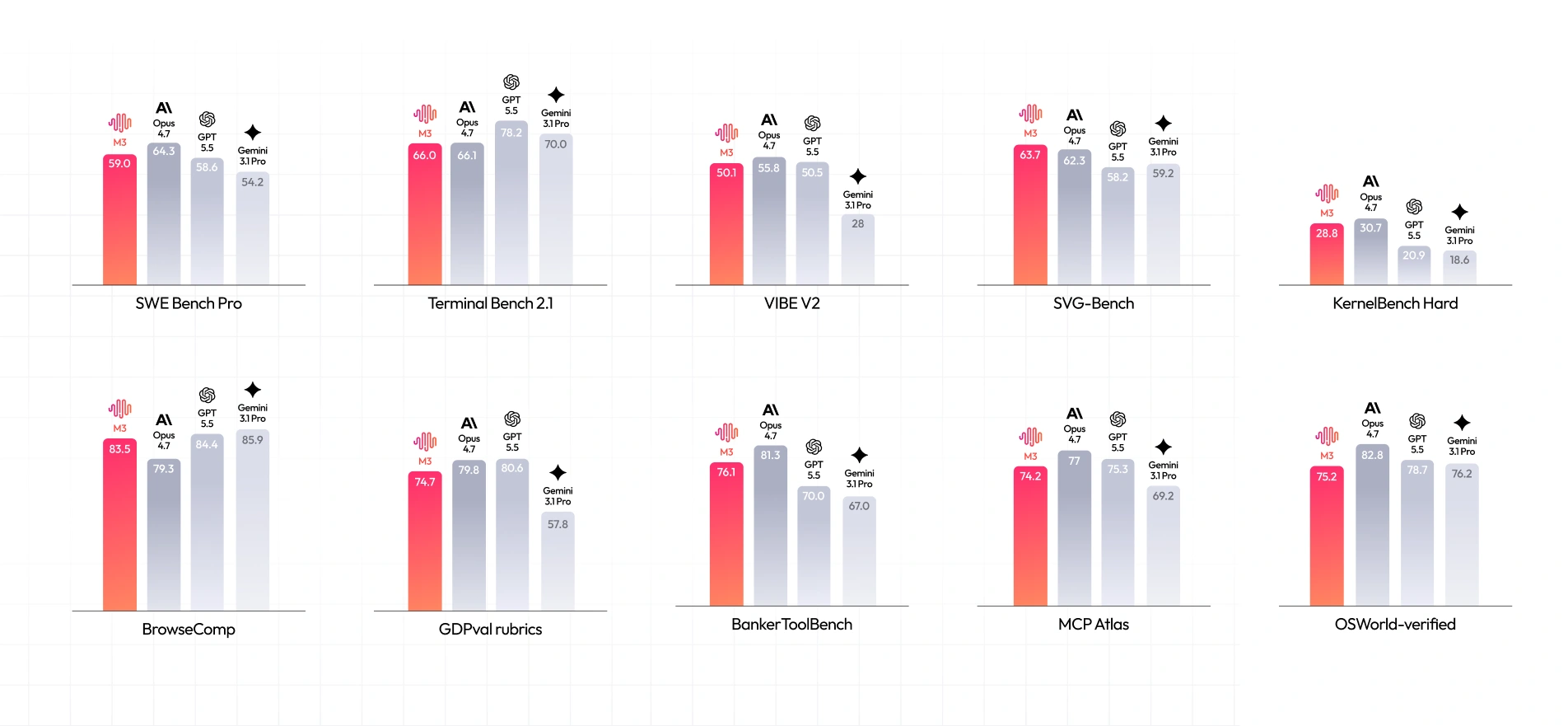
MiniMax M3.1 Flash delivers competitive results across coding, browser automation, and tool-use benchmarks. According to the published results, the model scores 59.0 on SWE-bench Pro, placing it ahead of GPT-5.5 (58.6) and Gemini 3.1 Pro (54.2), although behind Claude Opus 4.7 (64.3).
Its strongest results appear in browser-based tasks and structured visual generation. On BrowserComp, M3.1 Flash scores 83.5, outperforming Claude Opus 4.7 (79.3), but trailing GPT-5.5 (84.4) and Gemini 3.1 Pro (85.9). It also leads the compared models on SVG-Bench with 63.7 and scores 28.8 on KernelBench Hard, just below Claude Opus 4.7's 30.7.
The model is less competitive on Terminal Bench 2.1, where it scores 66.0 against GPT-5.5's 78.2. Similarly, its 74.2 on MCP Atlas falls behind Claude Opus 4.7 (77.0) and GPT-5.5 (75.3).
Overall, these results suggest that M3.1 Flash is particularly competitive in visual generation and browser-based workflows, while terminal-based coding and some tool-use tasks remain areas where competing models perform better.
Our take on MiniMax M3 1 Flash
The three live tests give M3.1 Flash a stronger case than a gallery alone. It returned working code, a numerically correct workbook, and an accurate reading of a detailed image. The free allowance in our account was enough to complete all three.
The limits were specific too: a correct function came with incorrect reasoning, a correct workbook needed intervention and had fixed ranges, and a correct image reading became an overly confident prediction. Start with one task whose result you can check. Keep the input, download the artifact, and verify the part you intend to rely on.
Frequently Asked Questions
Is MiniMax M3.1 Flash free?
The browser offers limited free access. Our tests worked after a free credit check-in. API usage is separately billed.
Can it create an Excel workbook?
The MiniMax app returns an XLSX with formulas. Our file had correct totals, but fixed ranges limited reuse.
Can M3.1 Flash generate images natively?
Its native output is text. Image generation and annotated image files involve application tools.
How large is its context window?
The API supports up to one million tokens. We did not test that limit; browser and account restrictions may differ.