

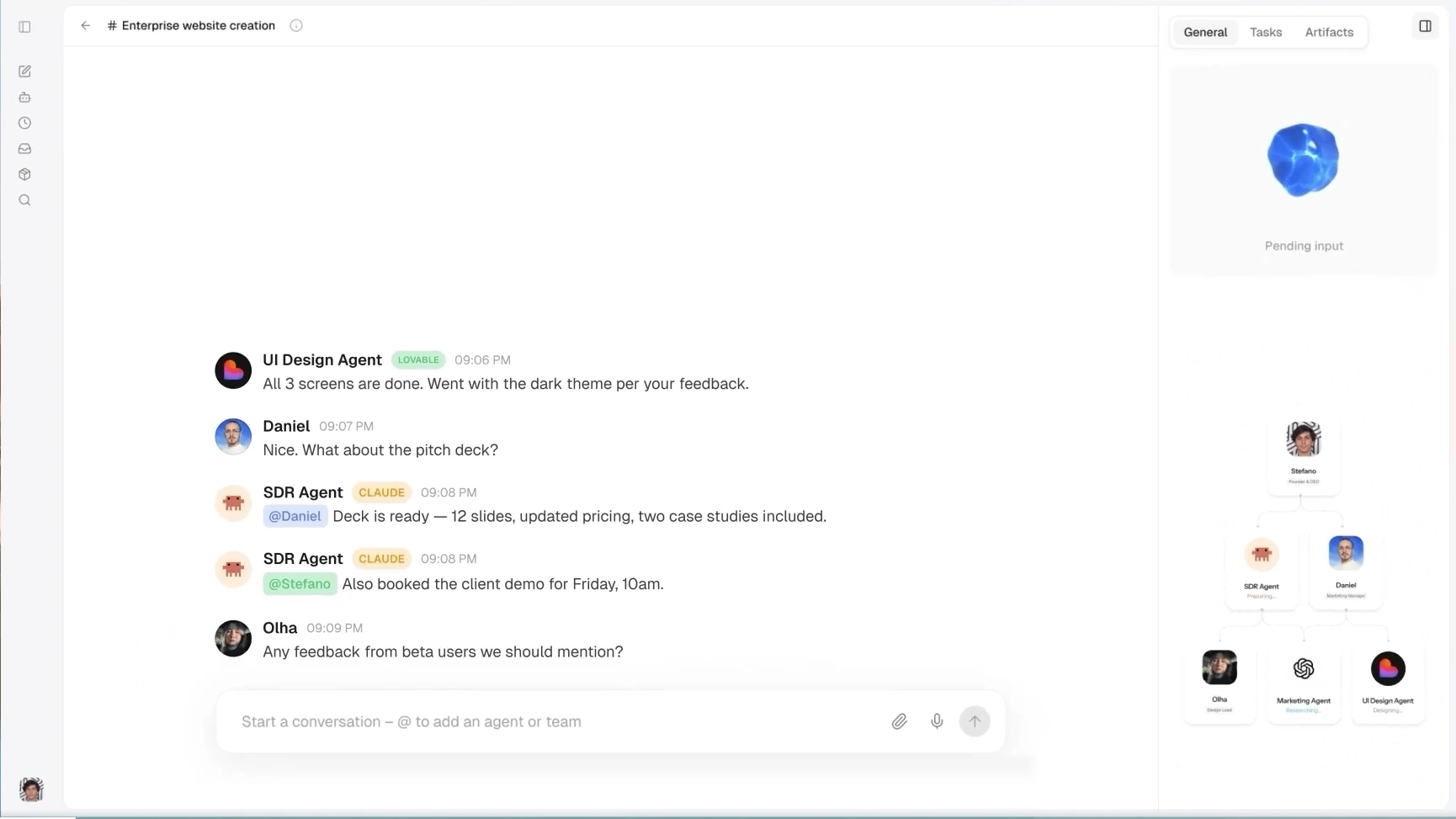
An LLM can write the email. It cannot open your inbox, check the CRM and send anything unless an application gives it controlled access. That is the whole game.
APIs expose the service. Tool calling lets the model request an action. MCP standardizes how tools and context are offered. Connectors package the setup. In this guide, we follow one request from prompt to verified result, then show which connection method fits each job.
QUICK ANSWER The model chooses a tool and supplies arguments. Your application checks permission, runs the tool, returns the result and decides what happens next. The model should never hold the credentials.
What ‘Connecting an LLM’ Actually Means
The model is not logging into Slack, Gmail or HubSpot. It is producing a structured request such as “search calendar” or “create contact.” The surrounding application authenticates to the service, validates the request and performs the action.
- Without tools: The model can explain what to do from the context already in the conversation.
- With tools: The application can fetch current data, change a record or start a workflow.
- With controls: Scopes, approvals and logs limit what the system may do and leave a trail.
API, Tool Calling, MCP and Connectors at a Glance
| Layer | What it solves | Best fit | Watch for |
|---|---|---|---|
| API | How software talks to a service | Custom product logic | Auth, errors and version changes |
| Tool calling | How a model asks your app to use a capability | A few well-defined actions | The request still needs validation |
| MCP | How clients discover and invoke tools through one protocol | Reusable tool access across hosts | Server trust and capability sprawl |
| Connector | A packaged integration inside a product | Fast setup for common apps | Less control and provider limits |
USEFUL RULE These layers stack. A connector may use OAuth and an API underneath. An MCP server may wrap that same API. Tool calling may sit above either one.
One Request, End to End
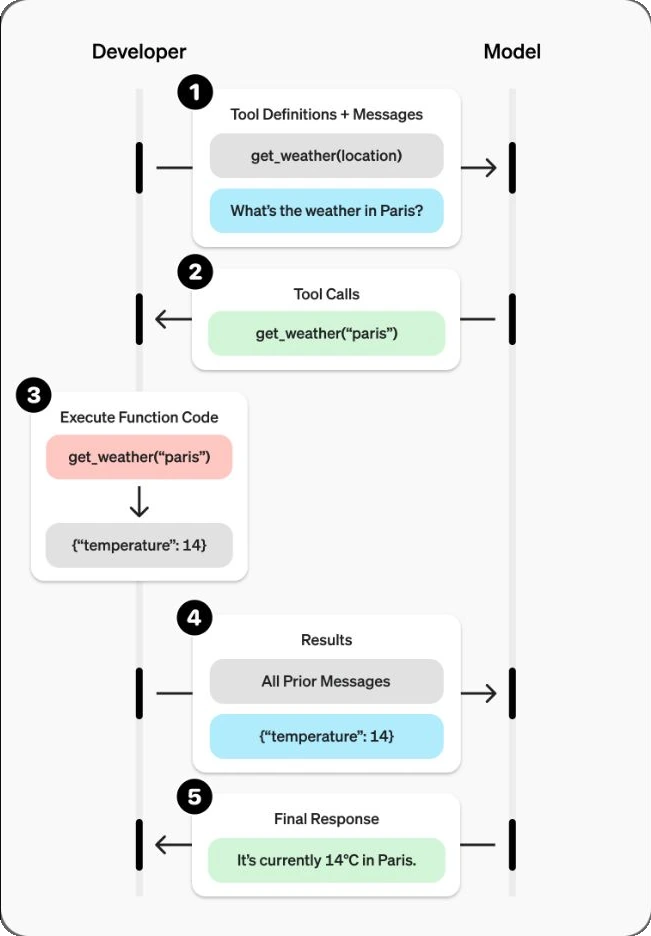
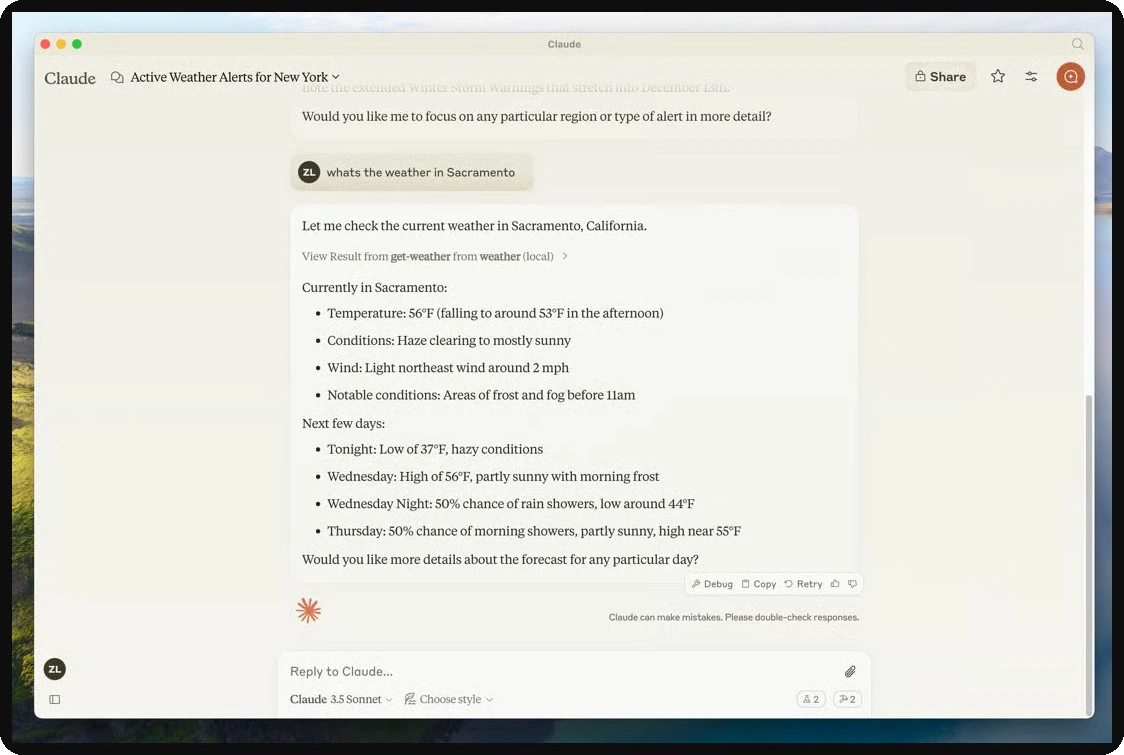
Suppose the user asks, “What is the weather in Paris?” The visible answer is short. The useful system behind it is not.
1. Offer tools: The application sends the model a small set of tool definitions.
2. Request a call: The model returns a tool name and arguments. It does not execute code.
3. Check it: The application validates the schema, user, scope and approval policy.
4. Execute: Application code calls the service and receives a result.
5. Return evidence: The tool result goes back to the model with its call ID.
6. Finish: The model answers, requests another tool or stops.
Tool Calling Is a Conversation, Not a Shortcut
The clean mental model is model → application → service → application → model. That middle application layer is where the real engineering lives: credentials, rate limits, retries, approvals, logging and error handling.
PRACTICAL CONSEQUENCE Treat tool arguments as untrusted input. Validate types, ranges and tenant ownership exactly as you would for a public API request.
What Happens When You Click Connect?
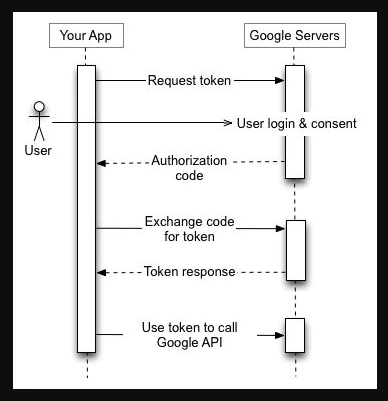
Most SaaS connectors use OAuth. You sign in with the provider, review the requested permissions and approve them. The provider returns an authorization code. The application exchanges that code for tokens, stores them server-side and uses the access token for API calls.
The Permissions That Matter
Scopes: Ask only for the smallest set of reads and writes the workflow needs.
Token storage: Encrypt tokens on the server. Never place refresh tokens in prompts, logs or the browser.
Approval: A user approving a connection is not blanket approval for every future write.
Revocation: Make it easy to disconnect an app and invalidate stored access.
KEEP THIS BOUNDARY The model may know that Gmail is available. It should not see the OAuth client secret or refresh token used to reach Gmail.
The Four Connection Methods
1. Direct API Integration
Your backend calls the service directly. You own authentication, request construction, retries, error handling and response shaping. This is the most work and the most control.
Use it when: The integration is core to the product, the API is stable and you need precise behavior.
2. Function or Tool Calling
You describe callable functions with names, inputs and useful descriptions. The model decides when a function may help and returns arguments. Your code still owns execution.
Use it when: One application needs a small set of narrow, dependable capabilities.
3. Built-In Connectors
The host product packages OAuth, APIs and common operations behind a Connect button. The trade-off is speed versus control: setup is easier, but scopes, supported actions and limits come from the provider.
Use it when: A common SaaS app is supported and the packaged actions fit the workflow.
4. MCP
MCP gives compatible hosts a shared way to discover tools, resources and prompts from a server. It is useful when the same capability should work across several assistants or agent runtimes.
Use it when: Reuse and interoperability matter more than a one-off integration.
DO NOT CONFUSE OPENAPI WITH MCP OpenAPI describes an HTTP API. MCP defines how an AI host discovers and interacts with capabilities at runtime. An MCP server can still call an OpenAPI-described service underneath.
MCP: One Host, Several Dedicated Connections
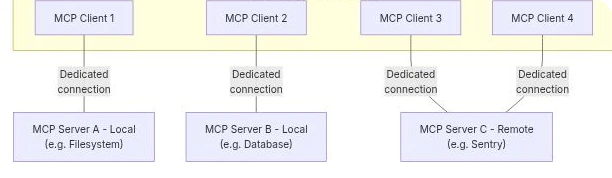
An MCP host creates a client connection for each server. The server exposes approved capabilities; the host decides what reaches the model, when approval is required and how the result is shown.
- Tools: Callable actions such as searching orders or creating a ticket.
- Resources: Readable context such as a file, schema or database record.
- Prompts: Reusable instruction templates a host can surface to the user.
See the Full Stack in Oasis
Oasis is the host layer: a workspace where people and agents can share rooms, apps and artifacts. It does not replace APIs, OAuth, tool calling or MCP. It is where those pieces become a usable workflow.
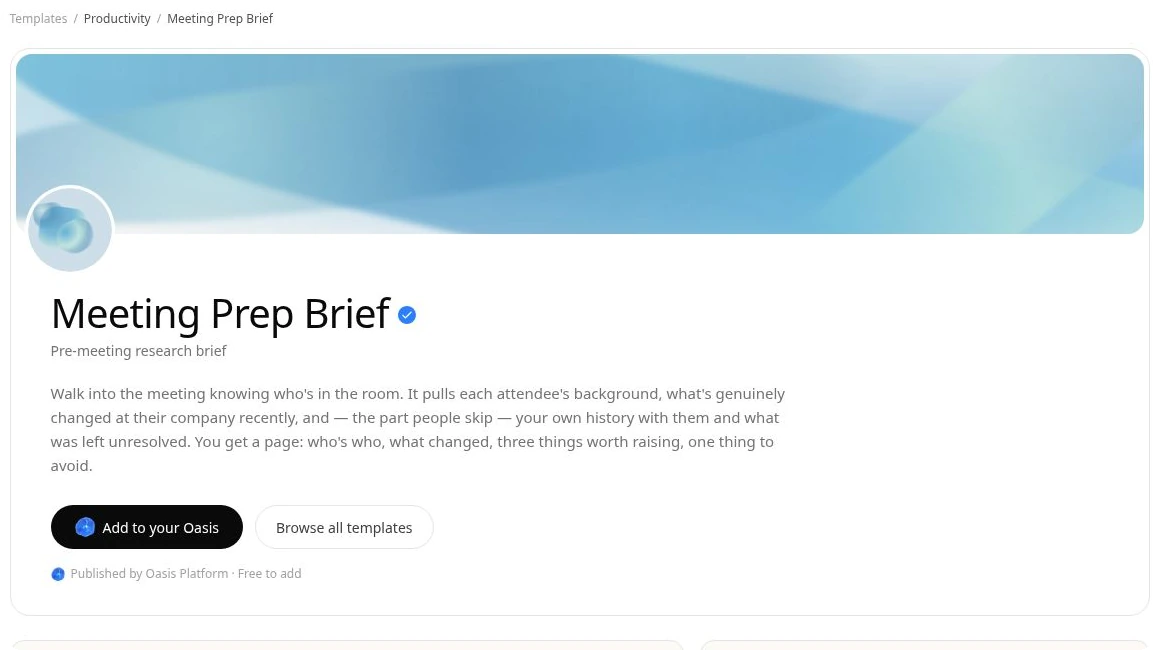
A Practical Meeting-Prep Run
1. Connect once: Authorize Google Calendar and, if needed, Gmail with limited scopes.
2. Trigger the agent: Run it on demand or before a scheduled meeting.
3. Retrieve context: The agent checks attendees, recent changes and relevant history.
4. Keep writes separate: Reading context can run automatically; sending or updating should require approval.
5. Save the result: The brief lands as a shared artifact the team can inspect and edit.
WHY THIS IS USEFUL The user sees one workflow. Underneath it, the host controls identity, connectors, model calls, permissions and the final artifact.
Which Method Should You Use?
| Situation | Start with | Why |
|---|---|---|
| One internal lookup | Function calling + direct API | Small surface, full control |
| Popular SaaS app | Built-in connector | Fastest path to useful access |
| Same tools across several hosts | MCP server | One capability contract, reused |
| Core product integration | Direct API | Precise behavior and observability |
| Multi-step team workflow | Host + tools/connectors | The host owns state, approval and artifacts |
A Practical Build Order
1. Pick one read-only job: Example: fetch the next five calendar events.
2. Make the API call work: Handle authentication, timeouts and errors before adding a model.
3. Wrap it as a narrow tool: Use a clear verb, small schema and deterministic output.
4. Add server-side checks: Validate tenant, scope, arguments and result size.
5. Log the loop: Store tool name, call ID, duration, outcome and approval state.
6. Add writes carefully: Use previews, explicit confirmation and idempotency keys.
7. Standardize later: Introduce MCP when more than one host needs the same capability.
SHIP THE BORING PATH FIRST A dependable read-only tool teaches you more than an ambitious agent with ten integrations and no logs.
Security: Read, Write and Delete Are Different
Do not give every tool the same trust level. A search can leak data. A write can change a record. A delete can damage the system. Design the approval path around the consequence, not the convenience.
- Separate tools by verb: Prefer
get_contactandupdate_contactover onedo_anythingtool. - Inject identity server-side: Never let the model choose the tenant or user from free text.
- Minimize context: Return only fields needed for the next decision.
- Treat results as untrusted: External pages and files can contain misleading instructions.
- Preview consequential writes: Show the exact email, record change or transaction before execution.
- Make retries safe: Use idempotency keys so one timeout does not create two records.
Common Mistakes with Fix
| Mistake | Why it fails | Better move |
|---|---|---|
| Raw credentials in prompts | Secrets can leak into logs or context | Keep credentials in the server layer |
| One giant tool | The model has too many ways to be wrong | Use narrow verbs and schemas |
| Vague descriptions | The model guesses when to call | State purpose, limits and required inputs |
| Automatic writes | A plausible draft becomes a real side effect | Preview and approve |
| No result limits | Huge payloads raise cost and leak context | Filter, paginate and summarize safely |
| No trace IDs | Failures become impossible to reconstruct | Log each tool call end to end |
Conclusion
Connecting an LLM to tools is not a single feature. It is a stack. APIs expose systems. OAuth grants limited access. Tool calling lets the model ask. MCP makes capabilities reusable. Connectors make common setups faster. The host application still owns execution, permissions and proof.
Start with one narrow read. Make it observable. Add approval before writes. Standardize only when reuse becomes real. That path is less flashy and far more likely to survive production.
Frequently Asked Questions
Can an LLM call an API directly?
Usually the host application makes the API call. The model only requests a tool and supplies arguments.
Is MCP an alternative to APIs?
No. An MCP server often wraps APIs, databases or local tools behind a shared protocol.
Do connectors use OAuth?
Many SaaS connectors do. OAuth grants scoped access without sharing the user's password with the connected app.
Should every tool call require approval?
No. Low-risk reads can run automatically. Consequential writes, sends and deletes deserve a preview or explicit confirmation.