

Can an AI image generator create a convincing food photograph, preserve an exact room layout, and combine multiple references without missing a detail? OpenAI's GPT Image 2.6 promises greater creative control, but how well does it handle instructions where even a small mistake can ruin the result?
To find out, I put GPT Image 2.6 through tests covering food photography, floor plans, image editing, and reference-based compositions. In this article, we'll see where it impressed, where it struggled, and how reliably it followed instructions.
What's new in GPT Image 2.6?
Released on November 4, 2026, GPT Image 2.6 is OpenAI's latest image generation family, designed for creating and editing images through natural-language instructions.
The family includes two variants:
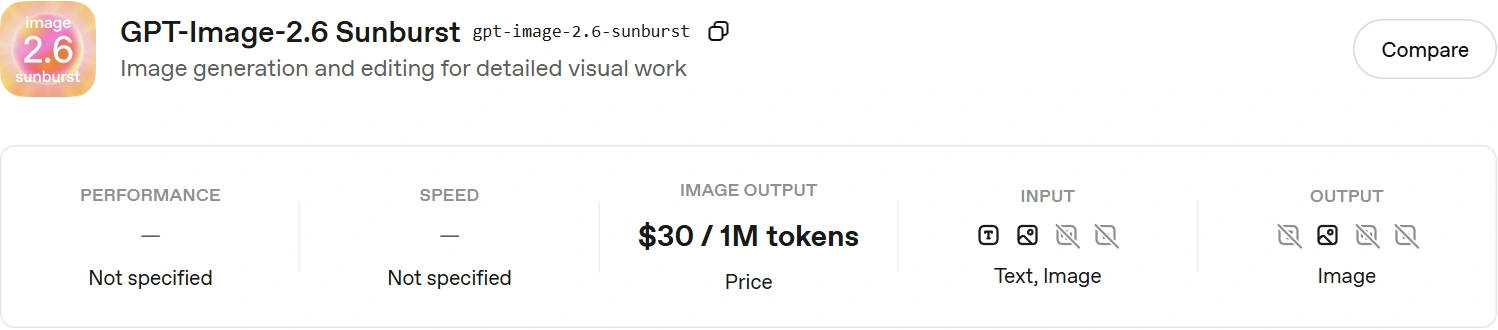
- GPT Image 2.6 Sunburst: Designed for detailed compositions, precise editing, and complex visual instructions.
- GPT Image 2.6 Flare: Optimized for faster image generation and iteration.
For this review, I tested GPT Image 2.6 Sunburst through ChatGPT's web interface. Here are the new features of ChatGPT Image 2.6:
- Improved Prompt Adherence: Better handling of detailed instructions involving object placement, composition, and multiple visual constraints.
- More Precise Image Editing: Modify specific objects, materials, or regions while attempting to preserve the surrounding scene.
- Enhanced Text Rendering: Generate images containing readable text, including menus, labels, and other typography-heavy designs.
- Multi-Image Reference Support: Combine information from multiple reference images into a single composition while retaining important visual details.
These capabilities make GPT Image 2.6 useful for everything from marketing visuals and product photography to interior design edits. However, precise text, object boundaries, and strict layout requirements still need manual verification.
Choose the model and controls before generating
GPT Image takes text instructions and reference images to generate a new picture or edit an existing one. Here is how to configure and run it:
- Playground Setup: Select gpt-image-2.6-sunburst explicitly in the OpenAI Platform Images playground.
- Generation vs. Editing: Use the generation path for a new visual, or attach a photo and describe changes for an edit.
API Access: API users can select the same model through the Image API (note that a ChatGPT app label is not proof that this exact API version was used).
Testing the model across various tasks
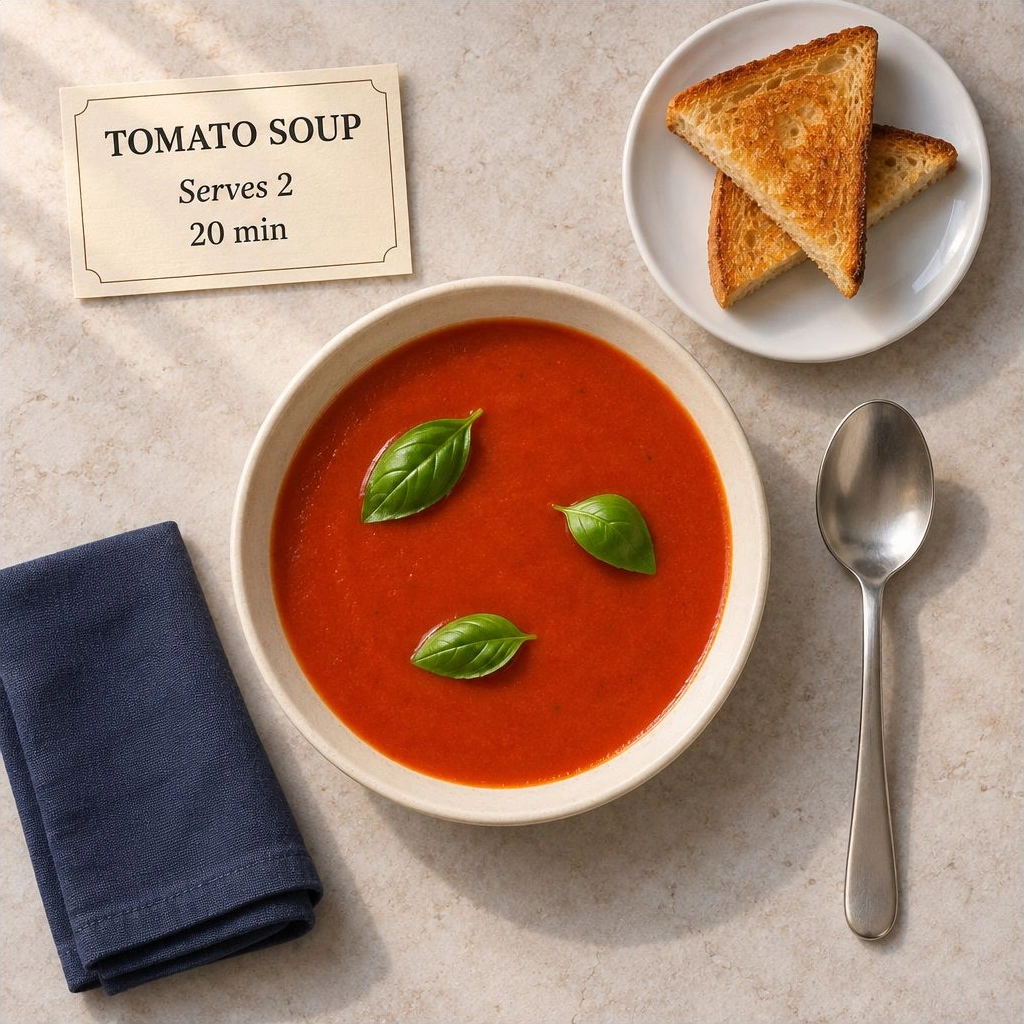
A recipe photograph with exact words and object counts
Checking whether the exact words and different accounts of this are tallied for correctly or not.
Prompt
Goal & Scene Setup:

-   Create a square, top-down editorial food photograph on a pale stone worktop.

Arrangement & Details:

-   Centre Bowl: Put one shallow ivory bowl of smooth red tomato soup in the centre, floating exactly three separate green basil leaves on the soup.
-   Upper-Right: Place one small white plate holding exactly two triangular pieces of toasted bread.
-   Lower-Left & Right: Put one folded navy cloth napkin in the lower-left and exactly one stainless-steel spoon to the right of the bowl, with its handle pointing down.
-   Upper-Left Recipe Card: Place a small cream recipe card with exactly these three lines, each once: "TOMATO SOUP", "Serves 2", "20 min" (make all three lines clearly readable).

Lighting & Framing Constraints:

-   Use realistic food textures and soft daylight from the upper-left, with consistent shadows.
-   Keep every requested object fully inside the frame.
-   No other food, utensils, lettering or watermark.

Anonymity Note: Keep the output anonymous with no personal names, organizations, brands, contact details, account information or signatures.
GPT Image 2.6:
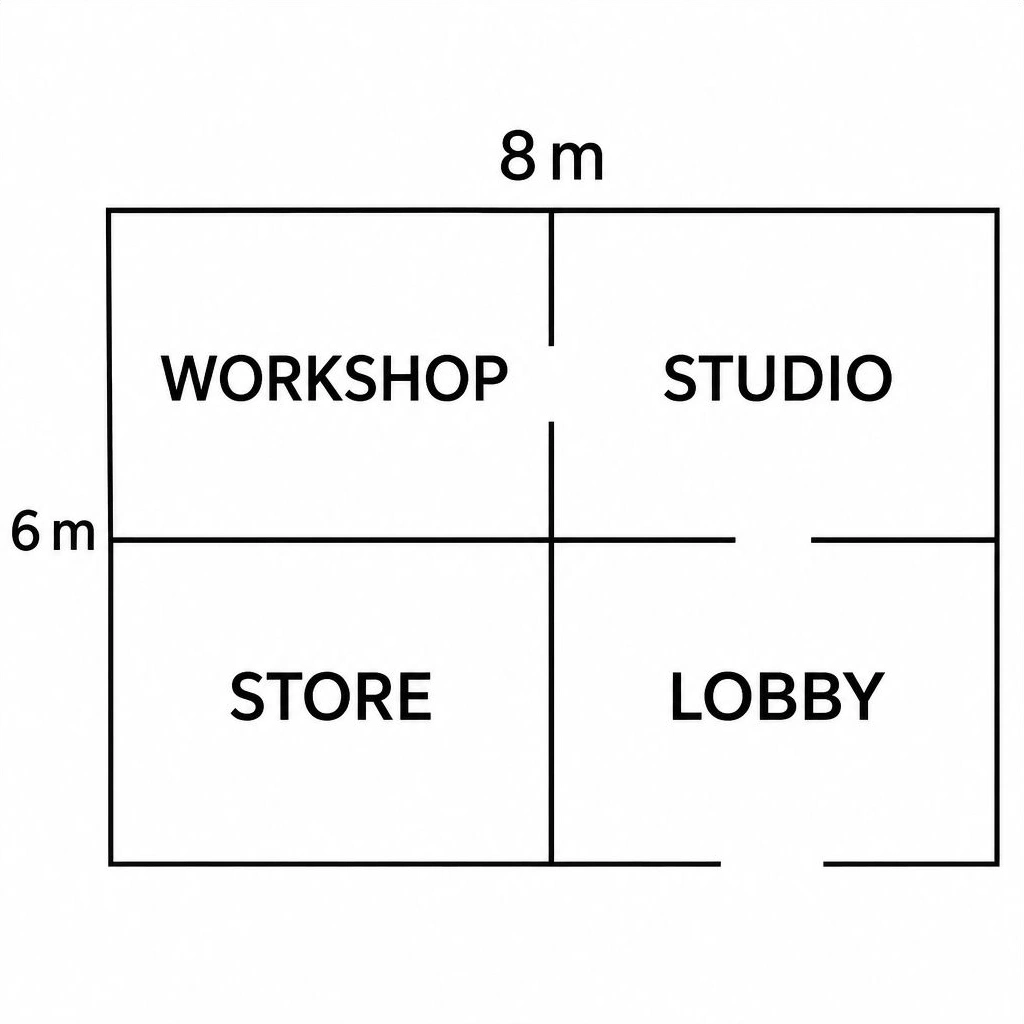
A floor plan that has to connect the right rooms
Although this schematic floor plan successfully meets all room and doorway requirements, it still needs professional drafting before construction use.
Prompt:
Goal: Draw a clean black-and-white, top-down schematic floor plan on a square white canvas.

Layout & Dimensions:

-   Building Outer Dimensions: Rectangle, 8 metres wide and 6 metres tall, with north at the top.
-   Dividing Walls: One vertical and one horizontal wall splitting it into four equal rooms in a 2-by-2 grid.

Room Labels:

-   Northwest: "WORKSHOP"
-   Northeast: "STUDIO"
-   Southwest: "STORE"
-   Southeast: "LOBBY"

Openings & Annotations:

-   Doors: Exactly three simple gaps in walls (no door-swing arcs): shared wall between WORKSHOP and STUDIO, shared wall between STUDIO and LOBBY, and exterior entrance in south wall of LOBBY. Keep all other walls continuous.
-   Measurements: Put only "8 m" above the outer top edge and "6 m" beside the outer left edge.

Note: Use clear, large labels, thin straight walls, and no perspective. Exclude furniture, windows, icons, extra doors, extra text, or identifying information.
GPT Image 2.6:
3. Replace one kitchen fixture while preserving the photograph
The edit has to remove a black cage lantern and its chain, then put a white paper pendant in the same place. The input matters here: the table, four chairs, window divisions, refrigerator and cabinetry give us landmarks to check whether a local change has turned into a room redesign.
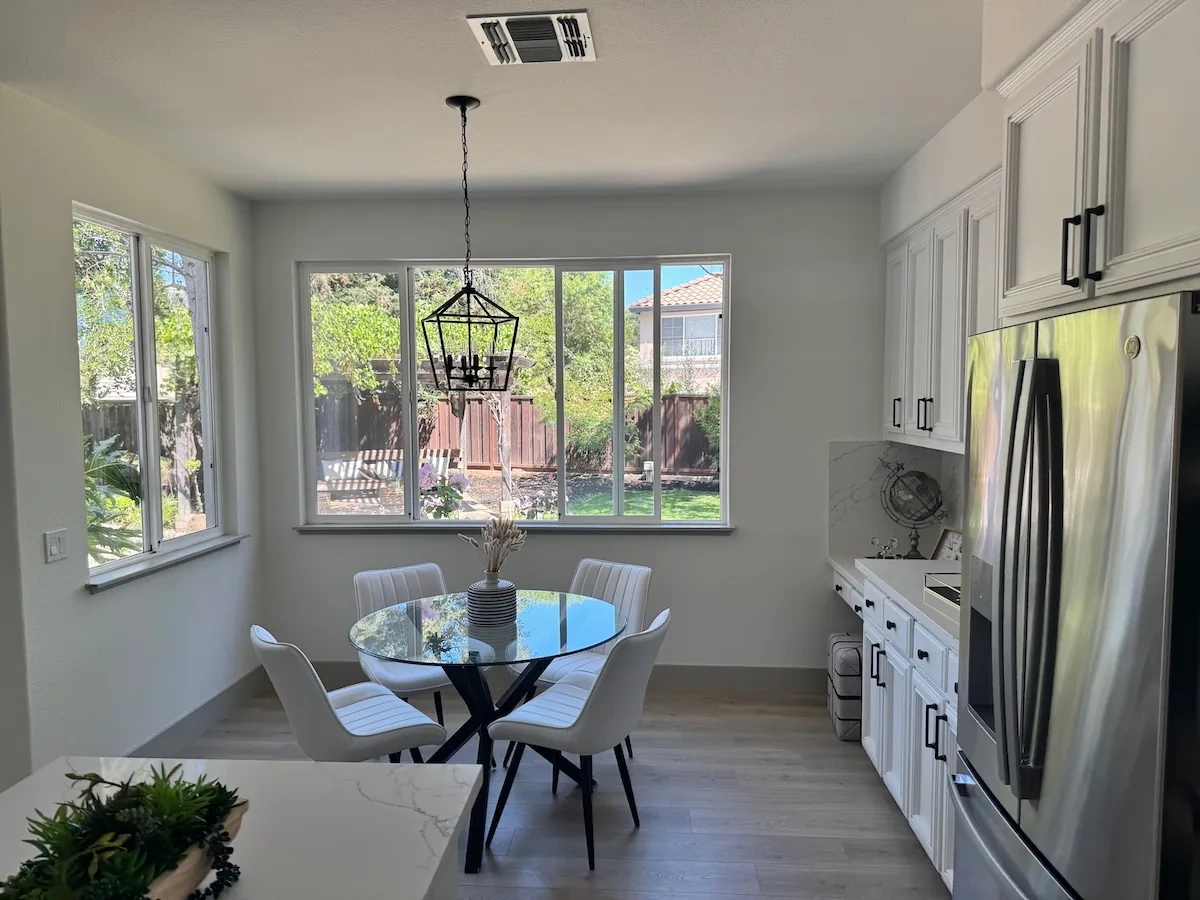
Prompt:
Primary Goal:

-   Edit the provided photograph by replacing only the black metal hanging lantern above the dining table (including its black chain) with one plain white spherical paper pendant hanging from a thin white cord.

Pendant Placement & Styling Specs:

-   Position & Height: Use the same ceiling attachment position, keep the lowest point at the original lantern's lowest height, and keep the width approximately equal to the original lantern.
-   Lighting: The new pendant is unlit; retain the existing daylight.
-   Cleanup: Completely remove all parts of the old lantern and chain.

Preservation & Constraints:

-   Unchanged Elements: Keep camera view, glass table (base & reflections), all four white chairs, striped vase and dried stems, windows, garden, refrigerator, cabinetry, counters, floor, and ceiling vent.
-   Framing & Extras: Do not crop, extend, or restyle the photograph. Add no other objects or text.

Anonymity: Keep output anonymous with no personal names, organizations, brands, contact details, account information, or signatures.
GPT Image 2.6:
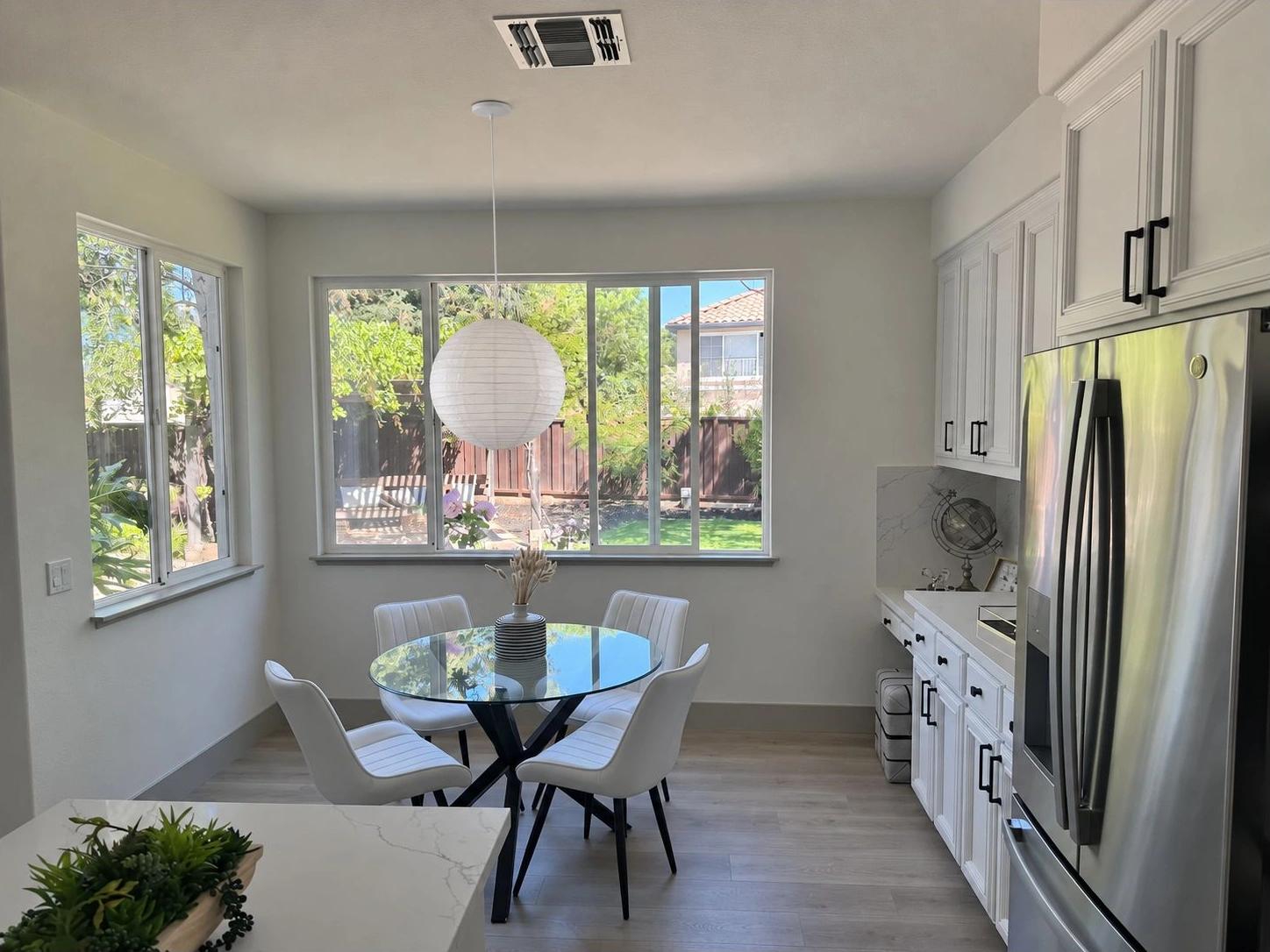
The old fixture and chain disappear, and the table, chairs, striped vase, windows and kitchen remain recognizable in the same wide view. The new paper globe is broader than the old cage and hangs a little lower, despite the size and height instructions. I would accept this as a useful design preview, then correct the pendant scale before treating it as a precise replacement mockup.
4. Combine two product references without mixing their details
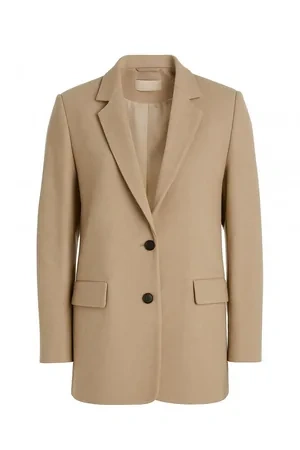
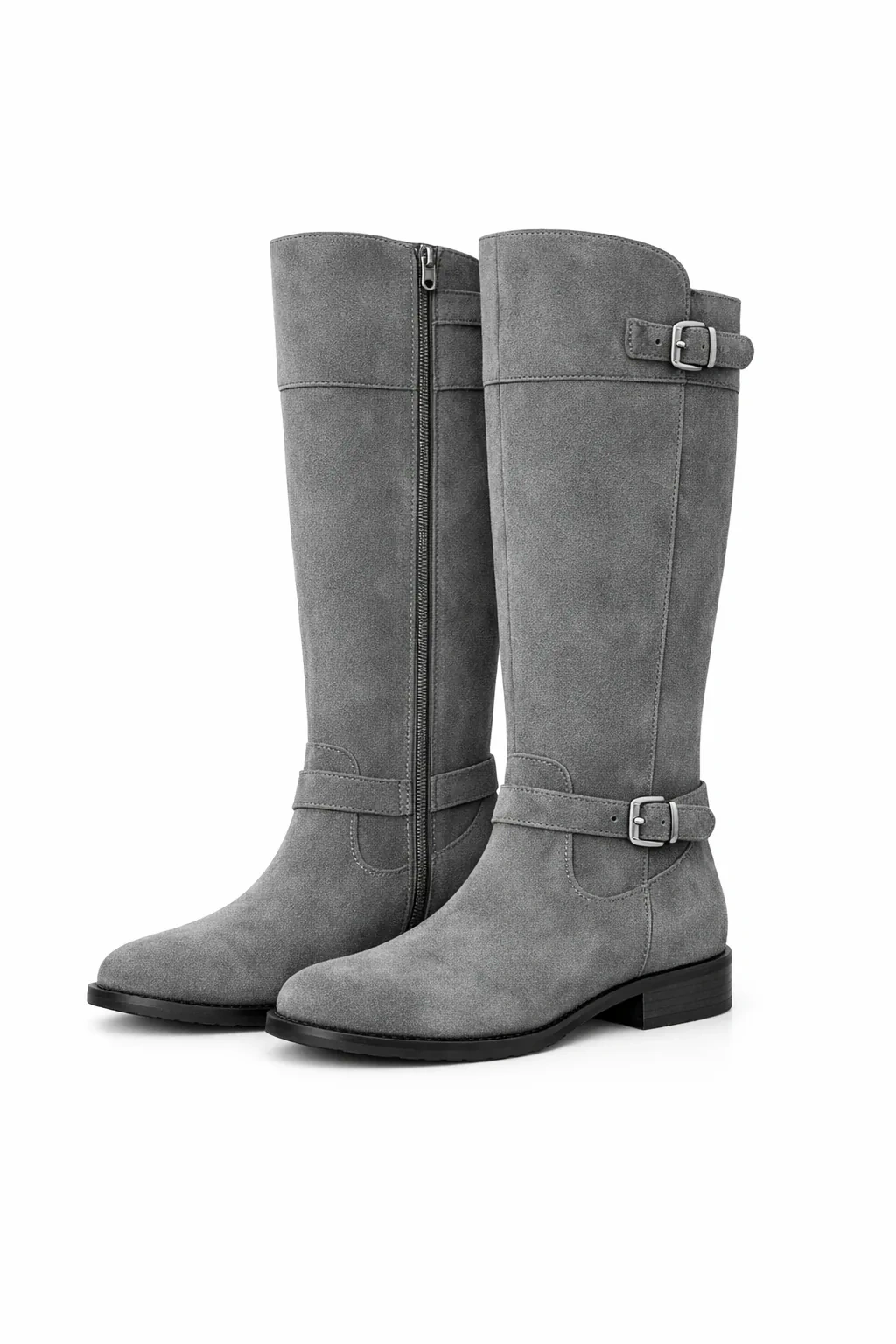
The first attachment defines the blazer; the second defines the boots. This tests whether the model can preserve two separate products while staging them together. The blazer reference is only 300 by 450 pixels, so visible shape, buttons and pockets are fair checks; tiny stitching is not.
| Beige Blazer | Grey Knee-High Boots |
|---|---|
 |  |
Prompt
Goal: Create a square, photorealistic catalog image using both product references on a pale warm-grey seamless background with soft daylight and shared contact shadows.

1. Beige Blazer (Image 1): Display on a headless torso mannequin on the left. Preserve beige color, notched lapels, 2 dark front buttons, and 2 lower flap pockets.
2. Grey Boots (Image 2): Stand upright on the floor on the right, fully visible. Preserve knee-high shape, grey suede, black low block heels, buckle straps, and side zippers.

Note: Do not mix details, change colors, or add props/text. Keep content anonymous.
GPT Image 2.6:
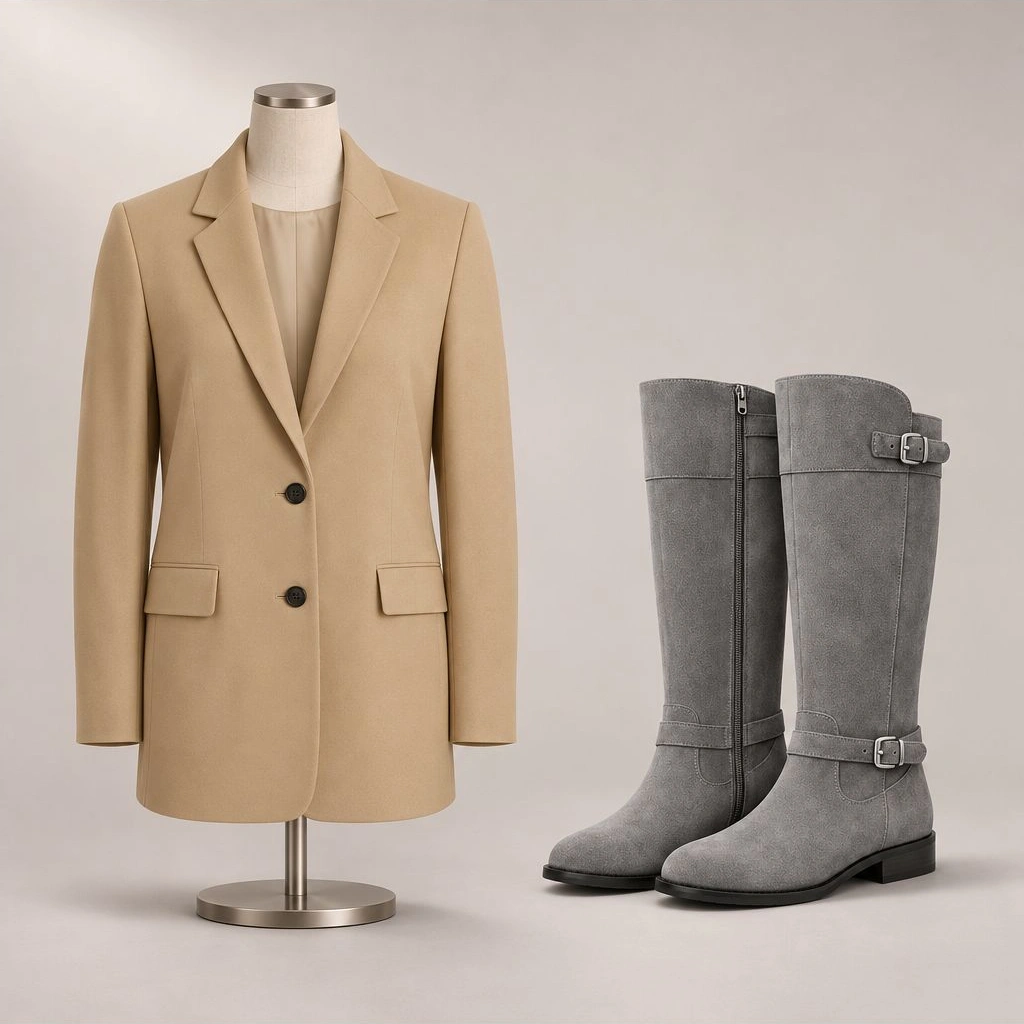
The output keeps the beige blazer on the left and the complete pair of grey boots on the right. The two dark front buttons and two lower flap pockets remain, as do the boots’ knee-high shape, low black heels and visible buckle and zipper details. The mannequin base stays inside the frame. That is a stronger result than merely placing generic beige clothing beside grey footwear, although it is still a newly generated product depiction rather than an exact photograph of the merchandise.
What the new formats and pricing change
Version 2.6 also adds SVG generation and short animated GIF generation through supported Image API routes. SVG gives you editable paths and shapes; GIF provides an animated output. These four tasks test raster generation and editing only. They do not test vector editability, motion consistency or Flare’s speed. GIF access is in preview, and these options are not guaranteed to appear in every app that offers image generation.
For a still-image workflow, do not mistake every recently announced feature for a reason to switch. Markup-guided editing is supported on selected 2.5 models as well as 2.6, and xhigh and max quality already existed in 2.5. The earlier GPT Image 2.5 hands-on guide is useful context for those shared capabilities.
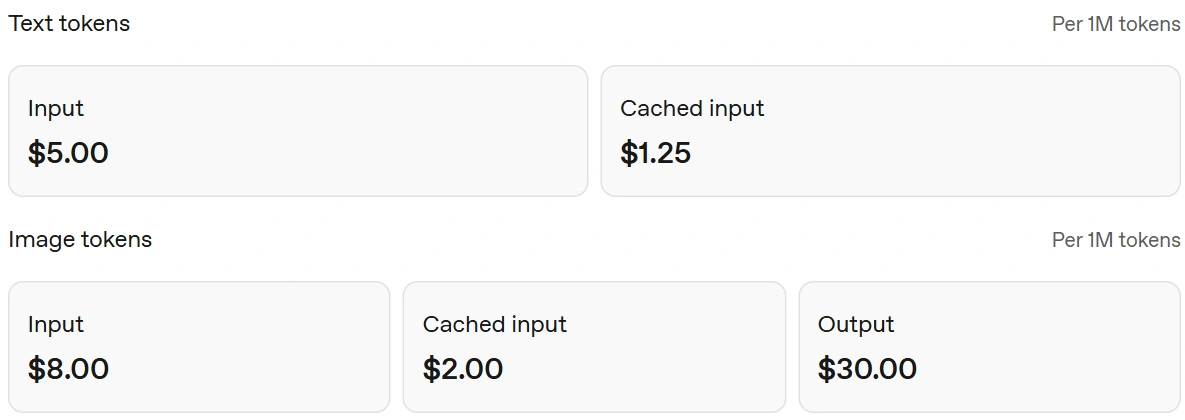
Standard Sunburst API rates are structured per million tokens rather than a fixed price per image:
- Text Input: $5 per 1M tokens
- Image Input: $8 per 1M tokens
- Image Output: $30 per 1M tokens
For context, the recipe prompt used 197 text-input and 1,449 image-output tokens (~$0.0445). Altogether, all four test runs totaled roughly $0.20 including reference image inputs.
SVG billing also includes the intermediate reference image and the model that authors the SVG. App subscriptions and API usage are separate. Check access to the exact model and output route before building a workflow around a new format.
Conclusion
GPT Image 2.6 Sunburst was most convincing here when it had a concrete structure to preserve: the doorway graph and the two product identities survived their briefs. The food crop and oversized pendant show why the final check should follow the prompt line by line. Start with a specific visual job, keep the full output visible, and inspect the constraint that would make the image unusable before asking for more detail or higher quality.
Frequently Asked Questions
Which GPT Image 2.6 model was tested?
Sunburst, selected explicitly in the OpenAI Platform Images playground at medium quality.
Does higher complexity mean higher image quality?
Complexity controls planning. Quality controls rendering. They are separate settings.
Can GPT Image 2.6 render exact words?
The recipe card reproduced all three requested lines correctly. The surrounding composition still had a framing error.
Were SVG and GIF tested here?
No. These four hands-on tasks tested still-image generation and editing.