

Starting with a blank n8n canvas makes sense when you need complete control. It is unnecessary when someone has already built the same project.
The harder part is finding n8n AI workflows that still exist and solve a real problem. I ranked the free, published AI templates by public views, checked every import page, and reviewed each canvas. In this blog, we set up five of the most popular workflows for agents, WhatsApp, research, short-form video & more.
1. Build a Search-Enabled AI Agent
The AI agent chat template is the cleanest first import on this list. A chat message reaches an AI agent that can answer directly, search the web through SerpAPI, or recall recent conversation through memory.
That small canvas teaches the core agent pattern without hiding it inside dozens of nodes.
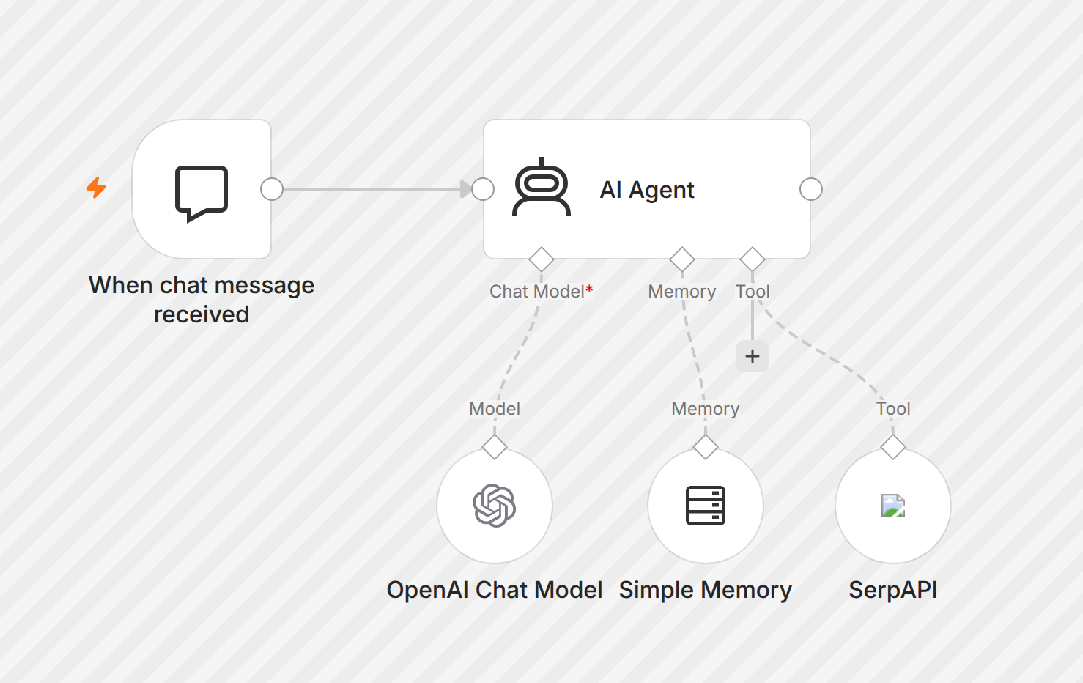
What it automates: Chat message → AI agent → web search or memory → answer
You will connect: OpenAI and SerpAPI.
Set it up:
- Add your OpenAI and SerpAPI credentials.
- Tell the agent when it should search instead of guessing.
- Keep the memory window short until you understand what it retains.
Test it: Ask a time-sensitive question that requires search. Then ask a follow-up that depends on the previous answer. Check whether the agent uses the correct tool both times.
Best for: Learning n8n agents, internal research assistants, and simple website chat.
2. Answer Product Questions on WhatsApp
The WhatsApp chatbot template turns a product brochure into a basic sales assistant. It loads the brochure into a vector store, receives customer messages, retrieves relevant product details, and replies through WhatsApp.
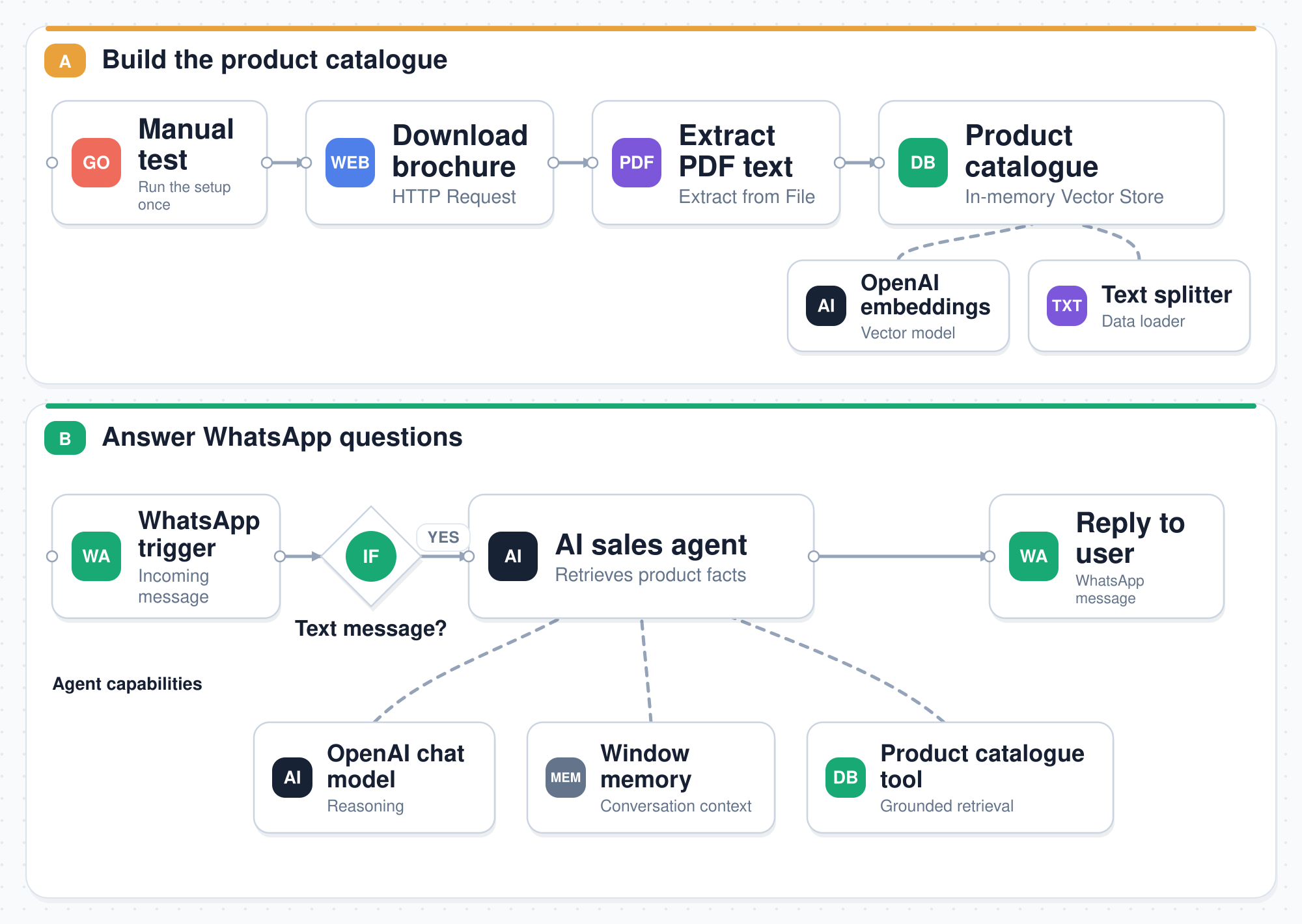
The workflow has two clear parts: build the product catalogue, then serve customer questions.
What it automates: Product brochure → vector store → customer message → AI sales agent → WhatsApp reply
You will connect: A WhatsApp Business account and OpenAI.
Set it up:
- Replace the sample brochure URL with your approved product source.
- Run Test workflow once to populate the catalogue.
- Connect the WhatsApp trigger and reply nodes.
- Edit the agent instructions with pricing, escalation, and refusal rules.
Test it: Ask one question answered by the brochure and one that is not. The bot should answer the first and admit when the product source lacks the second.
Watch before production: The template uses an in-memory vector store.
Best for: Product discovery, sales qualification, and first-line WhatsApp support.
3. Run a Personal Assistant in Telegram
Angie is a Telegram-based personal assistant. It accepts text or voice, transcribes voice notes, and uses connected tools to retrieve email, calendar events, tasks, or contacts.
It is a stronger project than a basic chatbot because it shows one agent working across several personal systems.
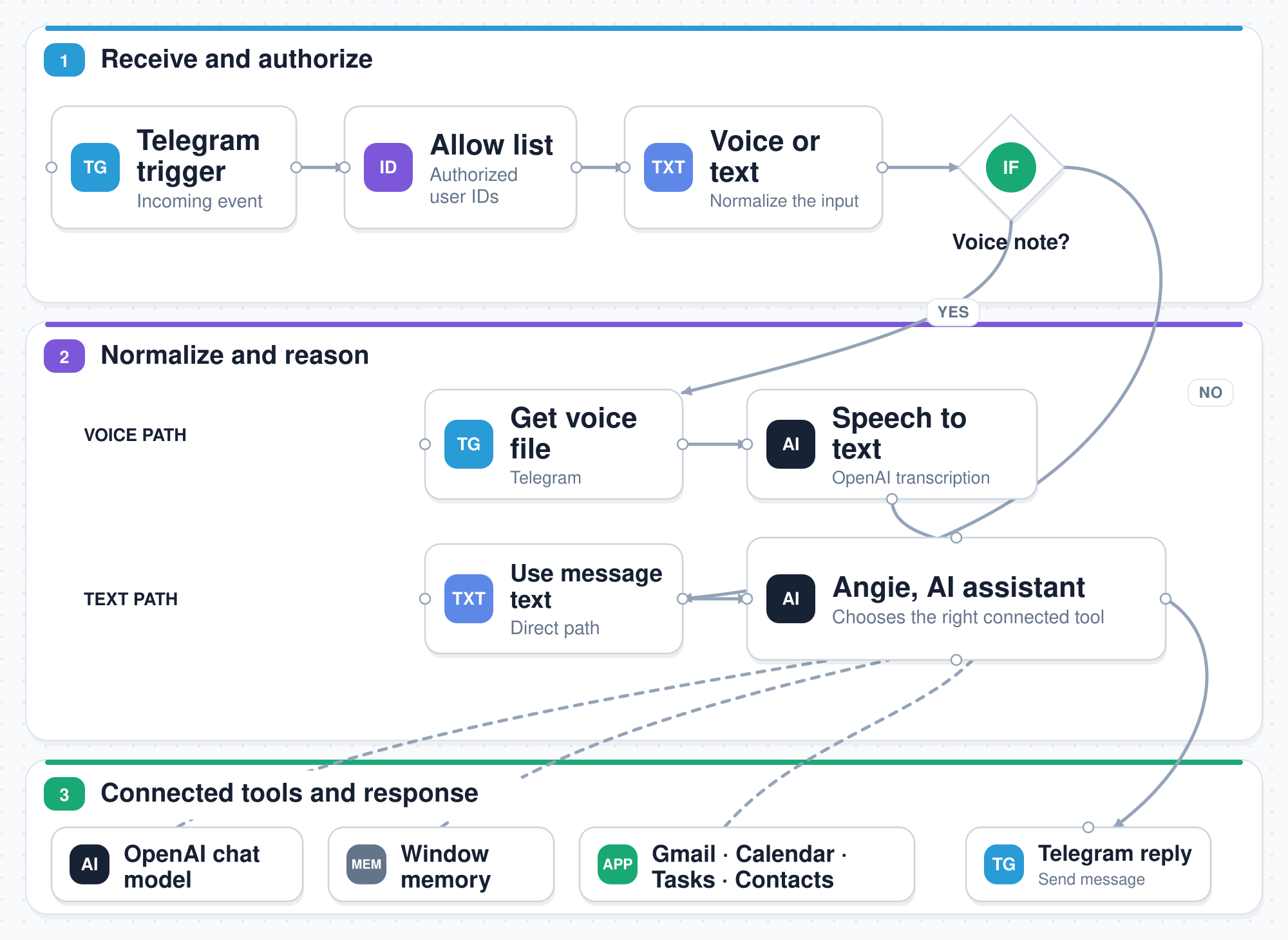
What it automates: Telegram voice or text → transcription → AI assistant → connected tool → Telegram response
You will connect: Telegram, OpenAI, Gmail, Google Calendar, and Baserow.
Set it up:
- Create a Telegram bot and add its credentials.
- Add your Telegram user ID to the workflow's allowlist.
- Connect Gmail, Calendar, and Baserow with the least access required.
- Update the agent prompt with your timezone and tool rules.
Test it: Start with a read-only request, such as “What is on my calendar tomorrow?” Send the same request as a voice note and compare both replies.
Watch before production: Email and calendar data are sensitive. Restrict who can message the bot, limit stored conversation history, and avoid write actions until retrieval works reliably.
Best for: Personal productivity and learning how one agent selects among several tools.
4. Scrape and Summarize Webpages
The webpage summarizer starts with a list page, extracts links, fetches each page, pulls its text, and summarizes the result with an AI chain.
Its default example processes Paul Graham essays. Replace the source and selectors, and the same pattern can monitor articles, research pages, documentation, or public updates.
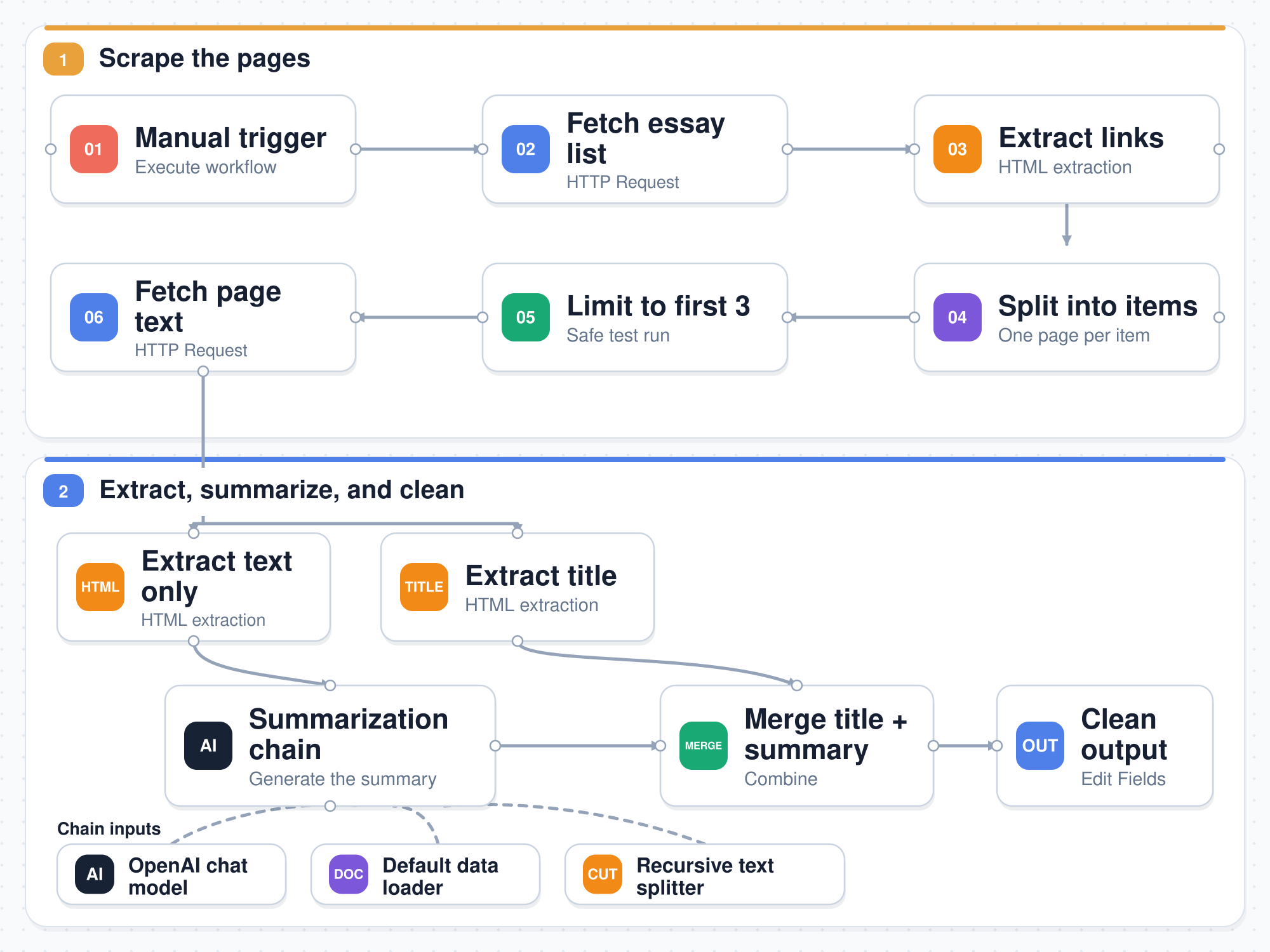
What it automates: List page → links → page text → chunks → AI summary → clean output
Set it up:
- Run the original example before changing its source.
- Replace the list URL and update the HTML selectors.
- Limit the first run to a few pages.
- Adjust chunking for the length and structure of your content.
Test it: Compare one generated summary with its complete source page. Check names, numbers, dates, and claims before scaling the run.
Watch before production: Website layouts change. Extraction can fail silently when a selector breaks. Respect the source's terms, robots rules, copyright, and request limits.
Best for: Market research, reading queues, competitor updates, and content monitoring.
5. Generate and Publish Short-Form Videos
The AI video workflow automates an entire content pipeline. It generates an idea, drafts scene prompts, creates clips and sound, stitches the video, records the output, and publishes across social platforms.
It is the most ambitious template here. It is also the easiest one to misuse. “Viral” is part of the template name, not a promised outcome.
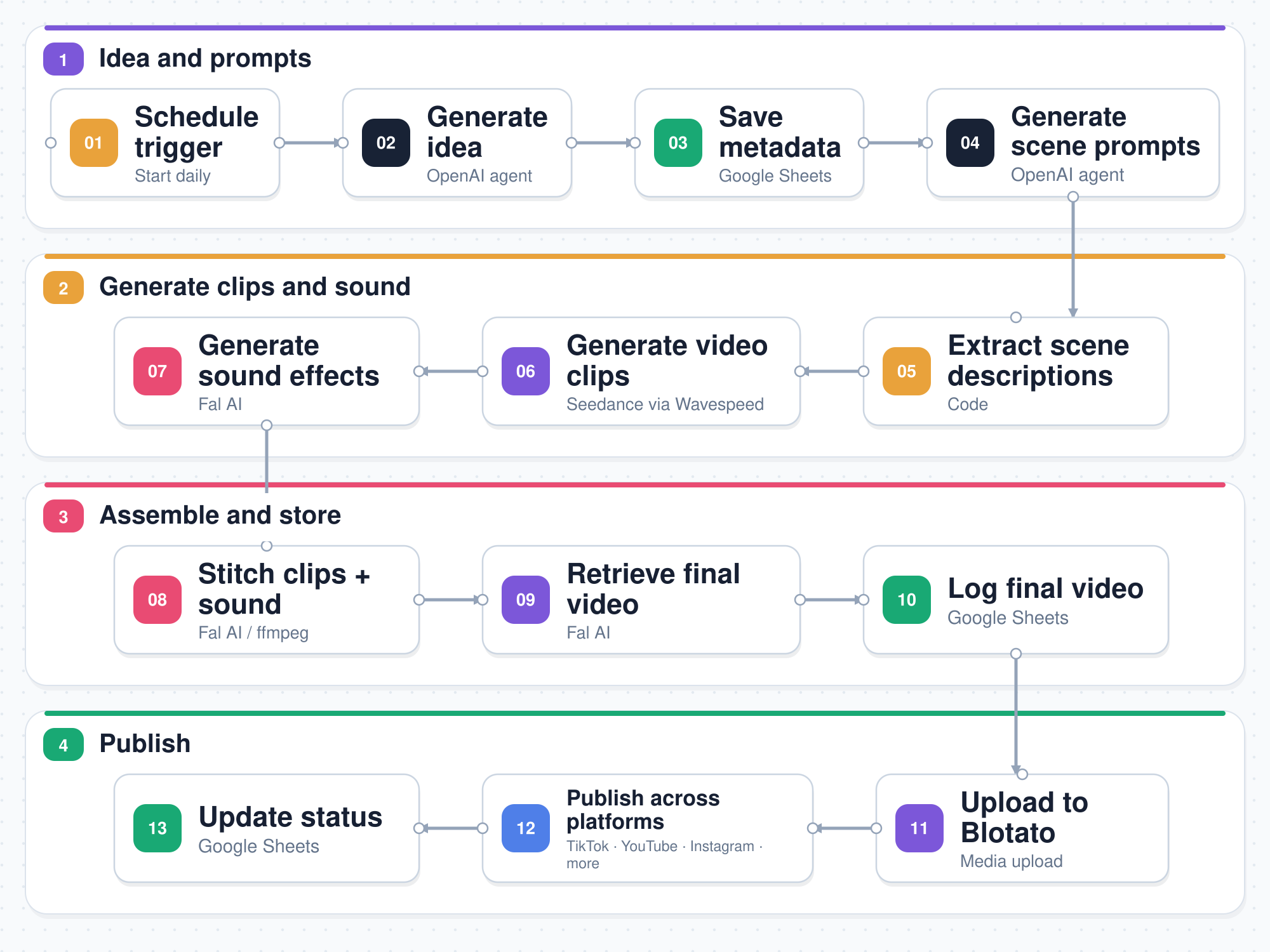
What it automates: Schedule → idea → scene prompts → clips and sound → final video → social publishing
You will connect: OpenAI, Seedance through Wavespeed, Fal AI, Google Sheets, and Blotato.
Set it up:
- Add each API credential and confirm your available credits.
- Connect the tracking Sheet and map the required columns.
- Add the account IDs for every social destination.
- Disable all publishing nodes during the first test.
- Add a Slack, Telegram, or email approval before upload.
Test it: Generate one short clip with a narrow prompt. Review the footage, audio, cost, caption, and aspect ratio before testing an unlisted or private destination. l Best for: Content teams with an established review process and a clear need for high-volume production.
Which Workflow Should You Import First?
Choose by bottleneck, not node count:
- New to n8n: Start with AI agent chat. It is small enough to understand in one sitting.
- Handling repeated product questions: Use the WhatsApp sales chatbot.
- Managing a busy personal stack: Try Angie after locking the bot to your account.
- Researching many public pages: Use the webpage summarizer.
- Publishing video at scale: Use the video workflow only after adding approval and cost controls.
Frequently Asked Questions
How do I import an n8n workflow?
Open the template page and select Use for free. You can also import workflow JSON from a file, URL, or copied canvas.
Are n8n workflow templates free?
These five templates are free to import. n8n hosting, AI models, APIs, storage, and connected services may charge separately.
Can I use these templates with self-hosted n8n?
Usually, yes. Check version requirements, credentials, community nodes, and network access before importing them into a self-hosted instance.
Which n8n AI workflow is best for beginners?
AI agent chat is the simplest. It uses five core nodes and demonstrates a trigger, model, memory, tool, and agent.