
You ask Claude Code to change one line. A few minutes later, the usage warning appears. The request was short, but the session may have been carrying an afternoon of code reads, failed test output, and earlier decisions. Another Claude tab or a background job could have been spent from the same allowance.
You can narrow it down before changing models or paying for more usage. Claude Code has separate views for your plan allowance, local activity, and the context in front of the model. In this article, we’ll use those views to work out what’s consuming your limit and run a controlled test to see what changes it.
TLDR: Start with Settings → Usage to identify the limit you hit. In Claude Code, run /usage for local attribution and /context for what’s filling the current session.
Find out which number moved
Before shutting anything down, open Settings → Usage in Claude. Check Current session, where applicable, and the weekly limits. Pro and Max have both a five-hour session limit and a weekly limit. Verified Ultra accounts have a weekly limit without a five-hour session limit. Max and Ultra also have a separate weekly allowance for Fable. Activity across Claude and Claude Code draws on the same plan.
| What you want to know | Where to look | What it tells you |
|---|---|---|
| How much of my plan have I used? | Settings → Usage | Account-level progress and reset times |
| What’s been consuming usage on this computer? | /usage and the plan breakdown | Recent attribution and recommendations from local Claude Code history |
| What’s filling this conversation? | /context or /context all | Current context and the items taking up space |
| What did this session use in API tokens? | /usage → Session | Token counts by model and estimated spend. Confirm API charges with your billing provider. |
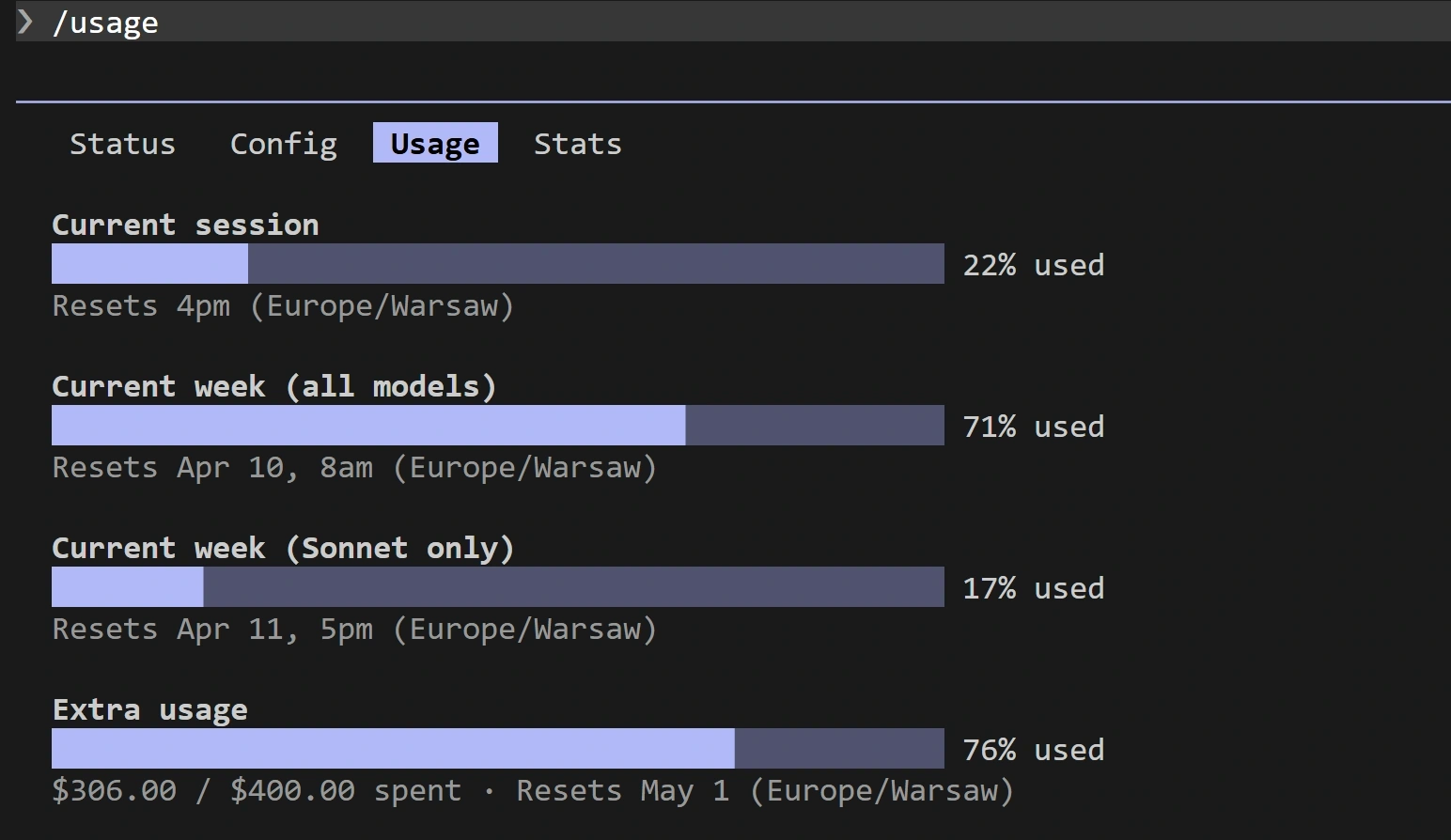
Earlier Oasis capture of /usage. Session and weekly bars include reset labels. These values belong to the earlier session.
Current Claude Code treats /cost as an alias for /usage. /stats opens the Stats tab of the same interface. The Session dollar figure estimates API cost. If you’re using included subscription usage, read the plan bars to see what’s left. If you’ve enabled paid usage credits, check the separate usage-credits row for that spend. Claude Code command reference · Claude Code cost documentation
Read the attribution before changing your setup
Earlier Oasis /context capture. Compare messages, tools, memory, and remaining capacity before choosing what to trim.
Run /usage inside Claude Code. On a supported subscription, look for a large CLAUDE.md, high effort, cache misses, subagents, or a scheduled loop. The terminal’s d and w shortcuts switch the local breakdown between the last 24 hours and the last seven days. Use the account bars to see activity from other computers and Claude surfaces. Plan usage breakdown
A row with a 25% share means the recommendation applies to about a quarter of recent usage. It can overlap with other rows. A session that used both a skill and an MCP result can contribute to multiple rows. If the plan bars are marked Showing last-known usage, check the timestamp and refresh when the panel permits it. Run /tasks if you suspect a loop or background job is still active. Plan usage breakdown · Troubleshooting the usage panel · Claude Code command reference
Test a clean session, a long session, and a scoped task
Pick a small fix with a clear pass condition. For a disposable demo, put this function in totals.py. Both Python files below are also in the claude-code-usage folder of oasis-guide-fixtures.zip.
def average_price(prices):
    return sum(prices) / len(prices)
Save these checks as test_totals.py next to it.
import unittest
from totals import average_price


class AveragePriceTest(unittest.TestCase):
    def test_empty_prices(self):
        self.assertEqual(average_price([]), 0)

    def test_nonempty_prices(self):
        self.assertEqual(average_price([12, 8]), 10)
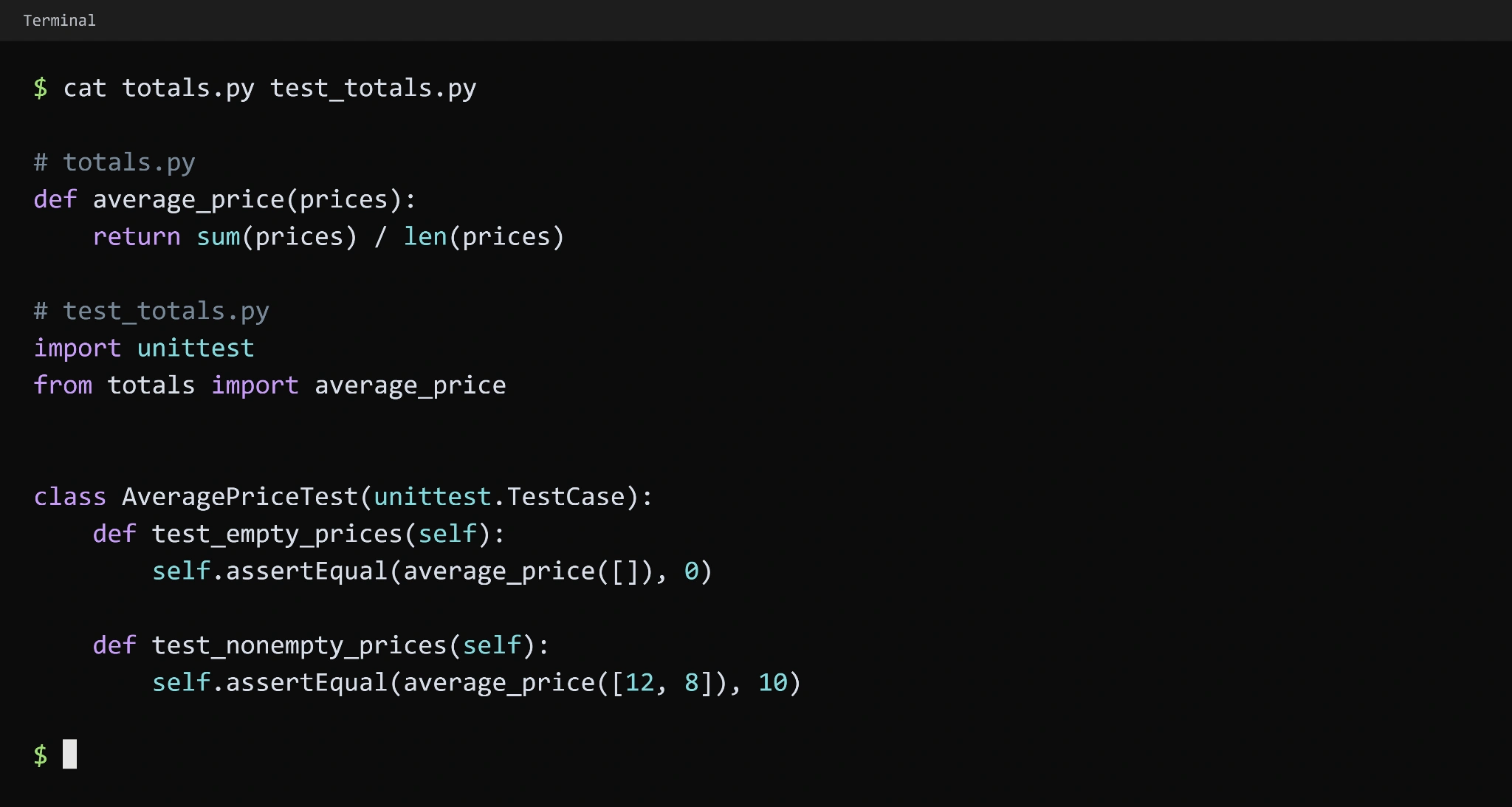
The empty-input test fails before the fix. The existing nonempty calculation should keep passing.
Run python -m unittest test_totals. In the fixture check, the empty case raised ZeroDivisionError and the nonempty case passed. The usage experiment below is for your signed-in Claude Code session.
The original fixture raised ZeroDivisionError for an empty list and passed the nonempty test. This is local unittest output.
Keep the model, effort, and starting file identical. Restore the fixture before each run and pause other Claude activity where you can. Capture /context and the /usage Session token counts before and after the measured task. Record the time, changed files, and whether the tests passed. If available, record cache reads and writes as separate counters. Claude Code session cost and cache stats
-
Fresh baseline: Open a new conversation and ask, “Fix average_price so an empty list returns 0, preserve the behavior for other inputs, and run the tests.” Record what Claude reads and the test command it chooses.
-
Long-session repeat: Use the exact same prompt in an existing conversation with unrelated history, or seed a sandbox conversation with harmless background material. Take the baseline after that history is loaded. Compare the change from that baseline with the fresh run.
-
Scoped repeat: Open another fresh conversation. Add, “Read totals.py and test_totals.py first. If those files are sufficient, keep changes within them and run python -m unittest test_totals. Report any need to expand scope before proceeding.” This tests how much work the tighter instructions avoid.
| What you observe | Change to try on the next run |
|---|---|
| The long session carries much more context before it starts | Start unrelated work with /clear. If you need continuity, use /compact and tell it which decisions to retain. |
| The scoped run reads fewer files or produces less test output | Name the starting files and verification command in the first prompt. |
| Cache reads drop and cache writes rise after a break or configuration change | Compare runs with similar cache conditions before attributing the difference to the prompt. |
| The plan percentage barely changes between runs | Use the token and tool evidence for the small test. Recheck the plan allowance over a longer work block. |
Conclusion
Fix the largest recurring source first. If yesterday’s investigation is still in context, start fresh for a new task. If Claude is scanning the repository, give it the starting files and the test it needs to pass. If usage keeps rising while your terminal is idle, check the account bars and active jobs. Then repeat the same task under the same conditions to see whether the change helped.
Frequently Asked Questions
Does /clear reset my Claude Code usage limit?
It starts a fresh conversation and resets the local Session totals in current versions. Your account allowance still follows the reset time shown under Settings → Usage.
Does switching to a subagent save usage?
A subagent can keep verbose output out of your main context. It still makes its own model requests, so check the combined usage and whether the task finishes with less rework. C
Why is /usage missing the plan bars I see in Claude?
Check your login method with /status and your installed version with claude --version in the shell. A Console or third-party provider can have different billing and reporting. If you’re signed in through a supported Claude subscription and the panel has stale data, check the account’s Settings → Usage page.