

Codex is our default recommendation for delegating repository tasks and reviewing the resulting changes. Claude Code is the better choice when you want to build custom checks and specialist workers into the coding agent itself.
Claude Code has five native hook handler types; Codex currently supports two. Codex CLI can run local models and expose its client source. At $100 a month, Codex Pro removes the five-hour usage cap; Claude Max does not.
TLDR: Codex has better subscriptions and multimodal models. Claude Code has better coding models.

Claude Code vs Codex at a Glance
| Decision | Claude Code | Codex |
|---|---|---|
| Custom action checks | Command, HTTP, MCP tool, prompt and agent hooks | Command and MCP tool hooks |
| Model backend | Claude models through supported providers | OpenAI models; local and custom providers in CLI |
| $100 monthly tier | Max retains five-hour and weekly caps | Pro has no five-hour cap; weekly limits may apply |
| Client source | Proprietary binary | Open-source CLI, App Server and SDK |
| Recovery and review | Prompt checkpoints with /rewind | Line feedback and Git staging or reverting by hunk |
| Task workspace | Terminal, IDE, desktop and cloud sessions | Managed worktree chats and Local handoff in the app |
Codex app makes isolated task handoff easier
For moving a finished task from an isolated working copy into your everyday checkout, Codex’s app is our pick. A worktree is a second checkout of the same Git repository: the agent can edit there while your main checkout stays available for other work.
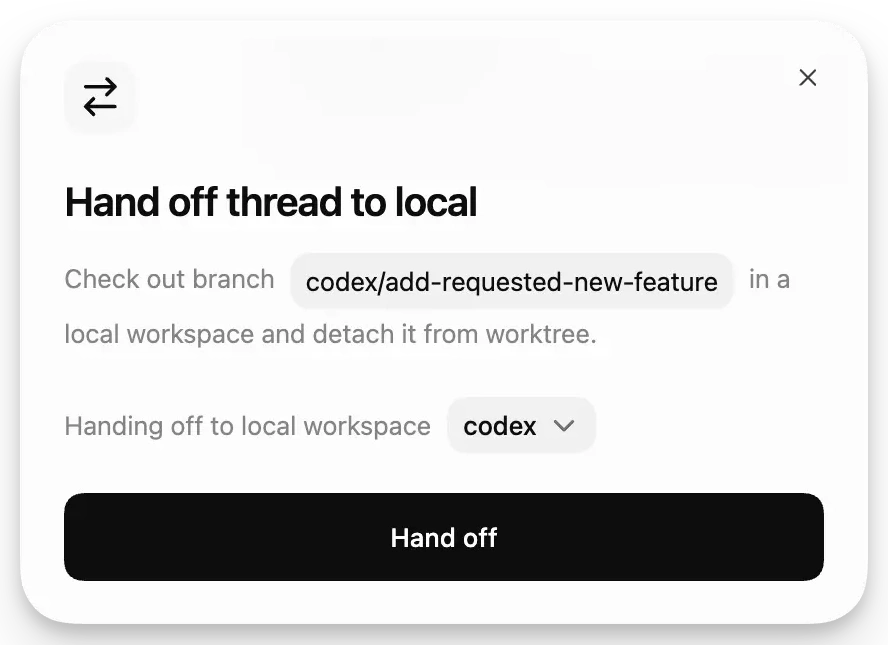
Codex’s handoff dialog moves the branch into a local workspace and detaches it from the worktree.
Consider three separate jobs: fixing an API error, updating installation instructions and investigating a failing test. Put each in its own worktree chat, then bring back only the job you want to inspect locally. The app handles the Git operations behind that transfer.
- Open a Git project, select Worktree beneath the composer and choose the starting branch.
- Describe one bounded job, including the files or behavior it should affect.
- Inspect the resulting changes. Use Hand off to move the chat to Local when you want to run it in your normal development environment.
Claude Code also supports worktrees, desktop sessions and an agent view for background work. In the terminal, claude --worktree auth-fix starts an isolated session. Codex’s advantage here is the visible worktree-to-Local handoff, rather than exclusive access to parallel agents.
One setup detail matters: Git-ignored files do not automatically travel with a checkout. A development server that needs an ignored local configuration file may need .worktreeinclude configured before a Codex-managed worktree can run it.
Codex CLI supports local models and client modification
Model choice means two different things here: selecting a hosted model and replacing the model provider. Codex offers both in its CLI. Claude Code offers a choice of Claude models and supported hosts for those models.
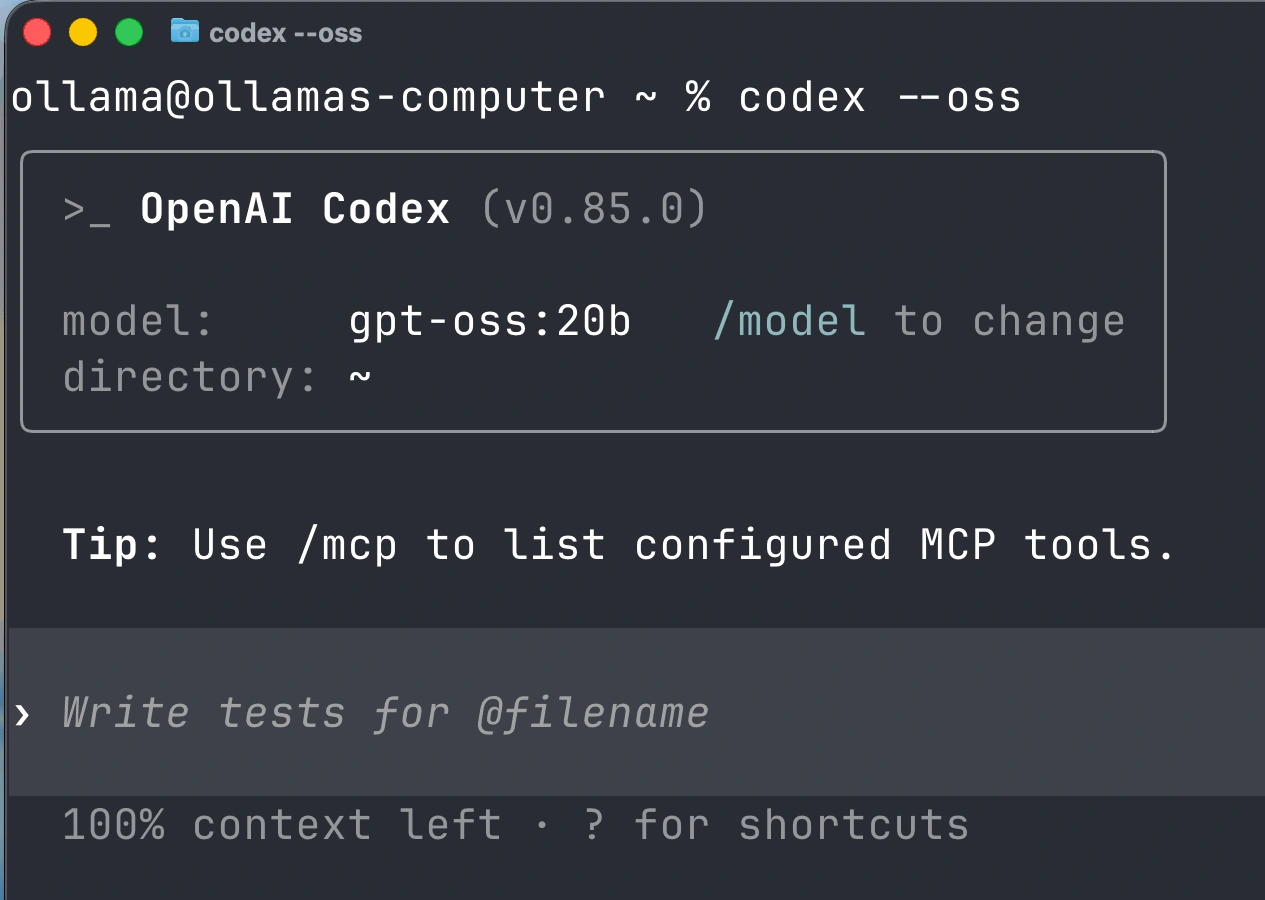
A published Ollama setup launches Codex CLI with --oss and identifies gpt-oss:20b as its local model.
- Hosted Codex sessions: use
/modelin the CLI to select an available model and reasoning effort. Current options include GPT-6.1 Sol, GPT-6.1 Terra, GPT-6 Astra and GPT-6 Luna; availability varies by client and plan. - Local Codex sessions:
--ossselects a local provider, with--local-provider ollamaor--local-provider lmstudiochoosing the server. You still need that server and a suitable model running locally. - Claude Code sessions: direct Anthropic aliases currently select Opus 5.5, Sonnet 5.5 and Haiku 5.5; Fable 5.1 is separately selectable. Using a cloud gateway changes the route to Claude, not the supported model family.
Our Codex recommendation concerns backend flexibility. A local model can satisfy a local-inference requirement, but its coding ability, tool support and hardware needs depend on the model and machine you choose.
Context capacity is a separate decision. Opus 5.5 offers a one-million-token window; GPT-6.1 Sol defaults to 500,000 tokens in Codex. That gives this Claude pairing more input room for code, conversation and tool results. It does not establish which agent will fix a bug more accurately.
Codex’s CLI, App Server and SDK are open source; its IDE extension and cloud service are not. Claude Code’s binary is proprietary. Source access matters if you intend to inspect or modify the client’s behavior or integrate it into your own tooling.
For the session controls, the Codex CLI commands guide covers /model, /permissions, /status and /review.
Compare file access separately from approval prompts
A prompt asking whether npm test may run and a rule preventing access to a credentials folder solve different problems. The first decides who approves an action. The second limits what that action can reach.
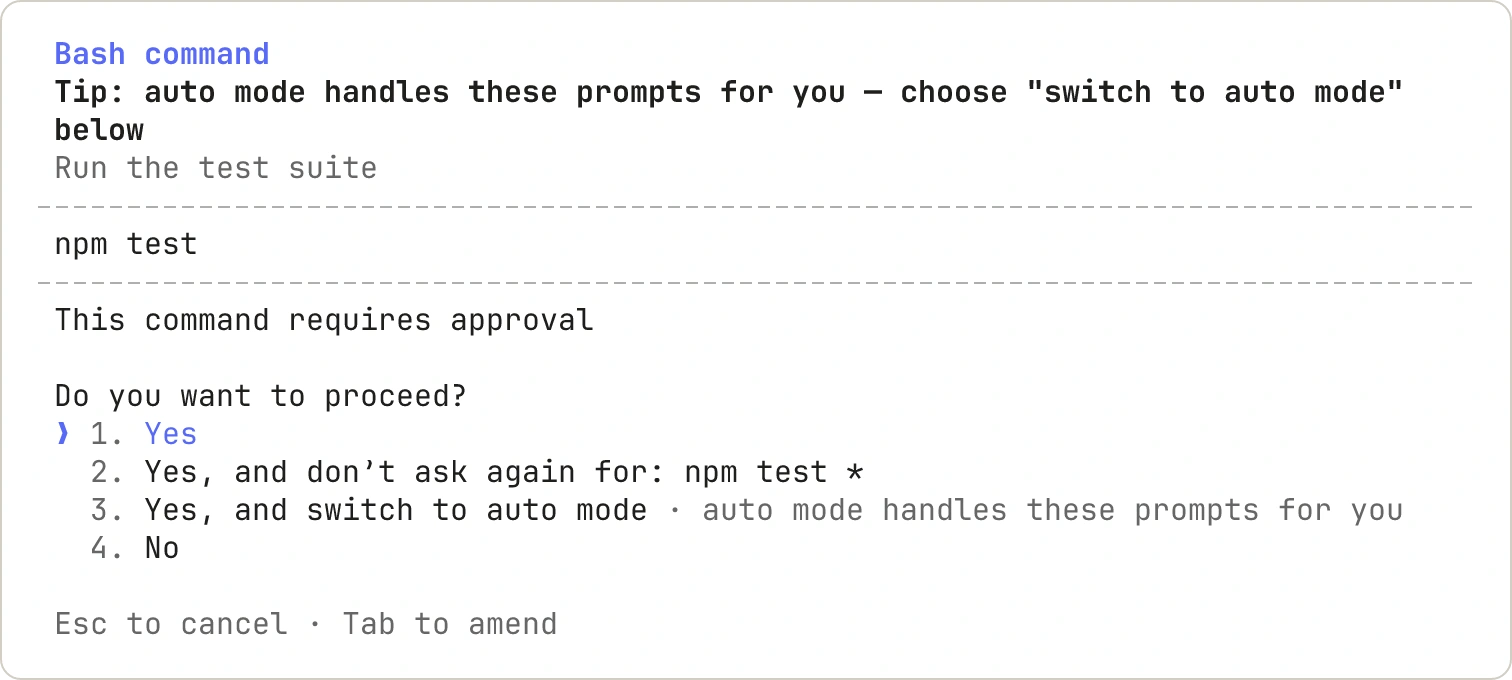
Claude Code’s command prompt offers one-time approval, a reusable npm test rule, or Auto mode.
Claude Code’s modes mainly change the approval workflow:
- Manual: generally reads without asking, then requests approval for edits, commands and network access.
- Plan: lets Claude investigate and propose an approach before implementation.
- acceptEdits: automatically permits file edits and common filesystem operations within permitted directories.
- Auto: uses a classifier to assess actions that would otherwise require approval. Current interactive terminal and VS Code versions can start in Auto, subject to saved or managed settings.
Codex also separates reach from approval. In the desktop app, Ask for approval pauses for eligible requests outside the allowed boundary; Approve for me sends eligible requests to automatic review. Automatic approval does not grant unrestricted file or network access.
Choose Codex profiles for that specific combination of filesystem and network rules. In Claude, use Plan to investigate before implementation; use Manual to review actions as permission prompts appear. Claude also has OS sandboxing; the number of approval modes is no measure of overall isolation.
Claude Code offers more native hook and worker settings
Claude Code’s customization advantage is most concrete when you need a check at a particular agent event or a specialist worker with its own tools. A repository instruction file can request behavior; a hook runs configured logic when its event occurs.
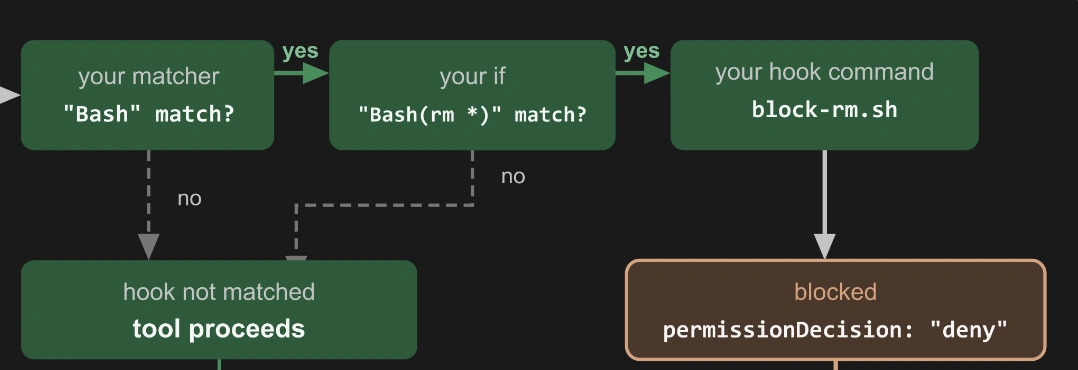
A matching Bash command reaches the blocking hook; a non-match lets the tool proceed.
Pick the hook by what the check must do
- Run a formatter after an edit: a command hook can invoke the existing formatting script. Both products support command handlers, so this task alone is not a reason to switch.
- Consult a central service before a tool call: Claude offers a native HTTP handler. Codex would need a supported command or MCP tool handler to reach an equivalent service.
- Judge whether a condition is satisfied: Claude’s prompt handler asks a model for a decision, such as whether a completion claim matches the stated criteria.
- Inspect files before judging: Claude’s agent handler can use tools to investigate. Agent hooks remain experimental; command hooks are the documented production choice.
Claude’s five handler types are command, HTTP, MCP tool, prompt and agent. Codex currently executes command and MCP tool handlers; prompt and agent definitions are parsed but skipped. Event support also varies. A post-tool check cannot prevent an action that has already happened, so a destructive-command block belongs before execution.
Use rewind to retry an approach and hunks to shape a commit
The useful distinction is what you want to undo. Claude Code’s /rewind returns to an earlier prompt checkpoint; Codex’s Git controls let you keep or discard selected parts of the current patch.
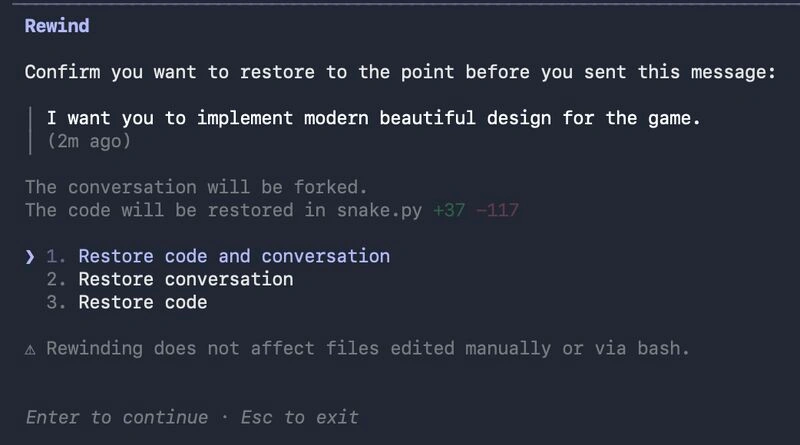
An earlier Claude Code rewind menu offers separate restoration of code, conversation, or both.
- Wrong implementation direction: if a caching experiment makes the design worse, use Claude’s /rewind and choose code, conversation or both before trying a different approach.
- Useful fix mixed with unrelated edits: if an API repair also reformats another function, use Codex’s review pane to stage the repair and revert the formatting hunk. A hunk is a group of nearby changed lines.
- Correct location, wrong behavior: both desktop tools support line-specific diff comments. Point to the faulty condition and describe the expected behavior, then review the next patch.
The Codex recommendation is specifically for choosing changes at whole-diff, file and hunk level inside its review pane. Claude’s recommendation is for returning to the session decision that led to an unwanted approach.
Rewind can restore shell changes to files already tracked by the session. Files changed only through shell commands, and many subagent edits to other files, remain outside that tracking. Keep Git commits for durable recovery.
Codex Pro removes the five hour cap at 100 dollars
For someone whose coding sessions stop at the five-hour allowance, the meaningful price comparison is $100 Codex Pro against $100 Claude Max. Codex Pro currently removes that window; Claude Max retains it. This is an interruption-limit comparison, not a claim of unlimited coding.
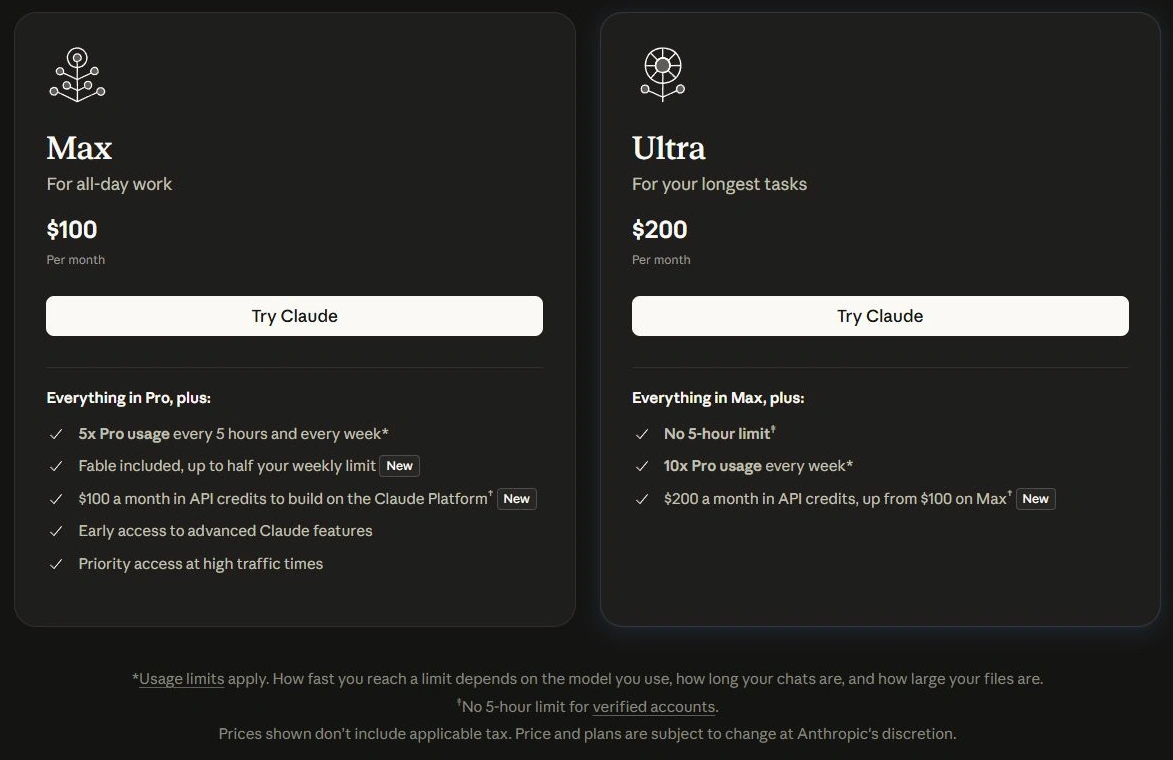
Max lists five-hour and weekly limits at $100; Ultra lists no five-hour limit at $200, with the verified-account condition shown below.
| Monthly web price in USD | Claude coding subscription | ChatGPT subscription with Codex |
|---|---|---|
| $20 | Pro | Plus |
| $100 | Max; five-hour and weekly limits | Pro; no five-hour cap |
| $200 | Ultra; no five-hour cap for verified accounts | Pro; no five-hour cap |
| $500 | No equivalent individual tier listed | Pro; no five-hour cap |
The allowances still need unpacking:
Claude Max provides five times Pro’s usage in both five-hour and weekly windows. Ultra provides ten times Pro’s weekly usage; removing its five-hour cap requires account verification.
Codex local messages and cloud chats share the subscription allowance. Weekly limits can still apply, and model choice, reasoning effort and task size change consumption.
Claude Max includes $100 a month in API credits and Ultra includes $200, subject to eligibility and linking a Console organization. Those credits pay for API work; they do not refill Claude Code’s subscription allowance.
If five-hour pauses are the problem and the budget is $100, Codex Pro has the clearer fit. If you will also use the Claude API, Max’s separate credits may change the value calculation. At $20, switch only when you can name a missing model or workflow feature. API-key sessions have separate usage billing.
Conclusion
Choose based on the action that is slowing you down:
- Move an isolated job into your normal checkout, then select the patch for a commit: start with Codex’s app.
- Run a local model or inspect and modify the client: use Codex CLI.
- Attach a dedicated tool set to a specialist worker, add native model-based hooks or retry from a prompt checkpoint: choose Claude Code for that facet.
For ordinary implementation tasks, both can edit repositories, run commands and delegate work. This comparison supports a workflow choice; it does not rank coding accuracy or speed. Before paying to switch, try the particular control you need on one bounded repository job.
If the missing piece is a different editor environment, the AI coding agents comparison covers other options alongside these two.
Frequently Asked Questions
Which has more native hook handler types?
Claude Code has five. Codex currently executes command and MCP tool handlers, so the difference matters for HTTP, prompt or agent checks.
Can either agent use local models?
Codex CLI supports Ollama and LM Studio through --oss. Claude Code’s official model support stays within Claude.
Which removes the five hour cap for $100?
Codex Pro. Claude Max retains it; verified Ultra accounts remove it at $200. Weekly limits still matter.
Does only Codex support background worktrees?
No. Claude Code also supports background sessions and worktrees. Compare handoff, patch selection and worker configuration instead.