
Can Gemini 4 Neon turn a difficult prompt into something you can actually use? We gave it four very different jobs: interpreting a chart, following a deployment video, building a strict CSV parser and writing a story with tight constraints. Its code survived execution, but a misplaced chart peak showed why plausible answers still deserve a closer look.
In this article, we explore Neon’s features and pricing, then examine four original hands-on tests. We check its accuracy, instruction-following and writing quality to see where it delivers and where you’ll need to step in.
TLDR: Neon delivered working code and followed story constraints, but chart precision and prose quality needed closer review.
What Gemini 4 Neon actually does
Neon is Google's reasoning model for complex coding, knowledge work and scientific tasks. You can supply text, images, video, audio or PDFs and receive text back. That lets one conversation move from inspecting a source to explaining it or writing code around it.
| Documented detail | Gemini 4 Neon |
|---|---|
| API model ID | gemini-4-neon |
| Input types | Text, images, video, audio and PDF |
| Output | Text |
| Shared input and output context | 1,048,576 tokens |
| Default synchronous output cap | 65,536 tokens |
| Reasoning settings | Low, medium, high and xhigh |
| Setting used for this review | Neon High in the Gemini app |
Long decode shares the remaining context budget. The ordinary synchronous cap is still 65,536 tokens, and these small inputs do not test retrieval across a million-token conversation.
Neon also supports function calling, code execution and structured output. Native image and audio generation are unsupported; our visual tests ask it to understand existing material.
How we tested Neon
Neon got one shot at each task, with no follow-up prompts to rescue a mistake. We put its untouched code through 24 independent checks, matched its visual claims against the originals and judged whether its story could do more than obey the rules.
Test 1: Follow a deployment across a video
The first input was a low-contrast, 15-second timelapse of a wheeled vehicle being lowered from a larger structure. The task was to track its changing position while keeping the answer within the visible evidence.
Prompt
Use only the attached video. Do not identify the mission or name the people. Return a three-row table covering the beginning, middle and end, with approximate elapsed
MM:SSranges and the visible change in each range. Explain how the wheeled object changes position relative to the large structure. After the table, answer whether the clip shows an occupied vehicle being driven away, and name one action you cannot confirm from the clip. Keep the entire answer under 150 words. Treat the timestamps as approximate; do not infer real-world speed from the playback. Do not use tools, browsing, account context, prior chats or personal details.
Neon output
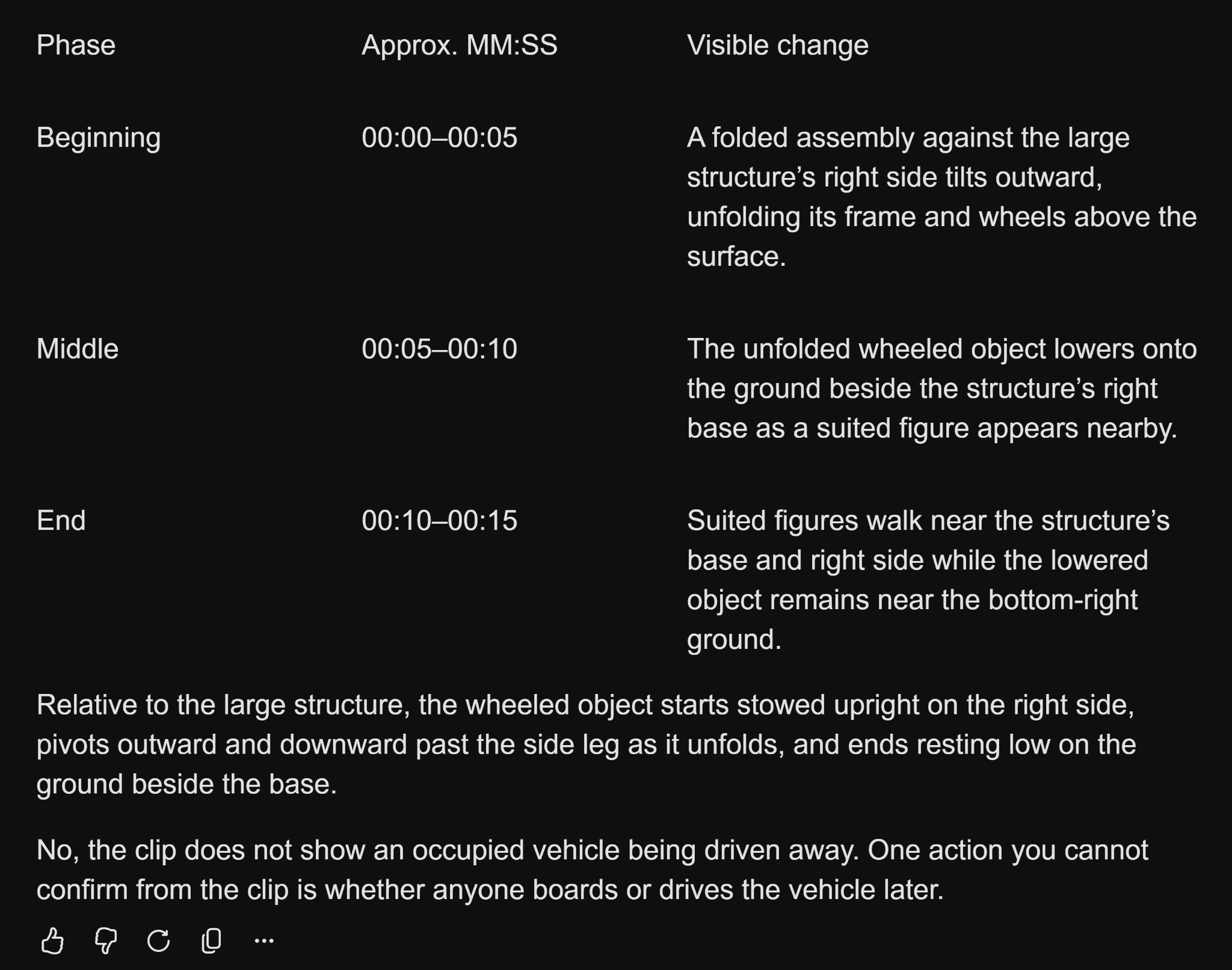
Neon divided the clip into three five-second ranges, correctly describing a folded assembly tilting outward, the wheeled object lowering beside the structure, and suited figures moving nearby while the object remained at the base.
Crucially, Neon noted the video did not show an occupied vehicle being driven away, leaving later boarding unconfirmed. This answer strictly adhered to visible evidence rather than invoking historical narratives. While useful for logging clips, these approximate ranges do not establish frame-accurate deployment speeds.
Result: A useful description of the visible sequence. Long recordings, audio and agentic video navigation remain untested here.
Test 2: Read a chart without inventing its missing context
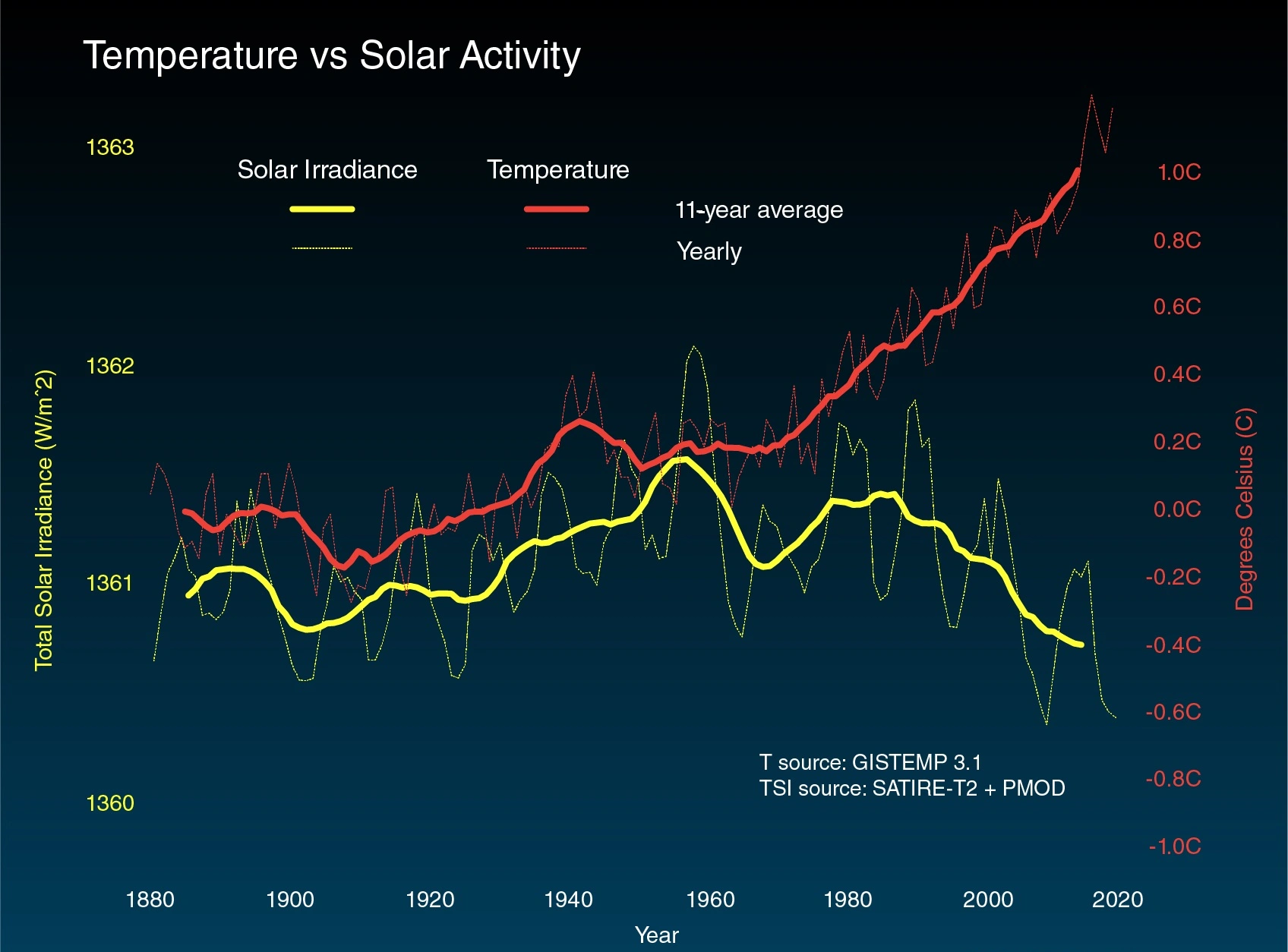
The chart puts temperature and solar irradiance on separate axes, with yearly values and thicker 11-year averages. Neon had to preserve the different units and smoothing, and recognize information that the image never supplies.
Prompt
Use only the attached chart image. Reply in exactly five numbered lines, under 150 words overall. (1) Match each color to its variable, axis and printed unit. (2) Explain the thick and dotted lines. (3) Compare the two thick series from about 1980 to 2010, without claiming causation. (4) Estimate the thick red value near 1980 and near 2000 to the nearest 0.1 on its own axis, explicitly marking the values approximate. (5) Does this image provide an exact annual correlation coefficient or the temperature reference-period years? State what is missing rather than filling it from memory. Do not use tools, browsing, account context, prior chats or personal details.
Neon output
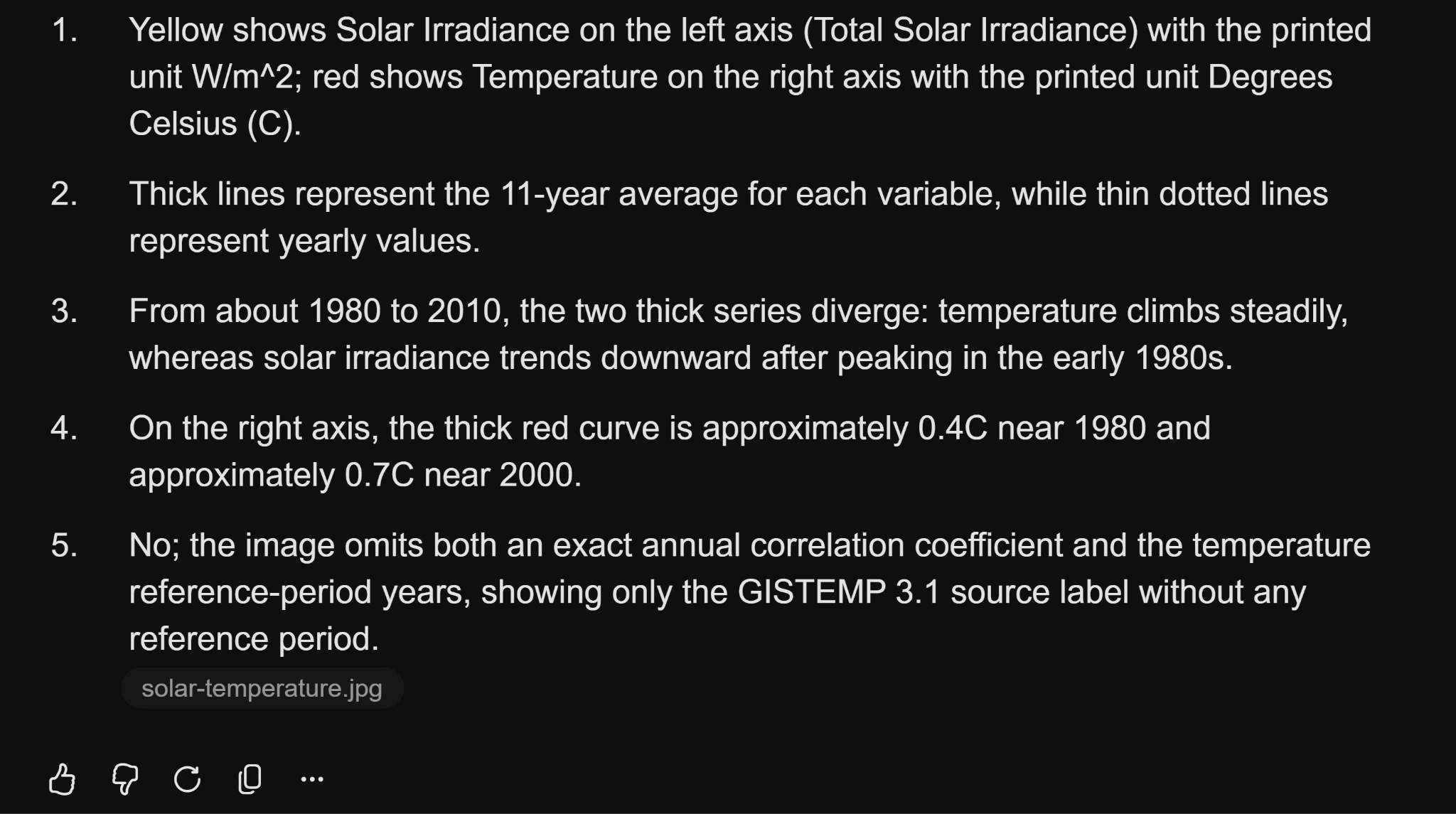
Neon correctly assigned yellow solar irradiance to the left axis in watts per square metre and red temperature to the right axis in degrees Celsius, distinguishing 11-year averages from yearly values. Visual estimates of 0.4 and 0.7 were reasonable.
Remarkably, it acknowledged missing metrics instead of inventing background facts. However, a precision flaw occurred: Neon placed the irradiance peak in the early 1980s, whereas inspection puts the thick curve's local peak near the mid-1980s. The overall trend comparison remained accurate.
Result: A sound reading of the main structure and evidence limits, with a local timing claim to correct. We would retain the briefing and check its dates against the curve.
Test 3: Build a CSV parser that survives awkward input
The coding task asked for a JavaScript parser, with a deliberately exact contract. Commas inside quotes, escaped quotation marks and embedded newlines all needed different handling from ordinary separators. The function also had to reject malformed input rather than quietly produce plausible rows.
Prompt
Return only one JavaScript code block defining function
parseCSV(text), with no imports or explanation. The input is a string. Return rows as arrays of strings, without treating any row as a header. Fields are comma-separated. Outside quoted fields, LF, CRLF and lone CR end a row. A quoted field may start only at the beginning of a field; doubled quotes inside it represent one literal quote. Preserve every character inside a quoted field, including its original newline sequence. After a closing quote, only a comma, a row ending or the end of the input is allowed. Reject an unterminated quoted field, a quote inside an unquoted field, or any other character after a closing quote by throwing SyntaxError. Preserve whitespace and empty fields. Remove at most one U+FEFF character at the very beginning of the input. Empty input, including a BOM by itself, returns[]. A final row ending terminates the current row without adding another row; repeated row endings still represent intervening blank rows as[""]. A trailing comma creates an empty final field.
Neon output
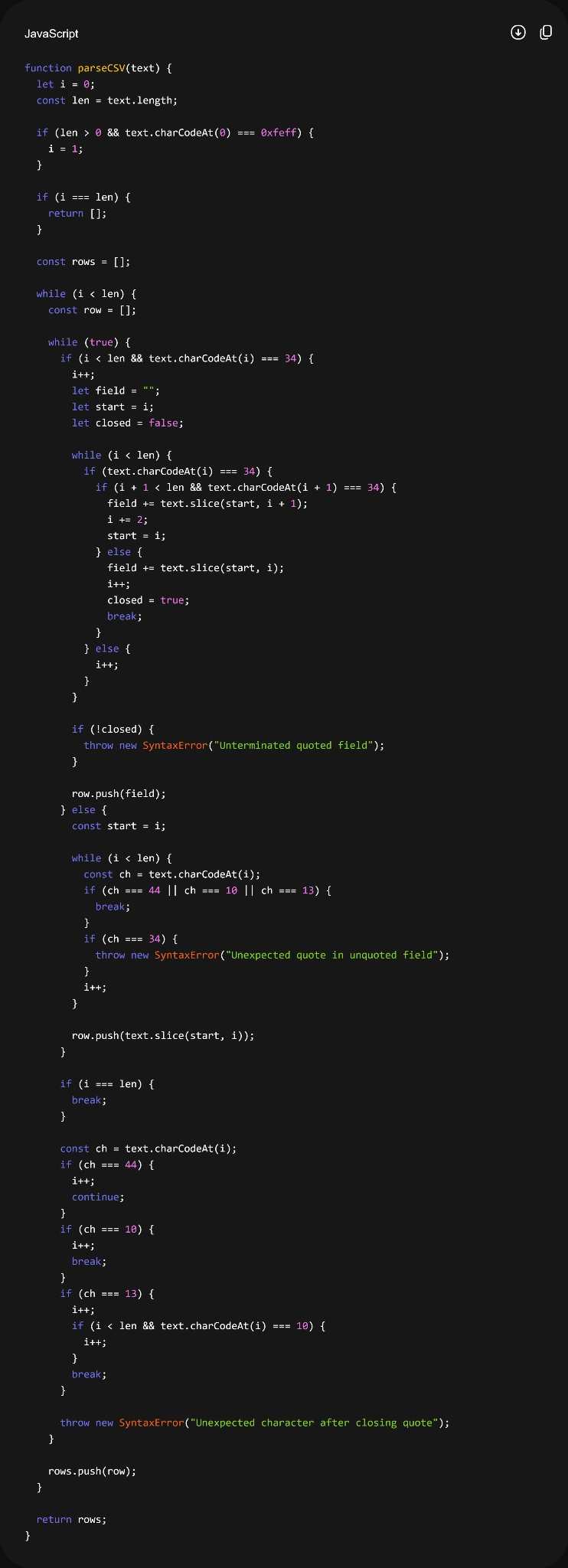
The unchanged function passed all 24 checks, expertly handling leading BOMs, empty inputs, trailing commas, repeated endings, escaped quotes, and mixed line endings. Crucially, it preserved CRLF sequences inside quoted fields while using CRLF as a record separator outside quotes.
The parser properly enforced error handling: quotes in unquoted fields, unterminated fields, or invalid characters after closing quotes raised SyntaxError without trimming whitespace. Testing confirmed the returned arrays matched the contract perfectly without requiring any prompt revisions or repairs.
Result: The strongest objective result in this set. It supports trying Neon on precisely specified functions, with large-file performance, streaming and application integration still to check.
Test 4: Write a story that follows a demanding brief
The final brief asked for a laundromat story with a word range, three paragraphs, a fixed ending, sensory details and a gently funny tone. There was no reference story to reproduce.
Prompt
Write an original microfiction story of 160–190 words in exactly three paragraphs. Use third-person limited narration with no dialogue and no character names. Set the story in a neighborhood laundromat at closing time. An exhausted worker believes a red wool sock has been lost; the sock must actually be recovered before the ending. Include one concrete sound and one concrete smell. Keep the tone gently funny and humane, without a moral or a sales pitch. Make the last sentence exactly: The spare sock is still warm. Return only the story, with no title or commentary.
Neon output
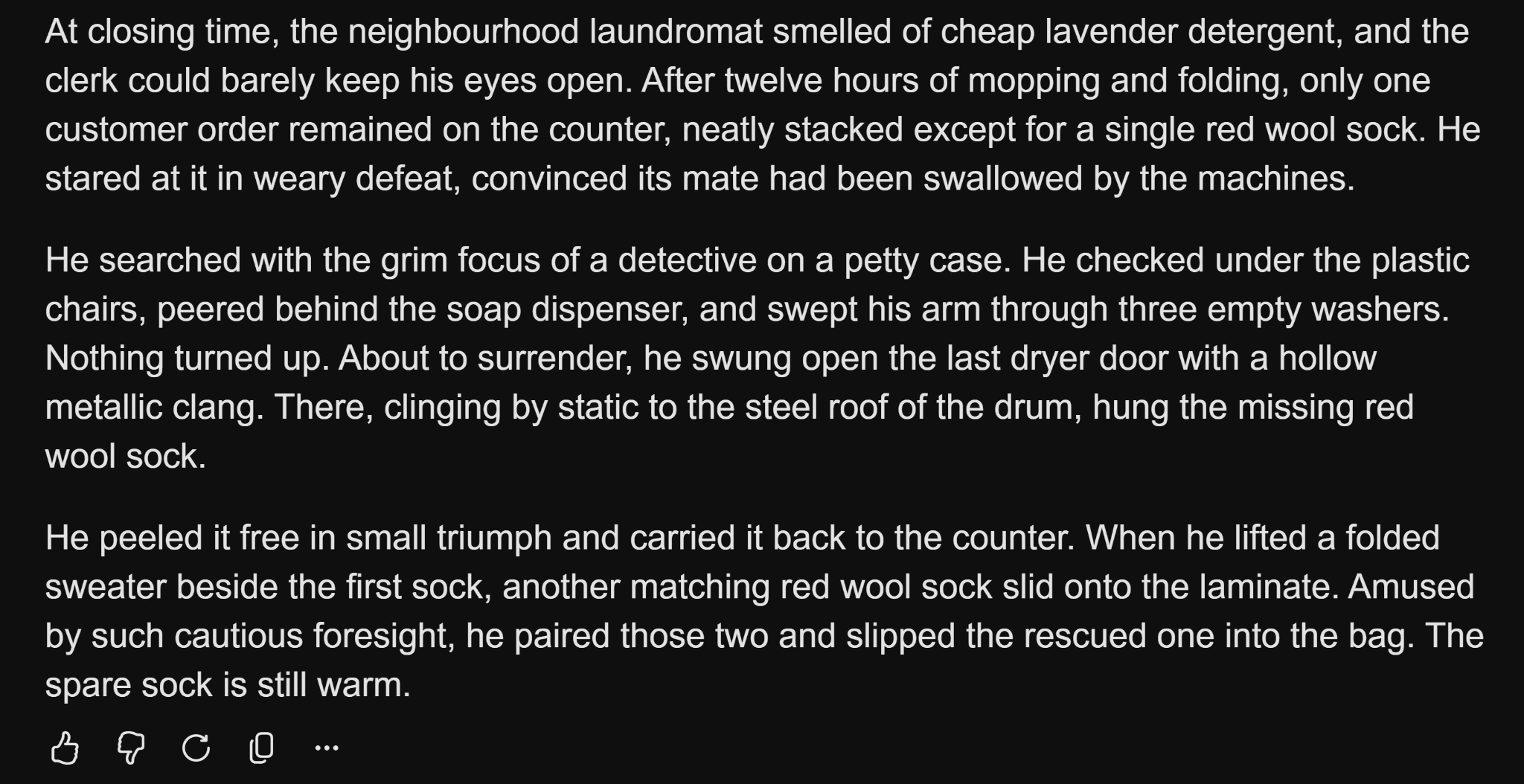
Neon delivered an exact 183-word story in three paragraphs using third-person narration without character names. Sensations like lavender detergent and a metallic dryer clang anchored the scene, while recovering the red sock resolved the core premise nicely. Having the clerk act like a detective created a coherent narrative structure.
Although explaining the punchline slightly blunted the humor, the text successfully balanced narrative creativity with strict prompt compliance, proving Neon can generate solid microfiction under tight formatting boundaries.
Result: Strong instruction following and workable short fiction. The next edit would improve the ending's restraint.
What these four results tell us
| Task | Observed result | What still needed judgment |
|---|---|---|
| Short video | Correct broad deployment sequence and no invented drive-away | Approximate timing and low-contrast details |
| Chart | Correct axes, smoothing, estimates and missing information | Irradiance peak dated too early |
| CSV parser | 24 of 24 checks passed unchanged | Performance and application integration untested |
| Microfiction | 183 words, three paragraphs and required content | One line overexplained the closing joke |
Neon's useful quality here was moving between different input and output forms while keeping much of the task's structure intact. It could inspect a historical visual source, produce executable logic and work within a creative brief. The acceptance check changed with the job.
We did not test business-app navigation, repository changes or a million-token packet. Those workflows need their own checks, whatever the published tool support and context capacity.
Should you try Gemini 4 Neon
Our verdict is positive with those checks attached. Neon handled four substantially different jobs, and its strongest result survived execution. Put it through a small set of your own representative tasks and measure the correction effort before choosing it for regular work.
Frequently Asked Questions
What inputs does Gemini 4 Neon support?
Text, images, video, audio and PDFs. Its native output is text.
How much does the Neon API cost?
Standard rates are $3 per million input tokens and $15 per million output tokens, including thinking.
Was Neon's generated code actually tested?
Yes. The unchanged JavaScript CSV parser passed all 24 independently prepared checks.
Did this review test Neon's full context capacity?
No. These four small tasks did not test retrieval across its million-token context.