

GPT-6.1 Sol vs Claude Sonnet 5.5: two powerful reasoning models, four identical challenges, and a surprisingly close contest. From image reasoning and CSV analysis to Python debugging and professional writing, we put both through practical tests to see which delivers more reliable results. Would either model pull ahead?
For three rounds, neither could. Both delivered correct answers. Then came the simplest task of all: drafting an email. One model introduced a deadline that never existed. In this article, we reveal what happened and which model earned the edge.
TLDR: GPT-6.1 Sol had a narrow edge on email fidelity. The image, CSV and Python checks are tied; Claude Sonnet 5.5 also offers free access.
1. Reading a label without mixing up servings
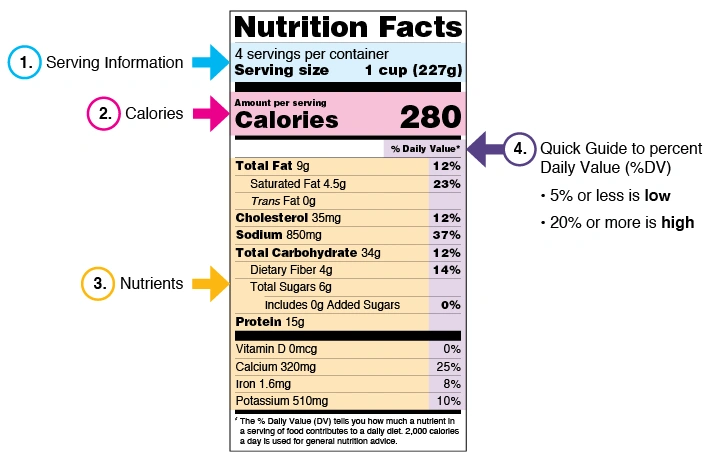
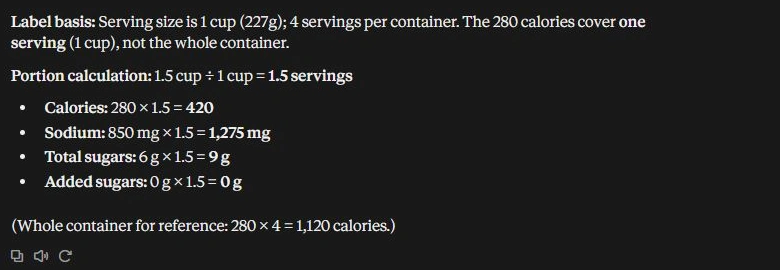
The first job was visual: read a food-label image and calculate a larger portion. A model can copy every visible number and still give the wrong answer if it confuses a serving with the container.
Prompt
Read this label from the attached image only. For a 1.5 cup portion, give the number of servings, calories, sodium, total sugars, and added sugars. Show the portion calculation and say whether the listed calorie amount covers one serving or the whole container. Keep it under 100 words. Give label arithmetic only, no dietary advice. Keep the output anonymous: no names, organisations, contact details, profile information, or personal signature.
GPT-6.1 Sol (Max/Ultra Effort)
Claude Sonnet 5.5 (Max/Ultra Effort)
Observation
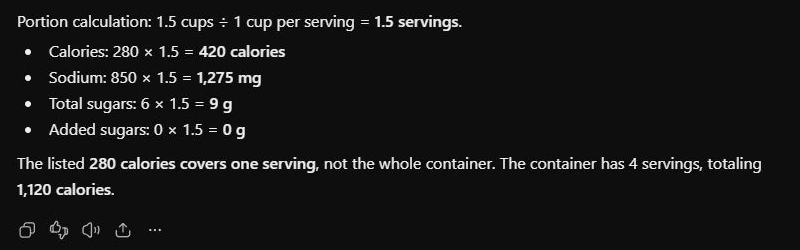
Both read the label correctly, scaled each requested amount by 1.5, and identified the calorie figure as per serving. The independent check matched every requested value. Neither needed a second prompt or slipped into dietary advice.
There's no accuracy winner here. For a clear, structured image like this, both produced a usable answer. That finding doesn't extend to blurred labels, handwriting or complicated charts, which we didn't test.
2. Checking a CSV with an incomplete total
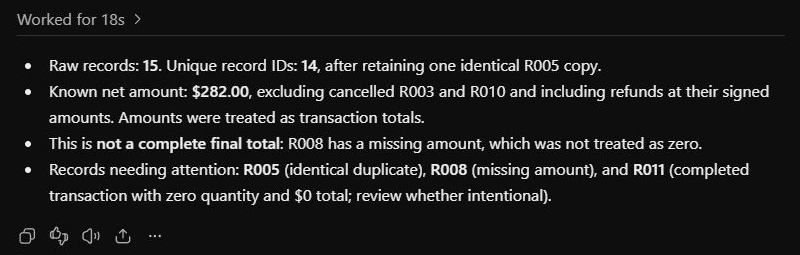
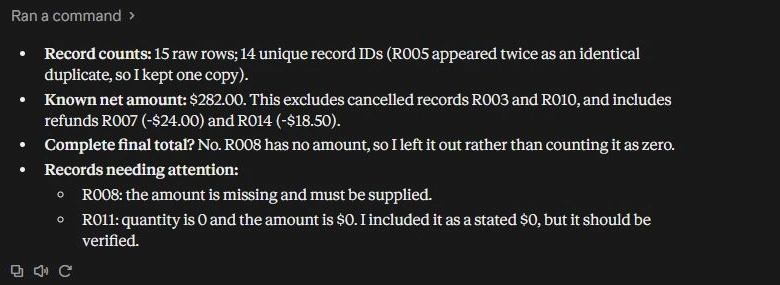
Next came an actual CSV upload, rather than a table pasted into the chat. The workshop-order file had 15 rows, an identical duplicate, cancelled transactions, signed refunds, a genuine zero and a blank amount. The real test was whether either model would turn incomplete data into a confident final total.
Prompt
Check the attached
workshop-orders.csv. Each row is a transaction; amount_usd is its total, not a unit price. Keep one copy of identical duplicate record IDs, exclude cancelled transactions, include refunds at their signed amounts, and never treat a missing amount as zero. In under 120 words, report raw and unique record counts, the known net amount, whether it is a complete final total, and every record ID needing attention. Use only this file. Keep the output anonymous: no names, organisations, contact details, profile information, or personal signature.
GPT-6.1 Sol (Max/Ultra Effort)
Claude Sonnet 5.5 (Max/Ultra Effort)
Observation
Both passed the important checks. Independent decimal arithmetic confirmed the known net amount, and neither treated the blank as zero or called the result complete. Both also preserved the stated zero transaction while asking whether it was intentional. That's a reasonable review flag, not an arithmetic error.
Sol put the duplicate in its attention list; Claude identified it in the opening count. Both made it findable. This file gives us another tie, and evidence of successful CSV handling in these apps. It doesn't establish how either would perform on a large workbook with formulas.
3. Drafting an email without inventing another deadline
Email is where a small addition can create actual work for someone. The notes included confirmed actions, a proposed time change and a fallback that still needed a decision. We asked for a concise draft that kept those categories straight.
Prompt
Turn these rough notes into a ready-to-send internal update email. Give a subject and a body of at most 120 words. Keep it calm and direct. Make decisions, owners, deadlines, and the unresolved question easy to find. Don't invent approval or treat a proposal as a decision. Use only the standalone notes below. Keep the output anonymous: no personal names, organisations, contact details, profile information, or signature.
Notes: The workshop is confirmed for 14 May 2027. Operations will send joining instructions by 12 May. The venue proposed moving the start from 10:00 to 10:30; nobody has approved that change. The facilitator will cut the opening talk to 15 minutes. Registration closes on 11 May. The coordinator must confirm by 10 May whether live captions are available. If captions aren't available, the fallback format still needs a decision.
Return only the email.
GPT-6.1 Sol (Max/Ultra Effort)
Claude Sonnet 5.5 (Max/Ultra Effort)
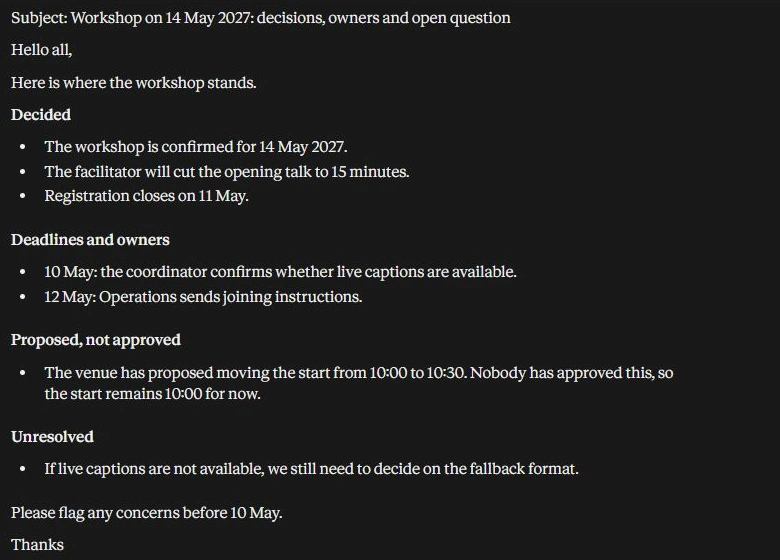
Observation
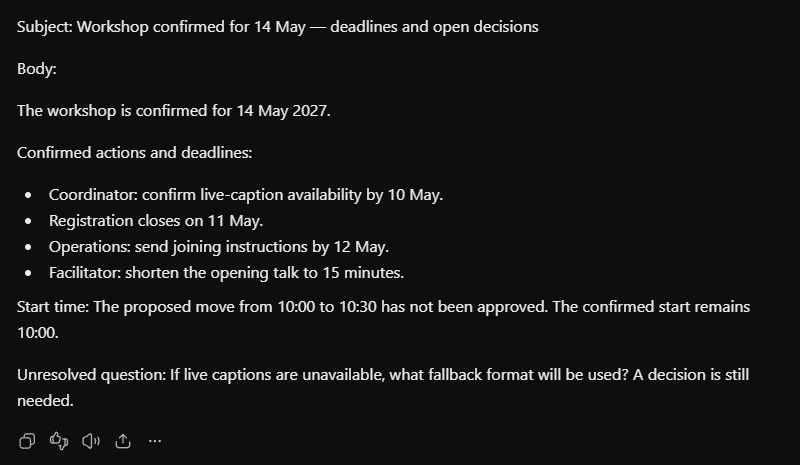
Both stayed under the 120-word body limit and preserved the core decisions, owners and dates. Claude's section labels made it easy to scan. Sol used 75 body words to Claude's 100, excluding its literal Body label. Its draft was more direct, although we'd remove that label before sending.
Claude also added “Please flag any concerns before 10 May.” That sounds helpful, but the notes didn't ask for it. It created another deadline despite the instruction to use only the supplied material. Sol avoided that addition, although calling the existing 10:00 start confirmed was stronger than the notes' exact wording.
We'd choose Sol's draft for this source-bound update. The advantage is fidelity, not a claim that one model always writes better prose. Both outputs still deserve a quick read before anyone hits Send.
4. Fixing photo sorting and running the result
The uploaded Python file used sorted(names, key=str.lower). That ignores case but sorts numbers as text, putting photo10 before photo2. We asked for natural ordering, stable ties, multiple numeric chunks and no changes to the input list.
Prompt
Fix the attached
sort_photos.pyusing only Python's standard library. Sort filenames naturally so photo2 comes before photo10, ignore case, and preserve input order when numeric chunks compare equal, including leading zeros. Handle multiple numeric chunks and empty input, and return a new list without changing the original. Return only the complete replacement code, then one sentence explaining the bug. Keep the output anonymous: no names, organisations, contact details, profile information, or personal signature.
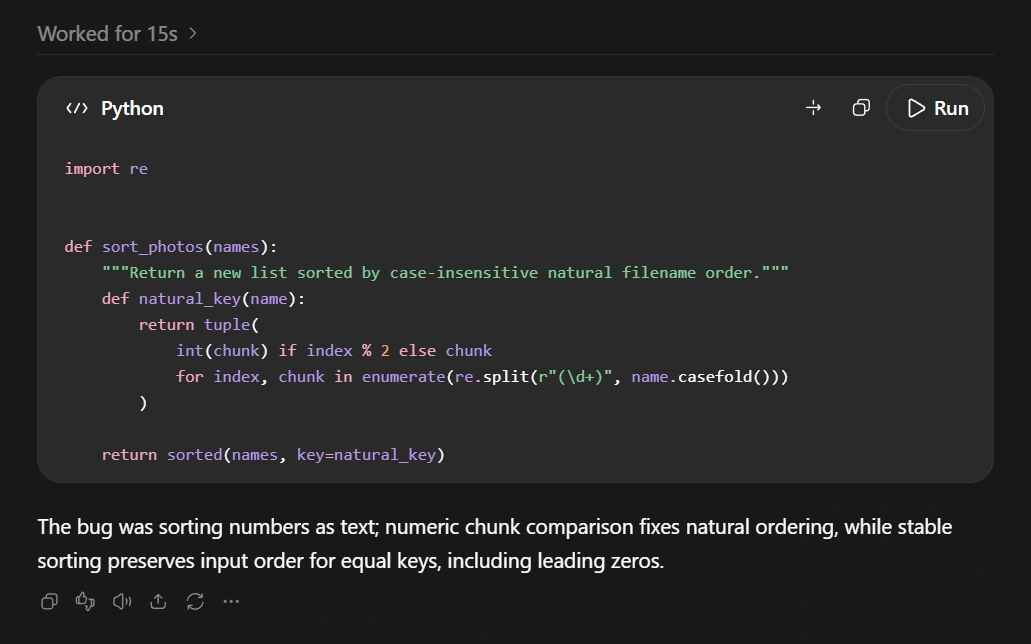
GPT-6.1 Sol (Max/Ultra Effort)
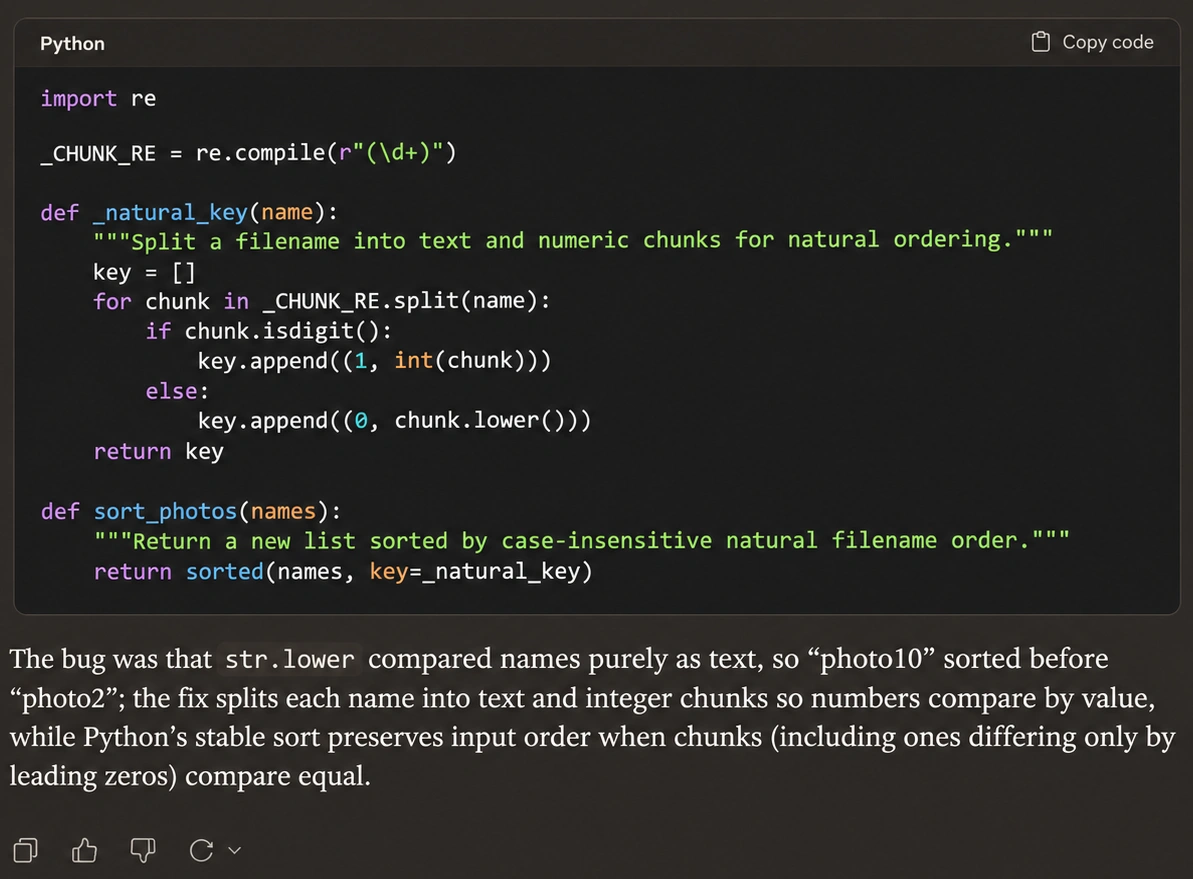
Claude Sonnet 5.5 (Max/Ultra Effort)
Observation
We executed both returned replacements against the same five cases: ordinary numeric ordering, case and leading-zero ties, multiple numeric chunks, empty input and digit-leading filenames. Every case also checked that the original list stayed unchanged and the function returned a new list. Both passed.
Sol's implementation was shorter; Claude separated the key-building logic into an explicit helper. Those are maintainability choices, not evidence of a performance win. For this small repair, either result did the job. A five-case function check doesn't settle a comparison of large coding projects.
How the runs were compared
All four paired tasks were run on 10 November 2026. The files and prompts were identical within each pair, and each task started in a fresh chat. The ten response captures above show all eight model responses; the two coding responses each need a code panel and an explanation panel.
| Comparison setting | GPT-6.1 Sol | Claude Sonnet 5.5 |
|---|---|---|
| Surface | ChatGPT Work on the web | Claude on the web, incognito mode |
| Reasoning effort | Ultra | Max |
| Inputs | PNG image, CSV file, text notes and Python source file | Same image, files and notes |
| Attempts | One per task; no corrective follow-up | One per task; no corrective follow-up |
| Checks | Label arithmetic, CSV reconciliation, source fidelity and five code cases | Same independent checks |
Matching effort names don't equalize computation. These were app-based tests, with each app's available file and code tools. We didn't measure generation speed, token use or cost per completed task. The findings apply to these four inputs, rather than every writing, spreadsheet or coding job.
To reach Sol, open Work in ChatGPT, use the model control below the composer, and select GPT-6.1 Sol. It isn't a model in ordinary Chat. In Claude, open the model menu beside the composer and select Sonnet 5.5; Effort is in the same menu. Availability still depends on your plan and workspace controls.
The accompanying test files contain the exact inputs, prompts, returned code and verification results. For more on Sol's broader capabilities, see our GPT-6.1 Sol review.
Price and context window
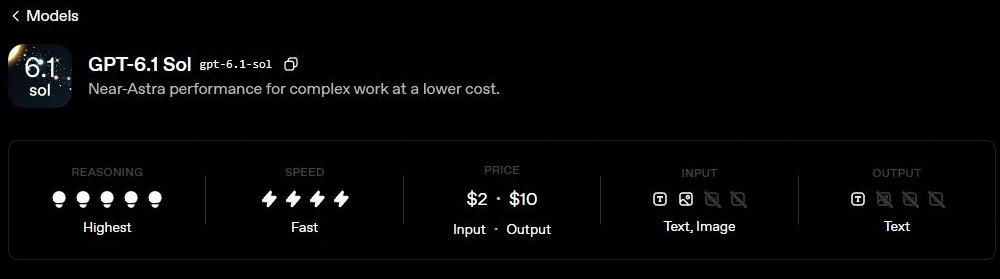
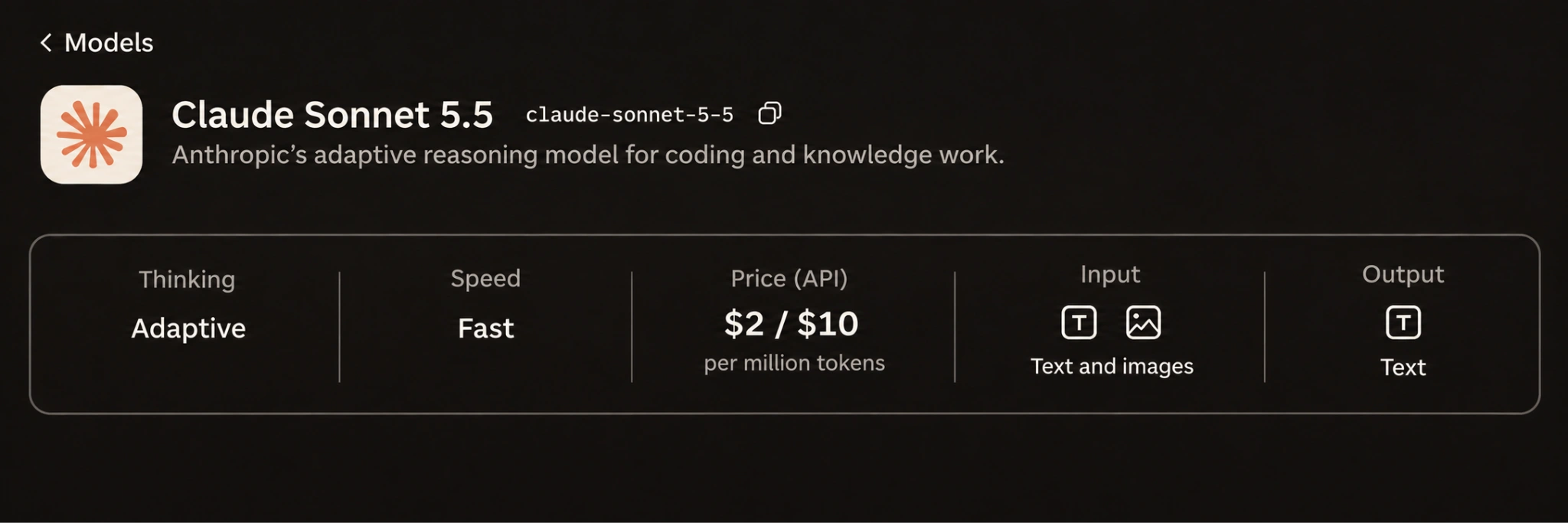
The simplest price difference is at the front door. Claude Free offers Sonnet 5.5 with usage limits. Claude Pro costs $20 monthly, or $200 annually. ChatGPT Plus costs $20 monthly and includes Sol through Work and Codex where available. These are US dollar prices checked on 10 November 2026, before applicable taxes.
Neither subscription buys unlimited work. Conversation length, files, tools and effort affect usage. ChatGPT Work and Codex share a usage pool; Claude's chat and coding surfaces also share allowances. Check your plan's current limits rather than treating a subscription price as a fixed number of completed tasks.
| Specification | GPT-6.1 Sol | Claude Sonnet 5.5 |
|---|---|---|
| Standard API input per million tokens | $2 | $2 |
| Standard API output per million tokens | $10 | $10 |
| API context window | 1.05 million tokens | 1 million tokens |
| App context window | 500,000 tokens by default in Work and Codex | 1 million tokens on paid Claude plans |
Matching standard token rates don't guarantee the same bill. Output length, reasoning, caching and tools can change what a completed task costs. We didn't meter API costs in these app tests.
Sol's API applies a surcharge above 272,000 input tokens: the full request's input and cache rates become twice standard, and its output rate becomes 1.5 times standard. Sonnet 5.5 offers its full API context at standard token rates.
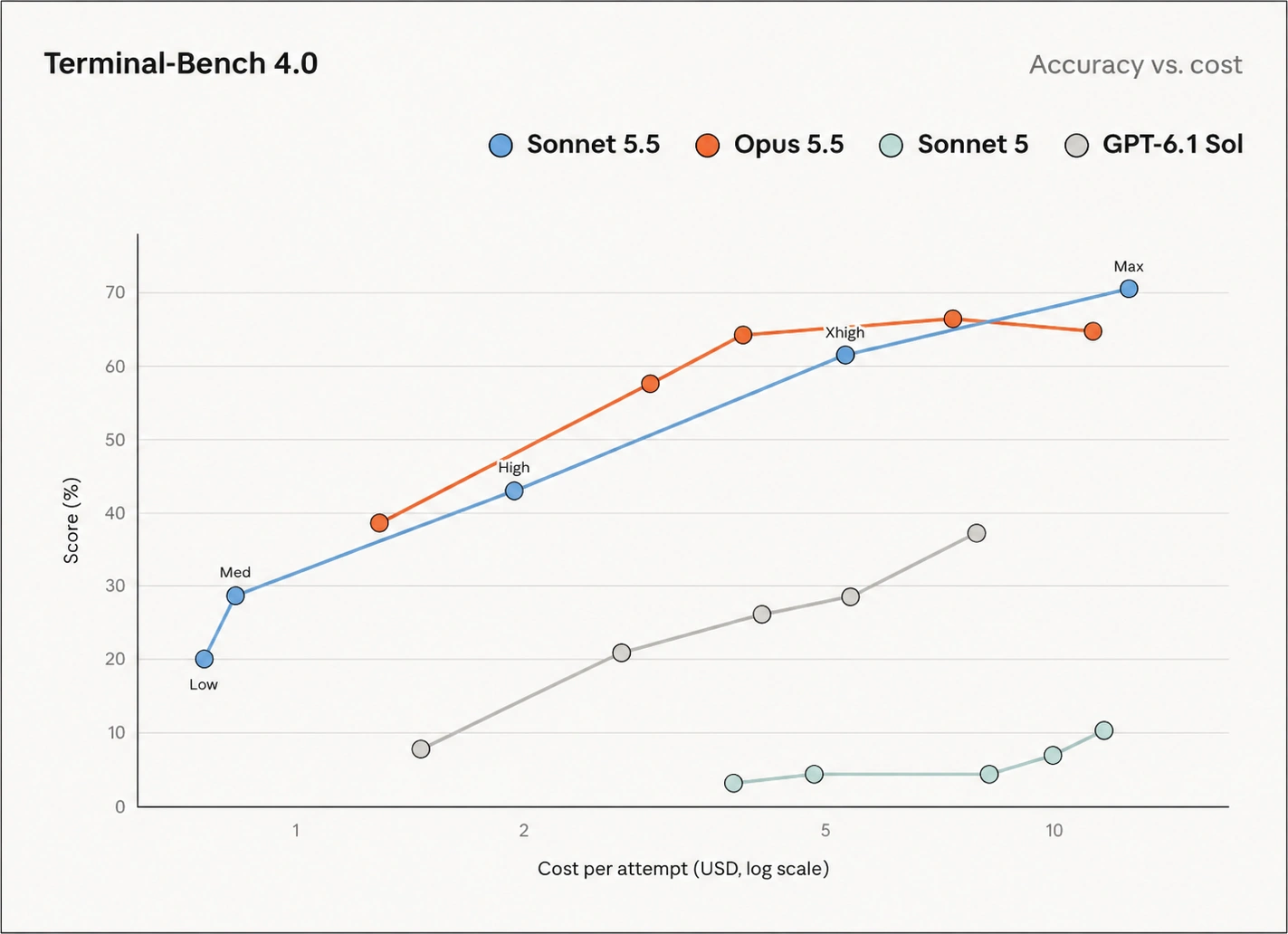
The app capacities in the table are separate from API limits. Sol's subscription usage has no API-style long-context surcharge. Context is how much material fits in the working window, not a guarantee that every detail will be used correctly. Our short tests didn't assess long-context accuracy. For the wider Claude feature set, our Sonnet 5.5 review is a useful next stop.
Frequently Asked Questions
Which model won these tests?
Sol edged the email task; the image, CSV and Python checks tied.
Can I use them for free?
Sonnet 5.5 is available on Claude Free. Sol requires eligible paid Work or Codex access, or billed API use.
Can both models read images?
Yes. Both accept image inputs; our label test checked extraction and portion arithmetic.
Which is cheaper through the API?
Standard rates match: $2 input and $10 output per million tokens. Context, caching, reasoning and tools affect actual costs.