

A good local coding model should earn its place on your machine. It needs to fix bugs, explain unfamiliar code, and leave enough memory for your editor to stay usable. In 2026, you have solid options for that, from compact models for everyday laptops to coding specialists for larger workstations. These five cover different budgets and workflows, with the actual downloads and commands you need to get started. Pick the model your hardware can comfortably run, then test it on your own code.
TLDR: Start with Qwen3.8-27B on a capable machine (for coding). For in general tasks, use Gemma 4-12B.
| Model | Ollama download | Suggested starting hardware |
|---|---|---|
| 1. Qwen3.8-27B | 18GB | 24GB GPU VRAM / 32GB Mac memory |
| 2. Gemma 4 12B | 7.6GB | 12GB GPU VRAM / 16GB Mac memory |
| 3. gpt-oss-20b | 14GB | 24GB GPU VRAM / 24GB Mac memory |
| 4. Devstral Small 2 | 15GB | 24GB GPU VRAM / 32GB Mac memory |
| 5. Qwen3-Coder-Next | 52GB | 64GB GPU VRAM / 96GB Mac memory |
GPU VRAM and Mac unified memory are different budgets.
1. Qwen3.8-27B
Qwen3.8-27B is an ideal default for local coding on capable hardware. It excels at debugging, project explanation, and UI troubleshooting from screenshots.
It supports quick questions and multi-file agentic workflows. Reasoning is enabled by default, but effort can be lowered for faster responses.
The download is ~18GB. We recommend at least 32GB Mac memory or a 24GB GPU to run it smoothly.
ollama run qwen3.8:27b
Try this: Qwen3.8-27B
2. Gemma 4 12B
Gemma 4 12B is built for fast local iteration on constrained hardware, making it a great everyday choice for standard 16GB laptops. Its lightweight 7.6GB download leaves plenty of system memory free for your IDE, browser tabs, and local dev servers without triggering aggressive swap usage.
It handles everyday coding tasks well, including writing unit tests, refactoring functions, and parsing UI mockups or error screenshots. While it requires clear prompts for complex logic, its swift generation speed keeps your coding flow uninterrupted during inline autocompletion and short conversational Q&A.
ollama run gemma4:12b
Try this: Gemma 4 12B
3. gpt-oss-20b
gpt-oss-20b specializes in deep logic tracing, structured tool execution, and multi-step bug isolation. It excels at breaking down complex stack traces, identifying root causes across interdependent modules, and generating well-documented fixes before modifying any code.
The ~14GB download runs smoothly on 24GB+ workstations and dedicated GPUs. Note that it is text-only, so it best fits backend logic work, CLI tool integration, and automated test suite creation rather than UI image analysis.
ollama run gpt-oss:20b
Try this: gpt-oss-20b
4. Devstral Small 2
Devstral Small 2 is a 24B parameter specialist engineered specifically for repository-scale operations, automated refactoring, and agentic code modification. It shines when navigating full directory trees, modifying multiple files in a single pass, and maintaining project-wide consistency.
At ~15GB, it supports native vision inputs for checking design implementations and runs comfortably on 24GB GPUs or 32GB Unified Memory Macs.
When paired with local coding agents like OpenCode or Cline, it handles end-to-end feature implementations with precise function calling and minimal hallucination.
ollama run devstral-small-2:24b
Try this: Devstral Small 2
5. Qwen3-Coder-Next
Qwen3-Coder-Next is designed for high-end workstation setups and demanding enterprise codebases. Utilizing an efficient Mixture-of-Experts architecture with 80B total parameters (3B active), it delivers top-tier performance for deep context understanding and autonomous multi-file development.
Its ~52GB footprint requires serious hardware—such as 64GB GPU VRAM or 96GB Mac Unified Memory—to run at practical speeds.
You can install qwen3-coder next using Ollama:
ollama run qwen3-coder-next
Try this: Qwen3-Coder-Next
Get a local coding setup running
Install the current Ollama app, keep it running, and enter the command under your chosen model in a terminal. The first run downloads the weights. You can then ask code questions directly.
For repository edits, use OpenCode with Ollama. Open a terminal in your project folder, then run:
ollama launch opencode --model qwen3.8:27b
Set the Ollama app’s context slider to at least 64K for if you're using Opencode, as its integration guide requires. This uses more memory than short chats. If it won’t fit, choose a smaller model.
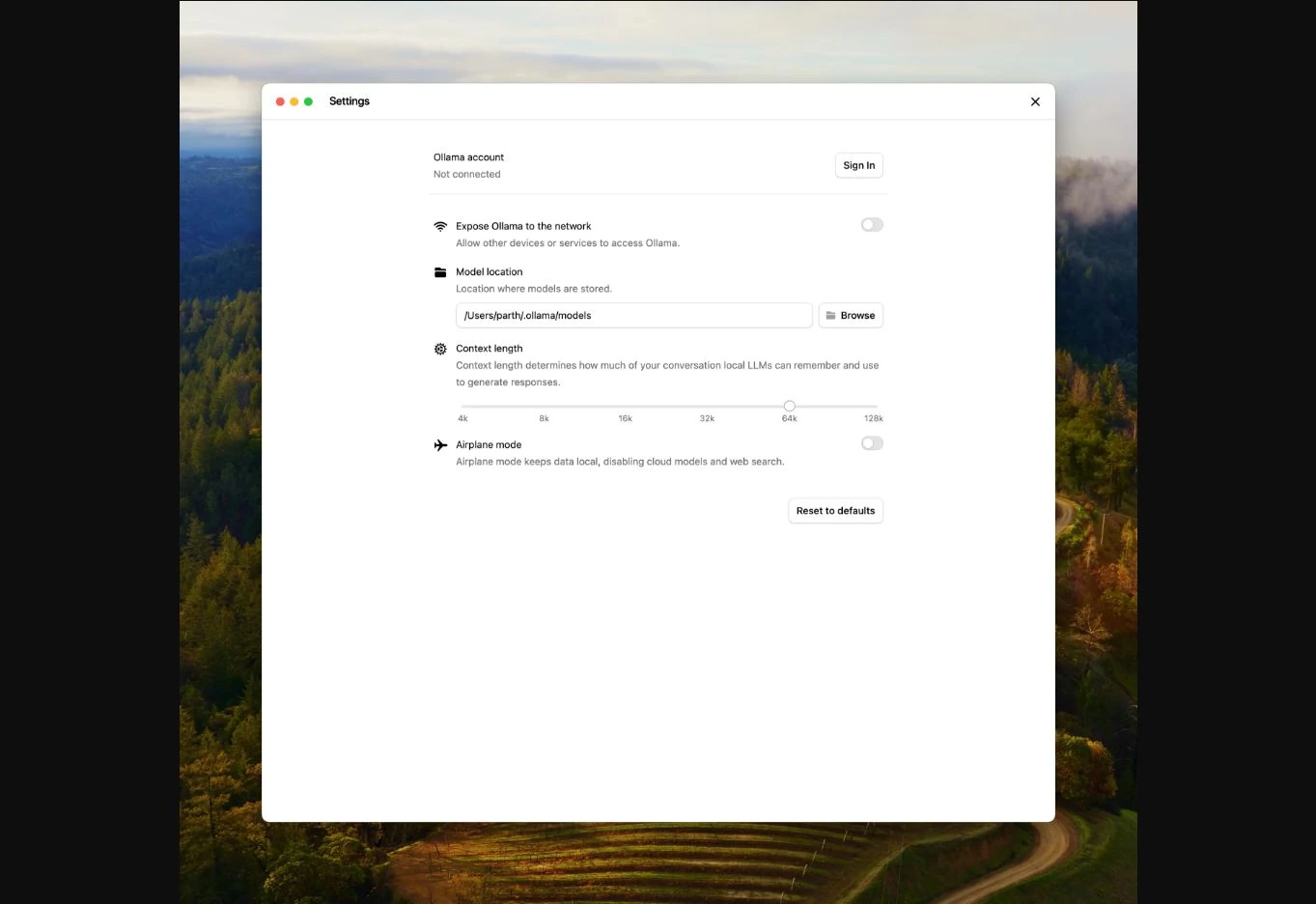
Run ollama ps in another terminal to check the loaded context and CPU/GPU split. CPU offloading can help a model fit, but usually slows it down. Use a downloaded local tag; tags ending in -cloud run remotely.
Start with one failing test and ask for the smallest fix. Compare the patch, test result, and time taken. That tells you more about your setup than downloading every model on this list.
Frequently Asked Questions
What is the best local LLM for coding in 2026?
Qwen3.8-27B is our starting pick for capable hardware. Gemma 4 12B is the more approachable option for a 16GB machine.
Can I code with a local model offline?
Yes, after downloading the model and tools. Package installs, web searches, and other network-dependent actions still need internet access.
Does local mean my code always stays private?
Local inference keeps prompts on your machine. Check the agent’s provider, plugins, telemetry, and external tools before using sensitive code.