

Imagine a world where you, as a businessman, have hired the smartest research assistant in the world. An assistant who has an enormous amount of knowledge. An assistant who has read every book, memorized every Wikipedia page, and can write brilliant drafts in seconds.
But we have a catch. The catch is, your assistant is locked inside a room with no access to the outside world. This means if you ask the assistant what the weather is in Tokyo, the assistant can only make a guess.
If you ask them to email a presentation to your client, they can only write a draft but cannot actually send it to your client's email.
And this used to be the exact same situation for an LLM in the past. They were the smartest thing that existed, but were completely isolated from the outside world. LLMs were brilliant at generating text, but that's the only thing they could do.
They couldn't perform any action. And honestly, that was a big limitation.
This all changed as soon as Function Calling (also known as Tool Use) came into the picture. This acts as the foundational block of Agentic AI.
In simple words, it gives LLMs the ability to perform actions such as querying a database, browsing the internet, running Python code, and much more. Let's break this down and understand how it works.
What is Function Calling?
I would say the name "Function Calling" might be a bit misleading to any beginner. This is because the LLM does not execute code or call functions itself.
Instead, I would define Function Calling as a conversation between the AI and the software you are building. It is a way for your application to describe its available tools to the AI, so the AI can determine when to use them.
Let's understand this shift:
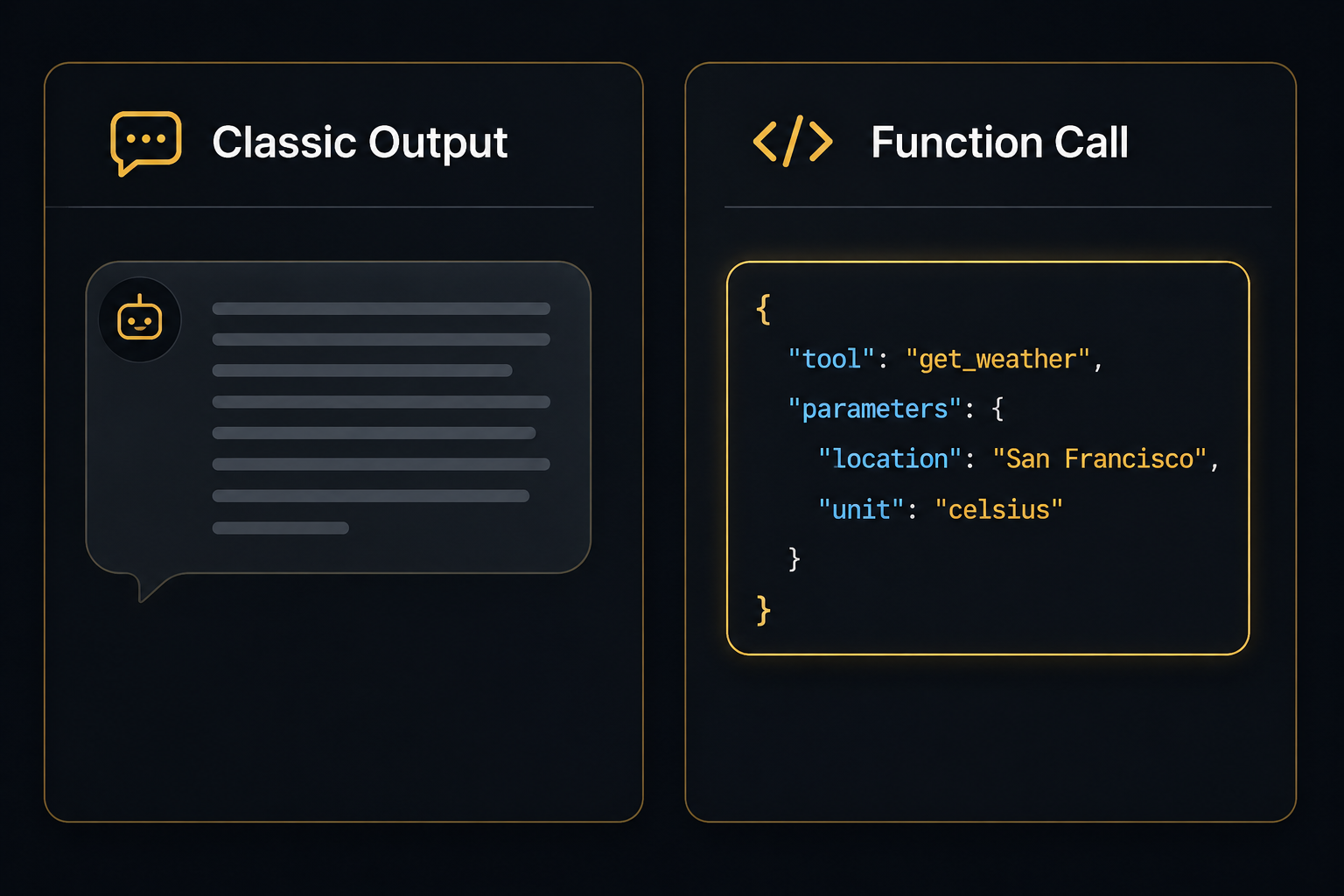
The Old Way (Text-in, Text-out): Here, you ask a question, the LLM reads its training data, and it replies with a paragraph of text answering your question.
The New Way (Text-in, JSON-out): You ask a question, and you also provide the LLM a list of available tools it can use. If the LLM thinks that it needs to use a tool to answer your question, it pauses. Instead of replying with text, it replies with a structured piece of data (a JSON object) that contains the exact arguments required to execute the tool.
Your application then takes that JSON, runs the code, and sends the result back to the LLM so it can finish its thinking and show the result.
The Step-by-Step Flow
To get a clear picture of how this works, let's walk through a real-world scenario. Suppose you're having a chat with an AI assistant and you ask: "What is the weather in New York right now, and should I wear a jacket?"
Since the LLM has a cutoff date for its training data, it may not know today's weather. Here is the loop that runs under the hood in milliseconds:
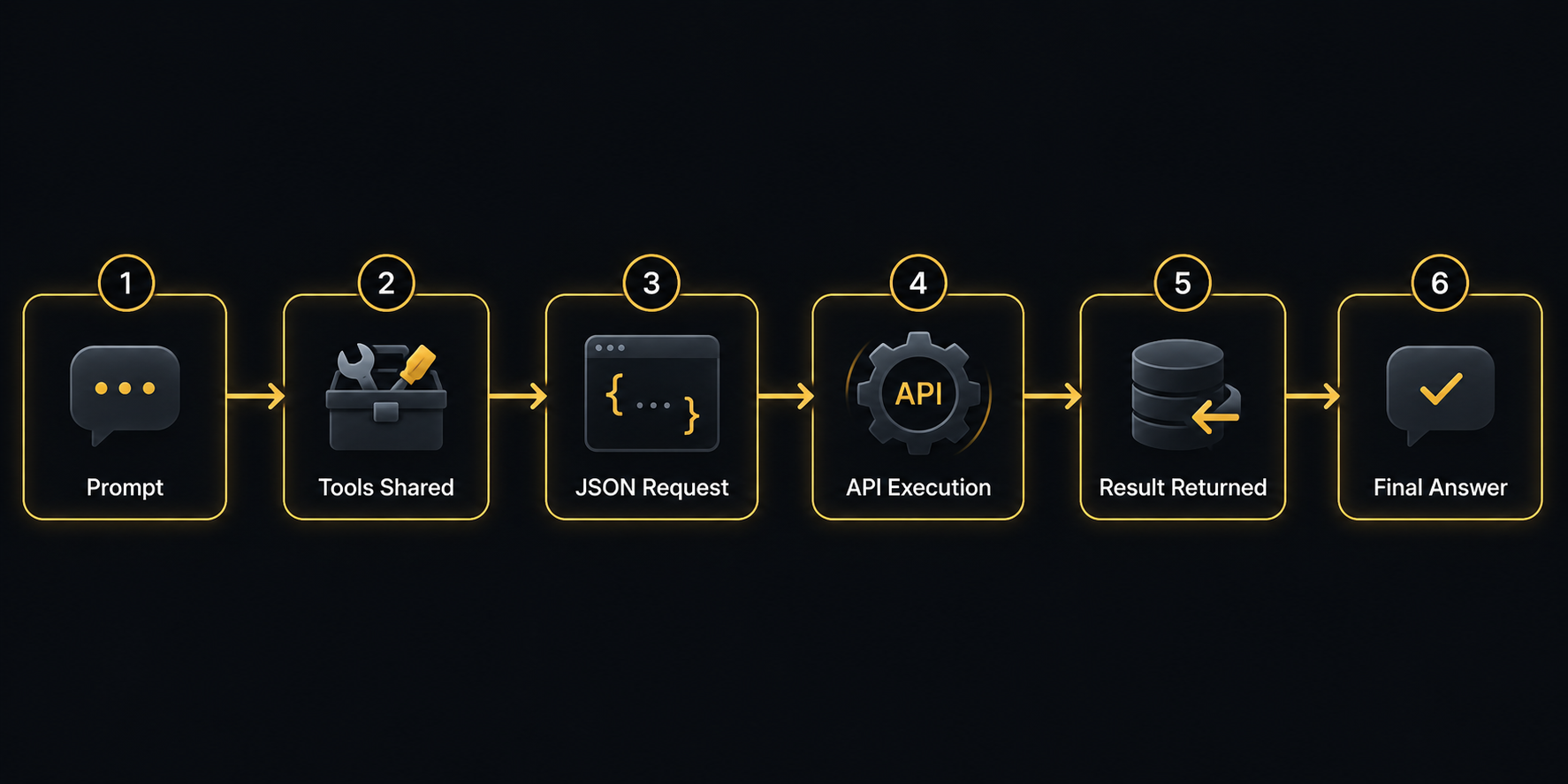
Setup: When you send your prompt to the LLM, your application behind the scenes sends a list of available tools alongside it. It's like telling the AI: "Hey, I do have a function called get_current_weather(location)."
The Decision: The LLM reads your prompt. It realizes it cannot answer this question using its trained knowledge. It decides to use the tool.
The JSON Output: Instead of saying "I don't know," the LLM outputs a strictly formatted JSON request: {"tool": "get_current_weather", "location": "New York"}.
The Execution: The LLM stops generating text. Your Python/Node application intercepts that JSON, extracts "New York," and queries a live weather API (like OpenWeatherMap).
Return: The weather API returns 28°C, Humid. Your application sends this data back to the LLM, saying: "Here is what the tool found."
The Final Answer: The LLM takes this new context and generates human-readable text: "It is currently 28°C and humid in New York. You definitely do not need a jacket today!"
Now, all this happens in milliseconds. To the user, it looks like a single smart response. But behind the scenes, the AI paused, asked for help, and produced the output.
The Strength of Function Calling
By allowing models to output reliable, structured data, developers can build advanced applications that go far beyond simple chatbots. Function Calling provides the following capabilities:
| Capability | What It Does | Example |
|---|---|---|
| Data Fetching | Pulls real-time or private information. | Querying an SQL database to answer: "How many new users signed up today?" |
| Action Taking | Modifies the application states. | Calling a Slack API to send a message. |
| Structured Extraction | Ensures the LLM outputs data perfectly. | Reading a messy PDF invoice and outputting a clean JSON object with vendor_name, amount, and date. |
Model Context Protocol (MCP)
Even though tools had such amazing capabilities, there was one big limitation holding them back. Every AI model, such as OpenAI, Anthropic, Gemini, and every tool provider, had slightly different ways of formatting function calls.
Meaning, if you wanted your AI to talk to Slack, GitHub, and a local database, you had to write custom integration code for every single one. This was known as the "N x M" problem.
In late 2024, the industry was introduced to Model Context Protocol (MCP), which solved this problem.
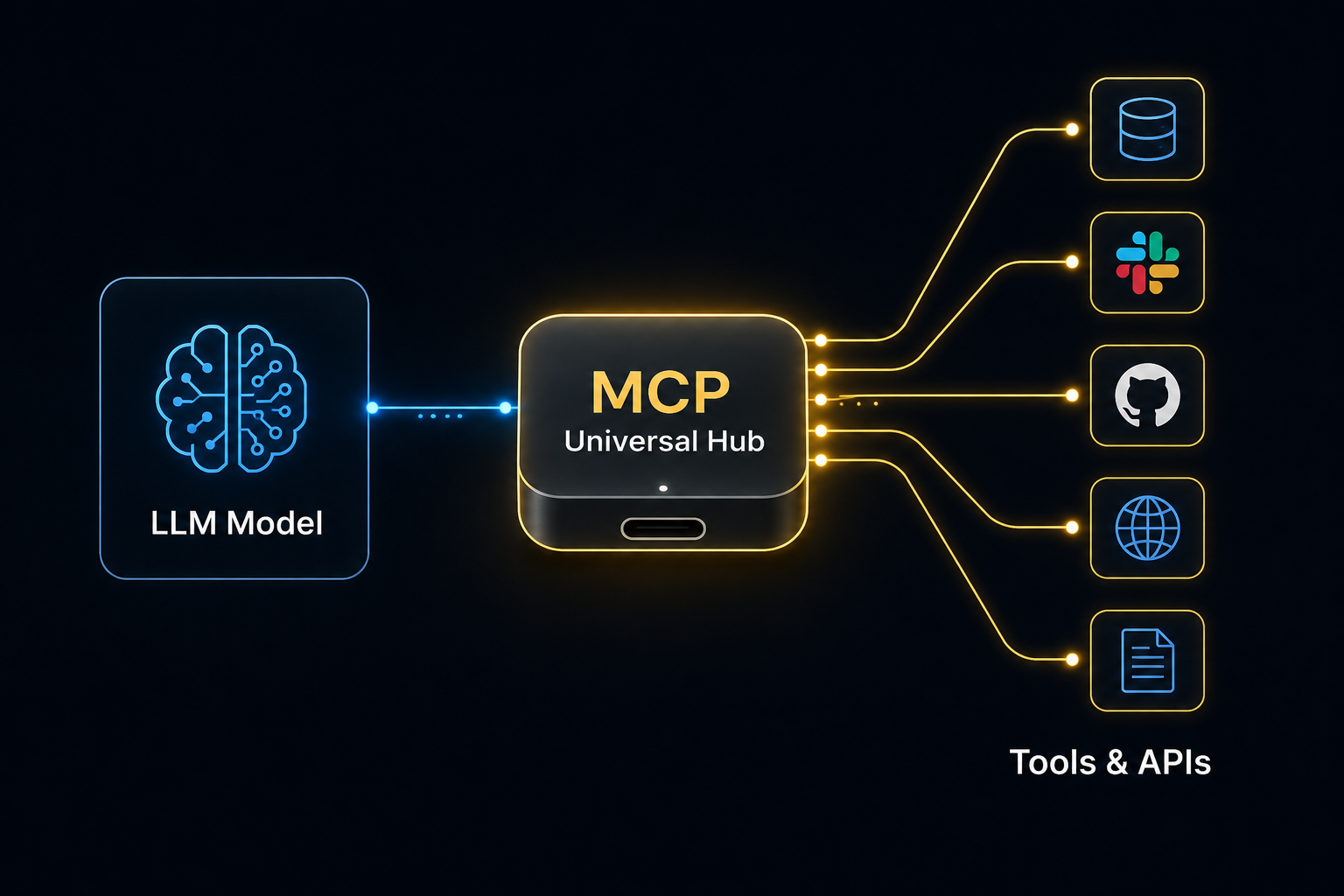
MCP is like the USB-C port for AI.
In simple words, MCP is an open standard that standardizes the connection between LLMs and external data sources. So now the need for hard-coding a specific API integration into your LLM prompt has been eliminated. You only need to connect your LLM to an MCP Server.
If an AI agent needs to search the web, query a file system, or pull a database record, it simply uses the universal MCP standard. This helps developers easily swap AI models or add hundreds of new tools to an application without rewriting the entire codebase.
Conclusion
Function Calling changed the landscape of Large Language Models by transforming them into active digital workers.
By describing actions with JSON schemas and using standards like the Model Context Protocol (MCP), developers can build AI agents that can easily use real-world tools, APIs, and data sources.
Frequently Asked Questions
What is Parallel Function Calling?
Parallel function calling is a way for an AI model to generate multiple tool requests at the same time.
For example, if you ask, "What is the weather in Tokyo, London, and New York?" the model won't be checking them one by one. It outputs three separate function calls simultaneously, improving the response time.
How do I stop the AI from hallucinating tool arguments?
This used to be a problem where the models would sometimes create arguments that your function didn't accept.
But modern APIs now support Structured Outputs. Meaning, by passing a strict true parameter, you force the LLM to accurately match your exact JSON schema,
Is Function Calling the same as RAG?
No, but they work perfectly together. Retrieval-Augmented Generation (RAG) is an architecture for finding relevant documents.
Function Calling is what allows the AI to trigger a RAG search. When the AI needs information, it calls the appropriate function, and the RAG system retrieves the relevant data.