

GPT-6.1 Terra and GPT-6.1 Sol are designed for practical work, but choosing between them involves more than comparing their prices. Terra has lower standard token rates, while differences in reasoning settings, tool use, and output length can affect which model is better suited to a task.
To compare them, I tested both models at Medium effort across four tasks: reading a chart, reconciling an orders CSV, repairing a Python function, and drafting a client email from a Word brief. Here I had compare their results, published benchmarks, and pricing to help you choose between them.
TLDR: Terra is ideal for bounded tasks, having passed all tests reliably and costing half as much as Sol. However, Sol remains better suited for complex coding and analysis due to higher benchmark scores.
What Terra and Sol actually do
GPT-6.1 Terra launched on October 26, 2026, with a focus on visual reasoning, computer use, and natural writing. GPT-6.1 Sol is the broader model, designed for complex coding and professional work. Both accept text and images, generate text, and can use tools when supported by the application.
Both models offer a 1M-token context window and up to 128k output tokens. The choice, then, comes down to their performance and cost rather than context capacity. A large context window also doesn’t guarantee that either model will interpret every detail correctly.
| Capability | GPT-6.1 Terra | GPT-6.1 Sol |
|---|---|---|
| Native input | Text and images | Text and images |
| Native output | Text | Text |
| Context window | 1,050,000 tokens | 1,050,000 tokens |
| Maximum output | 128,000 tokens | 128,000 tokens |
| Default reasoning | Medium | Medium |
| Reasoning options | None through Max | Low through Max |
Reasoning can be disabled in GPT-6.1 Terra
The application matters here. Browsing, executing code, generating an image, or clicking through software involves the tools around the model. Those actions are not all native output formats. Our guide to how LLMs connect to external tools explains that distinction.
How we ran the four hands on tests
Both models were tested in Work, using identical prompts across four formats (PNG, CSV, Python, and DOCX) at Medium effort. Each task ran in a fresh conversation without browsing or tools, and responses were checked directly against expected results before any follow-up.
Task 1: Reading a comparison chart
We attached the same comparison chart to each model and asked it to rank the five configurations, calculate a score gap, and challenge an unsupported purchasing claim. The chart labels some configurations as Max; Terra and Sol were both set to Medium while reading it.
Prompt
Read the attached chart and help me choose what to investigate next. Use only the image; do not browse or use any other apps.

In no more than 160 words:
1. List the five agent and model configurations, including the reasoning setting when shown, with their scores from highest to lowest.
2. Calculate the difference between Sol and Terra in index points and as a percentage of Terra's score. Keep those two units distinct.
3. A colleague says this proves Sol is cheaper and will fix 12.5% more of our bugs. Explain whether the chart supports that claim and name the missing evidence.

Do not guess a benchmark name, price, speed, or task success rate that is not visible in the image.
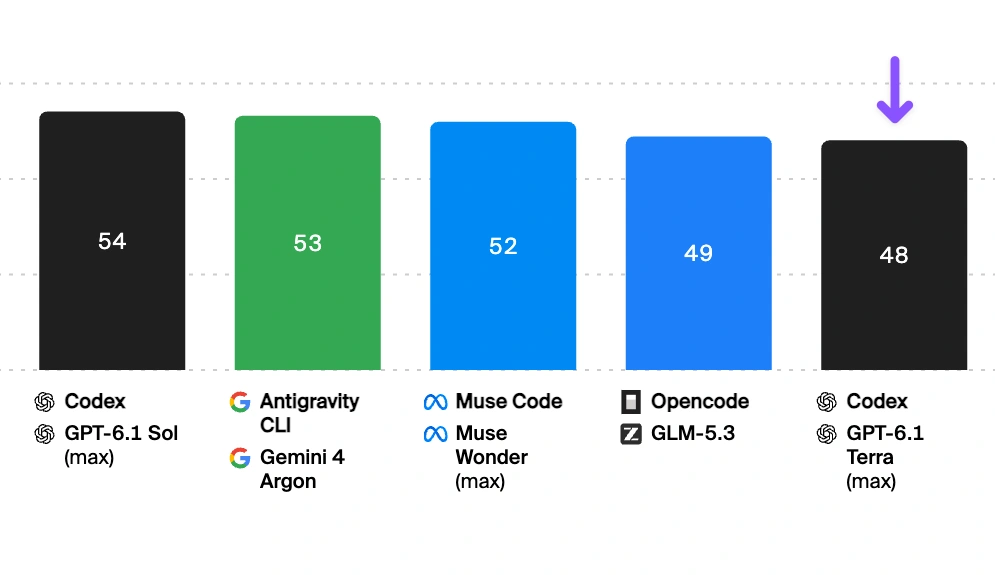
The PNG supplied to both models. The visible configurations, reasoning labels and scores were the information available for this task.
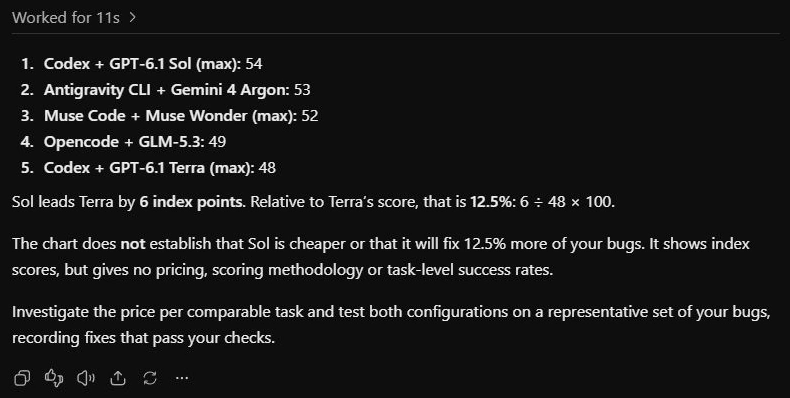
Terra output
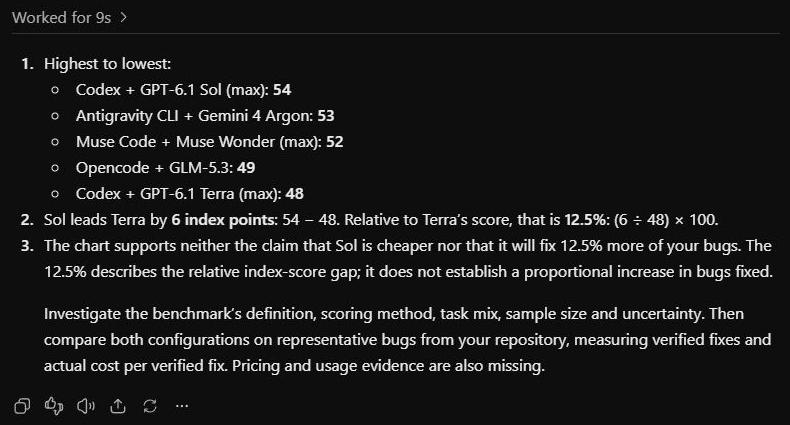
Sol output
Observation
Both listed the five configurations correctly in descending order, with scores of 54, 53, 52, 49 and 48. They calculated the Sol-Terra gap as six index points, or 12.5 percent of Terra's score. Both rejected the claims that the chart proved Sol was cheaper or would fix 12.5 percent more of our bugs.
Terra used 110 words and Sol used 138, both within the 160-word limit. Sol identified more methodological questions, including sample size and uncertainty; Terra reached the required answer more briefly. Both passed our checks, so this task gives us no clear capability winner.
Test 2: Reconciling an orders CSV
We uploaded an orders CSV containing paid, pending and cancelled orders, one repeated row, a EUR order, a blank refund and a refund larger than the sale. The job was to produce a usable finance summary while keeping those exceptions out of the totals.
Prompt
Reconcile the attached orders.csv for my finance update. Read the actual file; do not browse or use other apps.

Count only paid USD orders. Remove exact duplicate rows before counting. Treat a blank refund as zero. Exclude any row where the refund exceeds gross and flag that order for review. Net revenue is gross minus refund. Do not convert EUR or infer missing exchange rates.

Give one compact JSON object containing valid_order_count, net_revenue_usd, average_net_revenue_usd, by_channel with each channel's count and net revenue, and review_order_ids. Follow it with at most 60 words identifying the excluded rows and data-quality issues. Keep the source file unchanged.
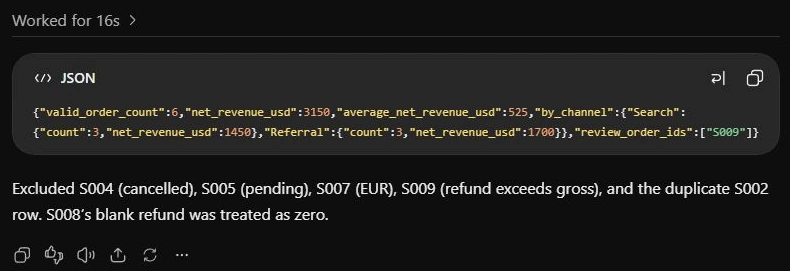
Terra output
Sol output
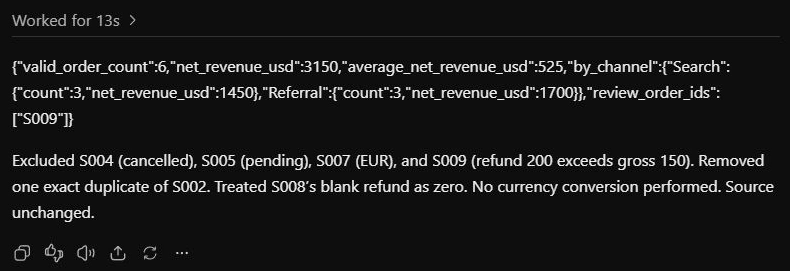
Observation
Both returned six valid orders, USD 3,150 in net revenue and USD 525 in average net revenue. Each channel had three orders: Search contributed USD 1,450 and Referral contributed USD 1,700. Both flagged S009, whose USD 200 refund exceeded its USD 150 gross amount.
The duplicate S002 row was removed, S008's blank refund became zero, and the cancelled, pending and EUR rows were excluded. We checked the JSON against an independently reconciled ledger and confirmed that the source file stayed unchanged. Both passed. Terra's exception note was 23 words; Sol's was 32, and both explained the relevant data-quality issues.
Task 3: Repairing billing code with overlapping pauses
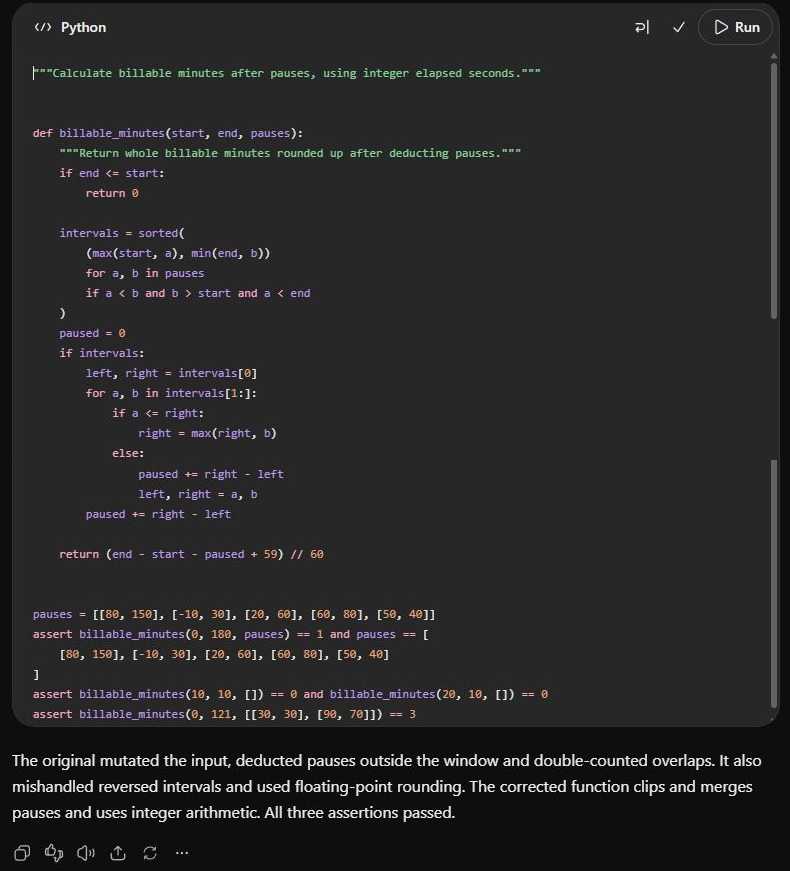
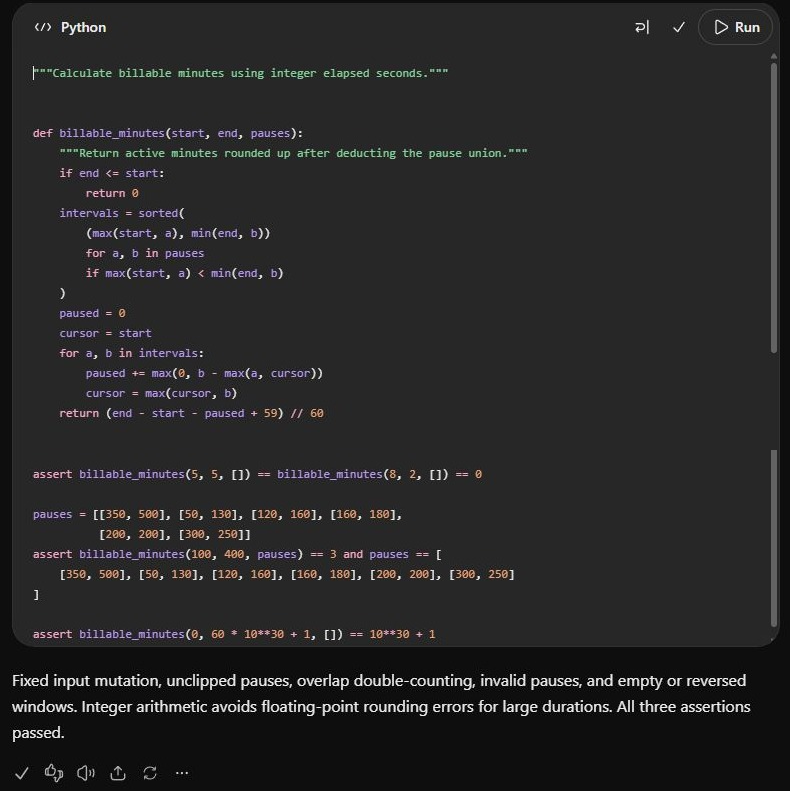
We attached a Python module that calculated billable minutes by subtracting every pause separately. That breaks when pauses overlap or extend beyond the work window. The function also sorted the input list in place and used floating-point division before rounding.
Prompt
Fix the attached billing.py. Use only this file and the standard library; do not browse or use other apps.

billable_minutes(start, end, pauses) receives integer elapsed seconds. The work window is \[start, end). Clip every pause to that window, ignore zero-length or reversed pauses, and deduct the union of pauses so overlaps and touching intervals are not counted twice. Return active seconds divided by 60, rounded up. Return zero for an empty or reversed work window. Do not mutate the input list or its nested pause lists.

Return one complete corrected Python module in a single code block, at most 40 lines including three useful assert tests. Add at most 60 words explaining the defects you fixed. Do not change the function signature or add validation requirements.
Terra output
Sol output
Observation
Both returned complete modules within the 40-line limit, preserved the function signature and included three assert tests. Terra's module was 33 lines and Sol's was 29. Both used integer arithmetic to round active seconds up to whole minutes, avoiding the original floating-point calculation.
We executed each unchanged module against 16 known cases and 1,000 fixed-seed cases checked with a separate reference calculation. Both passed all 1,016 checks, including overlapping, touching and clipped pauses, empty windows and preservation of the nested input lists. Sol also included its own useful large-integer assertion, using 10 to the power of 30.
This was a tie on correctness for a defined function with a checkable contract. Sol's shorter implementation and additional edge-case choice are worth noticing, but they do not establish an advantage on a larger codebase.
Task 4: Writing a client reply from an approved DOCX brief
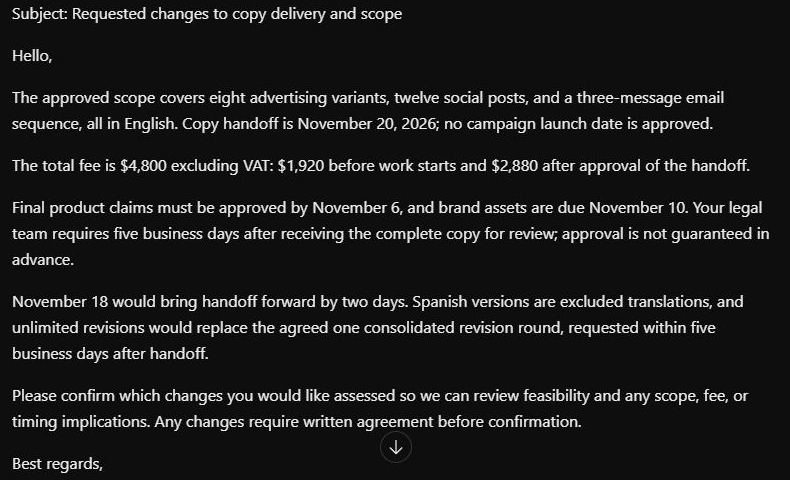
We uploaded an approved campaign brief and asked both models to reply to a request for earlier delivery, Spanish versions and unlimited revisions. The document replaced an earlier USD 6,000 proposal with a USD 4,800 agreement, so reading the current terms mattered as much as writing a helpful email.
Prompt
Read the attached approved project brief and draft a reply to Jordan's request: "Can we bring delivery forward to November 18, add Spanish versions, and keep revisions unlimited?"

Use only the DOCX; do not browse or use other apps. Write a subject and client email totaling at most 170 words. State the approved scope, current delivery date, total fee and payment split in dollars, the input and review dependencies, and how the new requests differ from the agreement. Give a useful next step without promising an unapproved scope, fee, deadline, refund, or completed action.

Keep the tone helpful and direct. Do not include internal notes or refer to this as a test.
Terra output
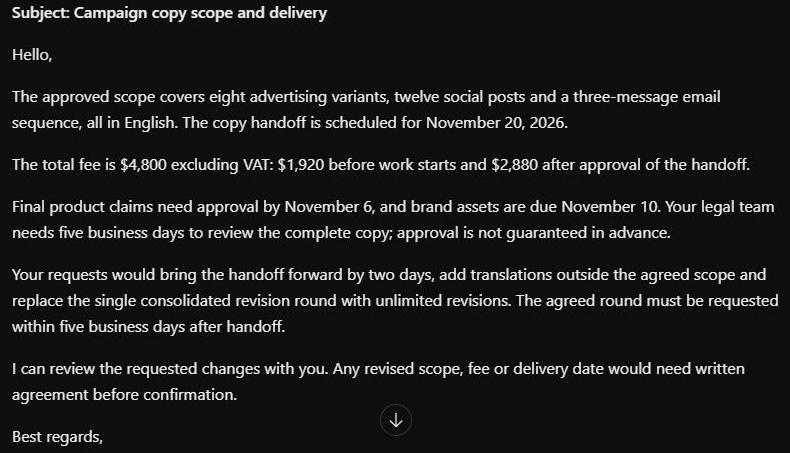
Sol output
Observation
Both used the approved USD 4,800 fee and calculated USD 1,920 before work starts and USD 2,880 after handoff approval. They preserved the November 20 handoff, November 6 claims signoff, November 10 asset deadline and five-business-day legal review dependency. Neither promised November 18 delivery, Spanish translations or unlimited revisions without written agreement.
Both also retained the single consolidated revision round and its five-business-day request window. Counting the subject, greeting and signoff, Terra returned 144 words and Sol returned 168, both within the 170-word limit. Sol explicitly noted that copy handoff and campaign launch were separate milestones; Terra gave the required terms in fewer words. Both passed the scope, arithmetic and length checks.
Report Card
| Task | Terra at Medium | Sol at Medium |
|---|---|---|
| Read a chart and challenge a claim | Passed checks | Passed checks |
| Reconcile an attached CSV | Passed checks | Passed checks |
| Repair the billing function | 1,016 checks passed | 1,016 checks passed |
| Draft from an approved DOCX brief | 144 words and terms preserved | 168 words and terms preserved |
Across these four paired tasks, both models met our stated checks. The differences were in brevity, explanation and edge-case selection. We did not measure generation time or actual task cost, so these runs do not establish that either model was faster, cheaper or better overall.
Terra makes the stronger case for visual computer work
This is the first place to look if you are considering a switch. Reading a product screenshot, matching a drawing to a specification, and moving the correct information into an application combine visual understanding with actions that can be checked. That is exactly the kind of work Terra is being positioned to handle efficiently.
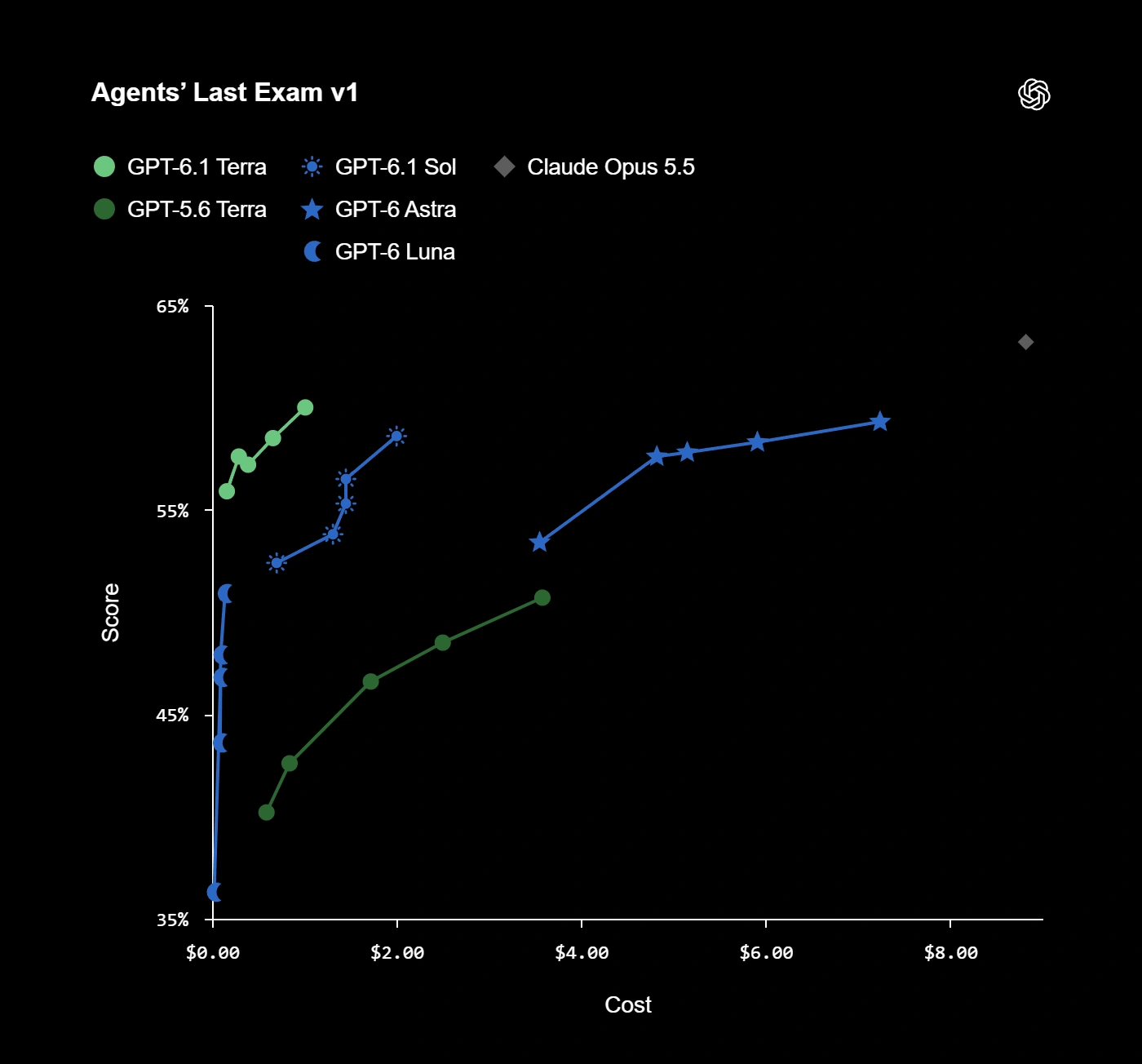
Computer-use performance versus task cost across different reasoning settings.
Agent’s last Exam is the de-facto benchmark for testing Computer Use capabilities of a model
OpenAI reports that Terra completes tasks on Agents' Last Exam more than three times faster than Sol and Astra. That evaluation covers professional work performed through tools and applications. It gives Terra a meaningful speed argument, but it is not a promise that every browser task or API request will finish three times faster.
Sol remains relevant when the visual task feeds into a harder decision. Extracting a figure from a chart and deciding whether an acquisition plan makes sense are different jobs. Give Terra the bounded visual job first; compare Sol when interpretation, dependencies, or exceptions become the difficult part.
Our GPT-6.1 Terra review looks at its visual and document workflows in more detail. Its tasks differ from those in our Sol review, so the two reviews should not be treated as a scored head-to-head test.
Pricing and the real cost of a task
Terra has a straightforward advantage when both models consume the same number and type of tokens. These are standard API prices per one million tokens.
| Token type | Terra | Sol |
|---|---|---|
| Uncached input | $1.00 | $2.00 |
| Cached input | $0.05 | $0.10 |
| Output | $5.00 | $10.00 |
For a request using 10,000 uncached input tokens and 2,000 output tokens, those rates work out to $0.02 on Terra and $0.04 on Sol. That calculation assumes identical token usage and excludes tool charges. It tells you what the rates mean; it does not tell you how many tokens each model will need to finish your request.
Which model should you choose for your work
| Your main job | Start with | What decides the switch |
|---|---|---|
| Read screens and complete a defined app task | Terra | Correct actions and verified saved results |
| Draft from supplied notes or a clear brief | Terra | Accuracy and editing needed |
| Make a scoped code change | Terra | Tests pass and behavior stays within scope |
| Solve complex coding or analysis problems | Sol | Correctness across dependencies and constraints |
| Handle a long project with uncertain requirements | Sol | Useful judgment and fewer corrective turns |
You do not need to move every task to the same model. A team can evaluate Terra for repeated intake work and keep Sol for exceptions that require more interpretation. An invoice extraction and a disputed invoice should not automatically take the same route.
Make that split from observed results. If Terra needs repeated escalation on a particular job, starting with Sol may save both time and money. If Sol produces no useful improvement on a routine job, Terra's lower rate becomes a much more persuasive advantage.
Conclusion
Terra and Sol both completed the four tested jobs correctly at Medium effort. Terra's shorter chart explanation and client reply were useful; Sol's shorter code and large-integer assertion were useful too. Those differences give us practical observations rather than an overall winner.
Terra earns a trial for clearly defined everyday work, especially when its lower token rates carry through to the finished job. For harder coding and analysis, the broader evaluations still support keeping Sol available. Start with the reasoning level that passes your checks and compare the full result, including the corrections you have to make.
Frequently Asked Questions
Is Terra cheaper than Sol?
Terra's standard token rates are half Sol's. Total task cost still depends on reasoning, token use, retries, and tools.
Which model is better for coding?
Sol scores higher than Terra in the independent Coding Agent Index. Terra remains worth evaluating for smaller changes with clear tests.
Do both models support image input?
Yes. Both accept text and images and produce text. Other output formats depend on tools in the surrounding application.
Can I use Terra and Sol in standard Chat?
No. Their ChatGPT availability is in Work and Codex, subject to plan, workspace, and administrator access.