

Connecting an AI assistant to your CMS does not teach it your editorial standards. Giving it a style guide does not make it manage an article from research to review. Those jobs involve different parts of an AI system, which is why MCP, skills, agents, and plugins keep appearing together.
Each solves a different problem, and a single application can use all four. In this article, we explain their differences, show how they work together, and help you decide which one your workflow needs.
TLDR: MCP connects AI applications to tools and data. Skills supply reusable know-how, agents decide and act, and plugins package capabilities for installation and reuse.
MCP vs Skills vs Agents vs Plugins at a Glance
| Concept | Main job | Content workflow example |
|---|---|---|
| MCP | Standardize access to tools and data | Read existing posts from a CMS |
| Skill | Provide task instructions and resources | Apply the publication’s editorial rules |
| Agent | Choose actions and check results | Research, draft, check, and revise an article |
| Plugin | Package extensions for an application | Distribute an editorial skill and CMS connection together |
The labels describe different responsibilities. An agent can use a skill and an MCP connection, while a plugin can distribute the components that support both. Exact plugin contents depend on the platform.
What Is MCP
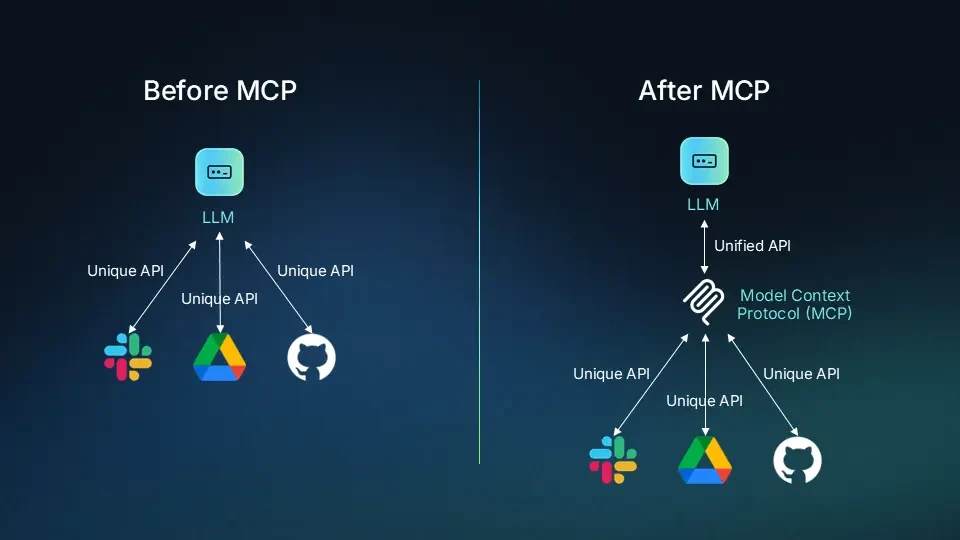
The Model Context Protocol is an open standard that lets AI applications communicate with external systems. An application connects through an MCP client to a server that exposes capabilities. The server can run locally or remotely.
Those capabilities can include:
- Tools: Actions such as searching posts, querying a database, or creating a draft.
- Resources: Data the application can read, such as a document or schema.
- Prompts: Reusable prompt templates offered by the server.
The available operations depend on the server and what the host application supports. MCP standardizes communication; the underlying service still handles its own functionality and access requirements.
For example, a CMS server could expose operations to find articles and retrieve their contents. Your assistant can then inspect existing coverage before drafting. It still needs instructions about what makes a good article.
Use MCP when your AI application needs a supported, reusable connection to external tools or data.
What Are AI Skills
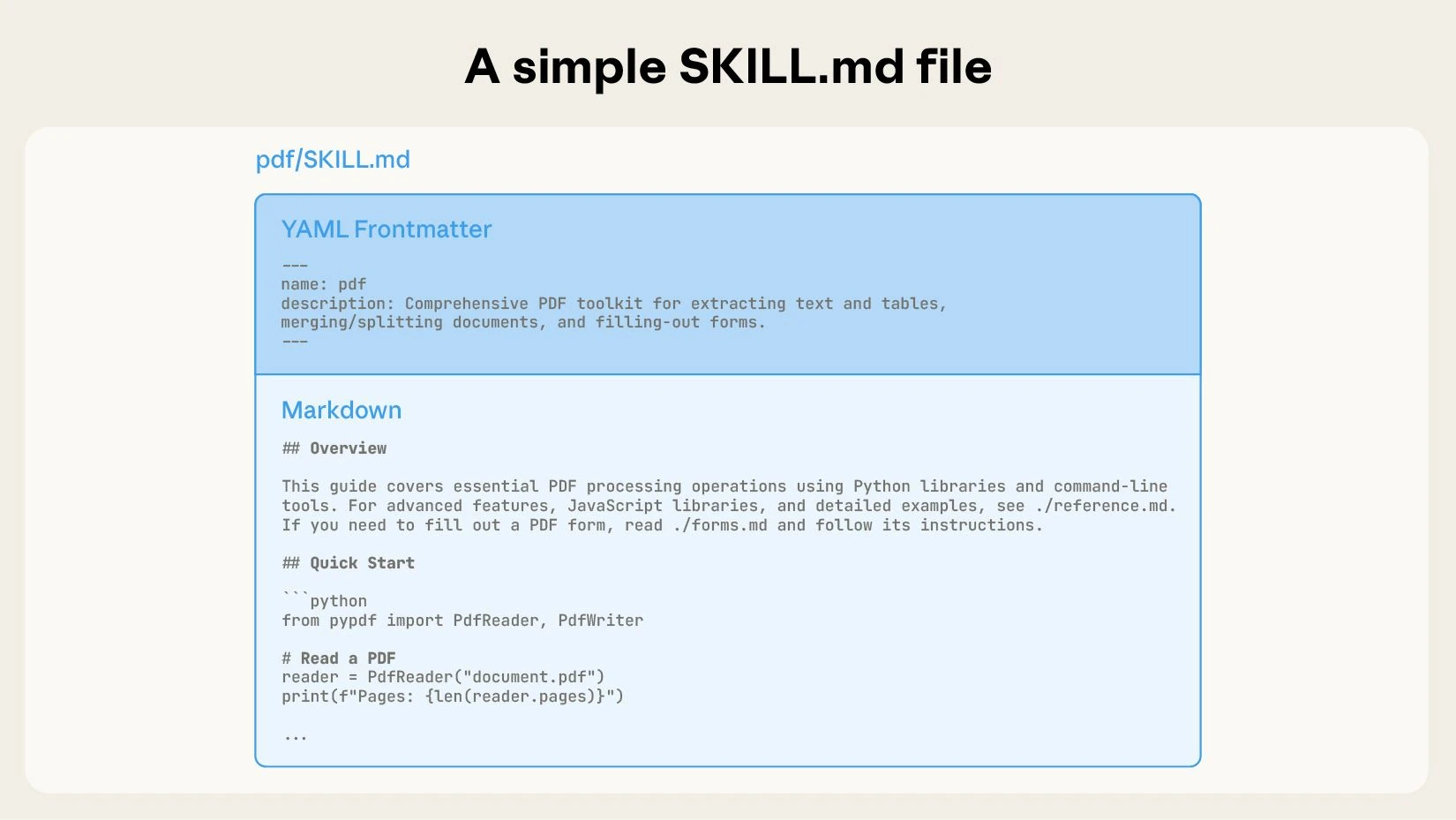
A skill packages instructions and resources for a specific task. In the Agent Skills format, it is a folder containing a SKILL.md file, optionally accompanied by scripts, references, and assets.
An editorial skill could specify an introduction, short paragraphs, primary sources, and images immediately below relevant headings. It could also include a sample article and a script for checking broken links.
Skills use progressive disclosure: the agent sees a short description first, reads the full instructions when relevant, and loads supporting material as needed. This avoids filling every conversation with every procedure.
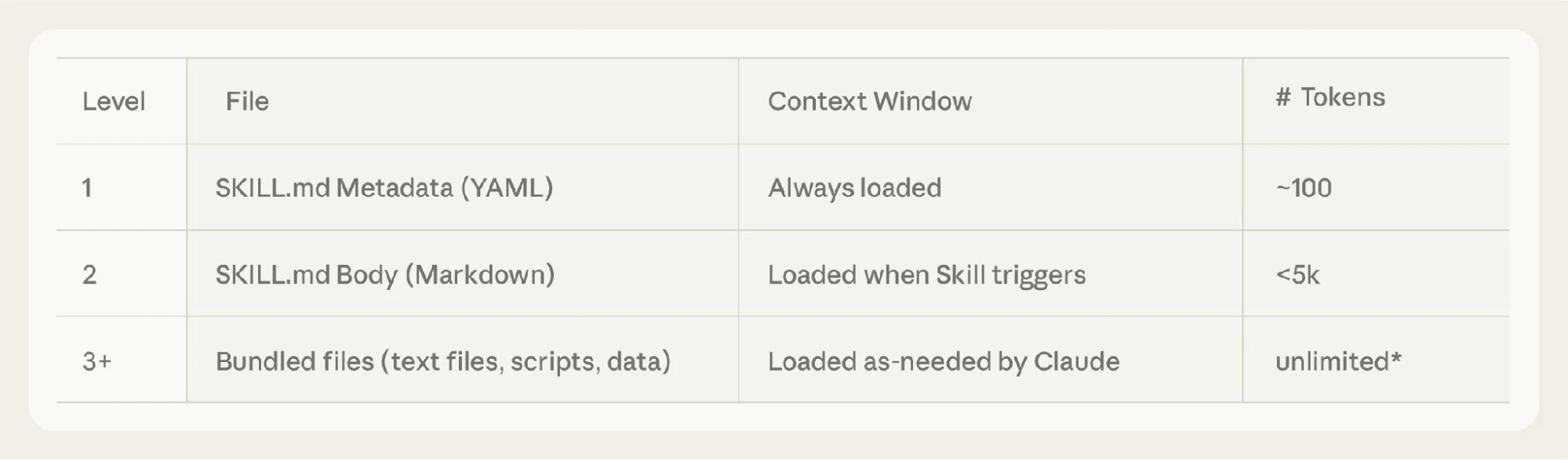
For example, an agent can recognize an editing request from the skill description, read the editorial rules, and open the image guidelines only when the article needs visuals. “Unlimited” in the illustration refers to bundled material, not the model’s context window.
A skill can include executable code, so it can do more than supply writing instructions. However, the host must provide the tools, dependencies, and permissions required to run that code.
For our article workflow, the skill explains how to research, write, and review. Access to the CMS comes from a separate integration or tool. A skill can describe how to use that connection, but instructions alone do not authenticate an account.
Use a skill when you repeatedly explain the same process, standards, or output format.
What Is an AI Agent
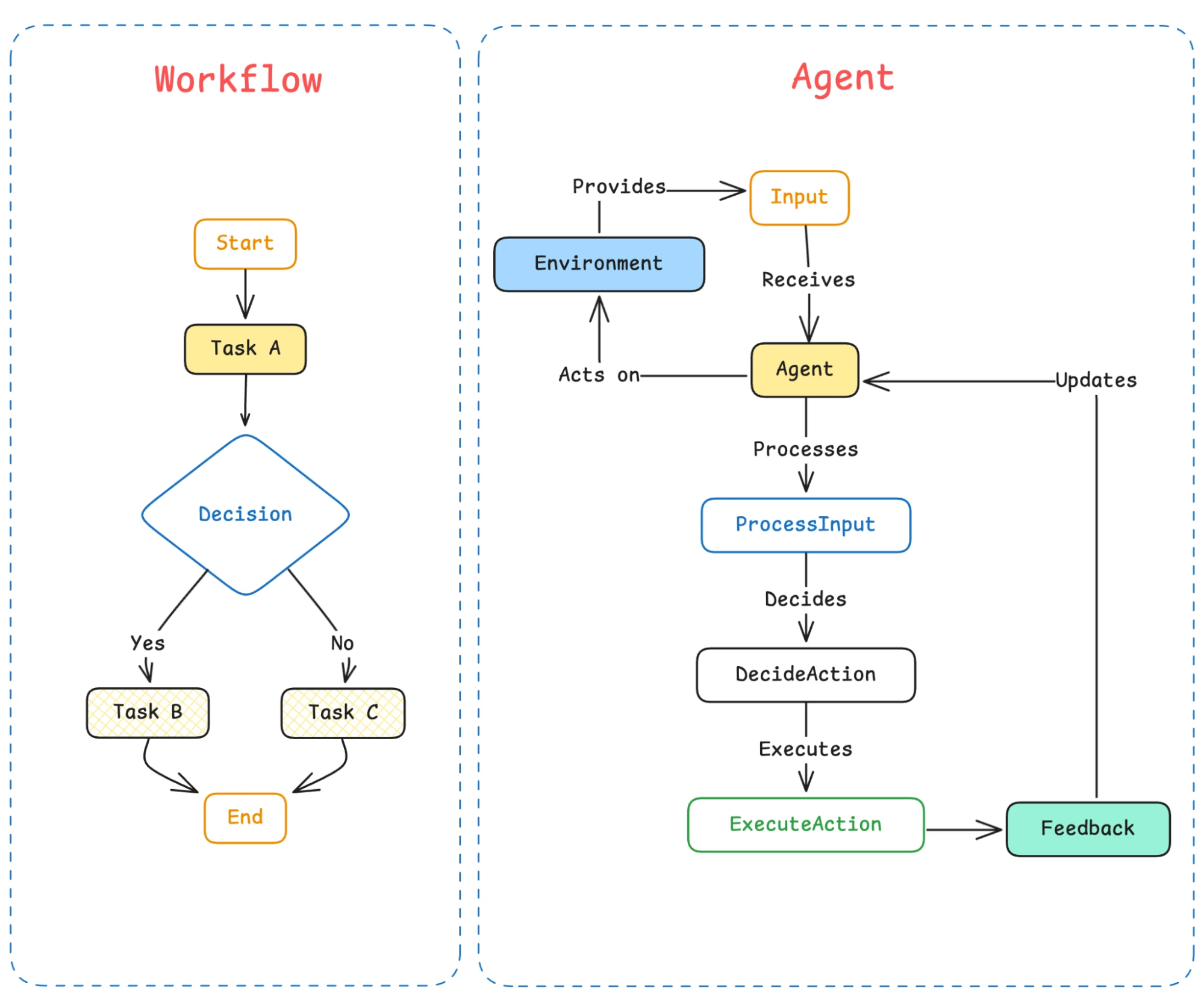
An AI agent uses a model to decide what to do next while working toward a goal. It takes an action, inspects the result, and adjusts its next step. The surrounding application provides tools, execution, and controls.
Give a content agent the goal “prepare a sourced article about MCP.” It could search official documentation, inspect existing coverage, load an editorial skill, write a draft, and revise claims that lack evidence.
The defining feature is its ability to choose the next action from what it finds. A fixed workflow follows a predetermined sequence; an agent can change its approach when a source is unavailable or a draft fails a check.
An agent does not require MCP. It can use built-in tools, direct APIs, or command-line utilities. It also does not need multiple subagents to qualify as an agent.
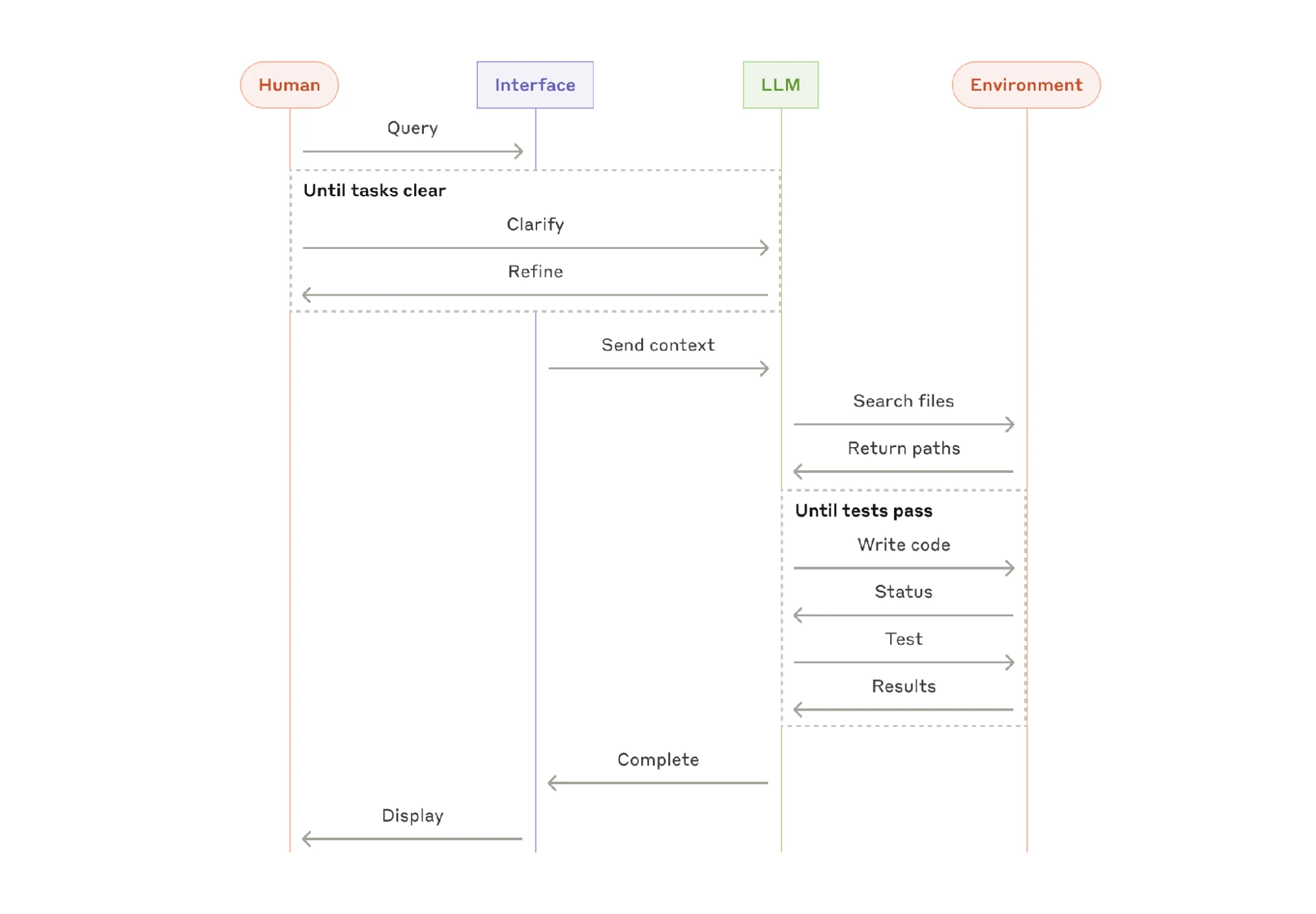
The coding example makes this concrete: the agent changes code, runs tests, inspects failures, and tries another fix. In an editorial workflow, the equivalent loop is draft, check claims and links, revise, and review again. A failed check changes the next action.
Use an agent when the task needs decisions between steps. For a predictable job such as exporting the same report every Friday, a scheduled script or fixed workflow can be enough.
You can further learn the difference between MCP and AI Agents in the MCP vs AI Agents blog.
What Are AI Plugins
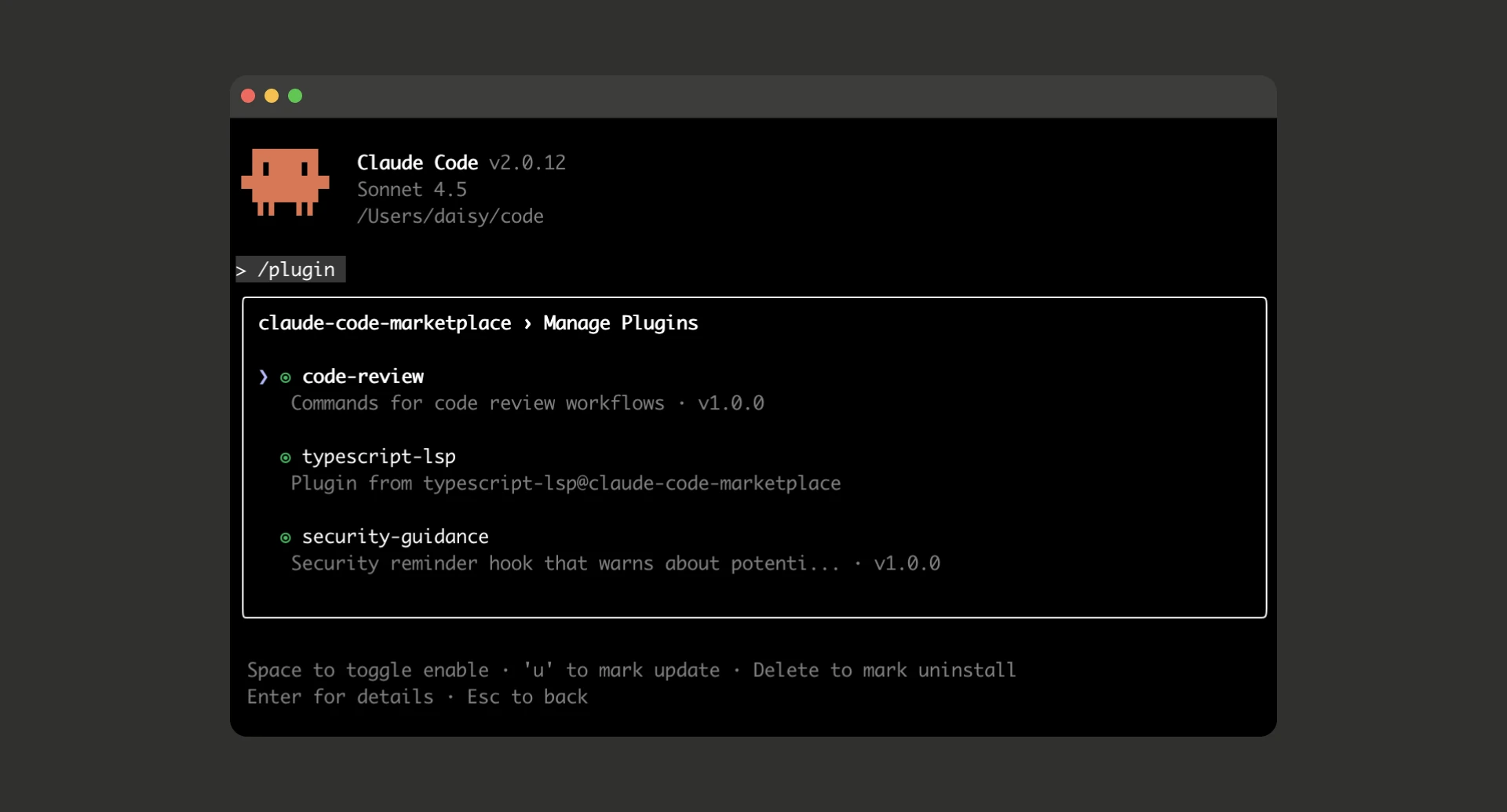
A plugin is an installable extension for a particular application. In Claude Code, plugins can bundle skills, agent definitions, hooks, and MCP server configurations. Hooks are commands triggered by specific events, such as a tool finishing.
For a content team, an editorial plugin could contain the house-style skill, a reviewer agent definition, and configuration for connecting to the CMS. Colleagues install the package instead of assembling those pieces individually.
A plugin can also contain just one capability. Installing it does not automatically connect every account or grant every permission its components need.
The word “plugin” is platform-specific. A Claude Code plugin and another application’s plugin need not share the same format, features, or installation process. Check compatibility before assuming a package will work elsewhere.
Use a plugin when you want to install or distribute a reusable collection of capabilities.
Where the Differences Get Confusing
MCP vs API: An API exposes a service’s operations. An MCP server can wrap those operations in an interface that compatible AI applications understand. Someone still has to implement that connection; MCP does not automatically turn every API into an available tool.
Skill vs Agent: The skill describes a procedure. The agent applies it to the current task, chooses tools, and evaluates results. A folder of instructions cannot complete work by itself.
Skill vs Plugin: A skill provides a reusable capability or procedure. A plugin is a distribution package and can contain that skill alongside other extensions. Packaging a skill does not turn it into a separate model.
How All Four Work Together
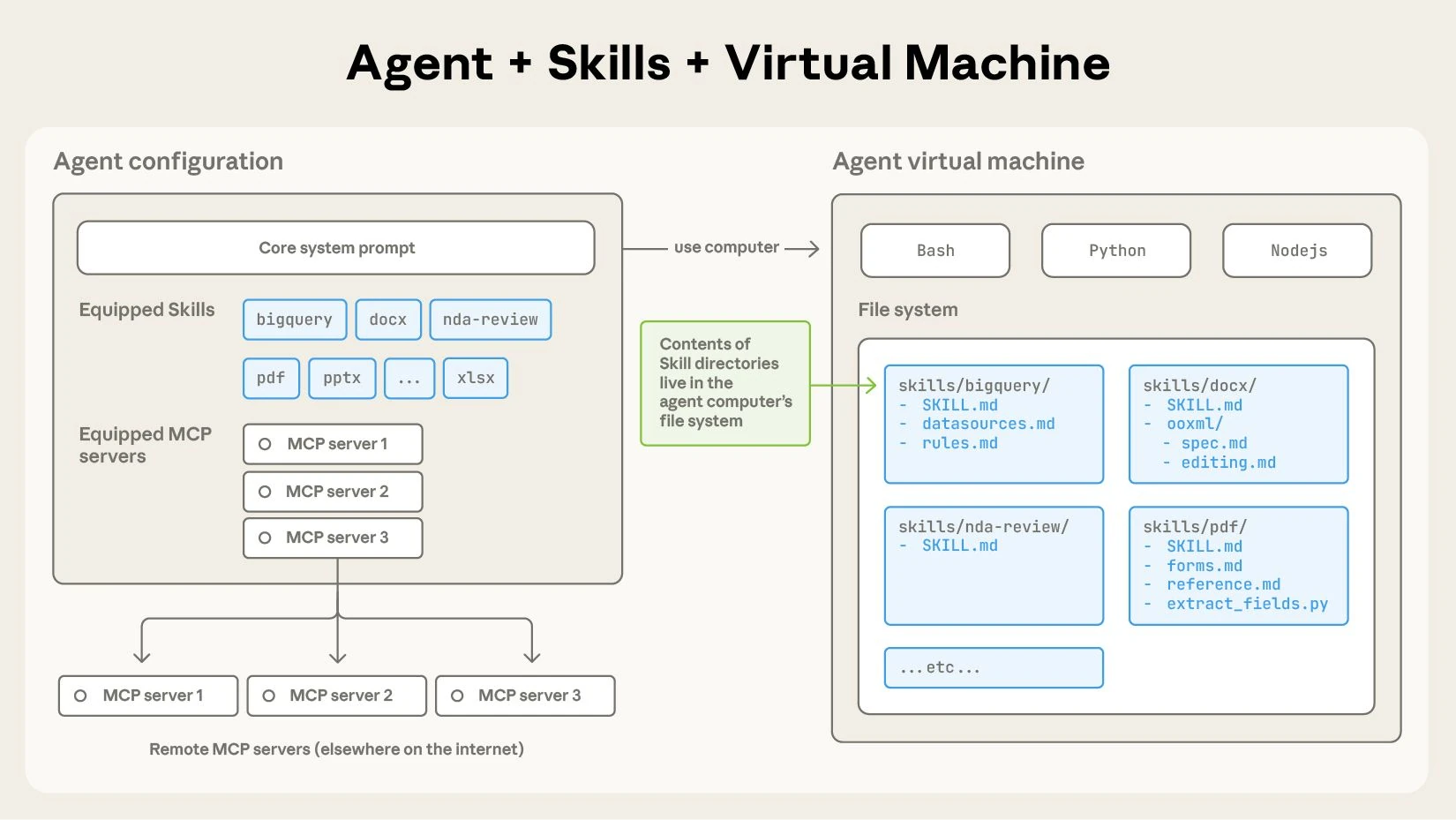
Consider this illustrative task: “Prepare an article on MCP, follow our style guide, check for overlapping coverage, and save it as a CMS draft.” The setup needs a CMS integration that supports those operations.
1. Install the package. The plugin supplies the editorial skill, reviewer configuration, and CMS connection settings. Authenticate the CMS account separately if required.
2. Read the working instructions. The agent loads the skill to learn the article structure, sourcing rules, and review criteria.
3. Check existing coverage. The agent uses tools exposed through MCP to retrieve relevant CMS posts and identify duplication.
4. Draft and revise. The agent researches the topic, writes the article, and checks the result against the skill. Missing evidence sends it back to research.
5. Save the result. The agent calls the CMS draft-creation tool through MCP and checks that a draft was created. Publishing remains a separate action.
The plugin packages the setup. The skill guides the work. MCP provides a connection. The agent uses those capabilities to complete the task.
Frequently Asked Questions
Can skills replace MCP?
Skills can include scripts that call services directly, but they do not replace MCP’s standardized connection interface. The two can also work together.
Is an MCP server an AI agent?
An MCP server exposes capabilities. It can wrap an agent internally, but serving tools or data alone does not make it an agent.
Is a skill just a prompt?
Instructions are central, but a skill can also bundle scripts, templates, and references that a compatible agent loads when needed.
Can a plugin contain skills and agents?
Yes. Claude Code plugins can package skills, agent definitions, hooks, and MCP configurations. Other platforms define their own plugin contents.