

Gemini 4 Hydrogen or Carbon: do everyday tasks need Google’s flagship model, or can its execution-focused sibling deliver the same useful result? A polished answer is only the start. The code must preserve every unit, the file audit must handle missing values, and the writing must stick to the facts.
In this article, we compare their original responses across four practical tasks, then examine the published benchmarks, model controls and API prices that matter when choosing between them.
TLDR: Hydrogen matched Carbon on the checked requirements in these four tasks. Start there for similarly bounded work; assess Carbon on a harder problem before paying more. The public benchmark reports provide context, not a controlled rerun.
What you get with each model
Gemini 4 Hydrogen is designed for everyday coding and agentic execution. It is the option to investigate when you want a defined job completed efficiently, such as repairing one function or producing a compact file summary. Its launch on November 12 added it to Google’s developer and consumer surfaces.
Gemini 4 Carbon became broadly available on November 10. Google positions it for longer, more demanding reasoning, including complex debugging and scientific investigations. That is a different brief from a short code repair, which is why the hands-on outcomes below should not be treated as a complete capability ranking.
| Feature / Metric | Gemini 4 Hydrogen (**gemini-4-hydrogen**) | Gemini 4 Carbon (**gemini-4-carbon**) |
|---|---|---|
| Primary Role | Everyday coding, agent execution, fast iteration | Hard architecture, subtle bugs, security audits, science |
| Context Window | 1M tokens (1,048,576) | 1M tokens (1,048,576) |
| Default / Max Output | 65,536 default tokens (up to 1M via long decode) | 65,536 default tokens (up to 1M via long decode) |
| Thinking Levels | Low, medium, high, and xhigh | Deep reasoning deliberation per turn |
| Speed (Tokens/sec) | ~188 tokens/sec | ~72 tokens/sec |
| Time to First Token | ~40.55s (or ~16.7s at default high) | ~64.71s |
| Launch Pricing (In/Out) | $1.50 / $7.50 per 1M tokens | $2.00 / 4.00 / $20.00 after Nov 30, 2026) |
| Intelligence Index Score | ~51 (high) up to 54 (xhigh) on Artificial Analysis | ~60 on Artificial Analysis |
These are text-output models. Image understanding does not mean native image generation, and a downloaded file also depends on the tools supplied by the app.
Now let’s test the two models across multiple tasks.
Task 1: Reading the uncertainty in a weather diagram
The first task used an actual image attachment. A red forecast line is easy to name; the more useful check is whether the model distinguishes two different uncertainty shapes and refuses numbers the schematic never supplies.
The filled cyan forecast uncertainty and the larger dashed cyan outline are different parts of the diagram.
Prompt
Explain the attached weather ensemble diagram in four numbered points, under 100 words total: (1) identify the red curve and thin blue curves; (2) describe how the ensemble spread changes from left to right; (3) distinguish the filled cyan area from the larger dashed cyan outline; (4) state whether the figure supports an exact temperature or probability of rain. Use only visible evidence. Do not browse or use other tools. Keep the response anonymous: no personal names, organisations, account details, contact information, personal references, or signature.
Gemini 4 Hydrogen
Gemini 4 Carbon
Observation
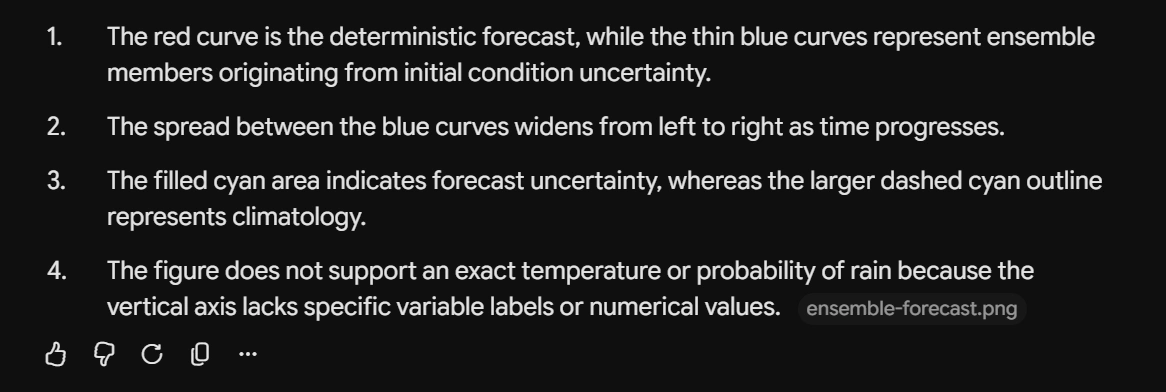
Both correctly identified the deterministic forecast and the ensemble paths, explained the widening spread, and kept filled forecast uncertainty separate from dashed climatology. Each declined to invent an exact temperature or rain probability from the unscaled diagram. The reading itself offered little reason to switch models.
Hydrogen used 95 words and Carbon used 72, both within the response budget. Carbon’s shorter answer is easier to fit into a compact explanation, but neither model supplied a more accurate reading on this diagram.
Task 2: Auditing a telescope exposure file
The CSV contained 15 rows, including one exact duplicate. After removing it and keeping accepted exposures, 11 frames remained. Two had no seeing value. Those frames still contributed exposure time, but could not contribute to the exposure-weighted seeing calculation. Dropping them from every total would quietly change the scientific record.
Input file
| exposure_id | filter | status | seconds | seeing_arcsec |
|---|---|---|---|---|
| E001 | R | accepted | 120 | 2.0 |
| E002 | R | accepted | 180 | 1.5 |
| E003 | R | rejected | 90 | 1.0 |
| E004 | G | accepted | 120 | 2.5 |
| E004 | G | accepted | 120 | 2.5 |
| E005 | G | accepted | 240 | 2.0 |
| E006 | B | accepted | 300 | 1.8 |
| E007 | B | pending | 180 | 1.3 |
| E008 | R | accepted | 60 | |
| E009 | G | accepted | 60 | 3.0 |
| E010 | B | accepted | 120 | |
| E011 | B | accepted | 180 | 2.2 |
| E012 | R | accepted | 120 | 2.5 |
| E013 | G | rejected | 600 | 0.8 |
| E014 | B | accepted | 60 | 1.6 |
Prompt
Audit the attached telescope exposure log. Remove the exact duplicate exposure once, then use only status=accepted. Return one compact table in filter order R, G, B with accepted-frame count, total integration minutes, and exposure-time-weighted seeing in arcseconds. Round the last two columns to two decimals. A missing seeing value must leave that frame in the count and integration total, but exclude its seconds from the seeing denominator. Below the table, name the duplicate ID, excluded IDs, missing-seeing IDs, and filter with the lowest weighted seeing. Use only the attached file; file-reading and calculation tools are allowed. Do not browse or create charts. Keep the whole answer under 150 words and anonymous: no personal names, organisations, account details, contact information, personal references or signature.
Gemini 4 Hydrogen
Gemini 4 Carbon
Observation
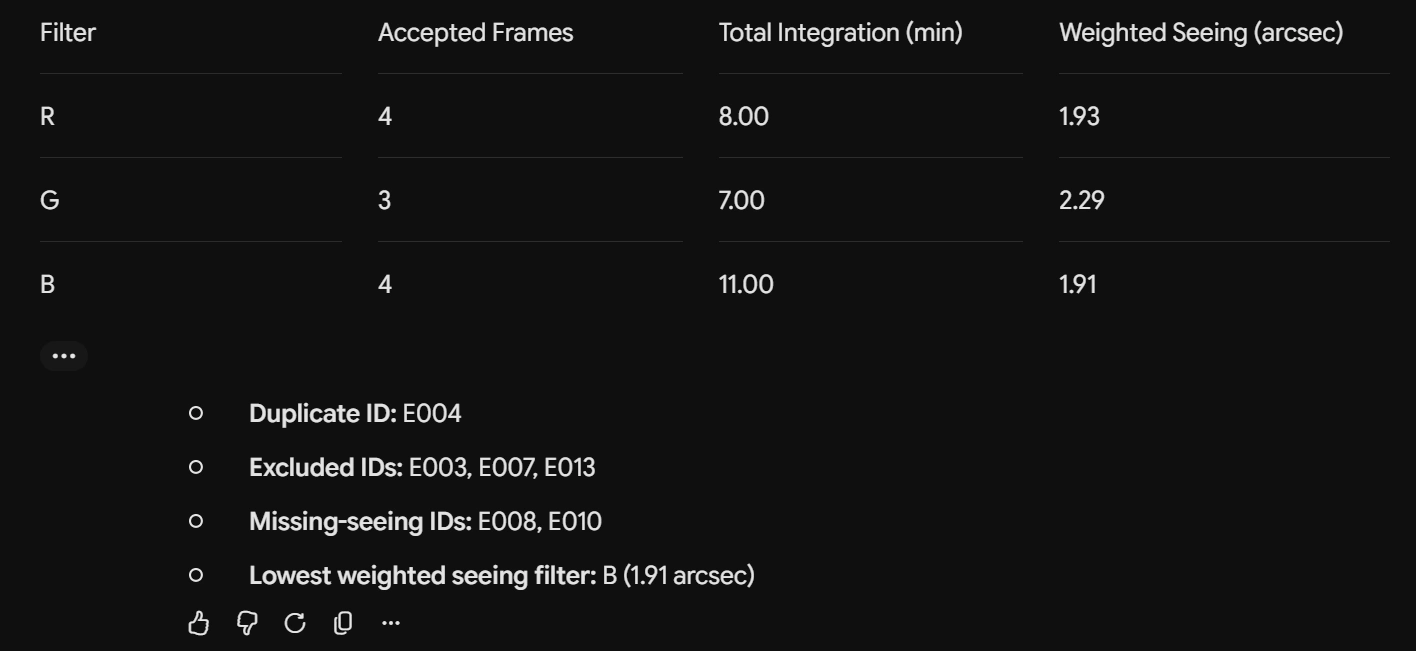
Hydrogen and Carbon returned all nine numeric cells and every requested record exception correctly through the allowed app tools. The accepted-frame counts were 4, 3 and 4 for R, G and B, with total integration of 8.00, 7.00 and 11.00 minutes. Weighted seeing was 1.93, 2.29 and 1.91 arcseconds.
Both kept frames with missing seeing in the count and integration total while excluding their seconds from the seeing denominator. That distinction is the task, not just a neat table. This round gives us a tie on the checked audit.
The blue-filter observations had the lowest weighted seeing, just below red. Lower seeing generally means less atmospheric blurring; these records do not show that the filter caused the difference.
Task 3: Repairing an exact integer allocation function
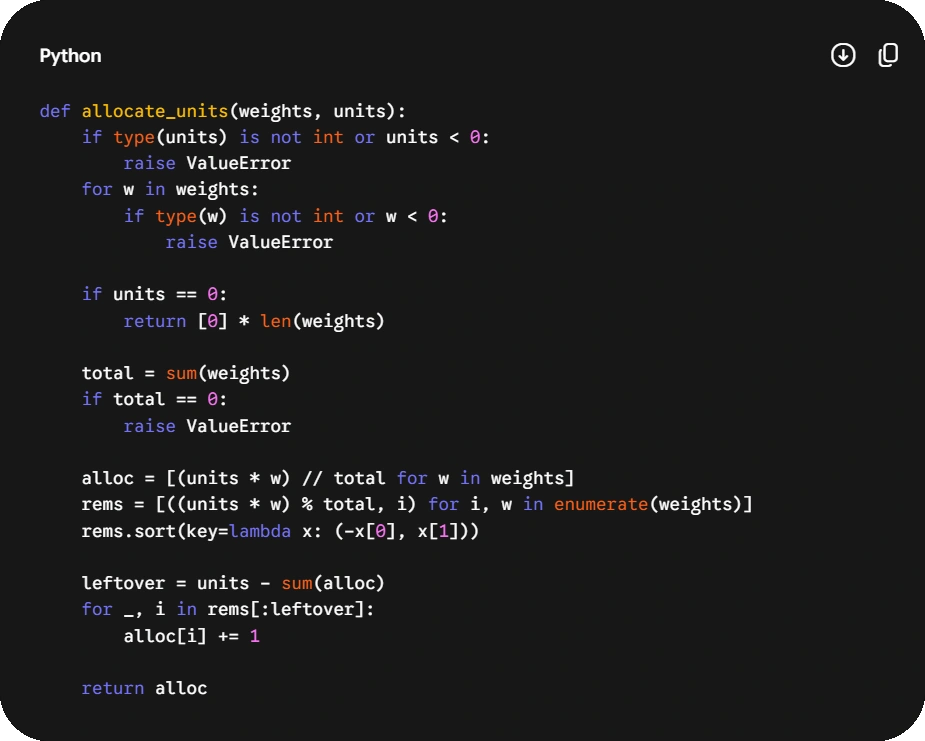
The Python attachment divided whole units in proportion to integer weights. Rounding each share independently can lose units or create extras; sorting the result can also detach an allocation from its original recipient. The requested repair had to conserve the total, retain input order and resolve equal remainders by original index.
Input function
def allocate_units(weights, units):
    total = sum(weights)
    shares = [round(units * weight / total) for weight in weights]
    missing = units - sum(shares)

    for index in range(missing):
        shares[index % len(shares)] += 1

    return sorted(shares, reverse=True)
Prompt
Repair allocate_units in the attached Python file. Allocate a nonnegative integer number of units proportionally to a list of nonnegative integer weights using largest remainders: take each exact quota's floor, then give leftover units to the largest fractional remainders, breaking ties by original index. Return integer allocations in the original order and never mutate weights. Reject booleans, non-integer values and negative values with ValueError. If units is zero, return matching zeros, including [] for empty weights. If units is positive and weights is empty or totals zero, raise ValueError. Use exact integer arithmetic, not floating point. Return only the replacement function in one code block, at most 25 nonblank lines. Use only the standard library; do not browse or build an app. Keep every output anonymous: no personal names, organisations, account details, contact information, personal references or signature.
Gemini 4 Hydrogen
Gemini 4 Carbon
Observation
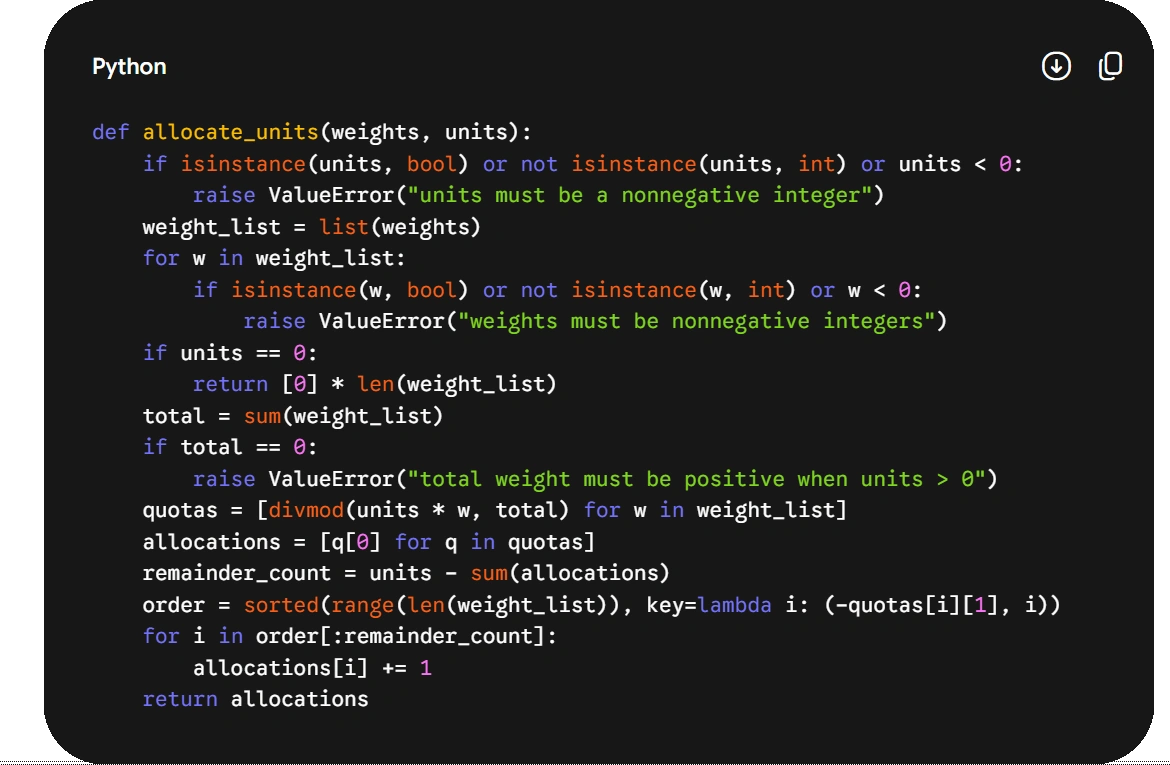
Both functions passed the 19 fixed behavioral cases and 757 enumerated small cases, including validation, input preservation and the large-integer precision check. Each met the 25-line limit: Carbon used 18 nonblank lines and Hydrogen 19. The checked contract was a tie; the small line-count difference does not establish a better repair.
The large-integer case is especially revealing: weights of 10^18 and 10^18 + 1 compete for one unit. Exact arithmetic must award it to the second weight. Converting the shares to floating point can erase the difference before the tie-breaking rule runs.
Task 4: Writing an update without promising a repair time
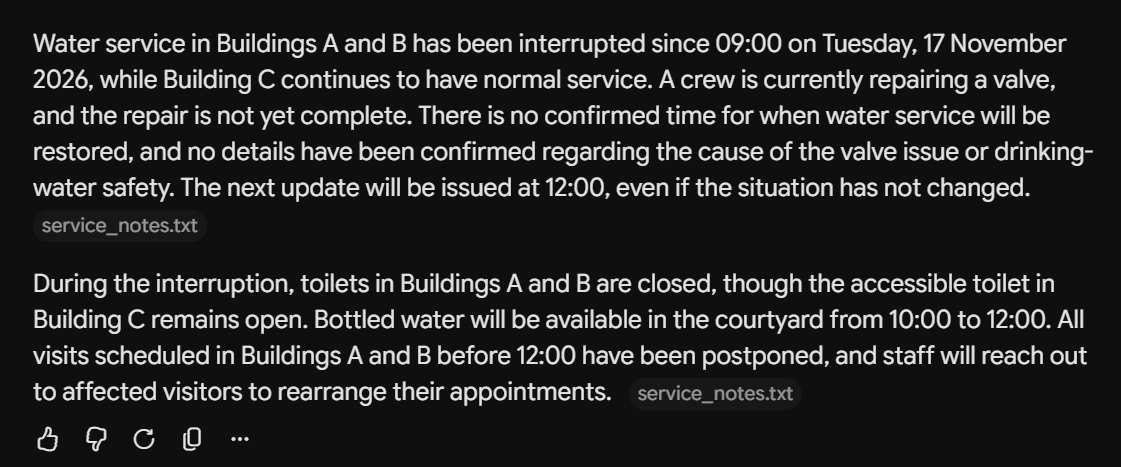
The last task used a text attachment about a water interruption. It had a confirmed next-update time but no confirmed restoration time. A fluent notice could still fail by turning noon into a promise, inventing safety advice or leaving readers unsure which buildings were affected.
Input notes
Water was turned off at 09:00 on Tuesday, 17 November 2026.

Only Buildings A and B are affected. Building C has normal water service.

A crew is repairing a valve. The repair is not yet complete.

There is no confirmed restoration time.

The next update will be issued at 12:00, even if there is no change.

Bottled water will be available in the courtyard from 10:00 to 12:00.

Toilets in Buildings A and B are closed during the interruption.

The accessible toilet in Building C remains open.

Visits scheduled in Buildings A and B before 12:00 are postponed.

Staff will contact affected visitors to rearrange those visits. No contact method is specified.

No information about drinking-water safety or the cause of the valve problem has been confirmed.
Prompt
Turn the attached notes into a clear public update about the water interruption. Write 120–150 words in exactly two paragraphs, with no heading or bullets. Put the affected buildings and lack of a confirmed restoration time in the first paragraph. Preserve the dates, times, facilities and arrangements accurately. Make the distinction between the next update and restoration unmistakable. Use only the notes: do not invent a cause, safety advice, contact method, repair progress or promise. Return only the notice. Do not browse. Keep the output anonymous: no personal names, organisations, account details, contact information, personal references or signature.
Gemini 4 Hydrogen
Gemini 4 Carbon
Observation
Both notices met the 120–150-word range in two paragraphs: Hydrogen used 139 words and Carbon 133. They preserved the required facts and separated the noon update from an unconfirmed restoration time. Hydrogen also included the notes’ unconfirmed cause and safety information. Carbon repeated the distinction about noon; I’d shorten that clause before posting while keeping the timing clear.
Benchmarks
Here are the officially published benchmark scores of the two models:
| Published benchmark | Hydrogen | Carbon |
|---|---|---|
| SWE-sweep | 13.5% | 9.6% |
| Agents’ Last Exam v1.1 | 71.6% | 77.4% |
| OSWorld-2.1 (offline subset) | 77.6% | 81.5% |
| Vending-Bench 2 (bank balance, USD) | $14,549 | $16,484 |
| Chartography | 66.6% | 72.5% |
Carbon’s reported figures are higher on Chartography and OSWorld, while Hydrogen’s SWE-sweep result is higher in its later report. That gives us different signals to investigate, not permission to claim either model always reasons or codes better.
Terminal-Bench is intentionally absent from the combined rows: Hydrogen reports 57.0% on cheating-adjusted Terminal-Bench 4.1, whereas Carbon reports 65.2% on Terminal-Bench 4.0 (AA). Those version labels matter; comparing the percentages directly would imply a test neither report ran.
Access and API pricing
Hydrogen’s rollout includes AI Studio and the Gemini API. Free Gemini users can receive it through automatic selection rather than a guaranteed manual choice. Carbon’s public launch includes paid API access and Google AI Ultra access in the Gemini app.
To reproduce the recorded app setup, open a fresh Gemini chat, choose the exact model where your plan allows it, select High thinking and wait for each attachment to finish uploading before sending the prompt. Keep these app settings separate from the API defaults listed earlier.
| Standard API rate (USD) | Hydrogen | Carbon |
|---|---|---|
| Input / 1M tokens, through Nov 30, 2026 | $1.50 | $2.00 |
| Output / 1M tokens, through Nov 30, 2026 | $7.50 | $10.00 |
| Input / 1M tokens, from Dec 1, 2026 | $1.50 | $4.00 |
| Output / 1M tokens, from Dec 1, 2026 | $7.50 | $20.00 |
Rates checked against Google’s Hydrogen and Carbon launch announcements on November 13, 2026. The December figures are the announced schedule, not a charge already applied. API billing is separate from app subscriptions.
Thinking contributes to output usage, and tools, caching and retries can change the total bill. The comparison below assumes uncached standard-rate input and the same token counts; it is not a measurement of our app tests.
For 100,000 input tokens and 10,000 output tokens, the base arithmetic is $0.225 for Hydrogen and $0.30 for Carbon through November 30. At the announced December rate, Carbon becomes $0.60 for that same request. Lower rates help, but only a representative run shows how much reasoning and correction your job needs.
Which model should you choose?
I’d start with Hydrogen for work resembling these briefs. It matched Carbon on the checked requirements, completed the CSV audit and carries lower published token rates. These tests give us no practical reason to pay more for the same four answers.
Carbon remains a candidate for a harder investigation: a multi-file debugging job, a difficult technical document or a longer chain of decisions. Test that workload directly rather than borrowing a win from a short writing task. The flagship positioning is a reason to investigate, not the verdict.
You also do not have to use one model for every step. Google describes Orchestrator switching between planning and execution models in Antigravity. You can also look at the Carbon vs Argon vs Hydrogen comparison to make the choice.
Frequently Asked Questions
Did Hydrogen beat Carbon in the hands-on tests?
Both met the checked requirements across all four tasks. These runs do not establish a speed or maximum-capability winner.
Which model has lower API rates?
Hydrogen has lower published input and output rates. Actual task costs also depend on reasoning, tools, caching and retries.
Were both tested at High thinking?
Yes, according to the original test record. Equal labels do not guarantee equal compute budgets.
Can I directly compare their Terminal-Bench scores?
No. The reports use Terminal-Bench 4.1 and 4.0 with different qualifications. The percentages are not a like-for-like head-to-head.