

Building a chatbot teaches you how to work with an AI model. But building an agent teaches you how to make that model plan, use tools, inspect results, and recover from failure.
The projects below cover research, customer support, automation, data, coding, voice, finance, and many more domains. Each includes a working source code and a practical way to make it your own.
1. Turn Questions Into Cited Reports
Level: Beginner
Best for: Students, researchers, analysts, and content teams
Give the agent a broad question and it breaks the topic into smaller searches, gathers evidence, and produces a cited report. GPT Researcher uses separate planning, research, and publishing stages. It can search the web or local files and export the result in several formats.
This is a friendly first project because its tools are mostly read-only and its sources remain visible.
Build on it: Restrict it to trusted domains and create a competitor-research, literature-review, policy-tracking, or article-brief agent.
Source: assafelovic/gpt-researcher
2. Complete Tasks Inside a Browser
Level: Beginner–Intermediate
Best for: Automation builders, QA testers, and operations teams
Browser Use lets an agent open pages, click elements, fill forms, extract data, and test websites. The agent must also handle pop-ups, slow pages, layout changes, and failed actions.
A website QA agent is a useful starting point. Ask it to complete common user journeys and return its steps, screenshots, errors, and usability issues.
Build on it: Create an accessibility checker, public-data collector, or form-testing assistant. Require approval before purchases or submissions.
Source: browser-use/browser-use
3. Route Customers to Specialist Agents
Level: Intermediate
Best for: Full-stack developers and support teams
A support system can use one agent to identify the problem and hand it to another agent trained for billing, refunds, orders, or technical help. OpenAI’s demo includes a Python orchestration backend and a Next.js interface that shows these handoffs.
Replace its sample tools with mock business APIs. Then define which actions run automatically and which need approval.
Build on it: Adapt the workflow for an online store, college help desk, SaaS product, or local service business.
Source: openai/openai-cs-agents-demo
4. Triage Emails Without Losing Control
Level: Intermediate
Best for: Productivity builders and Python developers
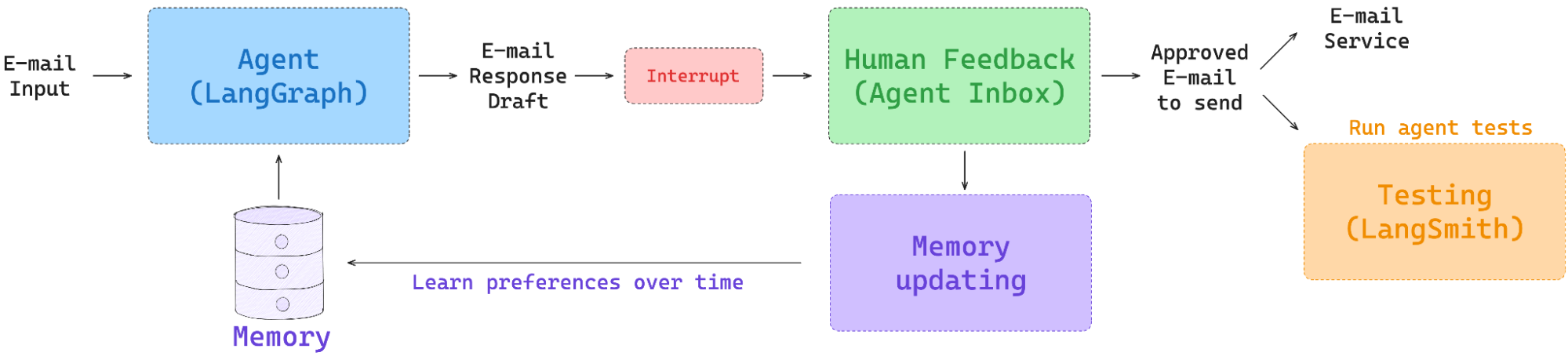
This agent decides whether to ignore an email, notify the user, draft a reply, or schedule a meeting. LangChain’s project adds these capabilities in stages: triage, evaluation, human approval, memory, and Gmail integration.
Mock tools let you test the workflow before connecting a real inbox. The approval step prevents the agent from sending or scheduling something silently.
Build on it: Add priority labels, multilingual drafts, daily summaries, and different rules for known and unknown senders.
Source: langchain-ai/agents-from-scratch
5. Build a Real-Time Voice Assistant
Level: Intermediate
Best for: Mobile developers and conversational AI builders
Voice agents must detect when someone stops speaking, respond quickly, handle interruptions, and recover from transcription errors. LiveKit’s starter supplies the voice pipeline, testing tools, deployment files, and support for web, mobile, and telephone interfaces.
Keep the first version focused. A narrow assistant is easier to test than a general voice companion.
Build on it: Create an appointment receptionist, campus guide, language partner, or voice interface for a knowledge base.
Source: livekit-examples/agent-starter-python
6. Analyze Messy Data With Specialist Agents

Level: Intermediate
Best for: Analysts, data scientists, and business teams
AI Data Science Team includes agents for loading, cleaning, transforming, visualizing, querying, and modeling data. A supervisor can route tasks between them, while AI Pipeline Studio preserves the work as a reproducible pipeline.
The repository remains in beta, so use it as a learning base rather than a finished analytics platform.
Build on it: Give it a public dataset, add data-quality checks, and compare its conclusions with a manual analysis.
Source: business-science/ai-data-science-team
7. Turn Issues Into Tested Code

Level: Intermediate–Advanced
Best for: Developers and DevOps teams
A coding agent explores a repository, edits files, runs tests, reads failures, and revises its approach. OpenHands provides an open-source agent and a self-hosted interface for running coding tasks and automations.
Run it inside a container or disposable repository. Coding agents can execute commands and alter files, so unrestricted access is unnecessary and risky.
Build on it: Create ten seeded bugs and measure fixes completed, tests passed, unnecessary changes, runtime, and cost.
Source: OpenHands/OpenHands
8. Simulate an Investment Research Team
Level: Advanced
Best for: Finance learners and multi-agent builders
AI Hedge Fund combines agents with different investment perspectives, then produces a final portfolio decision. Its current interface supports simulated funds, configurable strategies, rebalancing, and backtesting.
The project is educational. It does not place trades and should not guide real investments.
Build on it: Add transaction costs, position limits, dated data snapshots, and a benchmark. Check carefully for future-data leakage.
Source: virattt/ai-hedge-fund
9. Create an Agent That Learns New Skills
Level: Advanced
Best for: Game AI and embodied AI researchers
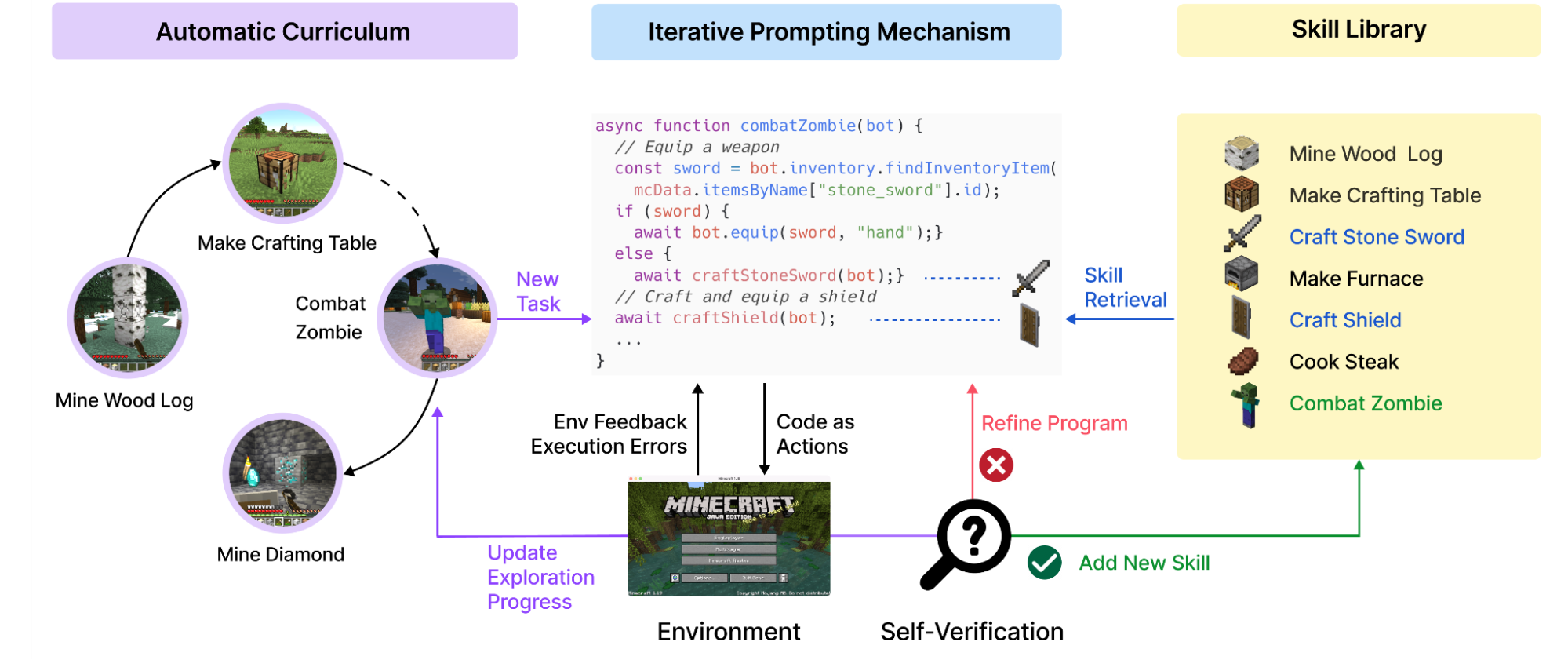
Voyager explores Minecraft, chooses new goals, learns successful behaviors, and saves them as executable skills. It can later retrieve and combine those skills for harder tasks.
The project shows how agent memory can store actions rather than conversation alone. Setup requires Minecraft, Python, Node.js, and compatible mods. Its documented stack is older, so expect some integration work.
Build on it: Measure skill reuse and learning speed, or adapt the same curriculum-and-memory pattern to a simpler simulation.
Source: MineDojo/Voyager
10. Automate ML Experiments

Level: Advanced
Best for: ML engineers and researchers
AI Scientist-v2 can propose hypotheses, check related work, write code, run experiments, analyze results, and draft a paper. It uses an experiment manager and tree search to explore several research directions.
The documented setup requires Linux and an NVIDIA GPU. It also executes model-written code, so run it only inside a tightly restricted sandbox.
Build on it: Limit the system to one benchmark, cap its compute, log every action, and require approval before execution.
Source: SakanaAI/AI-Scientist-v2
Which One Should You Build?
Start with research if you are learning agent basics. Choose support or email to practise handoffs and approvals. Browser, voice, data, and coding agents provide clearer business value. Voyager and AI Scientist-v2 suit research-focused builders with stronger infrastructure.
Do not publish an unchanged clone. Change the data, tools, interface, or evaluation. A small agent with clear limits and measured results is a stronger portfolio piece than a large demo you cannot explain.
Frequently Asked Questions
Which Agentic AI project is easiest?
GPT Researcher. Its actions are mostly read-only, and its citations make results easier to inspect.
Must I train a model in these projects?
No. These projects mainly teach tool use, memory, routing, guardrails, and evaluation.
What makes a good portfolio project?
Show your changes, evaluation results, limits, and failure cases, not merely a working clone.
Do I need paid APIs to build these projects?
Not always. Many can run with open-source models, local tools, or free API tiers.