
You finally get comfortable with tokens, prompts, and hallucinations. Then someone says their agent needs a better harness, a few skills, and an MCP server. Back to square one?
Fortunately, these terms describe fairly understandable things. Some explain how AI gets work done. Others explain how people find information through AI, or what a more capable AI might look like.
Here are some new AI concepts worth understanding, with simple examples and visuals. You don't need to write code to follow along.
1. Agent Harnesses
Imagine hiring a capable developer, then giving them no laptop, no project files, and no way to check their work. Their ability hasn't disappeared. You've just made it very difficult to use.
An agent harness is the software around an AI model that helps it operate. It handles things such as passing instructions to the model, executing tool calls, managing the information available during a task, and controlling the run.
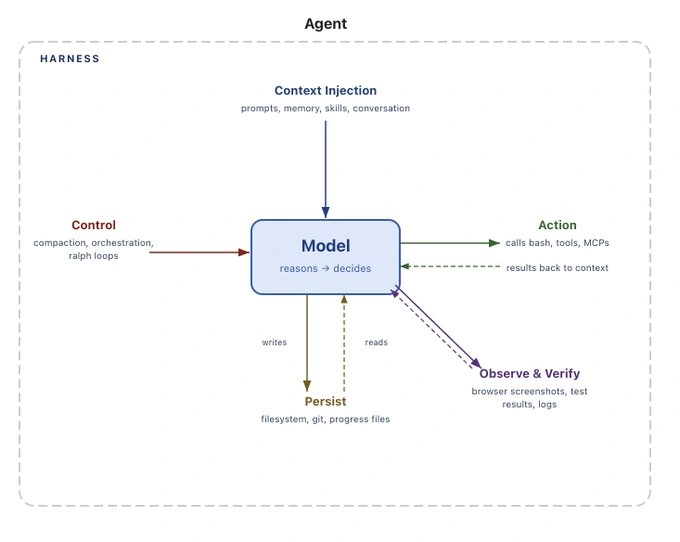
The model sits inside a system that supplies tools, instructions, memory, and context management.
For a coding assistant, that could mean access to your files, a terminal for running code, a browser for checking the app, and a progress log for resuming unfinished work. Permissions and spending limits can also be enforced around those actions.
The distinction matters because the model and the complete AI product are different things. Two assistants can use the same underlying model and still perform differently if one provides better tools and clearer feedback.
Think of the harness as the developer's working setup. A powerful model helps, but it still needs a useful environment to get the job done.
2. AI Agents
Suppose you ask an AI to investigate why a customer's refund hasn't arrived. A useful investigation might require checking the order, reading the refund policy, and looking up the payment status.
An AI agent uses a model to choose actions toward a goal, use available tools, and adjust its next action based on what happened.
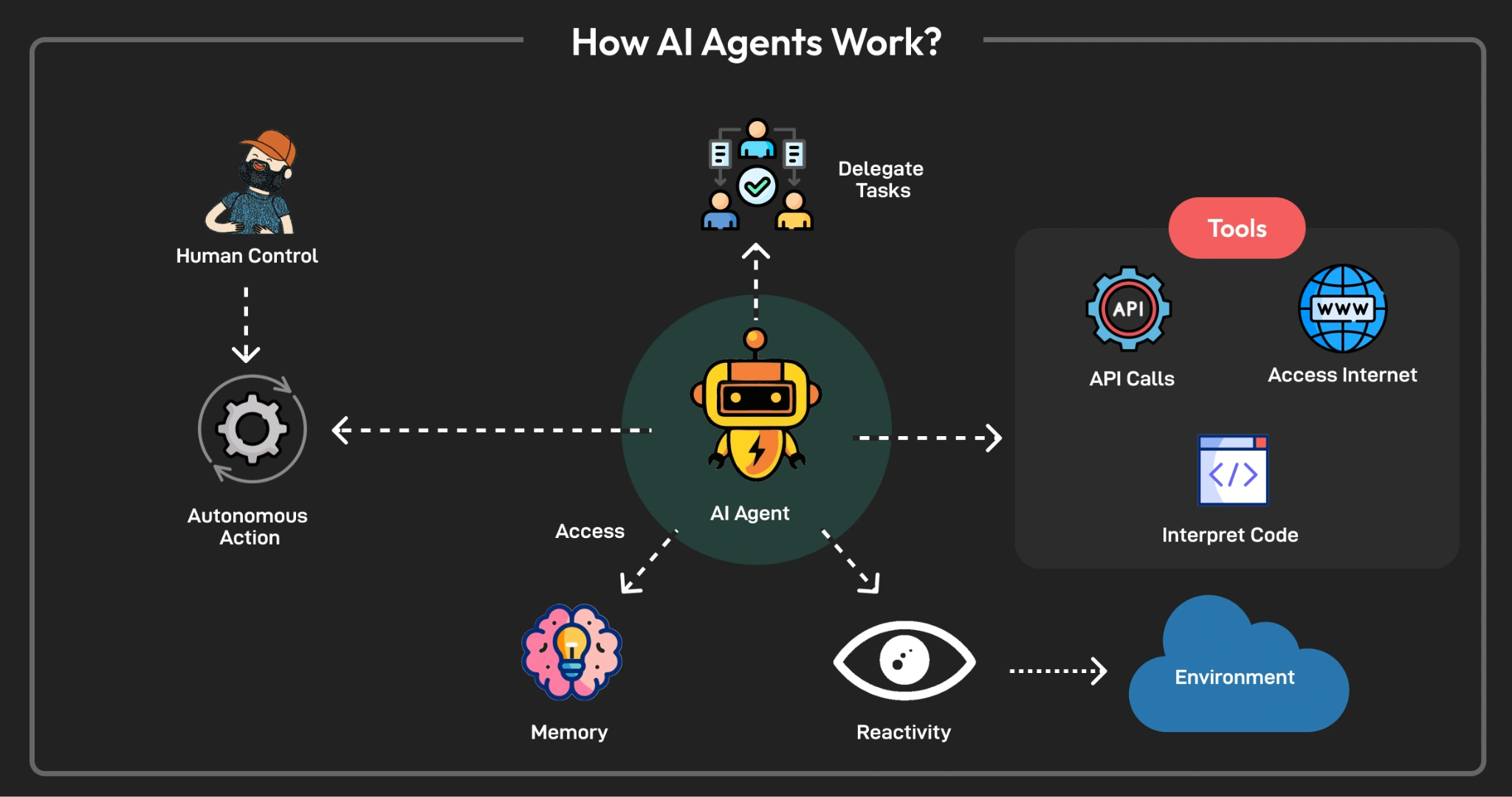
An agent uses feedback from its environment to choose another action or stop.
In our refund example, it might discover that the payment is still processing. It can then check the expected processing time before drafting an explanation. If the record is missing, it may need a different lookup or help from a person.
That ability to choose the next step is what makes the system agentic. A workflow follows predefined paths, which can include branches. An agent uses the model to decide the next action from the goal and the results so far.
An agent still needs the right tools and permissions. It doesn't automatically gain access to your payment system just because you asked nicely. And it can make mistakes along the way.
The harness supports the work. The agent is the system choosing how to carry it out.
3. MCP
Your assistant can write a useful reply, but the information it needs is sitting in a database, a calendar, or an entirely different application. How do those systems connect?
MCP stands for Model Context Protocol. It is an open standard that lets AI applications connect to external tools and information through a shared interface.
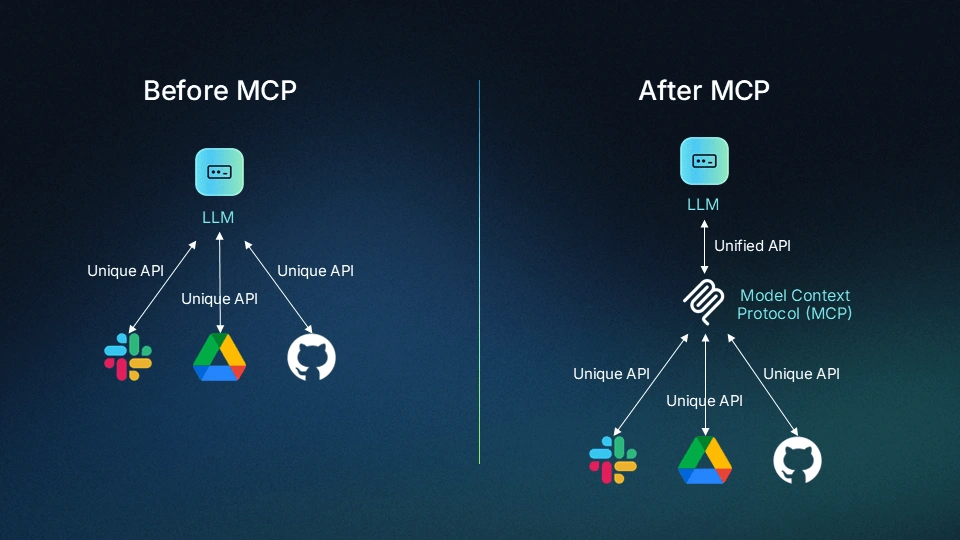
MCP provides a common connection between AI applications and external tools or information.
A simple analogy is a common connector. Rather than every assistant requiring a completely different connection to the same service, that service can expose an MCP server that compatible assistants understand.
For example, a company might expose a tool called find_order through an MCP server. A connected assistant can request the details for order 4821 and use the returned information in its reply.
MCP standardizes the connection; someone still has to build or configure the integration. Authentication and access controls still determine which records the assistant may read and which actions it may take.
Why it matters: MCP makes integrations easier to reuse. It doesn't make the model smarter or authorize unrestricted access.
4. Loop Engineering
An agent that keeps trying can be helpful. An agent that keeps trying forever can be an expensive nuisance.
Loop engineering is an emerging term for designing systems that start, check, and repeat agent runs with clear limits. In coding, a run might begin when an issue is opened or a scheduled check finds a failure.
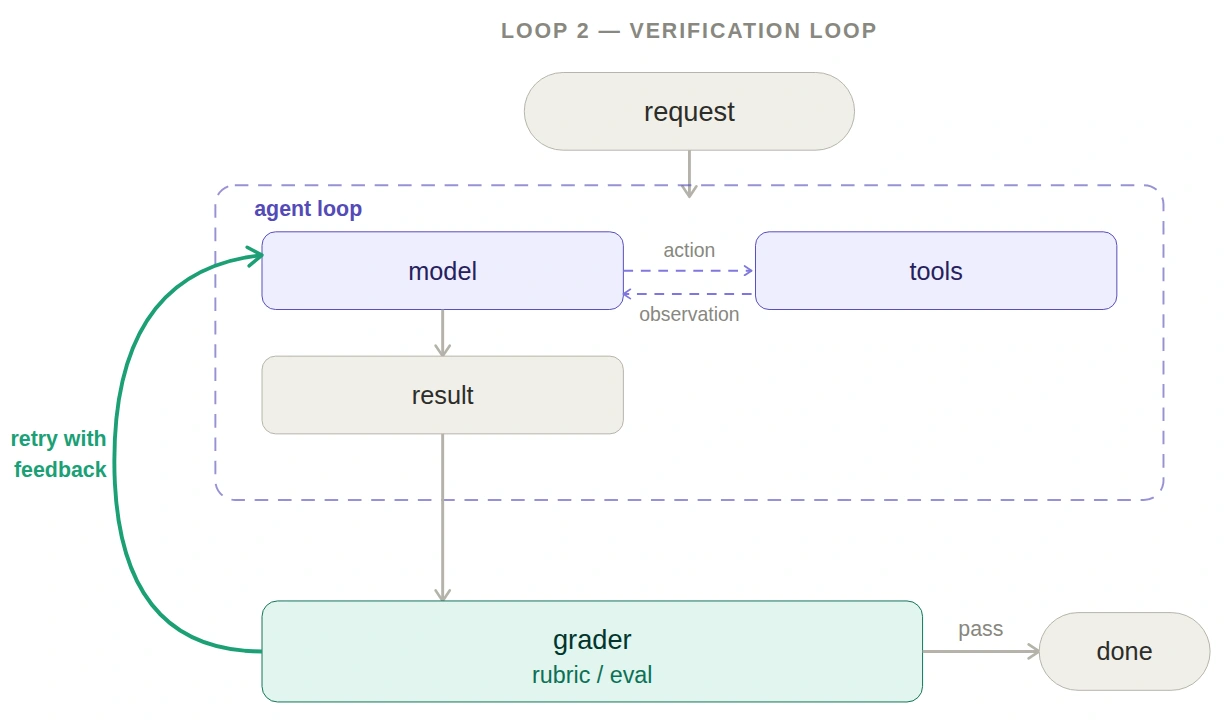
A verification loop sends an unsuccessful result back for another attempt. Automated runs also need triggers and stopping rules.
Imagine an automated assistant tasked with fixing a failing website test. It reads the failure, edits the relevant code, runs the test, and inspects the result. If the test still fails, it can use that feedback for another attempt.
But someone must define what happens around that repetition. For this example, the rules could be:
Start when the test fails.
Stop when the relevant checks pass.
Escalate after three unsuccessful attempts or when the budget is reached.
Require review before applying the fix to the live website.
A progress file can preserve what happened between runs. A separate checker can verify the result rather than accepting the agent's claim that it succeeded.
The term isn't a universally standardized discipline. Its useful idea is straightforward: design when the agent runs, what counts as success, and when the system should stop or ask for help.
5. Agent Skills
You ask an assistant to prepare the same weekly report every Friday. Every Friday, you explain the headings, the calculations, and the formatting again. There has to be a less tedious way.
An agent skill packages those instructions and supporting resources so the assistant can reuse them. In the Agent Skills format, it is a folder with a SKILL.md file containing a name, a description, and instructions. It can also contain scripts, reference material, or templates.
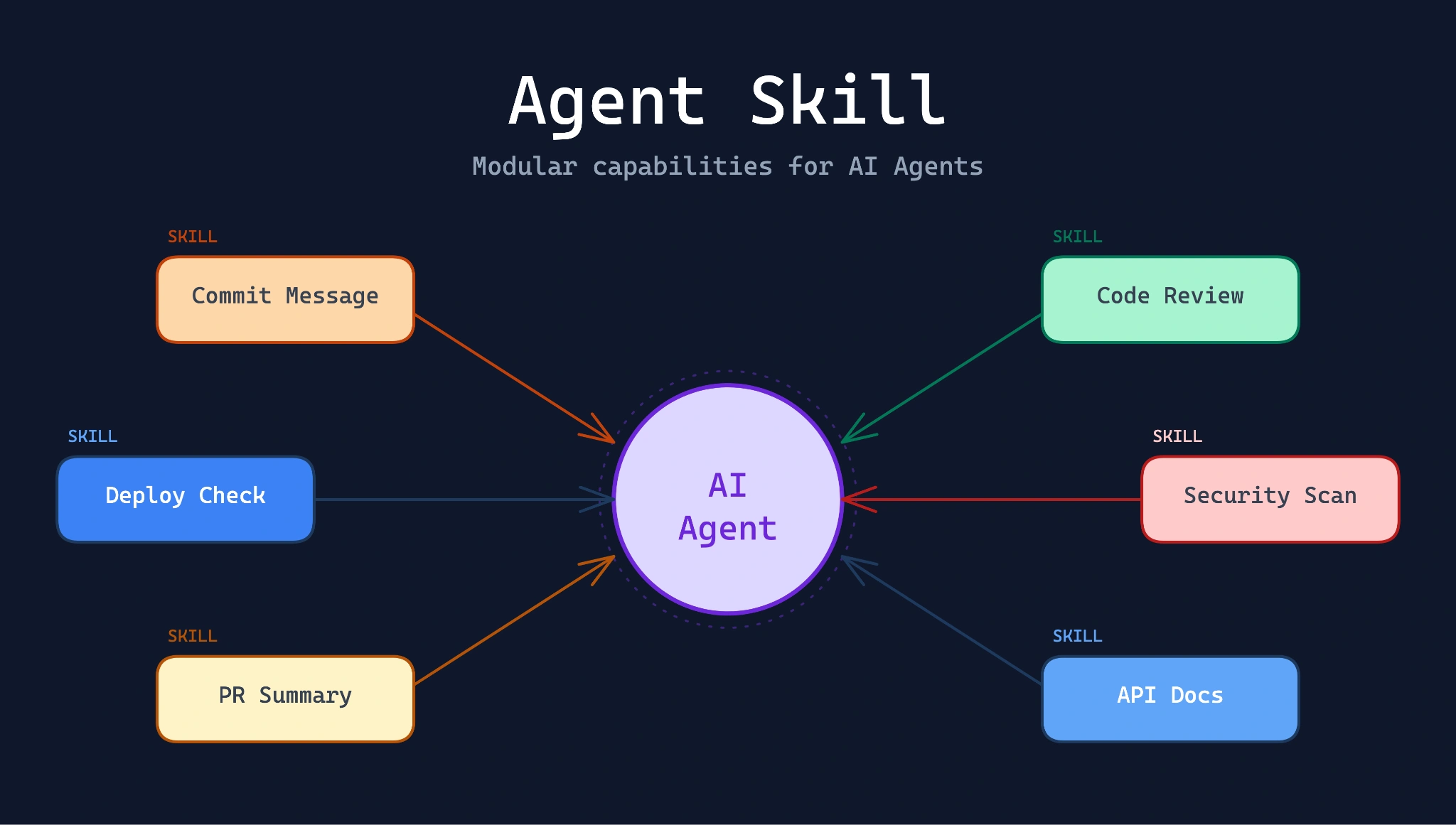
A skill starts with a short description, then loads detailed instructions and supporting files when needed.
A weekly-report skill could explain how to calculate net sales, include the report template, and supply a script that checks the totals. The agent loads the relevant guidance when it needs to prepare that report.
This is called progressive disclosure: read the short description first, then load the full instructions and extra files when relevant. The assistant doesn't need every manual open at once.
Adding a skill doesn't retrain the model. You're giving it reusable instructions and resources for doing a particular job.
Skills and MCP can work together. MCP might provide access to the sales database; the skill explains how to turn those records into your weekly report. One supplies the connection, the other supplies the procedure.
6. GEO and AEO
Someone wants to know whether your café offers vegan food. They could search for its website. Or they could ask an AI assistant and read the answer without visiting your page.
That second route is why you'll hear about GEO, or Generative Engine Optimization, and AEO, usually Answer Engine Optimization.
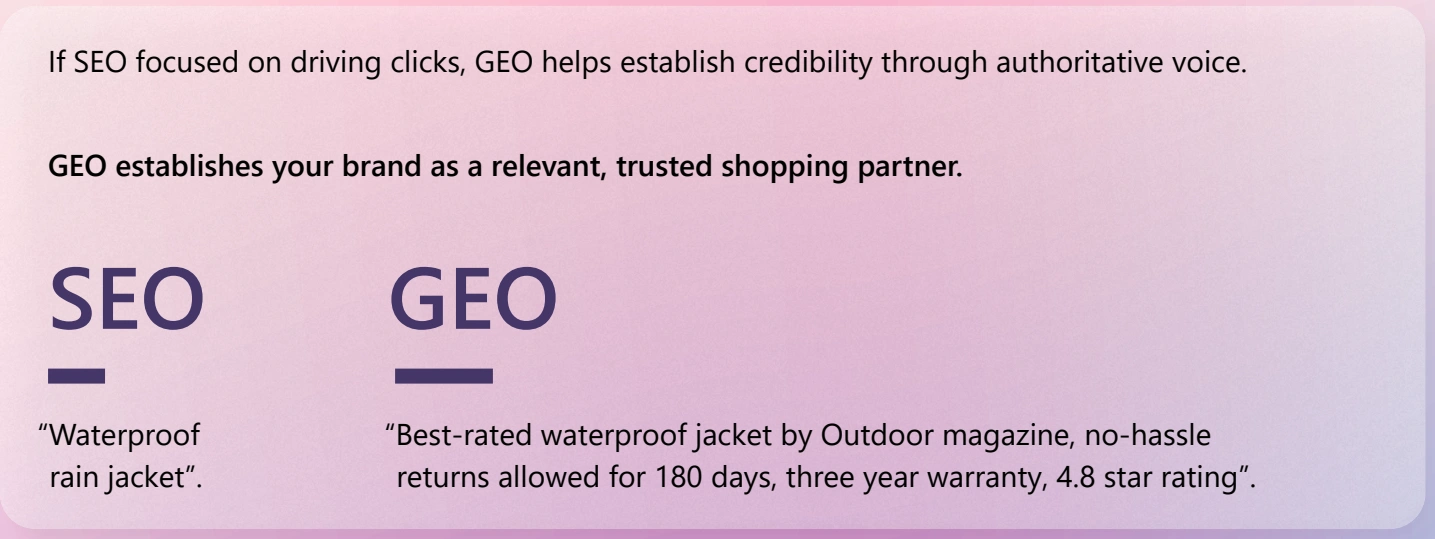
This GEO example enriches a product description with useful specifics that help answer a shopper's question.
Both terms concern making information discoverable and useful in answer-based search. AEO commonly emphasizes directly answering a question; GEO emphasizes visibility in answers assembled by generative AI. People use the labels with considerable overlap.
For the café, a useful page would name the vegan dishes, show current prices, and explain which options can be modified. That gives a reader, and a search system retrieving the page, something concrete to work with. A vague claim about 'food for everyone' doesn't answer the question.
This doesn't mean abandoning SEO. Google says its established search practices remain relevant to its AI search features, and no special AI markup is required just to appear there.
Why it matters: your information may reach people through an AI answer. Clear, accessible, accurate content helps, but these changes don't guarantee that an assistant will mention your business.
7. Computer Use
Some software has no convenient integration for the task you want to automate. It does, however, have buttons, menus, and text fields.
Computer use lets an AI system operate that interface: inspect the screen, move the pointer, click, scroll, and type. Anthropic's computer-use tools are one example of this approach.
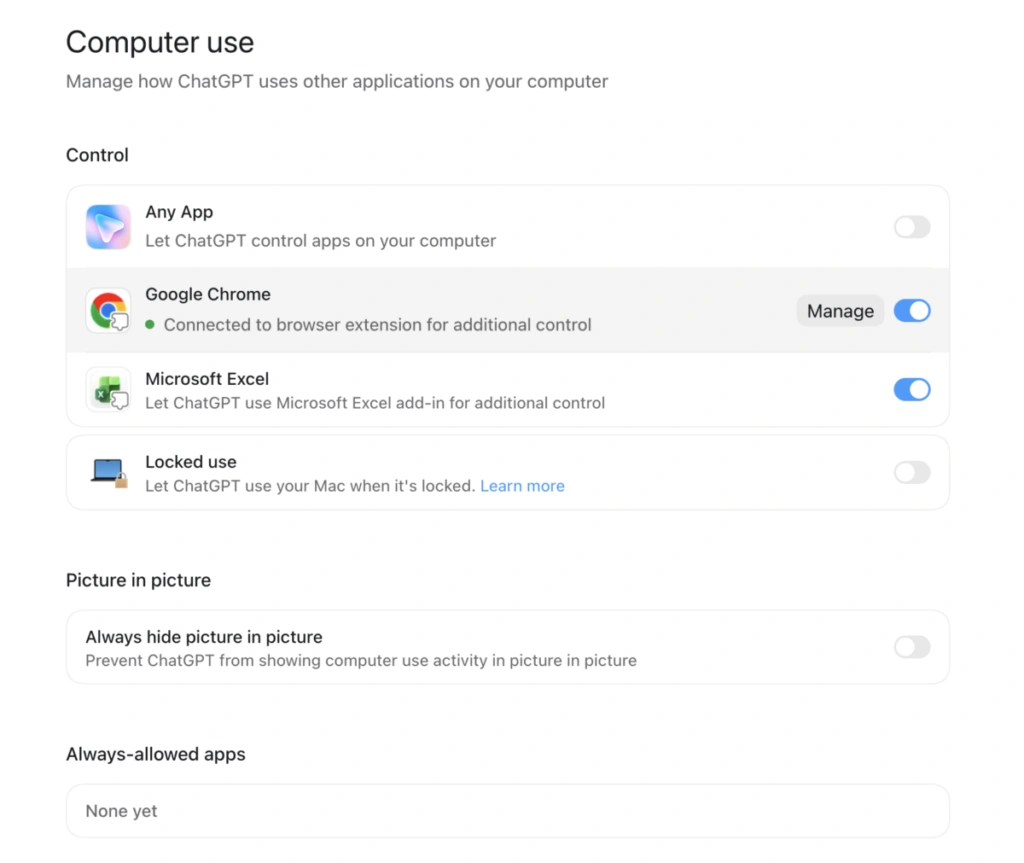
With computer use, an assistant interacts with the visible interface and checks the screen after its actions.
Imagine asking an assistant to copy the delivery details from an email into a courier's web form. It could open the form, inspect the available fields, enter the details, and check that they landed in the right places.
Compare that with a direct integration. An API is a software interface through which a system can request an action, such as creating a shipment. Computer use performs the task through the visible interface. MCP can expose an API-backed tool, but using MCP doesn't necessarily involve moving a mouse.
The interface route is useful when a direct connection is unavailable. It can also fail because a button moves, a page loads slowly, or a field is misread.
Practical takeaway: being able to click a Submit button doesn't establish that the details are correct. Check the result, and set approval points for consequential actions.
8. AGI and Superintelligence
An AI can beat an excellent chess player and still have no ability to plan your holiday. Being exceptional at one task tells us very little about its ability to handle everything else.
AGI stands for Artificial General Intelligence. Broadly, it refers to AI with human-level capability across a wide range of tasks, including learning how to handle unfamiliar ones. Researchers disagree on the precise threshold and how to measure it.
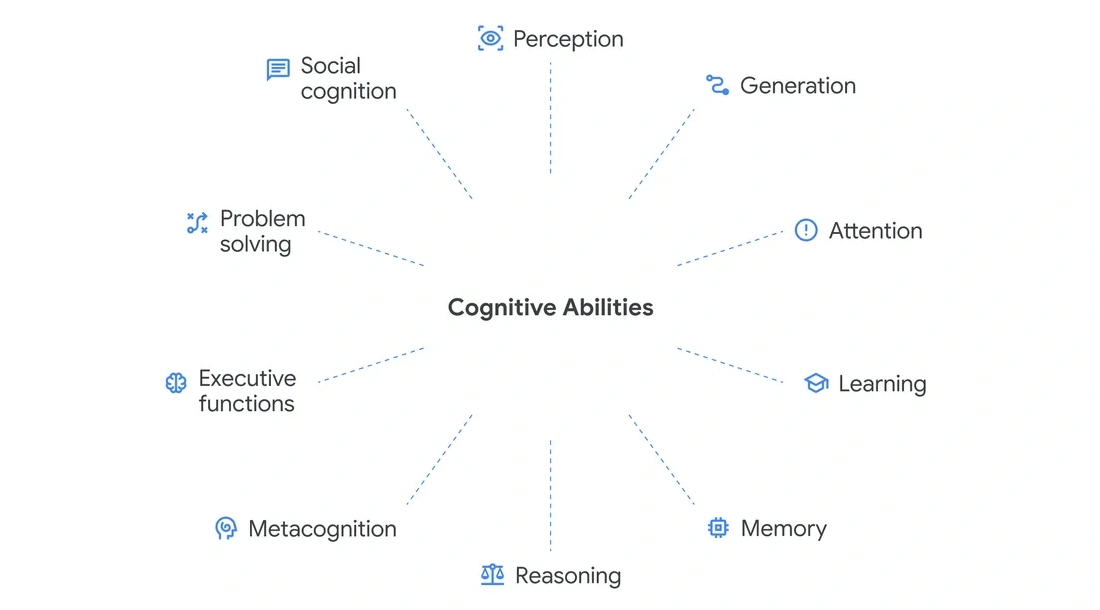
General intelligence concerns breadth across cognitive abilities such as learning, reasoning, and problem solving.
Artificial Superintelligence, or ASI, refers to intelligence that substantially exceeds human capability across a broad range of tasks. It's a stronger claim than outperforming people at chess, translation, or one coding benchmark.
| Capability | Meaning |
|---|---|
| Narrow AI | Strong performance within a limited task or domain. |
| AGI | Human-level capability across a wide range of cognitive tasks. |
| ASI | Broad capability substantially beyond human performance. |
Two questions help here: How many kinds of tasks can it handle, and how well does it handle them? Breadth and performance both matter.
These terms describe capability. They don't, by themselves, imply consciousness, human emotions, or permission to act autonomously.
When you see a claim that a system has reached AGI, look for the definition and the evidence behind it. A remarkable demo is interesting; a claim about general intelligence needs a much broader assessment.
How These Concepts Fit Together
Return to our weekly-report example. The agent chooses the steps. Its harness provides the tools and manages the run. MCP can connect it to sales records, while a skill explains your reporting procedure.
Loop engineering can arrange scheduled runs with checks and stopping rules. Computer use can help with a task that requires navigating a screen. GEO and AEO concern how information appears in AI search; AGI and superintelligence concern the breadth and level of AI capability.
You don't need to memorize every acronym. The next time you hear one, ask what it changes: the AI's working setup, its actions, its instructions, its access to information, or its capabilities. That question will get you much further than the buzzword alone.
Frequently Asked Questions
What is an agent harness?
An agent harness is the surrounding software that manages tools, context, and execution for an AI model.
How are skills different from MCP?
Skills package instructions and resources. MCP standardizes connections to external tools and information.
Does GEO replace SEO?
No. GEO focuses on visibility in generated answers, while established SEO practices still support discovery.Q4.
Is an AI agent the same as AGI?
No. An agent describes a system that pursues goals; AGI concerns broad intelligence across tasks.