
Is Gemini 4 Neon worth paying twice as much for when Hydrogen can handle the same tasks? We tested both models across four practical challenges involving PDF reasoning, financial reconciliation, audio understanding and building an interactive bill splitter. The results were closer than their pricing might suggest.
Both delivered accurate answers, but subtle differences emerged in how closely they followed instructions. In this article, we compare their performance, reliability and API pricing to see which Gemini model offers better value for everyday workflows.
TLDR: Both tied on checked results. Hydrogen followed the requested format more closely and has half Neon's API token rates.
What differs before you start
Google positions Neon for complex coding, analysis and knowledge work. Hydrogen targets efficient execution across everyday coding and agent workflows. Both accept the input types used here, so we could compare a PDF, two CSVs, a voice note and an HTML build without changing the source material between models.
| Documented feature | Gemini 4 Neon | Gemini 4 Hydrogen |
|---|---|---|
| API model ID | gemini-4-neon | gemini-4-hydrogen |
| Inputs | Text, images, audio, video and PDF | Text, images, audio, video and PDF |
| Core output | Text | Text |
| Unified API context | 1,048,576 tokens | 1,048,576 tokens |
| Standard input per million tokens | $3.00 | $1.50 |
| Standard output per million tokens | $15.00 | $7.50 |
| Cached input reads per million tokens | $0.15 | $0.075 |
The context budget covers input and output together. The default synchronous output cap is 65,536 tokens for both models, with separate long-decode support. Output prices include thinking tokens. Browser subscriptions and their usage limits follow the app's own rules.
We tested both models at High in fresh Gemini chats using identical prompts and attachments, retaining their first responses and independently checking the results. We also tested the generated HTML unchanged, without measuring speed, token usage or API costs.
1. Decide which dispatch rule controls a pickup
The three-page PDF contains a standard dispatch rule, a signed pilot exception and a newer unsigned chat. That last page asks for a convenient shortcut. The models had to distinguish an approved exception from a request to widen it.
Prompt
Use only the attached PDF. For P-17 through P-20, give RELEASE or HOLD, elapsed hours since QA if available, the decisive reason and the page number or numbers. Apply the policy effective at each scheduled pickup. Finish with one sentence explaining the status of the June 15 team chat. Return one compact table and that sentence.
Gemini 4 Neon
Gemini 4 Hydrogen
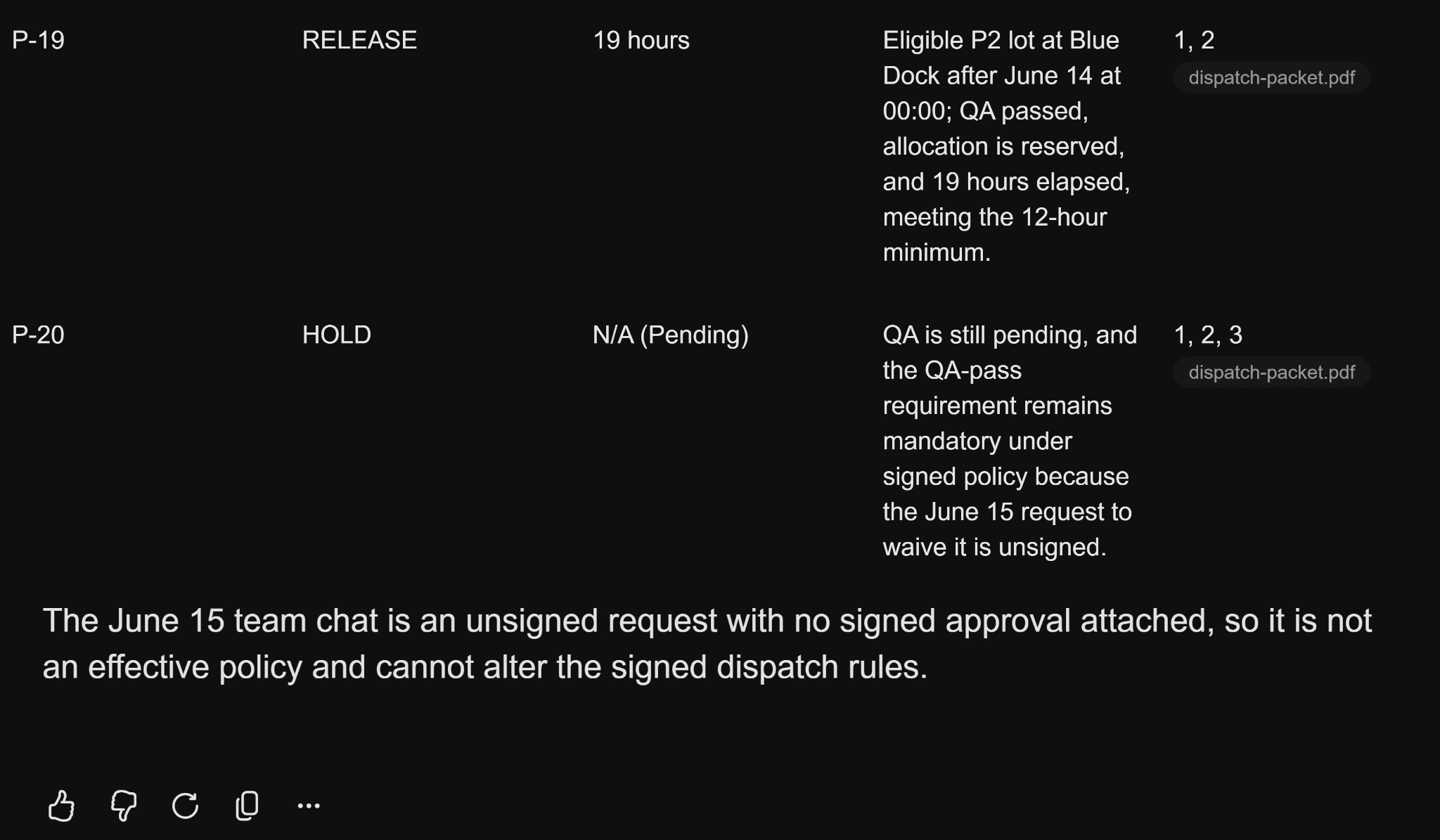
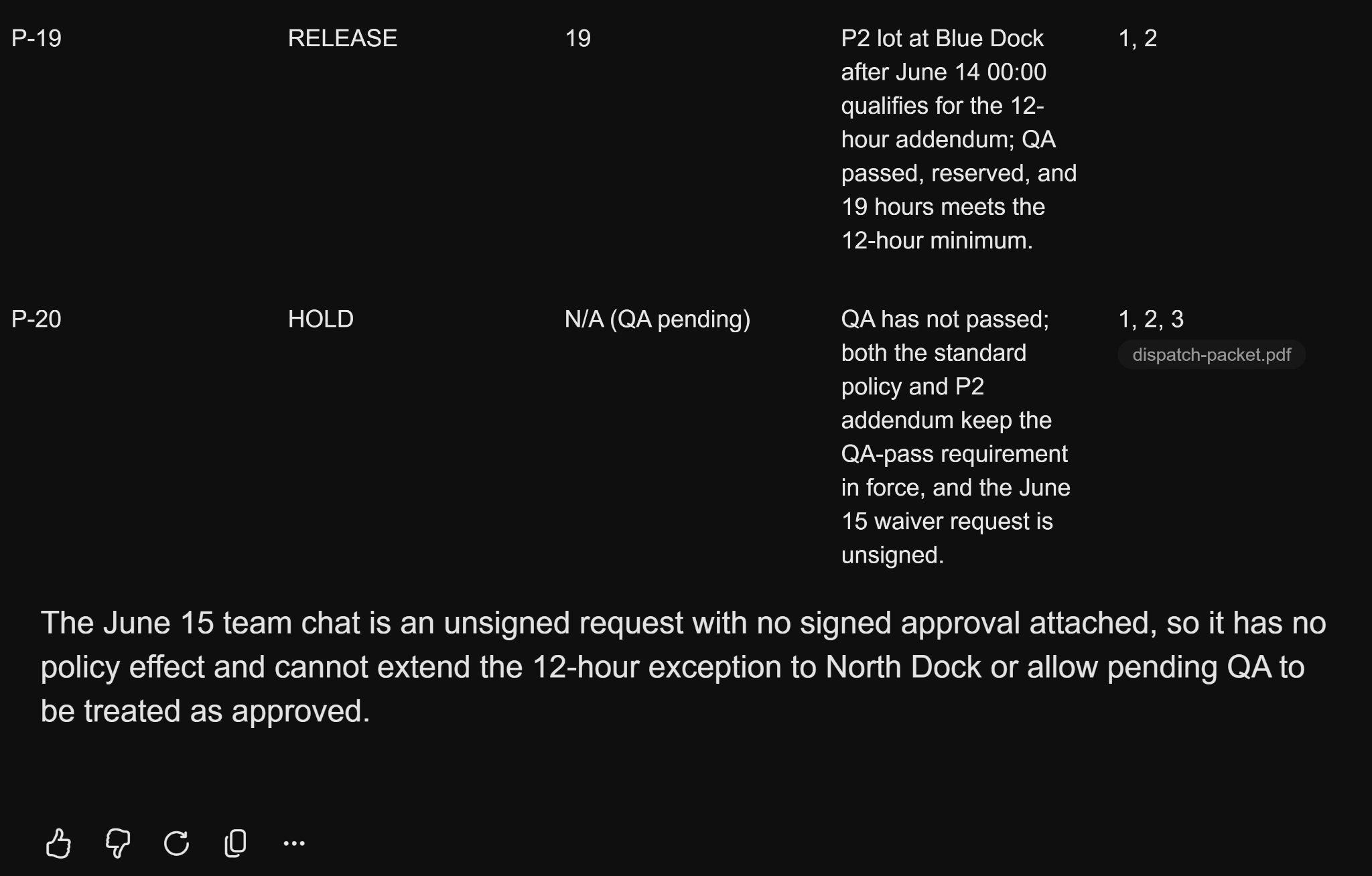
Both returned RELEASE, HOLD, RELEASE and HOLD in the requested order. They calculated 26, 22 and 19 hours for the first three lots and left the final elapsed time unavailable because QA was pending.
P-18 makes the distinction clear. It is a P2 pilot lot, but it is at North Dock. The signed addendum reduces the waiting period to 12 hours only at Blue Dock. Both therefore held P-18 under the original 24-hour rule. They released P-19 because its Blue Dock pickup qualified for the exception.
P-20 stayed on hold in both replies. The exception changes the waiting period while preserving the need for QA approval. Neither let the unsigned chat waive that requirement or expand the exception's dock coverage.
This round is a tie. Both gave the correct decisions, arithmetic, rule scope and supporting page numbers. The useful behavior was carrying the unchanged approval requirement into the exception.
2. Reconcile paid orders with partial refunds
The next task uses orders.csv and refunds.csv. Two separate refunds belong to the same paid order. Other rows include a pending refund, a refund against a pending order and a refund with no matching order. A correct total needs the join and the inclusion rules to agree.
Prompt
Use only the two attached CSV files. Include only paid orders. Count each settled refund whose order is included against that order's original acquisition channel. Ignore pending refunds, refunds against non-paid orders, and refunds with no matching order. Do not merge separate refunds on the same order. In channel order Search, Social, Email, return a table of paid order count, gross USD, eligible settled refunds USD and net USD, plus a Total row. Then list every excluded order ID and refund ID with its reason. Net means gross minus eligible refunds. Use two decimal places for money.
Gemini 4 Neon
Gemini 4 Hydrogen
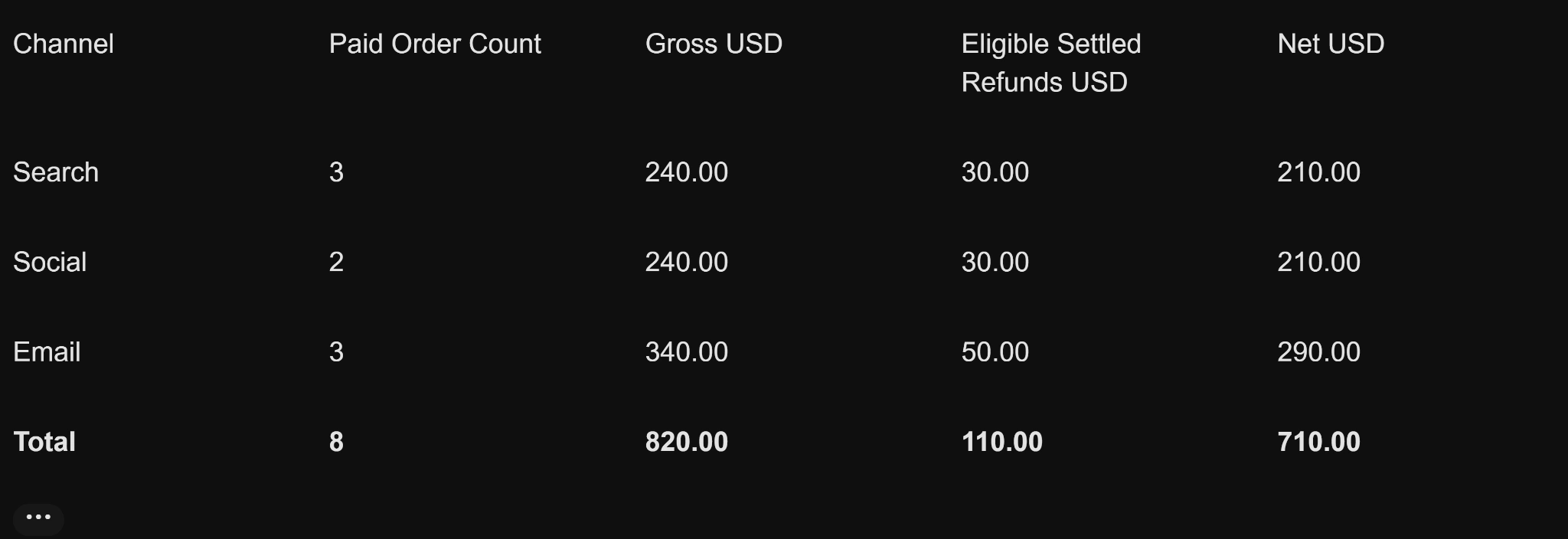
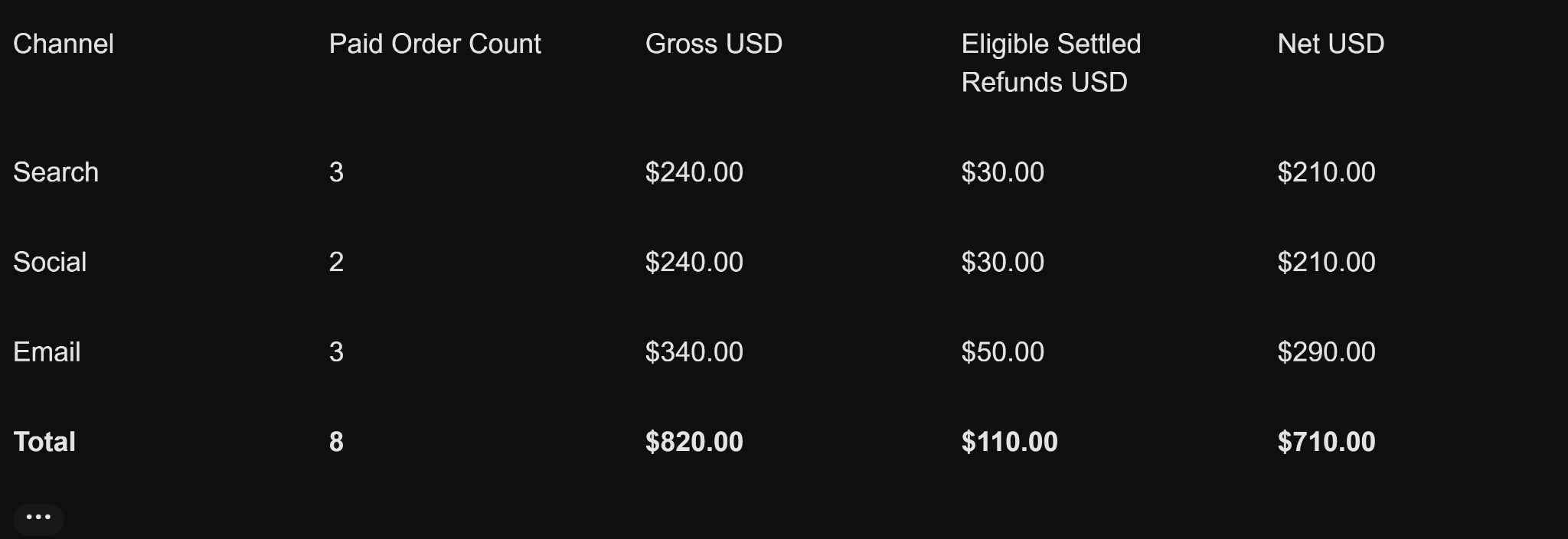
Both found eight paid orders, $820.00 gross revenue and $110.00 in eligible settled refunds. Net revenue came to $710.00. Search and Social each contributed $210.00 net, with Email at $290.00.
They also retained R1 and R2 as separate refunds against O1. Combining them into a single record would lose the audit trail, even if their amounts still happened to add up. Both excluded orders O5 and O7, plus refunds R3, R5, R6 and R8, with the appropriate reasons. We verified the results using decimal currency arithmetic.
Hydrogen kept its response to the requested table and exclusions. Neon added refund rates, audit flags and suggested next questions. Its extra figures were consistent with the data, but they made the answer longer than the requested handoff.
The calculations tie. We prefer Hydrogen's response for this particular brief because the result is easier to lift into an existing reconciliation workflow. Neon's additional audit suggestions could help a reviewer decide what to investigate next, but that was an extra editorial choice.
3. Extract active commitments from a corrected voice note
The synthetic voice note changes one task's owner and deadline, floats an unaccepted suggestion and cancels previously approved work. We uploaded the WAV itself to both models. They had to identify the final commitments instead of copying every action mentioned.
Prompt
Use only the attached audio. Return a JSON array containing confirmed, active commitments in the order first mentioned. For each item include exactly id, owner, action, and due. Format ticket IDs like R17. Copy the final stated weekday and clock time as a single string, or use null if no deadline was agreed. Exclude suggestions and canceled work. Return only JSON.
Gemini 4 Neon
Gemini 4 Hydrogen
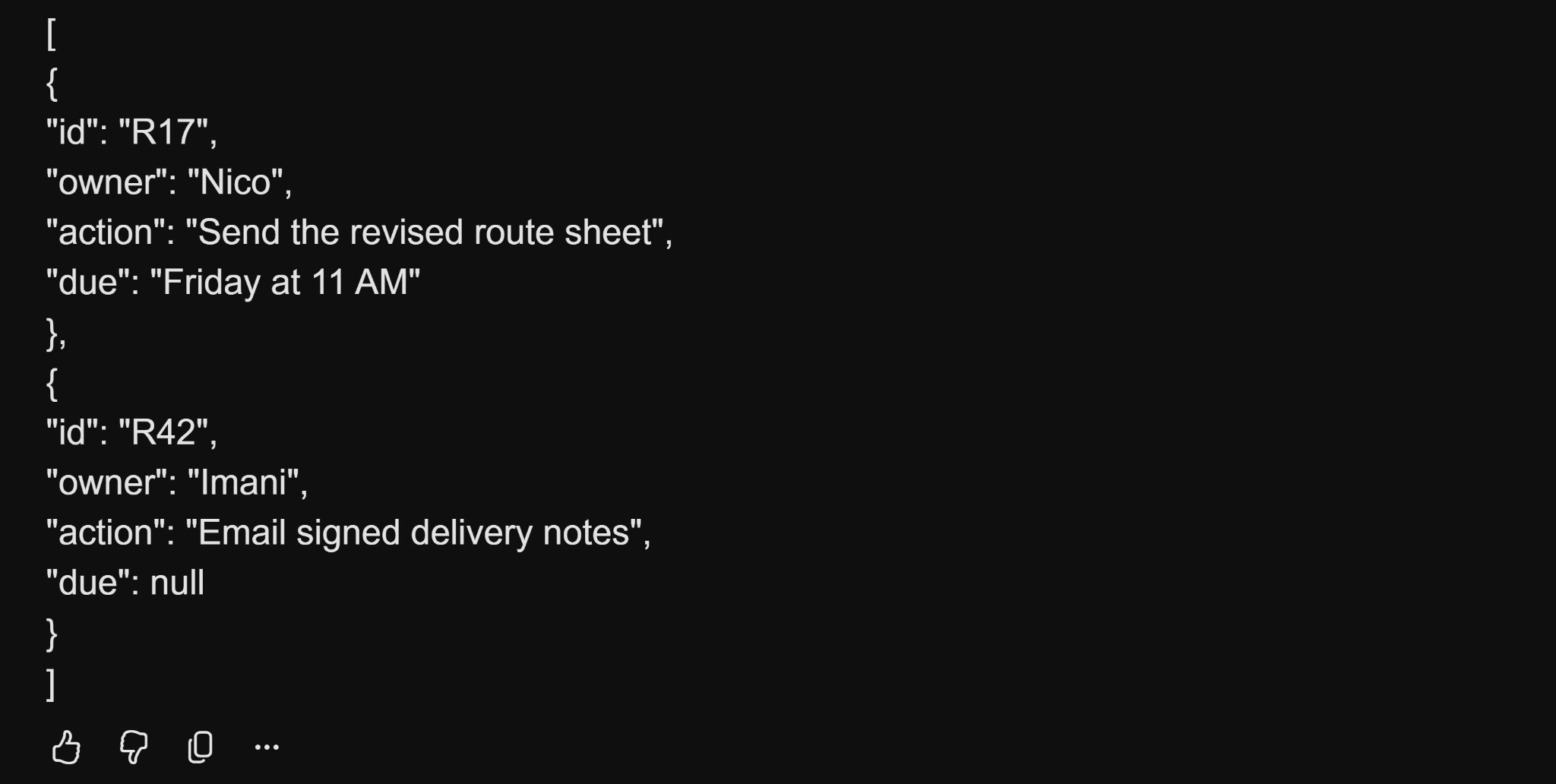
Both returned valid JSON with only R17 and R42. R17 used the replacement owner and Friday at 11 AM. R42 retained Imani and used null for its unagreed deadline. The suggestion R24 and canceled R31 were absent.
Both spelled the first owner's spoken name as Nico. The voice note provides no spelling, so the alternative Niko spelling in our synthesis script is insufficient grounds to mark either answer wrong. The consequential checks are who owns the task after the correction, the final deadline and which work remains active.
4. Build a bill splitter that accounts for every cent
An attractive bill calculator can still leave a cent unassigned. This build combined a visual brief with arithmetic, input validation and keyboard interaction. We asked for one self-contained HTML file and opened the returned files in a browser.
Prompt
Build an accessible dinner bill splitter in one standalone HTML file, with all CSS and JavaScript inline and no network requests, libraries or external assets. Use a warm cream background, dark ink, a restrained orange accent and a compact layout that fits a 360px viewport without horizontal scrolling. Provide labeled inputs Bill amount (USD), People and Tip (%), a Calculate button, a polite live status and visible keyboard focus. Bill and tip must be nonnegative finite numbers, bill must have at most 2 decimal places, and People must be a positive integer. On invalid input show a specific error and hide any previous shares. Compute the tip in integer cents, rounded to nearest cent, then divide the total equally in integer cents. Distribute any leftover cents to the first people so that all displayed shares sum exactly to the total. Show tip, total and each numbered share, always with two decimals. Return only the complete HTML in one code block.
Gemini 4 Neon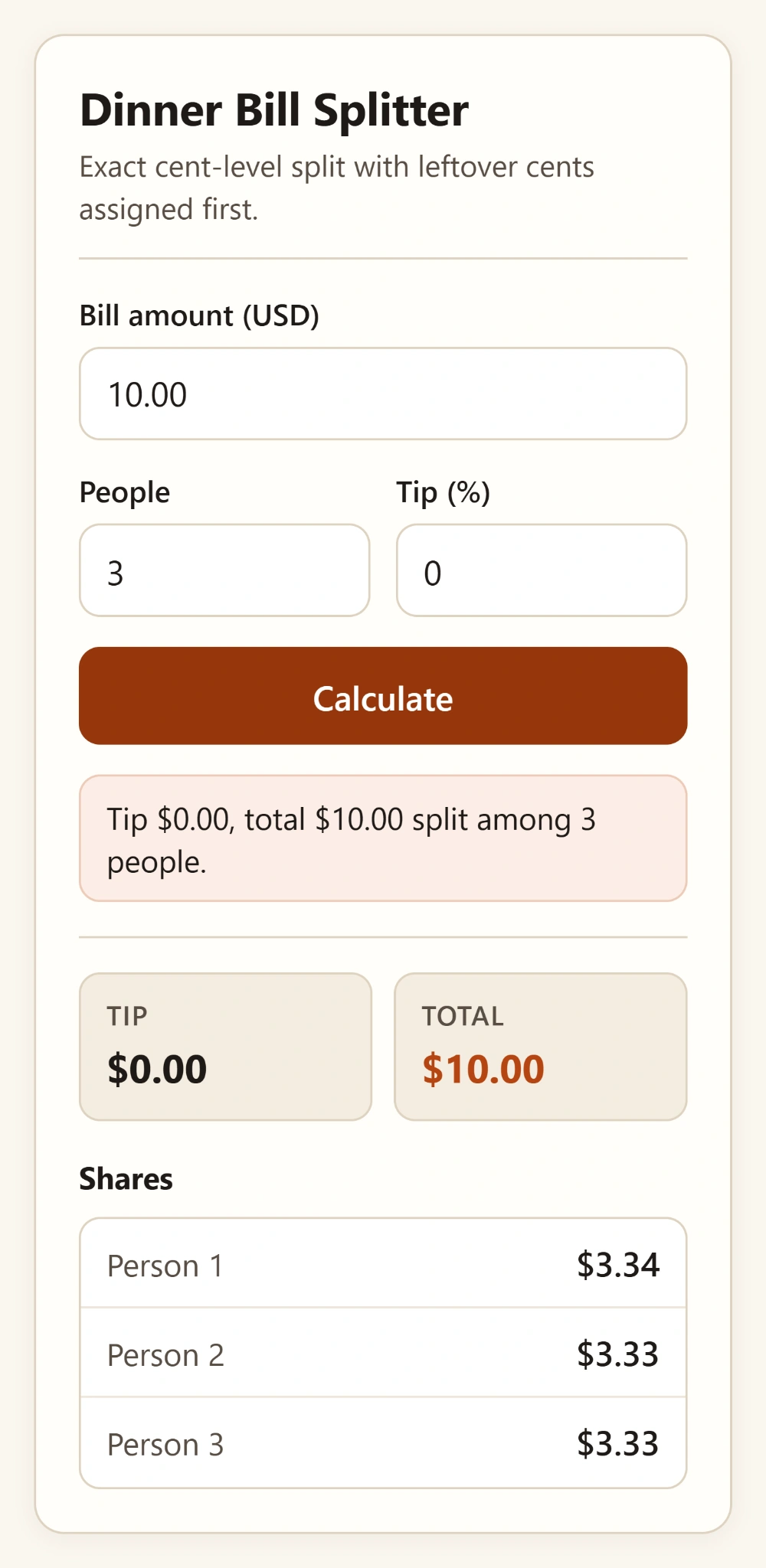 | Gemini 4 Hydrogen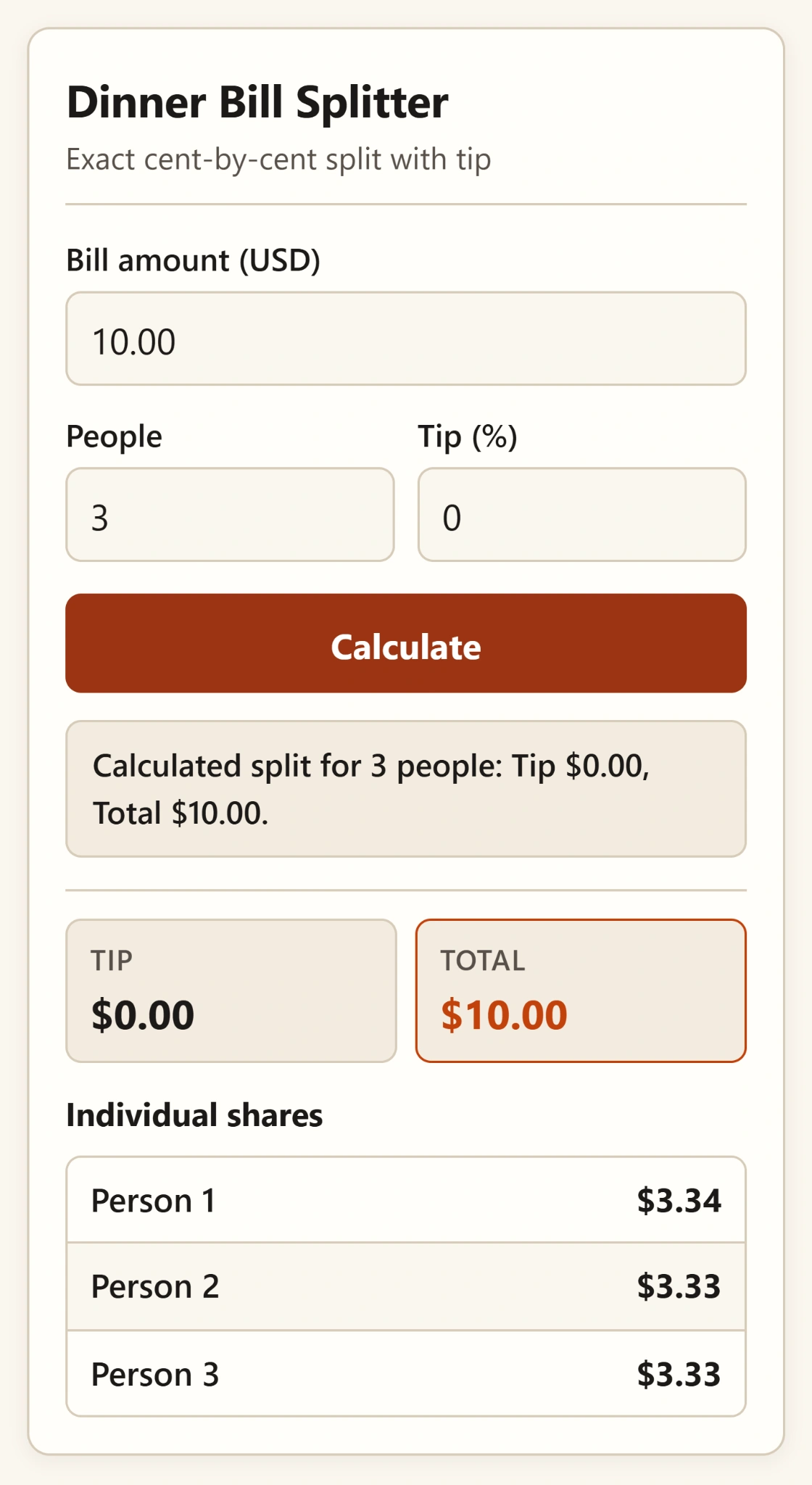 |
|---|
Both met the requested cream, dark-ink and orange treatment. Neon's card has more space around the fields and separates its status message from the result. Hydrogen packs the same information into a slightly denser card. Both fitted the checked 360-pixel viewport without horizontal overflow.
Each app passed 12 of the same 13 checks. A $10 bill with no tip and three people produced $3.34, $3.33 and $3.33. For $10.01 with a 10% tip, both calculated a $1.00 tip, an $11.01 total and three $3.67 shares. They also rounded a half-cent tip on $0.05 up to $0.01.
The invalid-state checks mattered as much as the happy path. Negative bills, zero or fractional people, a three-decimal bill and an infinite tip all produced errors and hid the earlier shares. Keyboard navigation and submission worked, focus remained visible, and the checked sessions produced no JavaScript errors or network requests.
Gemini 4 Neon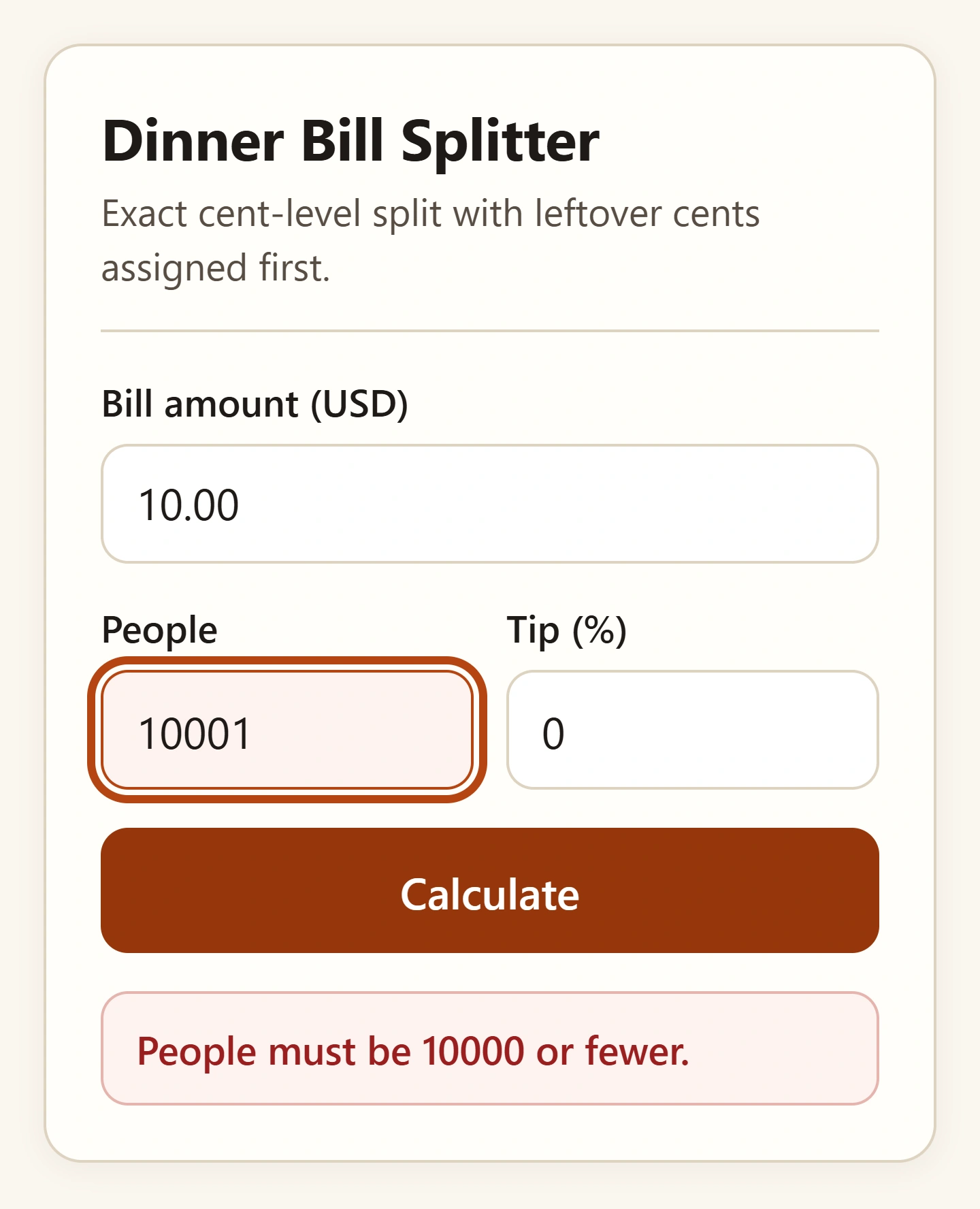 | Gemini 4 Hydrogen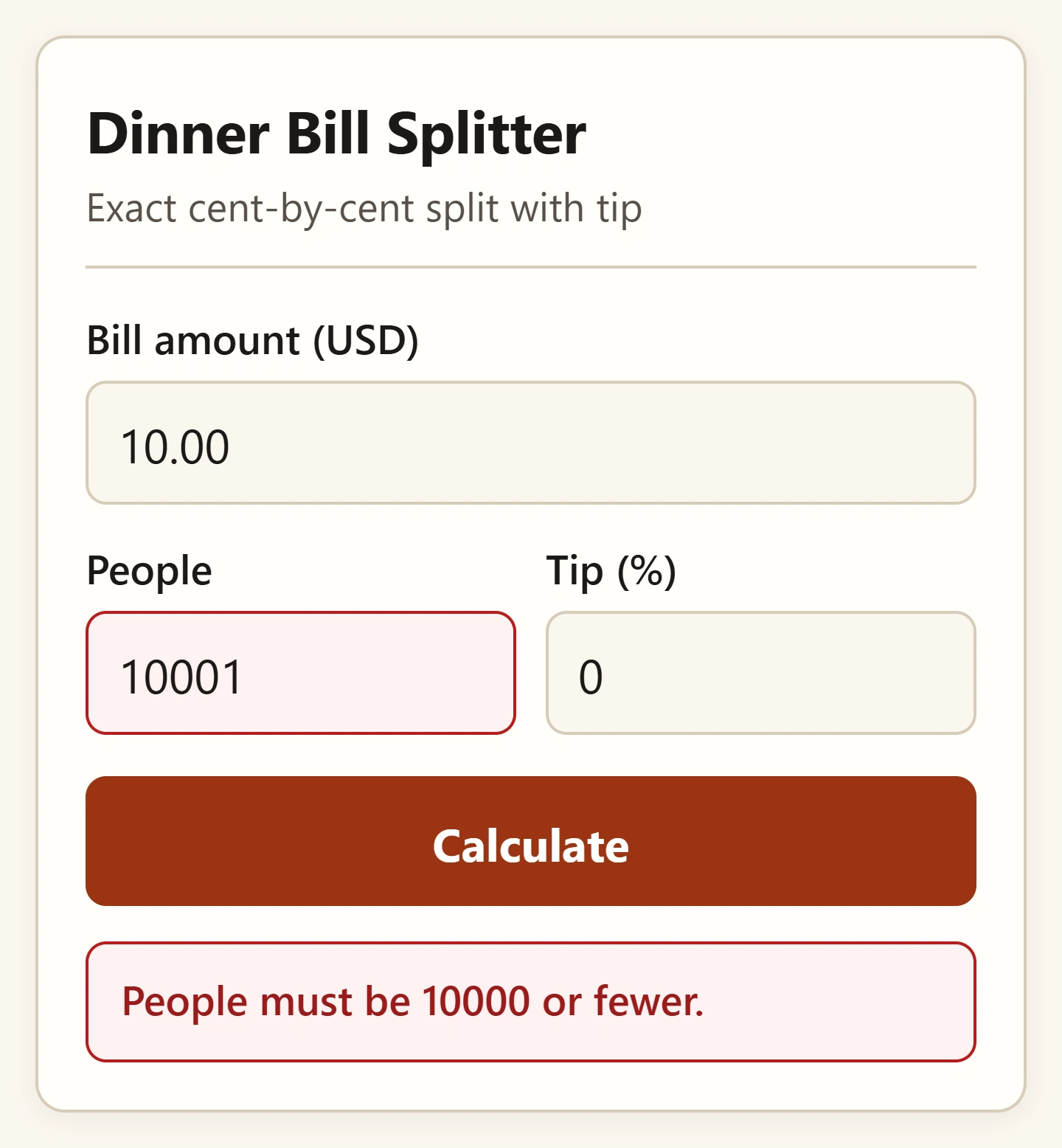 |
|---|
Both failed the remaining check. Entering 10,001 people produced an error saying the value must be 10,000 or fewer. The brief only required a positive integer and supplied no maximum. That is a shared restriction outside the requested contract. If you reuse either file, decide the supported input range explicitly and adjust the code accordingly.
The checked behavior ties. The screenshot gives you a design preference to make, while the arithmetic and invalid-state results supply the functional evidence.
What the four tasks tell us
| Task | Neon | Hydrogen | Judgment |
|---|---|---|---|
| PDF decisions | Correct decisions, hours and rule scope | Same | Tie |
| CSV reconciliation | Correct $710 net, extra audit advice | Correct $710 net, tighter format | Accuracy tie, format edge to Hydrogen |
| Audio and correction | Correct commitments and preserved fields | Same | Tie |
| Bill splitter | 12 of 13 checks passed, unrequested group cap | Same | Tie on checked behavior |
At standard API rates, Hydrogen costs half as much per input and output token. For 100,000 uncached input tokens and 10,000 billed output tokens, the price calculation is $0.225 for Hydrogen and $0.45 for Neon. Those are equal-volume examples. Our browser tests provide no measured total-cost comparison.
Neon's longer reconciliation would suit a reader who wants possible follow-up work suggested alongside the answer. Hydrogen was easier to use when the instruction already defined the deliverable. These four tasks gave us no accuracy improvement that would independently justify Neon's higher token rates.
Which model would we choose?
Start with Hydrogen for the bounded document, data and audio work tested here. It cleared the same checks and delivered the tighter reconciliation. Its lower API rates also help when your token volumes are comparable.
Bring Neon into a workflow when you can identify a recurring failure and give both models the same acceptance check. For these four tasks, the practical next step is to choose the output format you need and preserve the checks that caught the edge cases.
Frequently Asked Questions
Did Neon beat Hydrogen in these tests?
Their checked results tied. Hydrogen followed the requested reconciliation format more closely, while Neon supplied additional audit advice.
Which model has lower API rates?
Hydrogen's standard input and output token rates are half Neon's, before differences in actual token use and retries.
Can both models understand an audio file?
Yes. Both extracted the active commitments from our WAV and preserved the other fields after a deadline correction.
Were both generated apps fully compliant?
Both passed 12 of 13 checks. Both rejected 10,001 people, although the prompt specified no maximum.